How to Report Impersonation on TikTok: A Step-by-Step Guide
This guide provides clear, step-by-step instructions on how to report impersonation on TikTok and protect your identity effectively.

This guide explains how to report impersonation on TikTok with clear, step-by-step instructions. TikTok users who notice accounts mimicking their identity or someone else's can follow this process to file an official impersonation report and understand the platform’s handling of such cases.
Reporting impersonation requires access to the impersonating account’s profile, proof of identity if possible, and familiarity with TikTok’s reporting system. The process involves using TikTok’s dedicated report form, selecting the correct violation category, and submitting the necessary evidence to support the claim.
Understanding TikTok’s policies and the nuances of messaging and comment visibility can help users navigate common obstacles during reporting. This article covers these details alongside troubleshooting advice to ensure the report is effective and stands the best chance of prompt review.
Before you start: What is needed to report impersonation on TikTok?
Reporting impersonation on TikTok requires having a registered and logged-in TikTok account. This access is necessary to use the platform’s reporting tools and to track the status of a complaint. Without logging in, the option to report impersonation is not available.
Gather clear evidence before starting the report. This includes the impersonator’s exact username, profile URL, and screenshots showing the impersonation. Evidence might show copied profile pictures, bio information, or videos falsely attributed to the impersonated person. TikTok typically asks for this to confirm the impersonation claim.
Understand TikTok’s impersonation guidelines. Impersonation means creating a profile that pretends to be someone else with the intent to mislead or deceive. Examples include using another individual’s photo and name to gain followers or posting content falsely under that identity. Casual similarities or fan accounts usually do not qualify unless they explicitly misrepresent.
Be mindful of privacy when providing personal information. Avoid sharing sensitive data beyond what TikTok requests in the official reporting form. TikTok’s process is designed to protect user privacy while verifying claims.
- Log in to the TikTok app or website; the reporting feature should be accessible in the user menu.
Success: Access to the “Report” option appears on profiles or content. - Collect the impersonator’s username and profile link.
Success: Direct link and username ready for submission. - Take screenshots of the impersonation, including profile details and any relevant posts.
Success: Clear images saved on device for upload if needed. - Review TikTok’s impersonation policy in the Help Center to confirm the case fits the criteria.
Success: Understanding of what qualifies as impersonation. - Prepare to provide only the information TikTok requests, avoiding sharing extra personal details.
Success: Privacy maintained during the report.
How to report someone on TikTok for impersonation
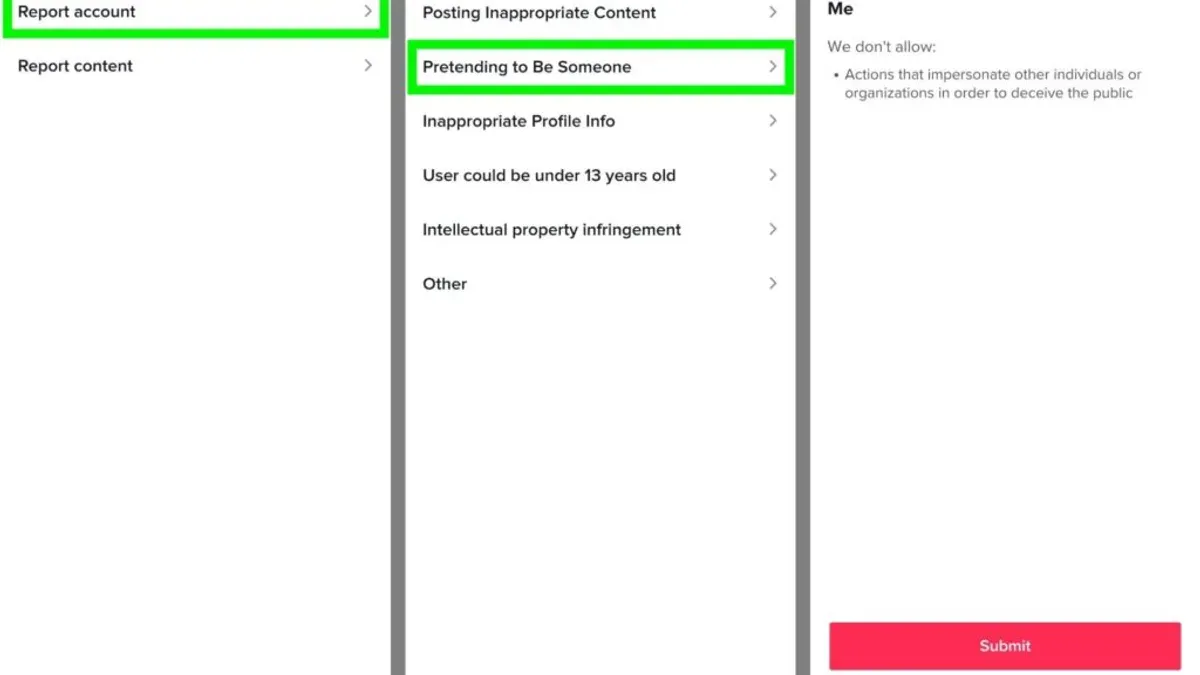
- Open the TikTok app and locate the profile of the account suspected of impersonation. Confirm it is the correct profile by checking the username and content.
- Tap the three-dot menu icon in the top-right corner of the profile page. This opens the account options menu.
- Select Report from the menu. This directs to the reporting interface.
- Choose Report Account if available, then select Impersonation as the reason for reporting. The app will prompt for more details to specify the impersonation issue.
- Complete the impersonation report form if TikTok provides one. This form requests specifics such as the real identity being impersonated and any relevant links or usernames.
- Attach additional evidence if the form allows, such as screenshots of the impersonation or messages proving the claim. This strengthens the report.
- Submit the report. TikTok will confirm submission, often showing a message indicating the report is under review.
Tip: Save screenshots of the impersonating profile and any related content before reporting, as TikTok may request these during the review process.
How to report a video on TikTok that involves impersonation
Reporting a video that involves impersonation requires a different approach than reporting an account. The focus here is on the specific content demonstrating impersonation rather than the entire profile. This method is essential when the impersonation is evident only in the video itself or when the video contains harassment linked to impersonation.
- Locate the video that shows impersonation. It should be the exact clip where the impersonation occurs or is promoted. After tapping the video, the interface will display playback controls and interaction buttons.
- Tap the "Share" icon on the right side of the screen, which looks like an arrow pointing right. A menu with sharing options will appear.
- Select the "Report" option from the menu. This opens a reporting interface specific to the video content.
- Choose the category most relevant to impersonation. Typically, this will be under "Report a safety issue" or "Harassment or bullying." Look for options like "Impersonation" or "Posting content that falsely represents someone."
- Provide a clear explanation of why the video violates TikTok's impersonation policies. Use the text box to describe how the video content copies or misrepresents another person, supporting the claim with details such as usernames or visual cues.
- Submit the report. TikTok will confirm receipt of the report and may follow up if additional information is needed.
Unlike account reports, which target the entire profile and its activities, video reports focus solely on the individual piece of content. This distinction is critical when the impersonation is limited to certain videos or when the account itself is not wholly dedicated to impersonation.
How to report harassment on TikTok linked to impersonation
Harassment on TikTok includes behavior that targets a user with repeated unwanted messages, threats, or harmful content. When harassment involves impersonation, it can intensify emotional distress and requires prompt reporting under TikTok’s Community Guidelines. TikTok defines harassment as actions that intimidate, threaten, or shame others, including stalking and bullying.
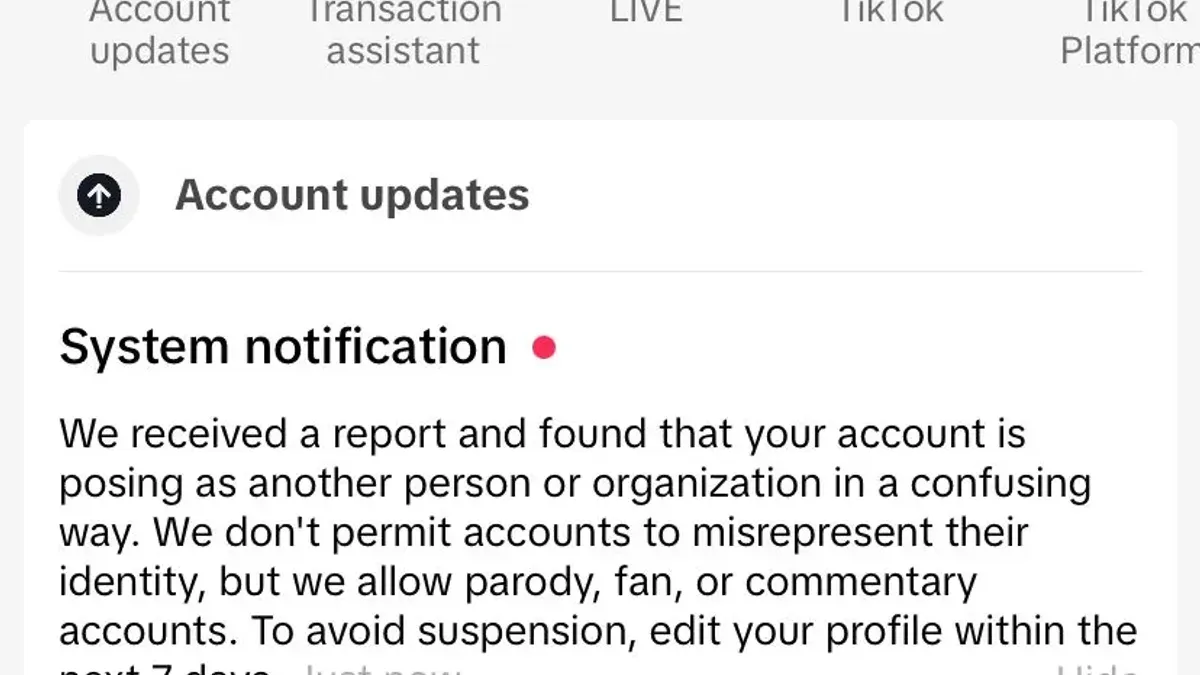
To report harassment connected to impersonation, use TikTok’s Safety Center or the in-app reporting tools. Combining impersonation and harassment reports can help TikTok review the full context more effectively.
- Open the TikTok app and go to the profile or content where harassment occurs. Tap the three-dot menu icon to access options. A menu will appear.
- Select Report, then choose Harassment or bullying as the category. You will see a list of specific issues related to harassment.
- Provide detailed information about the harassment and how it relates to impersonation. Attach screenshots or links if possible. Submit the report and expect a confirmation message.
- If the harassment is ongoing or severe, visit TikTok’s Safety Center online and fill out the harassment report form. This allows more detailed submission beyond the app.
- If impersonation and harassment are combined, mention both in the report description or submit separate reports referencing each other. This ensures TikTok can connect the cases.
- For persistent or severe harassment, consider escalating outside TikTok by contacting local law enforcement or legal counsel. TikTok’s policies encourage external help when safety is at risk.
Tip: Keeping a log of harassment instances, including dates and screenshots, supports stronger reports and potential legal action.
Does TikTok tell you who reported you?
TikTok maintains strict confidentiality regarding the identity of users who submit reports. The platform’s privacy policy explicitly states that reporter information is kept anonymous to protect users from potential retaliation or harassment. This means that if a TikTok account is reported for impersonation or any other violation, the account owner will not be informed about who filed the complaint.
For users concerned about retaliation, this anonymity ensures safety and encourages more honest reporting. It also means that follow-up actions or counter-reports must rely on TikTok’s internal review processes rather than direct communication with the reporter. Users can trust that their privacy is safeguarded during these procedures.
When an account is reported, TikTok reviews the report based on the evidence provided without revealing the reporter’s identity. If additional information is needed, TikTok may contact the reporter through the app’s messaging system but without disclosing their identity to the reported party.
Tip: Keep records of any harassment or impersonation incidents separately since TikTok does not share reporter identities or provide direct follow-up notifications about reports.
How to message someone on TikTok
TikTok allows direct messaging (DM) between users, but this feature depends on privacy settings and mutual following status. To send a message, the sender must be following the recipient, and the recipient must have enabled messaging from followers or everyone. Messaging minors is restricted to protect user safety.
- Open the TikTok app and tap the Inbox icon at the bottom of the screen. The Messages tab appears.
- Tap the New Message icon (a speech bubble with a plus sign) in the top-right corner. A list of contacts and a search bar appear.
- Type the username of the person to message in the search bar. If the user appears and is selectable, tap their name. If the user does not appear, messaging is likely blocked by their privacy settings or because they don’t follow you.
- Type the message in the text box at the bottom and tap the Send button. The message appears in the chat thread.
Tip: If direct messaging is unavailable, consider commenting publicly on a video or checking the user's profile for other contact methods.
Messaging TikTok support is different; users cannot DM support directly. Instead, use the app’s Help Center by navigating to Profile > Settings and privacy > Report a problem. This is the official channel for account or impersonation issues.
How to see someone's comments on TikTok
Viewing comments made by a specific TikTok user can assist in gathering evidence for impersonation or harassment cases. TikTok does not offer a direct feature to list all comments by a user, so the process requires manual navigation and observation.
- Open the TikTok app and go to the profile of the user suspected of impersonation. The profile is accessed by searching their username or tapping their username wherever it appears.
- Scroll through the user's video posts and open videos where the user might have left comments. This step helps if the user comments on their own content or related videos.
- Check the comment sections of relevant videos for the user’s comments. Comments appear below the video; use the search function within comments if available, or scroll manually.
- If comments are not visible or appear deleted, consider that the user might have removed them or the video owner might have moderated them. TikTok does not provide archived comments for public viewing.
- Use third-party tools cautiously if attempting to track user comments outside the app. Many such tools violate TikTok’s terms, may be unreliable, or compromise privacy.
Privacy considerations: Respect user privacy and legal boundaries when collecting comment evidence. Avoid sharing sensitive information publicly and use data only for legitimate reporting purposes.
Tip: Document suspicious comments with screenshots promptly, as users or video owners can delete comments without notice.
Troubleshooting common issues when reporting impersonation on TikTok
When TikTok denies an impersonation report, first review the rejection message carefully for specific reasons. Common causes include insufficient evidence or misunderstanding the impersonation criteria. Gathering additional proof such as clearer screenshots or links to multiple offending posts can strengthen a follow-up report.
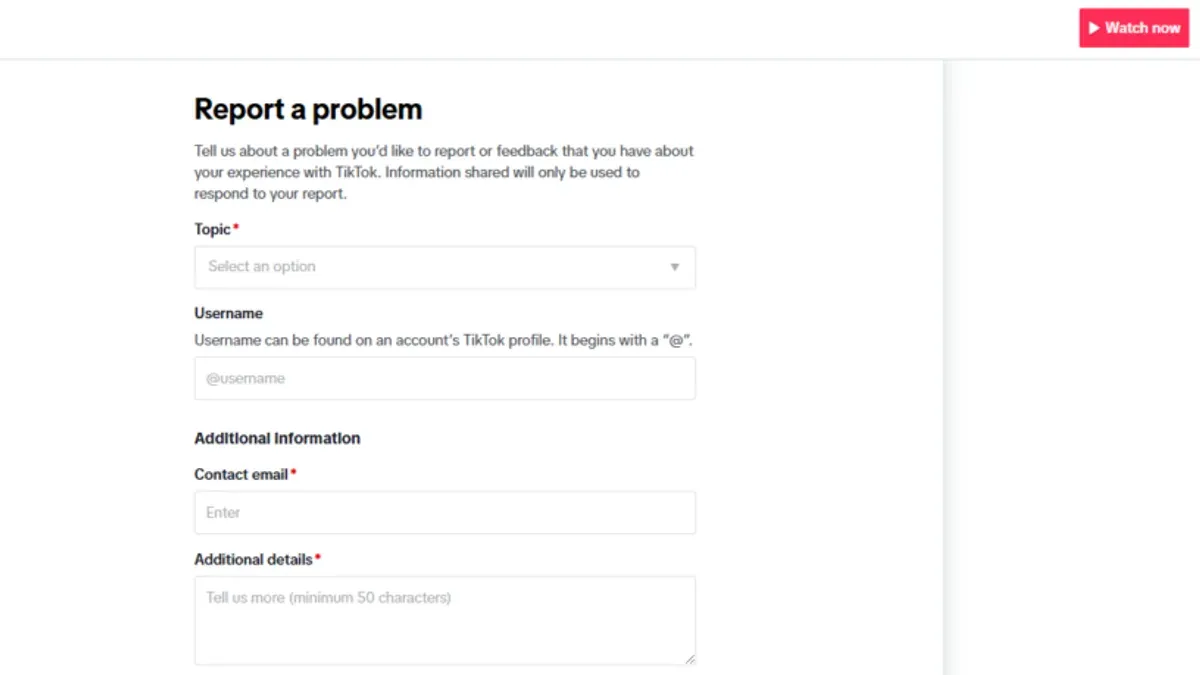
To follow up with TikTok support, use the app’s "Report a Problem" feature found under Profile > Settings > Support. Submit a detailed description referencing the original report ID if available. Response times vary widely; some users receive replies within days, while others wait weeks with no resolution.
If direct support is unresponsive, escalate by submitting the impersonation report form multiple times with updated evidence or contact TikTok via official social media channels for visibility. Avoid duplicate reports in quick succession as this may delay processing.
Understand TikTok’s enforcement has limitations: automated moderation and high report volumes mean some cases slip through or face delays. Persistent impersonators may create new accounts, requiring continuous monitoring and repeated reports.
- Collect additional clear evidence (screenshots, URLs) of impersonation.
- Resubmit the impersonation report form with this new evidence.
- If rejected again, use "Report a Problem" in Settings > Support with reference to previous reports.
- Monitor TikTok’s responses; if no reply in two weeks, try contacting TikTok’s official social media support.
- Keep records of all submissions and responses for reference if further escalation is needed.
Tip: Document every impersonation incident promptly to build a strong, ongoing case if repeated reporting becomes necessary.
Frequently asked questions
How to report people on tiktok?
To report someone on TikTok, go to the profile of the user in question, tap the three-dot menu at the top right, then select "Report." Follow the prompts to specify the issue, such as impersonation or harassment, and provide any requested details. TikTok reviews reports based on their community guidelines and takes action if violations are confirmed.
How to make a report on tiktok?
Reports on TikTok can be made via the app or the official impersonation report form online. In the app, find the content or user to report, tap the three dots, select "Report," and choose the relevant reason. The form requires specific information like the impersonated username and proof of identity to process impersonation cases efficiently.
How to message people on tiktok?
Messaging on TikTok requires both users to follow each other unless the recipient’s privacy settings allow messages from everyone. To send a message, open the user’s profile, tap the "Message" button, type the message, and send. If the message option is not visible, the user’s settings likely restrict direct messages.
Can you report someone on tiktok?
Yes, TikTok allows reporting of users, videos, and comments that violate its guidelines. The reporting feature is accessible via the three-dot menu on a profile, video, or comment. Reports should be specific to issues like impersonation, harassment, or inappropriate content to ensure proper handling.
How to make a report on TikTok?
Making a report on TikTok involves selecting the "Report" option on the content or profile causing concern. Clearly identify the reason for the report and provide evidence if possible, especially in impersonation cases. Completing all required fields helps TikTok’s moderation team assess and act on the report faster.
What this advice does not cover and who should do something else
This article does not cover legal actions outside TikTok or impersonation cases involving celebrities or brands that may require specialized legal advice. Users facing serious harassment, threats, or identity theft beyond the scope of TikTok’s reporting tools should consider consulting law enforcement or legal professionals. Additionally, trademark or copyright infringements tied to impersonation are not addressed here and might need direct legal intervention.
The single most useful next step is to gather all relevant evidence—screenshots, URLs, and timestamps—before submitting the impersonation report through TikTok’s official form. Providing clear, precise information significantly speeds up the review process and increases the likelihood of a successful resolution. Follow up within the app’s “Report a Problem” section if the issue persists or if the impersonation continues after initial review.
See also: How to Report Impersonation on Snapchat: A Clear Step-by-Step Guide · How to Report Impersonation on Instagram: A Clear Step-by-Step Guide · How to Report Impersonation on Facebook: Step-by-Step Guide · How to Log Out of TikTok on All Devices: Complete Step-by-Step Guide