How to Recover a TikTok Account Without a Phone Number
This guide explains how to recover a TikTok account without a phone number using alternative verification methods and manual appeal processes.

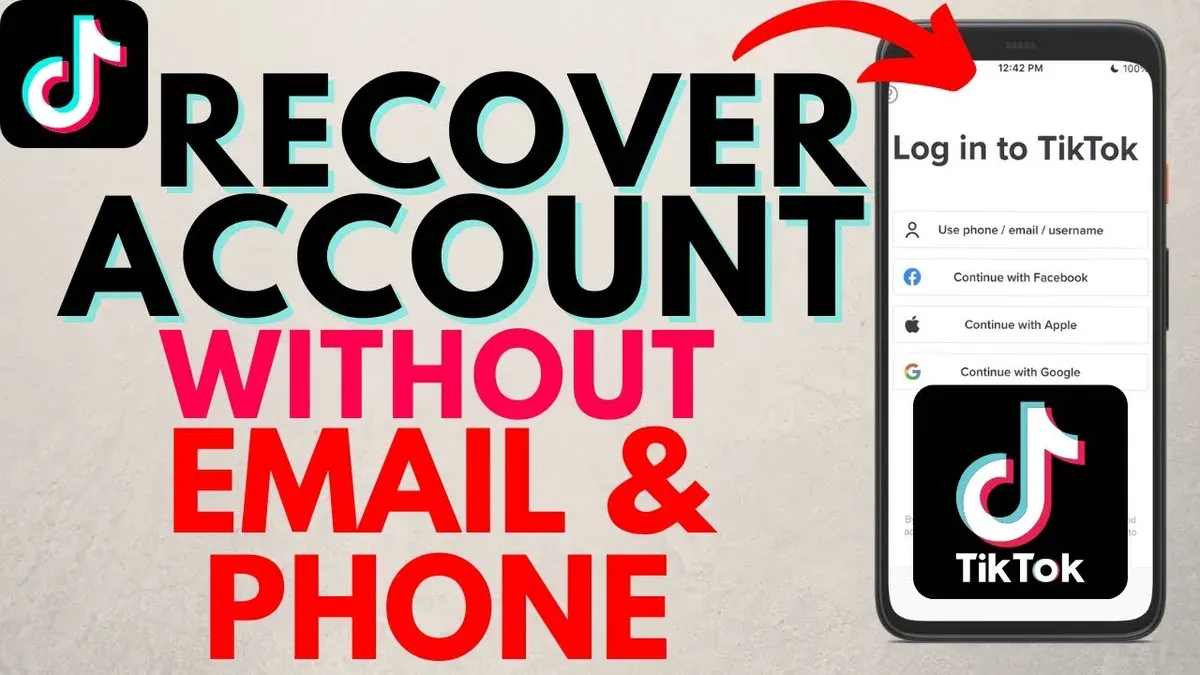
This article explains how to recover TikTok account without phone number when standard recovery options are unavailable. Losing access to a TikTok account without a linked phone number or email can block automated password resets. However, TikTok provides alternative verification methods and manual appeal processes to regain control.
Before attempting recovery, gather any linked social media accounts, previous passwords, and account creation details. These will support verification when contacting TikTok support or using in-app recovery tools. The steps outlined focus on practical, often overlooked paths beyond phone or email verification.
Following this guide will help navigate TikTok’s account recovery system effectively, even when the usual channels are inaccessible, minimizing downtime and loss of content.
Before you start: What is needed to recover a TikTok account without a phone number
Recovering a TikTok account without access to the original phone number requires preparation and specific information. The recovery process depends heavily on verifying ownership through alternative data points. Having the original TikTok username is essential, as it identifies the account in TikTok’s system. Access to any linked social media accounts, such as Instagram or Facebook, can facilitate recovery through connected login options.
Knowing previous passwords or partial password hints improves the chances of successful verification. TikTok may prompt for recent passwords during recovery to confirm identity. Access to any linked email addresses, even if not primarily used for login, can serve as a backup contact method. Devices previously used to log into the TikTok account, like a smartphone or tablet, help TikTok authenticate the user based on device history.
TikTok’s identity verification often requires providing specific details such as account creation date, profile information, or answering security questions. Users have reported that manual appeal forms request these details to establish ownership when standard recovery fails. Preparing this information before starting the process reduces delays and increases success probability.
- Locate the original TikTok username. Confirm that it matches the locked account. A successful match will display the account profile or recovery options.
- Gather access to linked social media accounts. Attempt login via these platforms to check if TikTok offers them as recovery options.
- Recall any previous passwords or partial passwords. Be ready to enter them when prompted by TikTok’s recovery system.
- Identify any linked email addresses or alternative contacts. Verify access to these emails for receiving recovery codes or messages.
- Have the device(s) previously used to log in. TikTok may send verification prompts to these devices.
- Prepare answers to identity verification questions, such as account creation dates or profile details. These will be requested during manual appeals or advanced recovery steps.
Tip: Before initiating recovery, attempt to access all linked accounts and devices to streamline TikTok’s verification process.
How to recover TikTok account without phone number and email
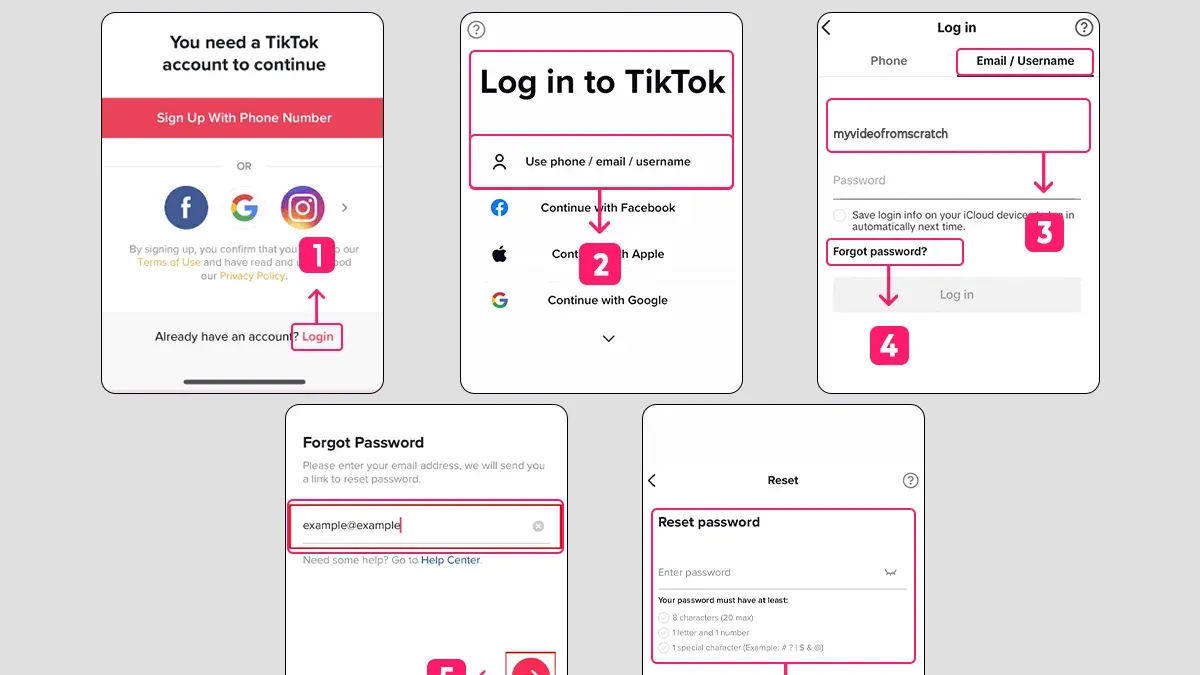
- Open the TikTok app and navigate to the login page. The screen will display options for signing in and account recovery.
- Tap on Forgot password? located below the password entry field. A prompt will appear offering recovery methods.
- Select the Use username or email option. Although email access is unavailable, this option allows input of the username for alternative verification.
- Enter the TikTok username associated with the account. The app will then prompt for identity verification through linked social media accounts or devices previously used for login.
- Follow the on-screen prompts to confirm identity. This may include receiving verification codes on connected devices or authorizing login via linked social accounts such as Facebook or Google.
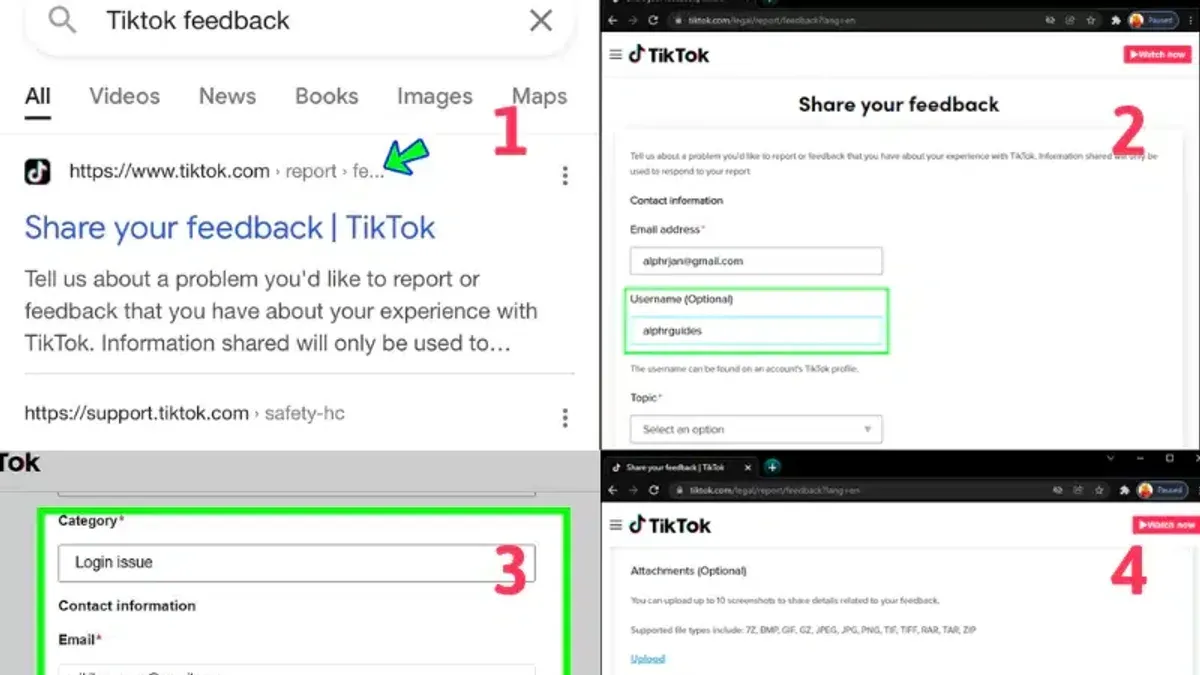
- If automatic verification fails or linked accounts are inaccessible, locate and open TikTok’s manual account recovery form. This form requests detailed proof of ownership, including account creation date, previous passwords, and other identifying information.
- Submit the manual recovery form carefully with accurate data. Upon submission, a confirmation message indicates the request was received.
- Wait for TikTok support to review the submission and respond via the app or linked contact methods. Response times vary, but manual recovery is effective for many users who cannot use phone number or email recovery.
Tip: Keep screenshots or evidence of account activity ready before submitting the manual recovery form to strengthen the case for ownership.
How to recover TikTok account without phone number and password
When both phone number and password are unavailable, but the email or username is accessible, the first step is to attempt a password reset via the email linked to the account. Navigate to TikTok's login page, select "Forgot password?", then choose the email recovery option. A reset link should be sent to the registered email; following this link allows the creation of a new password. Successful receipt of the email and completion of resetting confirm progress.
If the email is inaccessible, use the username to initiate identity verification. On the login screen, after selecting "Forgot password?", input the username and proceed through TikTok’s identity verification prompts, which may include answering security questions or confirming previous account activities. Passing these checks will enable password reset without phone or email access.
Linked social media accounts or connected devices can serve as secondary verification methods. Access the recovery options and select verification via linked platforms such as Facebook, Instagram, or Google. TikTok may send a verification prompt or code through these accounts or devices. Confirming this prompt grants access to reset the password.
If automated methods fail, submit a manual appeal to TikTok’s support with as much detail as possible, including username, previous passwords, associated emails, linked accounts, and approximate account creation date. This manual route is slower but can recover accounts when all standard recovery channels are unavailable.
- Go to TikTok login and click "Forgot password?" Select email recovery if email is accessible. Receive reset link and set a new password.
- If email is not accessible, enter username under "Forgot password?" and complete TikTok’s identity verification steps.
- Use linked social media account verification if available to confirm identity and reset password.
- If all else fails, submit a manual appeal form with comprehensive account details to TikTok support.
Tip: Checking all connected devices for logged-in TikTok sessions may provide an alternative way to update account security settings.
How to recover TikTok account without phone number and Gmail
When access to both the phone number and Gmail linked to a TikTok account is lost, recovery must rely on alternative login methods and direct communication with TikTok support. Logging in using the TikTok username or user ID is often the first step, as these do not require email or phone verification. If social accounts like Facebook or Instagram were linked, they can serve as backup login options, often providing smoother recovery than email-only methods.
- Open the TikTok app or website and select the login option.
- Choose "Use phone / email / username" and enter the username or TikTok ID instead of the email address.If successful, the account dashboard should appear, bypassing email or phone verification.
- If login fails, try logging in with a linked Facebook or Instagram account by selecting the respective social login buttons.Successful login here shows the account's main page without needing phone or email confirmation.
- If neither username nor linked social accounts permit access, navigate to TikTok’s Help Center and locate the manual recovery or account appeal form.
- Submit a request including the username, any previous passwords, linked social accounts, and clear proof of identity such as a government-issued ID.Receiving a confirmation email or in-app notification indicates the request was accepted for review.
- Alternatively, use TikTok’s help center chat or email support to explain the situation, providing all relevant account details and identity verification documents.
Tip: Recovery through linked social accounts typically has higher success rates and faster response times compared to email-only methods.
How to recover TikTok account without phone number or email or password or birthday
When all standard recovery credentials are unavailable, recovering a TikTok account becomes significantly challenging. Collect any proof of ownership such as screenshots showing the account in use, payment receipts for TikTok coins, or follower lists. These materials support identity claims when contacting TikTok support.
Start by submitting a detailed appeal through TikTok’s official support channels. Provide the username, any linked social accounts, and the gathered proof of ownership. TikTok’s security policy is strict; the platform may decline recovery requests if verification is insufficient.
The official TikTok policy states that without verifiable credentials, account recovery might be impossible. User experiences confirm that many appeals without standard verification details remain unresolved. Persistence and accuracy in the appeal details improve the likelihood but do not guarantee success.
If recovery attempts fail, creating a new account is the practical fallback. Users should immediately link multiple recovery options like email, phone number, and social accounts to the new profile to prevent future lockouts.
- Gather all possible proof of account ownership (screenshots, payment receipts, follower lists). Successful collection means having tangible evidence related to the account.
- Access TikTok’s Help Center or app support to submit a recovery appeal. The appearance of a confirmation message or ticket number indicates the appeal was sent.
- Wait for TikTok’s response, which may ask for additional information or confirm recovery status. Receiving a reply confirms the process is ongoing.
- If denied, consider creating a new account and immediately add multiple recovery options to secure it. The new account should be fully set up with linked contact methods.
Tip: Keep detailed records of all interactions with TikTok support, including dates and ticket numbers, to track recovery progress.
Troubleshooting common failure points during TikTok account recovery
Recovery attempts often fail due to outdated contact information. If the verification code is not received, confirm that the linked phone number or email in the account settings is current. Codes sent to obsolete contacts will not arrive, blocking progress. Refresh recovery data by updating linked accounts or trying alternate verification methods.
Manual recovery appeals can be rejected if the proof submitted is insufficient. TikTok requires clear identity verification such as government-issued IDs or account details matching their records. Rejection emails typically cite vague or incomplete evidence as the reason. Resubmit appeals with precise documentation and ensure all requested fields are accurately completed.
Accounts that are permanently disabled or banned by TikTok cannot be recovered through standard channels. Such bans occur due to repeated violations of TikTok’s community guidelines. In these cases, recovery options are limited or nonexistent, and users should consider creating a new account.
Technical issues with the TikTok app or server delays can also impede recovery. Users may experience timeouts, errors, or failed submissions during verification. Clearing the app cache, reinstalling TikTok, or waiting several hours before retrying often resolves these problems.
- Verify linked contact details under "Me" > "Settings and privacy" > "Manage account" > "Phone Number" or "Email"; successful update allows receiving verification codes.
- Review rejection email from TikTok, identify missing or unclear proof, gather appropriate documents, and resubmit the manual recovery form; confirmation appears as a submission success message.
- Check account status by attempting login; if a ban notice appears, recognize recovery is not possible, necessitating a new account.
- Clear TikTok app cache via device settings or reinstall the app; upon relaunch, successful loading with no errors indicates resolution of technical issues.
Tip: Keep screenshots or copies of all communications with TikTok support to track appeals and avoid repeating errors.
How to prevent future loss of access to a TikTok account
Maintaining control of a TikTok account requires proactive security measures. Regularly updating and verifying contact information in TikTok settings ensures recovery options remain current and accessible. Navigate to Profile > Settings and privacy > Manage account > Phone number and Email to review and update these details as needed. Confirming changes through verification codes completes updates.
Enabling two-factor authentication (2FA) adds an important security layer. TikTok supports 2FA via SMS codes or authentication apps like Google Authenticator. Activate 2FA under Settings and privacy > Security > Two-step verification, then choose the preferred method. Verifying successful setup typically involves receiving and entering a test code.
Keeping a secure record of passwords and linked emails prevents lockout caused by forgotten credentials. Use password managers or encrypted notes to store this information securely. Avoid reusing passwords across accounts to reduce risk from breaches.
Logging in exclusively on trusted devices minimizes exposure to unauthorized access. Avoid clicking suspicious links or downloading unverified apps that could compromise login credentials. Regularly check active sessions under Settings and privacy > Security > Manage devices to identify and remove unknown devices.
Tip: Review and update security settings quarterly to maintain account integrity and reduce recovery complications.
Frequently asked questions
How to recover TikTok account without phone number and email reddit?
Reddit discussions often recommend using TikTok’s manual account appeal process when neither phone number nor email access is available. This involves submitting a verification form via TikTok’s support page, providing a government-issued ID or other proof of identity. Users emphasize patience, as response times can vary and multiple attempts may be necessary.
How to recover TikTok account without phone number and email and password?
When phone number, email, and password are all unavailable, TikTok’s in-app verification alternatives become essential. The user can try logging in with linked social media accounts like Facebook or Instagram if previously connected. If that’s not an option, submitting a manual appeal with identity verification is required through TikTok’s “Report a Problem” feature.
How to recover TikTok account without phone number reddit?
On Reddit, users suggest first checking if the TikTok account is linked to other login methods such as Google or Facebook. If no linked accounts exist, the next step is using TikTok’s support form to request account recovery by providing account details and proof of identity. Multiple follow-ups may improve chances of success.
How to recover TikTok account without phone number or email?
Without access to phone number or email, the primary recovery method is TikTok’s manual verification process. This requires submitting identity documents via the app’s “Report a Problem” or “Help Center” options. Having previously linked social media accounts can also facilitate login without phone or email.
What this advice does not cover and when to seek other help
TikTok’s recovery process heavily depends on verifying account ownership through linked phone numbers, email addresses, or previously used devices. Users without access to any of these standard credentials risk permanent loss of their account. While manual appeal options exist, they can take several days or even weeks to process and offer no guaranteed success. This guide does not address recovery for accounts that TikTok has disabled due to policy violations, which require separate dispute procedures.
The most effective next step is to start a manual account recovery appeal directly via the TikTok app or website. Use the “Report a problem” feature under Settings > Support, carefully provide all requested information, and submit any proof of account ownership available. Persistence and accuracy here maximize chances of regaining access when standard recovery channels are unavailable.
See also: How to Recover a Reddit Account Without a Phone Number: Step-by-Step Guide · How to Recover a Threads Account Without a Phone Number · How to Log Out of TikTok on All Devices: Complete Step-by-Step Guide