How to Report Impersonation on Snapchat: A Clear Step-by-Step Guide
This guide provides clear, step-by-step instructions on how to report impersonation on Snapchat and related platforms to protect your identity.

This article explains how to report impersonation on Snapchat with clear, step-by-step instructions, covering both the mobile app and Snapchat Web. It also addresses how to handle impersonation on related platforms like Instagram, Facebook, and Gmail, providing a complete cross-platform approach. Understanding the reporting process on multiple services ensures that users can effectively protect their identity across social media and email.
Reporting impersonation requires specific information such as the username of the impersonator, screenshots or evidence of the impersonation, and a clear description of the issue. This preparation streamlines the process on Snapchat and other platforms. The following sections guide through reporting impersonation on Snapchat’s mobile app and website, handling private or inactive accounts, privacy limitations, and steps for other major platforms.
Before you start: What is needed to report impersonation on Snapchat
Reporting impersonation on Snapchat requires preparation to ensure a smooth process. First, gather clear evidence such as screenshots of the impersonating profile and any messages that demonstrate the impersonation. These screenshots should include the username, profile picture, and any content that confirms the account is pretending to be someone else.
Next, know the exact username or profile link of the impersonating Snapchat account. This precision helps Snapchat identify the correct account swiftly. Access to your own Snapchat account or Snapchat Web is necessary to proceed with the report, as some reporting options require you to be logged in.
Understanding Snapchat’s community guidelines on impersonation provides context on what qualifies as impersonation and what Snapchat enforces. Key points include prohibiting accounts that misrepresent others to deceive or harm. Here are some excerpts from Snapchat’s impersonation policy:
- "Accounts must not pretend to be another person with the intent to deceive."
- "Impersonation that causes harm, harassment, or fraud is strictly prohibited."
- "Reporting requires clear evidence to validate claims."
- Take screenshots showing the impersonating account’s username, profile photo, and any messages that demonstrate impersonation. The images should be clear and unedited. When done correctly, the screenshots will show complete profiles and supporting messages.
- Copy the exact username or profile URL of the impersonating account. Ensure it matches the profile seen in the screenshots.
- Log in to your Snapchat account or Snapchat Web. You should be able to access the report feature once logged in.
- Review Snapchat’s community guidelines on impersonation for reference during the report. This helps in understanding what evidence to emphasize.
Tip: Keep all evidence organized and easily accessible before starting the report to avoid delays during the process.
How to report someone on Snapchat using the mobile app
- Open the Snapchat mobile app and log in to the account.
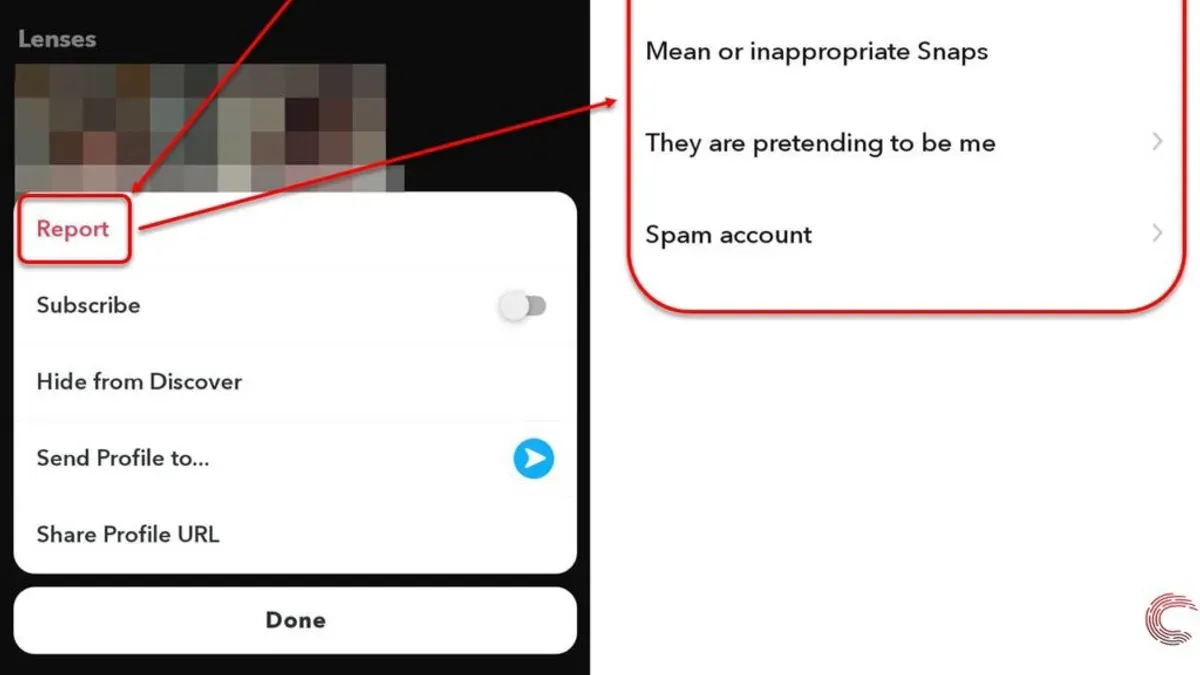
Locate the profile of the impersonating user by searching their username or finding them in the chat or friend list. - Tap the three-dot menu icon in the top right corner of their profile screen.
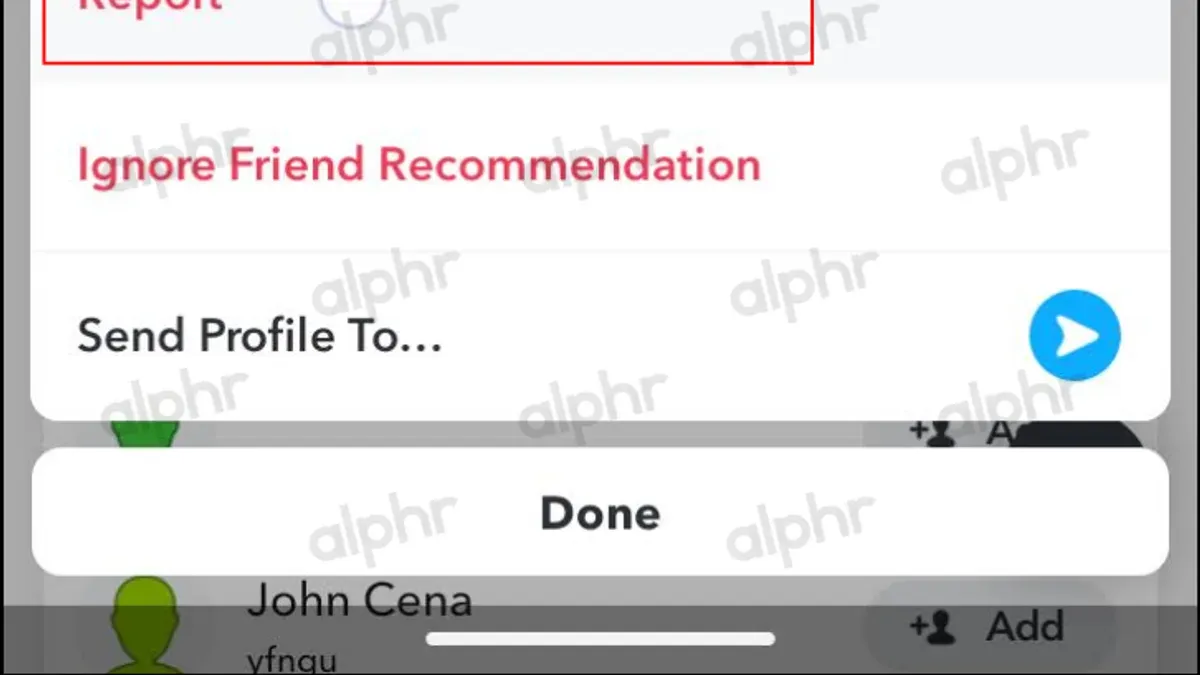
This opens a list of options related to the account. - Select Report from the menu.
The app will prompt for the reason for reporting. - Choose Impersonation as the reason for the report.
This directs the report specifically to Snapchat’s impersonation review team. - Provide any additional information or upload screenshots showing the impersonation if the app requests.
Supplying clear evidence improves the chances of a quick response. - Submit the report by tapping the Send or Submit button.
The app will confirm the report has been received and may display follow-up instructions.
Tip: Take screenshots of the impersonating profile and any relevant messages before submitting the report to have backup evidence ready.
How to report someone on Snapchat Web
Reporting impersonation on Snapchat Web is less straightforward than on the mobile app, but it remains possible with a few clear steps. First, log in to Snapchat Web using valid credentials. Once logged in, locate the impersonating user's profile by searching their username or finding them in recent chats.
On the user's profile page, look for the three-dot menu icon, typically found near the top right of the profile window. Clicking this menu reveals options including 'Report'. Select 'Report' to open the reporting interface.
- Click the dropdown or selection box for report reasons and choose 'Impersonation'. Selecting this ensures the report is categorized correctly and prioritized.
- Provide any additional details or evidence if prompted, such as links or screenshots, then submit the report.
Snapchat Web currently offers fewer reporting options than the mobile app. Features like attaching multiple screenshots or chat logs may not be supported, so collecting evidence beforehand is advisable. Additionally, response times and follow-up options might be limited on the web platform.
Tip: If reporting on Snapchat Web feels restrictive, complement the report by submitting it through the mobile app for a more detailed submission.
How to report a Snapchat account for impersonation if the account is private or inactive
Reporting an impersonation when the account is private or inactive requires a different approach since direct profile reporting may not be possible. Snapchat’s Report a Problem feature is the recommended tool for submitting detailed reports in these cases.
- Open Snapchat and tap your profile icon in the top-left corner to access settings.
- Scroll down and select Support, then tap Report a Problem.
- Choose My Account & Security, then Impersonation or Fake Account.
- In the text box, provide a clear description of the impersonation, including the impersonator’s username, even if the account is private or inactive. Attach any relevant screenshots or evidence by tapping the attachment icon.
- Submit the report. A confirmation screen will appear indicating the report was sent successfully.
- If the impersonating account is deleted after reporting, follow up by contacting Snapchat Support through their official help website or social channels to escalate the issue.
Reporting inactive accounts can still trigger Snapchat’s review process and potential action since impersonation violates community guidelines regardless of activity status.
Example: A user noticed a private account using their name and photos but could not access the profile to report directly. They used Report a Problem to submit the username, described the issue, and attached screenshots of messages from the impersonator. Snapchat reviewed the case and suspended the offending account.
How to tell who someone is Snapchatting: Understanding privacy limits
Snapchat’s privacy model strictly protects user communications. The platform does not disclose who someone is chatting with to any third parties, including other users. This means there is no legitimate or built-in method to view another user’s chat contacts or conversations without their explicit consent.
Common misconceptions include the belief that friends or followers lists reveal active chat partners or that third-party apps can access private chat data. Snapchat’s privacy policy explicitly forbids sharing message content or chat partner details except between the communicating users.
When reporting impersonation, the focus is on the impersonator’s account and behavior, not the identity of their contacts. Attempting to uncover who someone is Snapchatting can violate legal and ethical boundaries, as it intrudes on personal privacy protected by Snapchat’s terms of service and broader privacy laws.
Tip: Respect privacy boundaries; focus impersonation reports on the impersonator’s profile and actions without seeking to identify their contacts.
How to report impersonation on Instagram and Facebook: Cross-platform considerations
Instagram and Facebook offer specific reporting tools to handle impersonation, similar to Snapchat but with platform-specific nuances. Using these tools helps address impersonation that spans multiple social networks, ensuring a more comprehensive response.
- On Instagram, open the impersonating profile, tap the three-dot menu, and select "Report". Choose "It's pretending to be someone else" and follow prompts to specify if it’s impersonating a friend or a public figure. Completing the report submits it to Instagram’s moderation team; a confirmation message appears.
- Alternatively, use Instagram’s Help Center impersonation form at https://help.instagram.com/contact/636276399721841 to report impersonation directly. After submission, Instagram will review and respond via email.
- For Facebook, go to the dedicated impersonation report form at https://www.facebook.com/help/contact/295309487309948. Fill out all required details about the impersonator and the real person. After submitting, Facebook confirms receipt and reviews the case.
Both Instagram and Facebook require clear identification of the impersonated individual and evidence if possible. Unlike Snapchat, Facebook’s form is web-only, while Instagram allows reporting through both app and web forms. Cross-reporting impersonation across these platforms is crucial when the impersonator uses multiple accounts, increasing the chances of timely removal.
How to report email impersonation on Gmail and other services
Email impersonation often appears as phishing or spam messages pretending to be someone trusted, including social media contacts. Reporting these emails helps prevent fraud and protects users beyond social platforms.
In Gmail, use the built-in options to report impersonation:
- Open the suspicious email in Gmail.
- Click the three vertical dots next to the Reply button.
- Select Report phishing if the email tries to steal information or Report spam if it is unsolicited or abusive.
- Confirm the report when prompted; Gmail will move the email to Spam and analyze it for further actions.
Tip: For persistent or dangerous impersonation emails, forward the full message with headers to [email protected] to alert Gmail's abuse team directly.
Other email providers have similar reporting tools, typically found under options like "Mark as phishing," "Report spam," or "Report abuse." Consult the provider’s help center for exact steps.
Email impersonation is closely linked to social media impersonation as attackers often use combined methods to scam or mislead targets. Promptly reporting such emails reduces the risk of broader impersonation attacks.
Troubleshooting: What to do if Snapchat does not respond to an impersonation report
After submitting an impersonation report on Snapchat, a confirmation email or an in-app notification usually confirms receipt within a few days. If no acknowledgment arrives within a week, it may indicate the report was not processed. Resubmitting the report with additional evidence can help clarify the case and prompt action.
If repeated reports go unanswered, contact Snapchat Support directly. Use the support page at https://support.snapchat.com/en-US/contact to submit an inquiry referencing the original report. Expect response times to vary, but typical replies come within several days.
In cases of serious harm caused by impersonation, such as threats or fraud, consider seeking legal advice or involving law enforcement. Snapchat's response may be limited by privacy policies, so external intervention can be necessary for protection or recovery.
Maintain detailed records of all communications, report confirmations, and evidence submitted. This documentation supports follow-up actions and legal steps if needed.
- Check email inbox and Snapchat notifications for report confirmation; if found, the report is registered.
- If no confirmation, resubmit the impersonation report with new or clearer evidence; a confirmation should follow.
- Contact Snapchat Support via the official contact page referencing previous reports; expect a reply within several days.
- If impersonation causes serious issues, consult legal counsel or law enforcement; keep all records accessible.
Frequently asked questions
How to report people on snapchat?
Open the Snapchat app and locate the profile or snap from the impersonating user. Tap the three dots in the top-right corner, select "Report," then choose "Impersonation" as the reason. Follow the on-screen prompts to submit the report with any additional details or evidence.
How to report a gmail account impersonation?
Go to the Gmail help page and find the "Report a phishing or impersonation email" section. Forward the suspicious email as an attachment to [email protected]. Additionally, use Gmail’s built-in reporting feature by opening the email, clicking the three dots next to the reply button, and selecting "Report phishing."
How to report people on Snapchat?
Reporting on Snapchat requires navigating to the offending user's profile, tapping the menu icon, and selecting "Report." Choose "Impersonation" if relevant, then provide the requested information. This process is the same whether reporting from a snap, chat, or profile.
How to report someone on Snapchat web?
Snapchat Web does not currently support direct reporting features. Users must use the mobile app to report impersonation. If reporting is necessary, open the Snapchat app, find the user, and follow the standard reporting steps.
How to report a Gmail account impersonation?
Impersonation attempts via Gmail can be reported by forwarding the suspicious email to [email protected]. Use the "Report phishing" option within Gmail’s email menu to alert Google directly. This helps Google investigate and potentially block the impersonating account.
What This Advice Does Not Cover and When to Seek Professional Help
This article focuses on how to report impersonation on Snapchat and related platforms using available in-app and online tools. It does not cover legal actions, law enforcement involvement, or how to handle impersonation cases that involve threats, harassment, or identity theft requiring formal investigation. Individuals experiencing severe or criminal impersonation should contact local law enforcement or consult a legal professional to explore appropriate legal remedies.
For impersonation that escalates beyond platform reporting—such as stalking, blackmail, or financial fraud—professional assistance is necessary. Reporting through Snapchat and other services is effective for removing accounts or content but does not substitute for legal recourse when personal safety or legal rights are at risk.
Next Step: Submit a Detailed Report Through Snapchat’s Official Channels
The most effective immediate action is to submit a detailed impersonation report directly through Snapchat’s mobile app or web interface, providing clear evidence such as screenshots and URLs. Accurate and comprehensive information helps Snapchat’s Trust & Safety team assess and address the issue promptly. Parallel reporting on other affected platforms like Instagram, Facebook, or Gmail ensures broader protection against impersonation across accounts.
See also: How to Report Impersonation on Instagram: A Clear Step-by-Step Guide · How to Report Impersonation on Facebook: Step-by-Step Guide · How to Log Out of Snapchat on All Devices: Clear Step-by-Step Guide