Is dwm.exe a Virus? Understanding Its Role and Safety
This article explains what dwm.exe does, how to recognize the legitimate process, and how to tell if dwm.exe is a virus.

This article explains the role of dwm.exe in Windows, clarifies common concerns such as "is dwm.exe a virus," and offers practical advice for identifying legitimate processes versus malware. Dwm.exe stands for Desktop Window Manager, a core Windows component responsible for rendering visual effects like transparent windows, live taskbar thumbnails, and high-resolution support. It runs automatically in the background to manage the graphical user interface smoothly.
While dwm.exe is essential for modern Windows desktops, some users notice it consuming system resources or appearing suspicious. This often raises questions about its safety and whether it could be malware. Understanding where dwm.exe is located, how to verify its authenticity, and how to handle it safely helps users maintain system stability and security.
What is dwm.exe in Windows?
dwm.exe, or Desktop Window Manager, is a core system process in Windows responsible for managing and rendering the graphical user interface. It handles the composition of windows and visual effects such as transparency, live taskbar thumbnails, and smooth animations. By running in the background, dwm.exe enables high-resolution display support and advanced visual features that improve the overall desktop experience.
According to Microsoft documentation, Desktop Window Manager uses hardware acceleration to compose the desktop image efficiently, allowing for effects like Aero Glass and Flip 3D seen in modern Windows versions. Without dwm.exe, many of these graphical enhancements would be disabled, resulting in a more basic and less visually appealing interface.
This process is active by default on Windows 10 and Windows 11, where it integrates closely with the operating system to provide seamless window management and rendering. Users may notice dwm.exe running in Task Manager but should understand it is an essential part of the system rather than an optional utility.
Where is dwm.exe located and how to verify its legitimacy?
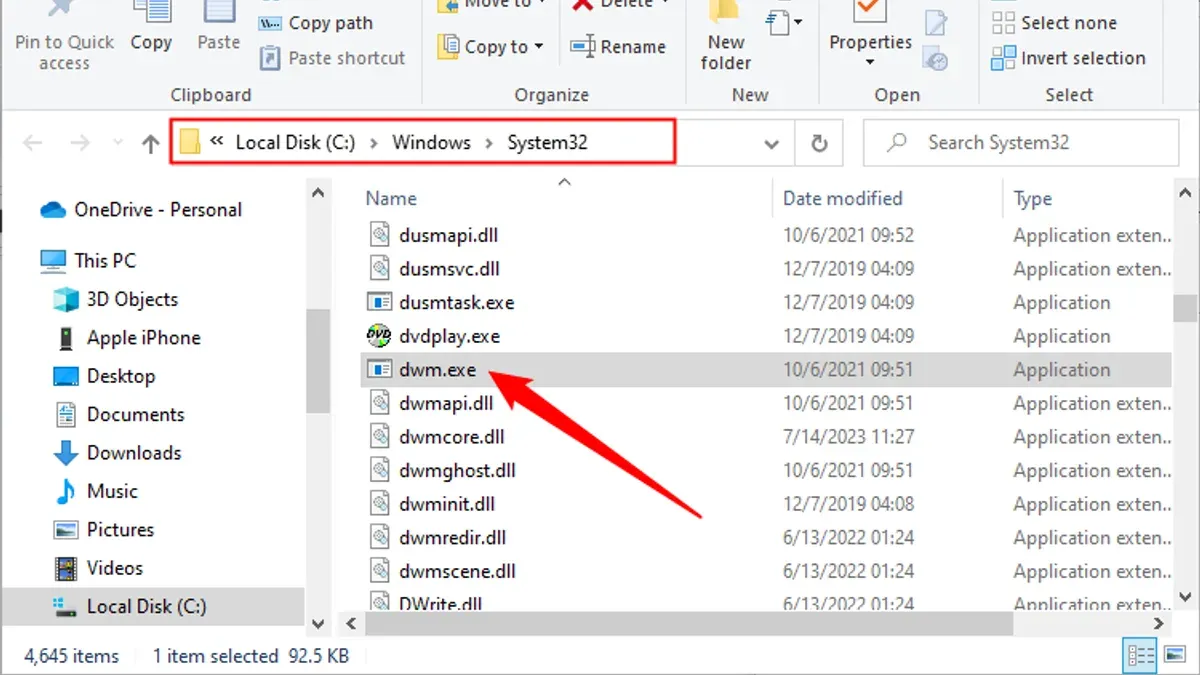
The legitimate dwm.exe file is located in the Windows\System32 folder, typically at C:\Windows\System32\dwm.exe. Verifying its location is the first step to confirm authenticity.
To check this, open Task Manager, right-click on the dwm.exe process, and select Open file location. If the file opens from the System32 folder, it is likely genuine. Files named dwm.exe found in other folders, especially user directories or temporary folders, are suspicious.
Further verification involves checking the file’s digital signature. Right-click the dwm.exe file, select Properties, then the Digital Signatures tab. The signature should be from Microsoft Windows. A missing or invalid signature may indicate malware.
Malware often mimics dwm.exe but resides in unusual locations such as C:\Users\[username]\AppData or C:\Temp. These impostors usually lack valid Microsoft signatures and may exhibit unusual system behavior.
Tip: Regularly scanning your system with updated antivirus software can help detect malicious files masquerading as legitimate system processes.
What does dwm.exe do in Task Manager and why is it using memory?
dwm.exe appears in Task Manager as a system process responsible for managing desktop composition and graphical effects, which explains its consistent presence and resource usage. Its memory and CPU consumption vary depending on factors like display resolution, number of monitors, running applications, and hardware acceleration settings.
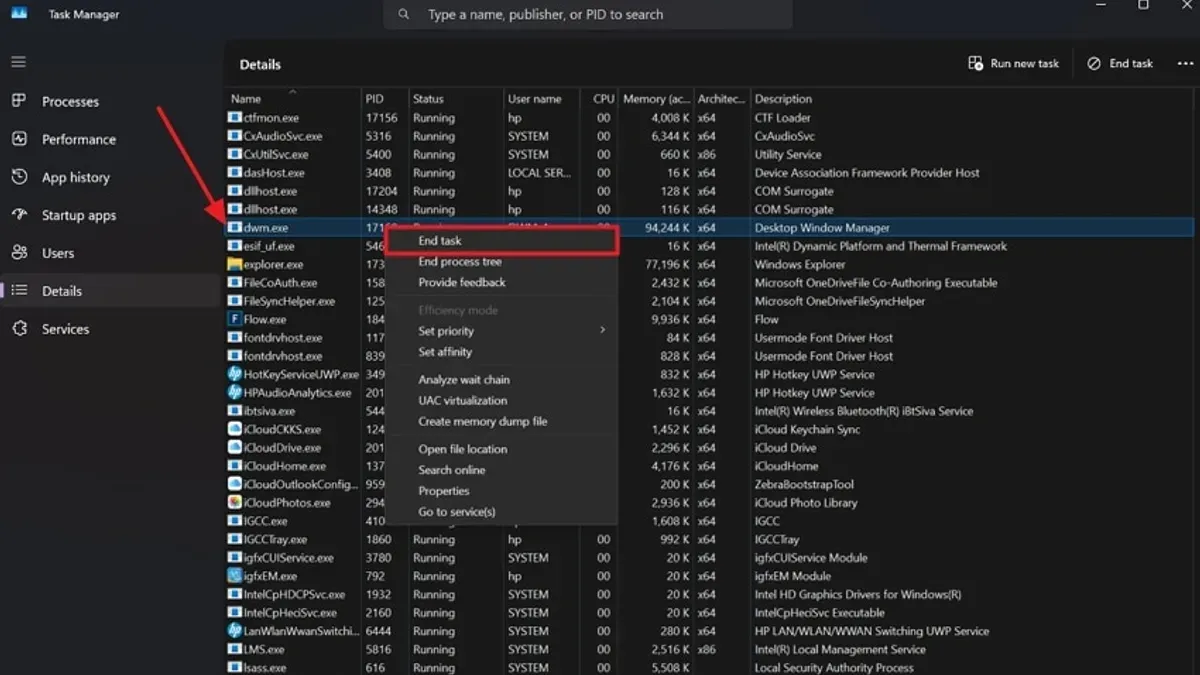
Typical memory usage for dwm.exe ranges from around 20 MB to 100 MB under normal conditions. However, if multiple high-resolution monitors are connected or graphic-intensive applications such as video editors or games are running, memory consumption can increase significantly without indicating a problem. CPU usage is generally low but may spike briefly during window animations or when changes occur on the desktop.
Sample Task Manager observations show dwm.exe using approximately 30–50 MB of memory on a single 1080p monitor setup with standard apps, while setups with dual 4K monitors and several open graphical applications may see usage climb toward 150 MB or more. Such fluctuations are expected and not a sign of malware.
Tip: If dwm.exe’s resource usage remains persistently high without obvious cause, checking for driver updates or display settings adjustments can help optimize performance.
How to safely close or restart dwm.exe if needed
dwm.exe cannot be safely ended through Task Manager because it is a critical system process, and forcibly terminating it risks system instability or crashes. Instead, restarting the Desktop Window Manager service or rebooting the system are the recommended methods to refresh dwm.exe.
To restart the service, open the Services console by typing services.msc in the Run dialog (Win + R). Locate the Desktop Window Manager Session Manager service, right-click it, and select Restart. This method safely refreshes dwm.exe without ending the process abruptly.
If issues persist, rebooting the computer will fully reload the service and associated drivers, providing a clean start for dwm.exe.
Advanced troubleshooting can involve using command-line tools like sc stop and sc start for the service or updating graphics drivers, as display driver problems often affect dwm.exe’s performance. Microsoft advises against manually ending dwm.exe, as this can cause unexpected system behavior.
Tip: Before restarting dwm.exe service, save all work to prevent data loss in case of system instability.
Is dwm.exe a virus? How to detect malware impersonating dwm.exe
The genuine dwm.exe process is not a virus; it is a trusted system file essential to Windows. However, some malware may disguise itself using the dwm.exe name to evade detection, often placing the file outside the legitimate Windows\System32 folder.
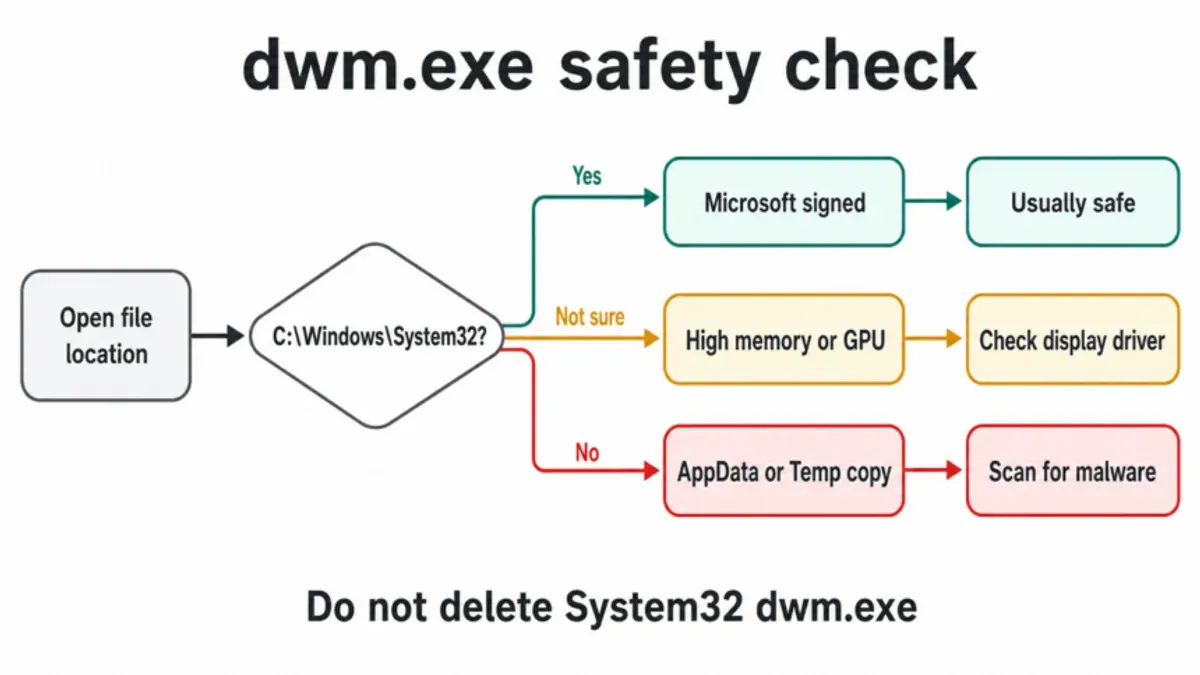
Malicious versions of dwm.exe typically do not carry the Microsoft digital signature and may exhibit unusual behavior such as high CPU usage when the system is idle, network activity, or frequent crashes. Users can detect suspicious instances by verifying the file path through Task Manager or using the "Open file location" option. If the file is not in the System32 directory, this is a red flag.
Running a thorough antivirus scan is a recommended step to identify fake dwm.exe files. Security tools can flag known malware variants that mimic this process. Monitoring system behavior for unexpected resource spikes or unauthorized network connections also helps in spotting impersonators.
Reports of malware using the dwm.exe name have emerged in past security bulletins, emphasizing the need for vigilance. Regular updates of antivirus software and system patches further reduce the risk of infection.
Tip: To confirm legitimacy, right-click dwm.exe in Task Manager, select "Properties," and check the "Digital Signatures" tab for Microsoft Corp. verification.
Further reading
- Is dllhost.exe a Virus? Understanding Its Role and Risks
- Types of Cyber Attacks: A Comprehensive Explainer Guide
- How to Check If an Online Store Is Legit: A Step-by-Step Guide
- How to Check If an Email Sender Is Legit: Step-by-Step Guide
Frequently asked questions
What is dwm.exe windows 10?
dwm.exe in Windows 10 is the Desktop Window Manager process responsible for rendering visual effects like transparency, live taskbar thumbnails, and high-resolution support. It manages the graphical user interface's compositing, enabling smoother animations and window transitions.
What is dwm.exe windows 11?
In Windows 11, dwm.exe continues to handle desktop composition and visual effects but supports the updated design language and enhanced graphical features. It ensures that the new rounded corners, animations, and other UI elements render properly and efficiently on the system.
What is dwm.exe in task manager?
In Task Manager, dwm.exe appears as the Desktop Window Manager process, showing memory and GPU usage related to graphical rendering. Its resource consumption varies depending on screen resolution, open applications, and active visual effects, which is normal behavior on modern Windows systems.
Is dwm exe a virus?
The legitimate dwm.exe is a core Windows system process and not a virus. However, malware can disguise itself using the same name, so verifying its file location in the System32 folder and scanning with reputable antivirus software is essential to confirm its authenticity.
How to close dwm.exe?
Closing dwm.exe manually is not recommended because it is essential for the Windows graphical interface and will automatically restart if terminated. If issues arise, restarting the computer or updating graphics drivers can help resolve problems without forcibly ending the process.
What this advice does not cover
This advice does not cover advanced troubleshooting for hardware-specific graphics driver issues or deep malware removal techniques that require professional tools. Users experiencing persistent graphics problems, system instability, or suspected serious infections should consider consulting IT professionals or using dedicated security software.
For many Windows users, the single most practical next step is to verify the file location of dwm.exe through Task Manager by right-clicking the process and selecting "Open file location." Confirming it resides in the "C:\Windows\System32" folder helps ensure the process is legitimate. If doubts persist, running a full system scan with a reputable antivirus or antimalware program can provide additional assurance without risking system stability.