How to Spot and Handle UPS Scam Texts Safely
Learn to identify UPS scam texts and protect yourself from fraud by recognizing their tactics and reporting suspicious messages.

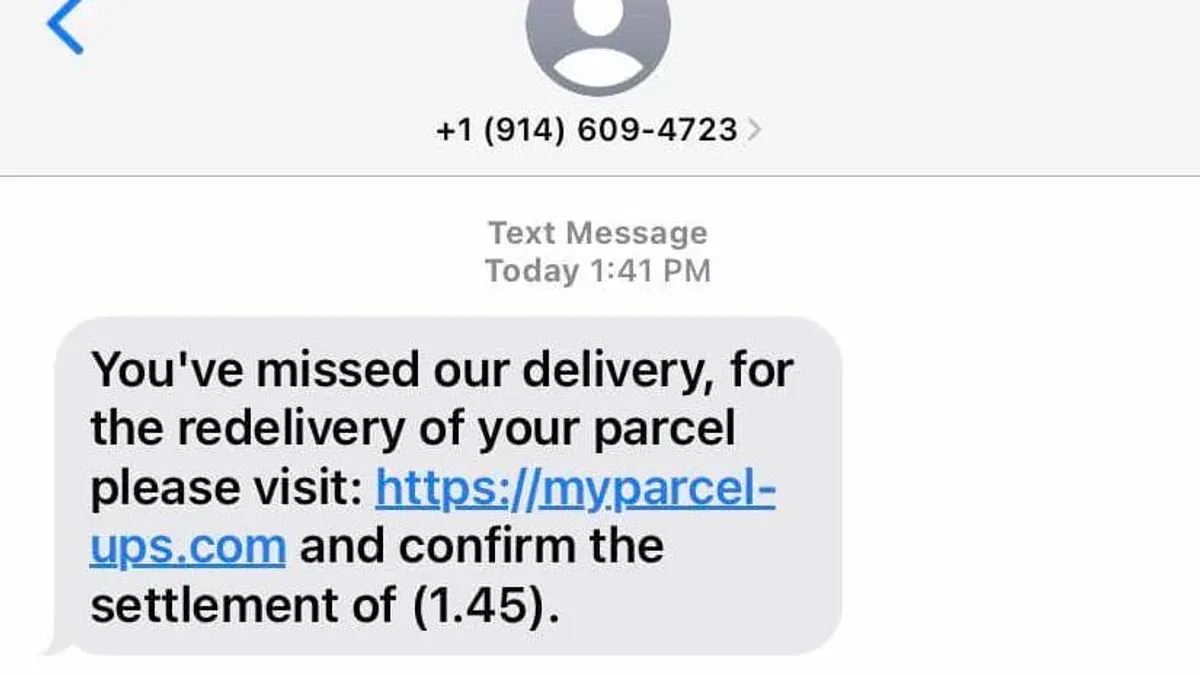
This article explains how to identify and handle a UPS scam text safely by examining the tactics scammers use and how to distinguish these messages from legitimate UPS communications.
UPS scam text messages often claim to provide urgent shipment updates or delivery issues, prompting recipients to click suspicious links or share personal information. Recognizing genuine UPS texts involves knowing their typical format, content, and communication channels.
By understanding the mechanics behind these scam texts and learning the proper steps to report and avoid them, consumers can better protect themselves from potential fraud and identity theft.
What is a UPS scam text and why it matters
UPS scam texts are fraudulent messages that impersonate the United Parcel Service (UPS) to deceive recipients into taking harmful actions. These texts often claim there is an issue with a package delivery, urging recipients to click on a link or provide personal information. The widespread use of UPS for millions of deliveries daily makes it a prime target for scammers who exploit the brand’s trust and recognition.
The impact of these scams can be severe. Victims risk identity theft, financial loss, or installing malware on their devices. For example, a consumer might receive a text stating, "Your UPS package is delayed. Confirm your delivery details here," with a link leading to a fake site designed to steal login credentials or credit card information.
Reports of UPS scam texts have increased alongside the growth of online shopping, with many consumers unknowingly falling victim to these schemes. The real danger lies in how convincingly these texts mimic legitimate UPS communication, making it difficult to distinguish between genuine and fraudulent messages.
Tip: Always verify package information directly through official UPS channels rather than responding to unsolicited texts.
Does UPS send texts and what do legitimate UPS texts look like
UPS offers official text notification services that customers can opt into for tracking updates, delivery alerts, and exception notifications. These texts come from sender IDs like “UPS,” “UPS Info,” or short codes such as “877-877.” The messages typically include concise, clear language referencing specific tracking numbers and direct users to the legitimate UPS website, usually with links starting with “https://www.ups.com” or “https://wwwapps.ups.com.”
For example, an authentic UPS text might read: “UPS Info: Your package with tracking number 1Z999AA10123456784 is scheduled for delivery today. Track your shipment at https://www.ups.com/track.”
UPS never requests sensitive information such as passwords, payment details, or Social Security numbers via text message. They also do not ask recipients to download files or apps through text links. If there is an issue with delivery, UPS notifies customers with straightforward instructions to visit their official website or contact customer service directly.
Tip: To verify a UPS text, manually enter the official UPS tracking website URL into a browser rather than clicking on links within the message.
Is there a UPS scam text going around and how do these scams work
Several UPS scam text variants continue to circulate, exploiting common delivery scenarios to lure recipients into clicking malicious links or sharing personal information. Typical scam messages claim there is a delivery issue, such as an unpaid fee or a failed shipment attempt, urging recipients to resolve the problem by following a link or replying with sensitive data.
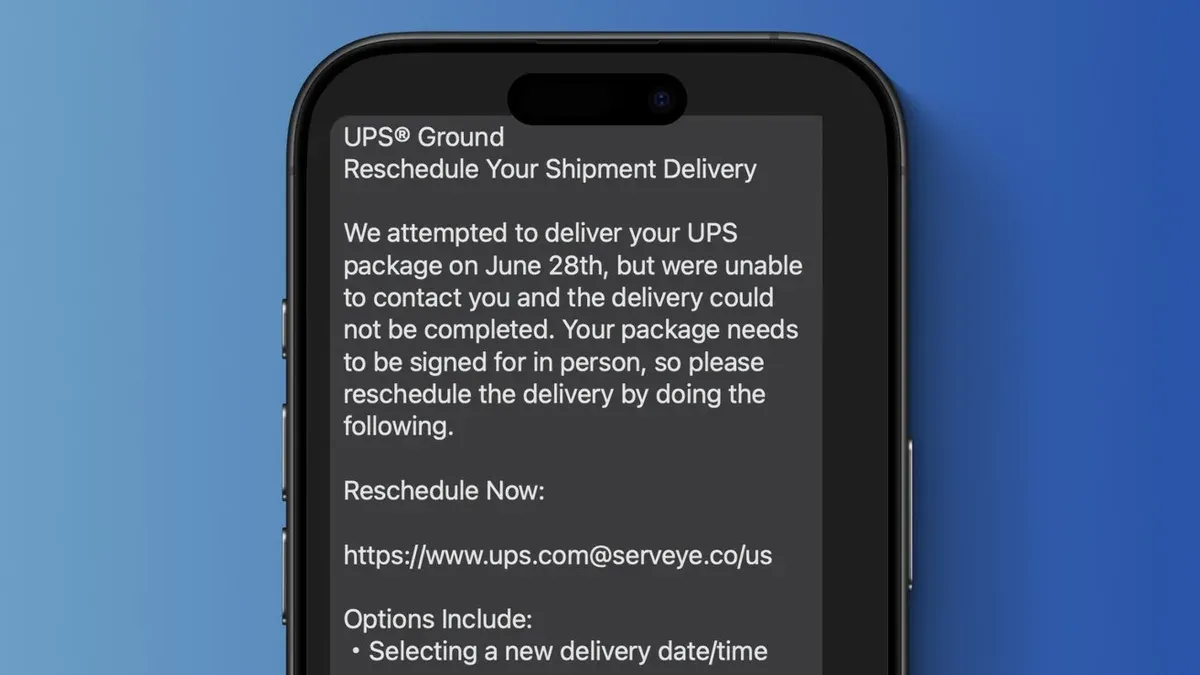
Scammers often embed phishing URLs that mimic UPS’s official website addresses but lead to fraudulent pages designed to steal login credentials, credit card numbers, or install malware. For example, a scam text might read: "UPS Delivery Alert: Your package delivery failed due to unpaid customs fees. Pay here: ups-delivery-secure.com". The link appears plausible but redirects to a fake payment portal.
To increase credibility, scammers use spoofing techniques that alter the sender ID to resemble legitimate UPS numbers or shortcodes. Some texts also incorporate fake tracking numbers and bogus delivery dates, making the message look authentic at a glance.
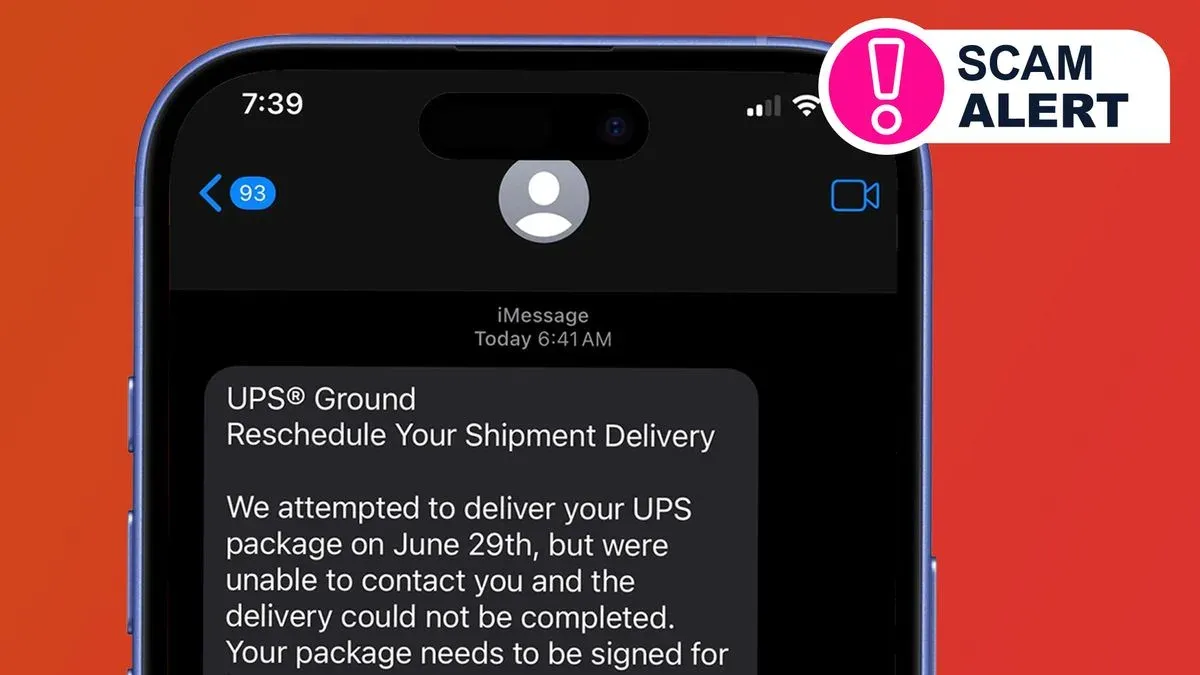
Emerging trends include scams referencing UPS Ground shipments or claiming urgent action is needed to avoid package return. These texts often feature shortened URLs or QR codes, which obscure the destination address and complicate user verification.
Tip: Hover over links or scan QR codes with a trusted app to verify URLs before clicking or entering any information.
Is UPS email a scam and how to tell UPS scam emails apart
UPS scam emails often mimic the style of scam texts but include additional deceptive elements. Common scam email tactics include using sender addresses that appear close to official UPS domains but contain subtle misspellings or extra characters, such as [email protected] instead of a legitimate @ups.com address. Poor grammar and awkward phrasing are frequent giveaways, unlike the generally concise and straightforward language in official UPS emails.
Legitimate UPS emails typically feature branded headers, personalized content referencing actual shipment details, and security features such as digital signatures or verified sender indicators visible in many email clients. They also avoid urgent language pressuring recipients to click links immediately. In contrast, scam emails may embed malicious links or attachments claiming to resolve delivery issues or require payment.
Some scammers combine email and text channels to increase credibility, sending a text alerting the recipient to check their email for delivery updates. This dual approach aims to exploit trust across platforms.
| Feature | UPS Scam Email | UPS Scam Text |
|---|---|---|
| Sender Address | Fake or misspelled domain (e.g., ups-secure.com) | Spoofed sender ID mimicking UPS |
| Language | Poor grammar, awkward phrasing | Brief, urgent but less formal |
| Content Format | Branded header, attachments, embedded links | Short message with phishing link |
| Security Features | Usually lacks digital signature | None |
| Cross-channel use | May be paired with scam texts | May reference email follow-up |
Example: A scam email might claim "Urgent: Package delivery failed, please verify your payment details" from [email protected] with a link to a fake UPS site. Paired with a text saying "Check your email for UPS delivery issue," this multi-channel scam tries to prompt quick action without scrutiny.
Tip: Always inspect the sender's email address carefully and avoid clicking links in emails or texts without confirming their legitimacy through official UPS channels.
How to report a UPS scam text and protect yourself
Reporting UPS scam texts promptly helps authorities track scams and protect others. Start by forwarding the suspicious message to UPS at [email protected]. UPS actively investigates such reports and provides guidance on their website: ups.com/safety-scam. Consumers can also file complaints with the Federal Trade Commission (FTC) through their online form at reportfraud.ftc.gov, which collects scam data for law enforcement use.
Mobile carriers often offer simple ways to block and delete scam texts. For example, on iPhones, users can tap the message, select "Info," then "Block this Caller." Android devices typically have a "Block number" or "Report spam" option accessible via the message menu. Avoid clicking any links or replying to the message, as this can confirm the number is active and increase scam attempts.
Tip: After interacting with a scam text, monitor bank and credit accounts closely for unauthorized activity, and consider setting up fraud alerts with credit bureaus.
Imagine receiving a text claiming a UPS delivery issue with a link to "resolve it." By forwarding this text to UPS's spoof address and blocking the sender, the message is flagged for investigation. Meanwhile, not clicking the link protects personal information, and monitoring accounts ensures any misuse is caught early.
Common mistakes to avoid with UPS scam texts
One frequent error is clicking on suspicious links or downloading attachments embedded in scam texts. For example, a consumer received a text claiming a package was held due to unpaid fees and clicked the included link, which installed malware on their device. Avoiding such links can prevent potential data breaches and financial loss.
Another common mistake is responding to scam texts or providing sensitive information. Scammers often prompt replies with personal details or payment information. In a reported case, an individual shared credit card data after responding to a scam text, resulting in unauthorized charges.
Some consumers mistakenly ignore official UPS notifications and rely solely on texts. UPS often sends emails or updates through its official app; dismissing these can cause confusion and make one vulnerable to scams posing as the only source of information.
Failing to verify tracking numbers or sender details is also risky. Scam texts may include fake tracking codes or use spoofed sender IDs resembling UPS. Checking tracking numbers directly on the official UPS website and confirming sender information can help detect fraud.
Tip: Always cross-check any delivery-related message through official UPS channels before taking action.
Understanding UPS tracking scam texts and related variants
UPS tracking scam texts are designed to closely mimic legitimate UPS tracking alerts, often using similar language and sender IDs to create a false sense of authenticity. For example, a real UPS tracking message might read: "Your UPS package 1Z999AA10123456784 has been delivered. Track details: ups.com/track?loc=en_US". A scam text, by contrast, could state: "UPS delivery notice: package 1Z999AA10123456784 is held due to unpaid fees. Pay here: ups-delivery-pay.com". The scam URL may look convincing but usually features suspicious domains or extra words not found in official UPS URLs.
Delivery fee scams are a common variant where texts claim a payment is required to release a package. These messages often pressure recipients to provide personal or financial information to avoid shipment delays. They may mention specific services like UPS Ground or UPS Express to increase credibility, exploiting the familiarity consumers have with these shipping options.
Scam texts referencing UPS Ground or other services aim to make the message appear routine, as many consumers expect deliveries via these channels. However, legitimate UPS communications never request payment through text links or ask for sensitive data.
Tip: Always compare the URL in the message with the official UPS website (ups.com) and avoid clicking links that do not clearly originate from a verified UPS domain.
What to do if you clicked on a UPS scam text link
Clicking on a UPS scam text link can expose a device to malware such as spyware, ransomware, or keyloggers, which collect sensitive data or lock files for ransom. Immediate action can reduce potential harm.
Securing devices and accounts
First, disconnect the device from the internet to prevent further data transmission. Run a comprehensive scan with reputable security software like Malwarebytes, Norton, or Bitdefender, which can detect and remove common threats. Update the device’s operating system and apps to close security vulnerabilities.
Next, change passwords for all important accounts, especially email, banking, and shopping platforms. Use strong, unique passwords and enable two-factor authentication where possible. Check recent account activity for unauthorized access.
Contacting financial institutions and reporting
If financial information was entered, contact the bank or credit card company immediately to alert them of possible fraud and to monitor or freeze accounts if necessary. Consider placing a fraud alert or credit freeze through credit bureaus to prevent new accounts being opened in one’s name.
Report the scam to the Federal Trade Commission via their website and forward the message to UPS at [email protected]. This helps authorities track scam trends and protect others.
For example, if a scam link installed ransomware that encrypted files, a thorough scan and restoring from backup would be essential, alongside notifying financial institutions if login credentials were compromised.
Tip: Keep security software up to date and regularly back up important files to an offline location to mitigate damage from scam-related malware.
Further reading
- How to Spot and Avoid FedEx Scam Texts Safely
- How to Identify and Report Royal Mail Scam Texts Safely
- Types of Cyber Attacks: A Comprehensive Explainer Guide
Frequently asked questions
Does ups text you?
Yes, UPS does send text messages to customers who opt in for delivery notifications. Legitimate UPS texts typically include shipment status updates, delivery alerts, and tracking information, and they come from verified short codes or numbers associated with UPS.
What's up text scam?
A UPS text scam is a fraudulent message pretending to be from UPS, designed to trick recipients into clicking malicious links or providing personal information. These scams often use urgent language about missed deliveries or unexpected fees to prompt quick, uncritical responses.
Will ups ever text me?
UPS will only text individuals who have signed up for text alerts through official UPS channels or during a shipment process. If no opt-in occurs, receiving a UPS text message is unlikely and should be treated with caution.
How to report ups scam text?
Report suspicious UPS texts by forwarding the message to the official UPS fraud reporting number, 7726 (SPAM), or by contacting UPS customer service directly. Additionally, report scam texts to the Federal Trade Commission (FTC) or relevant local authorities to help combat fraud.
Is ups text a scam?
Not all UPS texts are scams, but many scam texts impersonate UPS to deceive recipients. Verify the sender's number, avoid clicking on unexpected links, and cross-check shipment details on the official UPS website to determine authenticity.
Limits of this advice and who should seek specialized help
This article does not cover UPS scams that occur outside of text or email, such as phone scams or in-person fraud. The guidance focuses on consumer-level detection and reporting of suspicious UPS texts and emails. Organizations or businesses with specialized security needs, such as IT departments or fraud prevention teams, should consult cybersecurity professionals or law enforcement for tailored strategies.
The single most useful next step is to report any suspicious UPS text messages immediately to UPS by forwarding the message to their official scam reporting number, 7726 (SPAM). This action helps UPS track and block scam operations, protecting others from falling victim to these evolving threats.