Types of Malware: What They Are and How They Impact Security
This article explains types of malware, how they operate, and practical ways to protect your systems from their harmful effects.

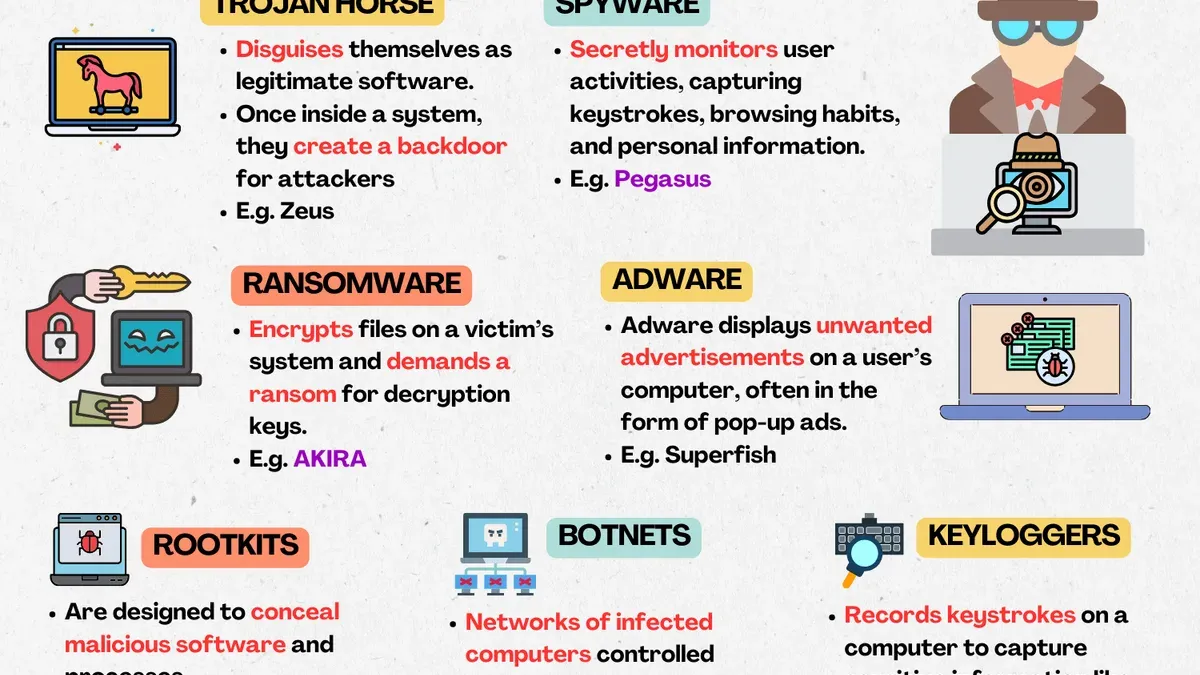
This article explains the types of malware by detailing how each operates, interacts with systems, and the commands they use to execute harmful actions.
Malware encompasses a range of malicious software designed to disrupt, damage, or gain unauthorized access to computer systems. Understanding these types helps in recognizing their behavior beyond mere definitions, such as how ransomware encrypts files to demand payment, or how spyware covertly collects user data. By focusing on their operational methods, this guide highlights practical prevention techniques, including system updates, behavior monitoring, and controlled access management, which are essential for effective cybersecurity.
Tip: Regularly review application permissions and network activity logs to detect unusual command patterns indicative of malware presence.
What types of malware are there
Malware, short for malicious software, is designed to damage, disrupt, or gain unauthorized access to computer systems. It encompasses various types, each operating differently to exploit vulnerabilities. Common categories include viruses, worms, trojans, ransomware, spyware, adware, rootkits, bots, and keyloggers.
Viruses attach themselves to legitimate files and require user action to spread, often via email attachments or downloads. Worms are self-replicating and spread across networks automatically without user intervention. Trojans disguise themselves as harmless software but execute harmful commands once activated.
Ransomware encrypts files and demands payment for their release, while spyware covertly collects user information. Adware delivers unwanted advertisements, sometimes bundled with free applications. Rootkits gain deep system control, often hiding other malware. Bots allow remote control of infected devices, and keyloggers record keystrokes to capture sensitive data.
For example, the WannaCry ransomware spread rapidly by exploiting a network vulnerability, encrypting users’ files without their action beyond opening an infected link or attachment, highlighting the destructive potential of self-propagating malware.
Tip: Differentiating self-replicating malware like worms from those needing user action, such as viruses, helps prioritize prevention strategies.
What types of malware can adware be
Adware occupies a complex space in the malware spectrum, often classified as a potentially unwanted program (PUP) rather than outright malware. However, when adware becomes intrusive, deceptive, or collects user data without consent, it crosses into malicious territory. This dual nature depends heavily on how aggressively the adware operates and how it impacts user experience.
Benign ad-supported software typically displays advertisements in a controlled manner and respects user privacy settings. In contrast, malicious adware can bombard users with excessive pop-ups, redirect browsers, or track browsing habits to build invasive user profiles. An example is the "Fireball" adware campaign, which affected millions by manipulating browser settings to generate ad revenue while secretly collecting data.
Antivirus tools vary in their detection of adware; some flag aggressive adware as malware, while others categorize less harmful variants as PUPs. This inconsistency reflects adware’s borderline status and the challenge in balancing security and user tolerance for advertising.
Tip: Reviewing browser extension permissions and monitoring unexpected pop-ups can help identify potentially malicious adware early.
What kind of malware is TLauncher
TLauncher is a third-party launcher for the popular game Minecraft that is not officially sanctioned by the game's developers. This unofficial status often causes it to be flagged by antivirus software as potentially unwanted software (PUP) or riskware rather than traditional malware like viruses or ransomware. The primary concern arises from TLauncher’s bundling of adware or other potentially unwanted programs, which may display intrusive ads or collect user data without explicit consent.
For example, VirusTotal scans frequently show TLauncher flagged by multiple antivirus engines, not necessarily as a direct infection but due to its association with bundled components that exhibit suspicious behaviors. Users report that installing TLauncher can lead to unwanted toolbars or background processes that degrade system performance or compromise privacy.
Security experts caution that using unofficial software like TLauncher entails inherent risks because such programs bypass official distribution channels and quality controls. This increases the likelihood of hidden malware components or vulnerabilities, which can be exploited by attackers or lead to unintended system changes.
Tip: When considering third-party launchers, reviewing VirusTotal results and user reports can help assess the risk before installation.
How many types of malware are there
The number of malware types cannot be pinned down to a fixed figure due to their constant evolution and the emergence of hybrid forms that combine characteristics from multiple categories. Cybersecurity frameworks often group malware into broad categories such as viruses, worms, Trojans, ransomware, spyware, adware, and rootkits, but within these lie numerous subtypes defined by their specific behaviors and attack methods.
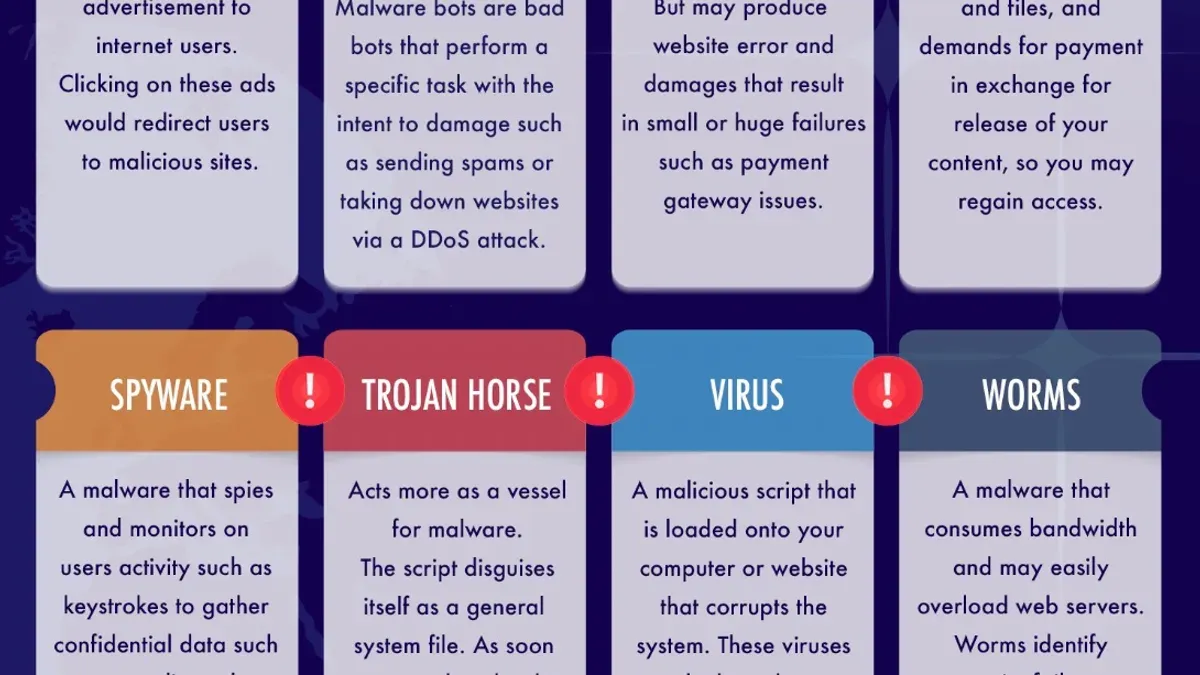
Classification typically depends on how the malware behaves, its method of infection, and the payload it delivers. For instance, some malware silently harvests data, while others aggressively encrypt files or hijack system resources. A practical example is a ransomware strain that incorporates worm-like capabilities to spread autonomously across networks, blurring traditional category lines.
Recent cybersecurity reports frequently list hundreds of distinct malware families, reflecting the complex and shifting landscape. Visual classification charts often organize malware by delivery mechanisms or targeted platforms, helping security professionals map threats effectively. This layered approach aids in understanding and mitigating risks despite the fluid number of malware variants.
What is types of malware
The term “types of malware” refers to the classification of malicious software based on their function, behavior, and the impact they have on infected systems. This classification helps cybersecurity professionals and users understand how malware operates and what objectives attackers aim to achieve, such as data theft, system disruption, or financial gain.
Recognizing different malware types allows for more effective detection and prevention strategies. For example, ransomware encrypts files and demands a payment for decryption, requiring rapid isolation and backup restoration to minimize damage. In contrast, spyware silently collects information over time, making detection and removal a longer process.
Understanding these distinctions influences incident response and recovery. If an organization identifies an infection as a worm, which can self-replicate and spread quickly, immediate network segmentation is crucial to prevent widespread damage. Conversely, a trojan horse, which hides harmful code within legitimate software, might necessitate detailed forensic analysis to uncover the attack vector and prevent re-infection.
Tip: Tailoring security tools and responses to specific malware behaviors can reduce downtime and improve overall protection.
What kind of malware is You Are an Idiot
The "You Are an Idiot" malware is best categorized as scareware or prank malware. Emerging in the early 2000s, it was designed primarily to disrupt users by displaying repetitive pop-up messages or altering system settings to frighten or frustrate users rather than to cause direct damage or steal data.
Typically, this malware would present intrusive alerts with messages such as "You Are an Idiot," often accompanied by sounds or persistent dialog boxes that interfered with normal computer use. This behavior fits within the social engineering malware category, as it exploits user reactions to manipulate or annoy rather than compromise system security through traditional means like data theft.
For example, a user might find their desktop background replaced with a message declaring "You Are an Idiot," while the malware repeatedly opens multiple windows or disables certain system features. Although it does not usually inflict permanent damage, it can cause system instability and require manual removal, creating a nuisance and potential productivity loss.
Tip: If encountering persistent, non-destructive pop-ups or system annoyances, running reputable antimalware software and restoring system settings can often resolve scareware effects.
Types of malware attacks and their effects
Malware attacks commonly exploit vectors such as email attachments, drive-by downloads from compromised websites, infected software installations, and phishing campaigns that trick users into revealing credentials or running malicious code. For example, ransomware often arrives via email attachments disguised as invoices or reports, prompting users to open files that encrypt data and demand payment.
The consequences of these attacks vary widely. Data theft can lead to identity fraud or corporate espionage, while system damage from viruses or worms may cause service outages and hardware failure. Financial losses include ransom payments, remediation costs, and lost productivity. Espionage-oriented malware targets sensitive information, threatening national security or competitive advantage.
A notable incident is the WannaCry ransomware outbreak, which affected hundreds of thousands of computers worldwide, disrupting hospitals, businesses, and government agencies. The attack exploited a known vulnerability in outdated Windows systems, demonstrating the high impact of unpatched software. Success rates of malware attacks depend on the vector and defense measures; phishing remains a prevalent method due to its reliance on human error rather than technical vulnerabilities.
Tip: Regular software updates and cautious handling of email attachments significantly reduce the risk of malware infections.
Types of malware analysis and prevention
Malware analysis involves static and dynamic techniques. Static analysis inspects malicious code without execution, using tools like IDA Pro or Ghidra to examine file structure and signatures. Dynamic analysis runs malware in controlled environments such as sandbox software (e.g., Cuckoo Sandbox) to observe behavior, system changes, and network activity.
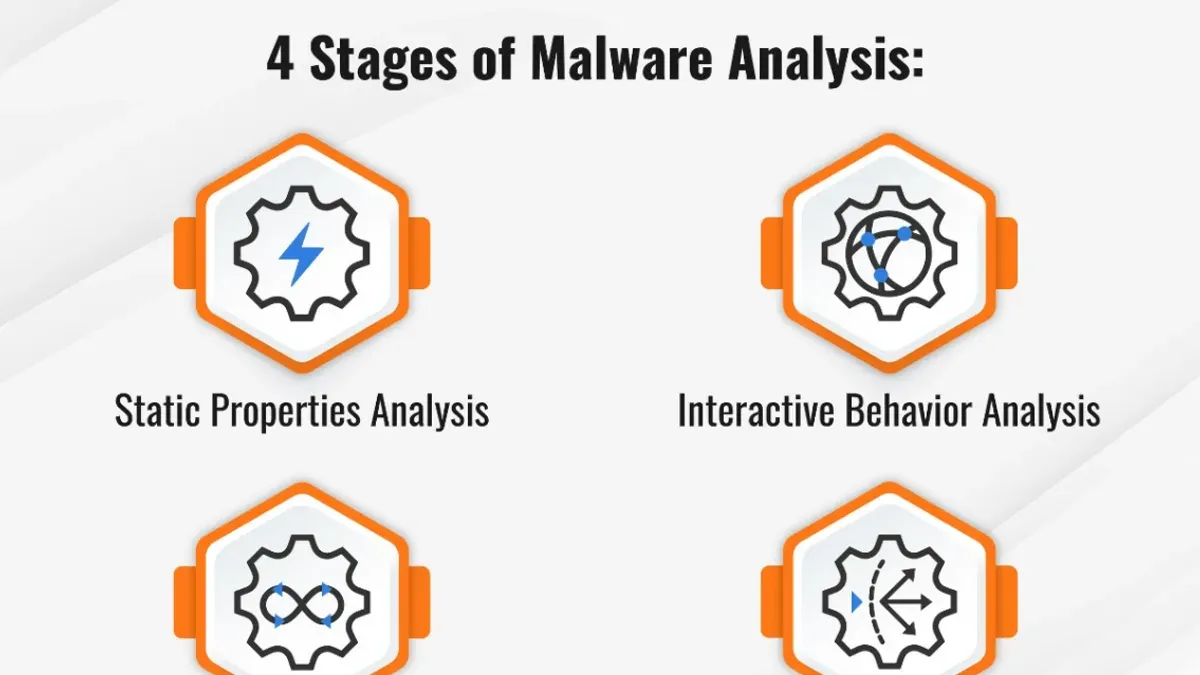
Detection relies on signature-based methods that match known malware patterns, heuristic analysis that identifies suspicious code traits, and behavioral analysis monitoring real-time actions. For instance, antivirus software may block a program exhibiting unauthorized file encryption, a ransomware hallmark.
Prevention best practices include regularly updating operating systems and applications to patch vulnerabilities, enabling firewalls to control incoming and outgoing traffic, and using reputable antivirus solutions with real-time protection. User education is critical; recognizing phishing attempts or suspicious downloads reduces infection risk.
Example: A user receives an email with an attachment claiming to be a receipt. Static analysis of the attachment reveals embedded macros, while dynamic analysis in a sandbox shows attempts to connect to an external command server. Antivirus heuristics flag the file, preventing infection. This layered approach illustrates effective malware defense.
Tip: Combine automated tools with user awareness training for the most robust prevention strategy.
Common mistakes to avoid when dealing with malware
One frequent error is neglecting software updates and security patches. Many users postpone or disable automatic updates, leaving systems exposed to known vulnerabilities that malware can exploit. For example, failing to install Windows updates accessible via Settings > Update & Security > Windows Update can allow ransomware to infiltrate a device.
Downloading software from untrusted sources is another common risk. Obtaining applications from unofficial websites or peer-to-peer networks often introduces malware bundled with the installer, increasing infection chances.
Disabling security tools such as antivirus programs or firewalls, or ignoring their alerts, significantly raises vulnerability. Some users turn off Windows Defender via Settings > Privacy & Security > Windows Security, mistakenly believing it slows their system, but this removes essential defense layers.
Falling victim to phishing or social engineering remains a major cause of infection. Opening unexpected email attachments or clicking suspicious links can trigger malware downloads. For instance, a user receiving an urgent-looking email prompting password resets may unknowingly install keyloggers or trojans.
Tip: Treat all unexpected communications with caution and verify sources before interacting with links or attachments.
Further reading
- Types of Hackers Explained: Who They Are and What They Do
- Types of Cyber Attacks: A Comprehensive Explainer Guide
- Types of Firewalls Explained: Functions and Uses in Network Security
- Types of Encryption: A Clear Guide to Algorithms and Applications
Frequently asked questions
What types of malware exist?
Malware types include viruses, worms, trojans, ransomware, spyware, adware, rootkits, and botnets. Each type operates differently, targeting various system functions such as file integrity, user data, or network control. Understanding these distinctions helps identify the specific threats and appropriate defenses.
What kind of malware is TLauncher?
TLauncher itself is not malware but a third-party Minecraft launcher that may be bundled with adware or potentially unwanted programs (PUPs). While it does not inherently contain malicious code, downloading it from unofficial sources can expose systems to security risks. Users should exercise caution and verify the source before installation.
How many types of malware are there?
The number of malware types is not fixed and can vary based on classification criteria, but commonly recognized categories number between seven and ten. These include major groups like viruses, worms, trojans, ransomware, spyware, adware, rootkits, and botnets. Each category may have numerous variants with different behaviors.
What kind of malware is You Are an Idiot?
"You Are an Idiot" is a type of prank malware or joke virus that displays an annoying message but generally does not cause serious harm to systems. It is mostly designed for disruption or humor rather than malicious damage. However, such programs can still interfere with normal operations and are best avoided.
Limits of this advice and when to seek expert help
This article does not cover advanced persistent threats (APTs) or state-sponsored malware in depth; readers seeking enterprise-level threat intelligence should consult specialized sources. It also does not address highly targeted attacks or forensic incident response, which require professional cybersecurity teams and tools beyond typical user capabilities.
For general users and IT beginners, the single most useful next step is to implement layered defenses: enable automatic updates for operating systems and software, use reputable antivirus and anti-malware solutions with real-time scanning, and configure firewall settings to block unsolicited inbound connections. Regularly backing up important data and avoiding suspicious downloads or email attachments further reduces risk. These practical measures form a fundamental cybersecurity baseline that significantly limits malware impact.