How to Turn On Two-Factor Authentication on Reddit: A Step-by-Step Guide
This guide explains how to enable and manage two-factor authentication on Reddit to enhance your account security easily.

This article explains how to turn on two-factor authentication on Reddit, providing clear, step-by-step instructions for enabling and managing 2FA. Two-factor authentication adds an extra layer of security by requiring a verification code in addition to the password during login.
Before enabling 2FA, ensure access to a smartphone with an authenticator app like Google Authenticator or Authy, or a phone number for SMS-based codes. Reddit’s 2FA works through time-based one-time passwords (TOTP) rather than SMS by default, which is more secure.
The guidance covers the exact menu paths within Reddit’s user settings, common setup mistakes, how to disable 2FA if needed, and how Reddit’s approach compares with other platforms. This is designed for Reddit users seeking straightforward, practical help to protect their accounts efficiently.
Before you start: What is needed to enable two-factor authentication on Reddit
Enabling two-factor authentication (2FA) on Reddit requires a few key prerequisites. First, a Reddit account with a verified email address is mandatory since Reddit uses this to communicate important security details and backup codes. Without email verification, 2FA setup cannot proceed. Second, a smartphone equipped with an authenticator app is necessary. Popular options include Google Authenticator, Authy, and Microsoft Authenticator, each widely rated for reliability and ease of use. These apps generate time-sensitive codes, adding a crucial second layer of security beyond just a password.
Users should have a basic understanding of what 2FA is: it protects accounts by requiring two forms of identification — typically a password plus a one-time code from the authenticator app. This system drastically reduces the risk of account breaches caused by compromised credentials. While precise statistics vary, security experts agree that 2FA can prevent a significant majority of unauthorized access attempts.
Finally, access to backup codes or alternative recovery methods is essential before starting the setup. These codes allow account access if the primary 2FA method becomes unavailable, such as losing the smartphone or deleting the authenticator app. Reddit provides backup codes during setup, which must be saved securely.
- Verify that the Reddit account email is confirmed. Successful verification shows a confirmed status in account settings.
- Install a trusted authenticator app on the smartphone. Opening the app should display the option to add a new account or scan a QR code.
- Locate or prepare a secure place to save backup codes when prompted during the Reddit 2FA setup process.
Tip: Choose an authenticator app that supports cloud backup and multi-device syncing to reduce the risk of losing access.
How do I turn on two-factor authentication on Reddit?
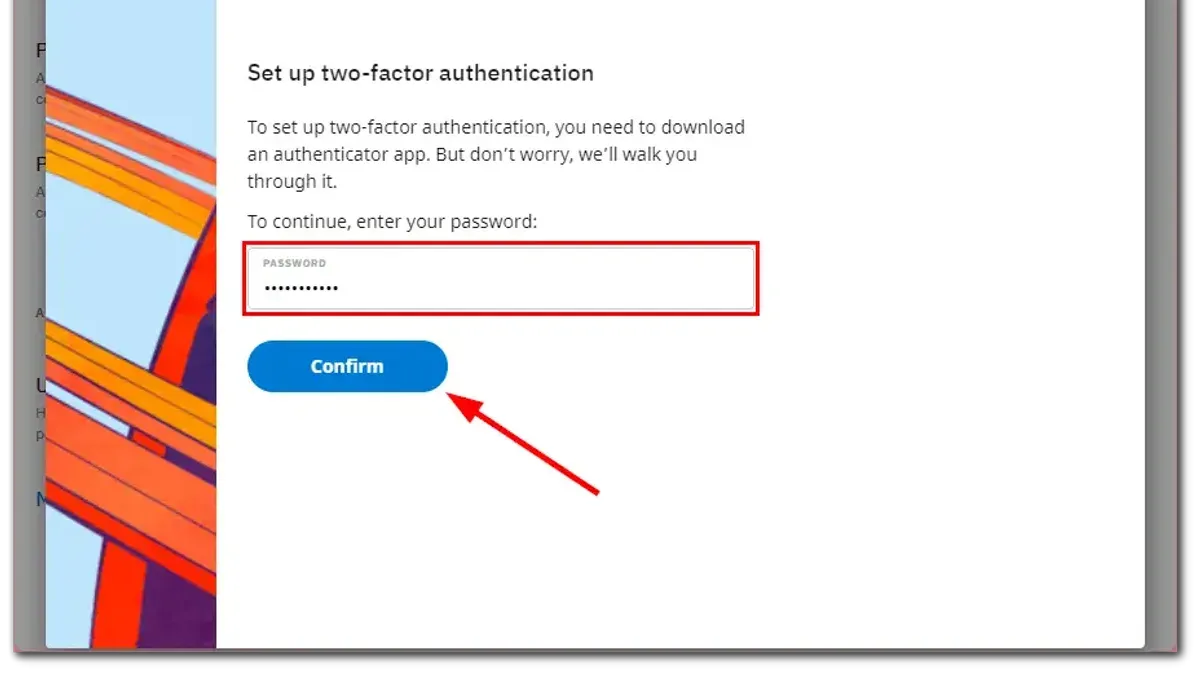
- Log in to the Reddit account and click the user icon in the top-right corner to open the dropdown menu. Select User Settings. The settings page should load with multiple tabs visible.
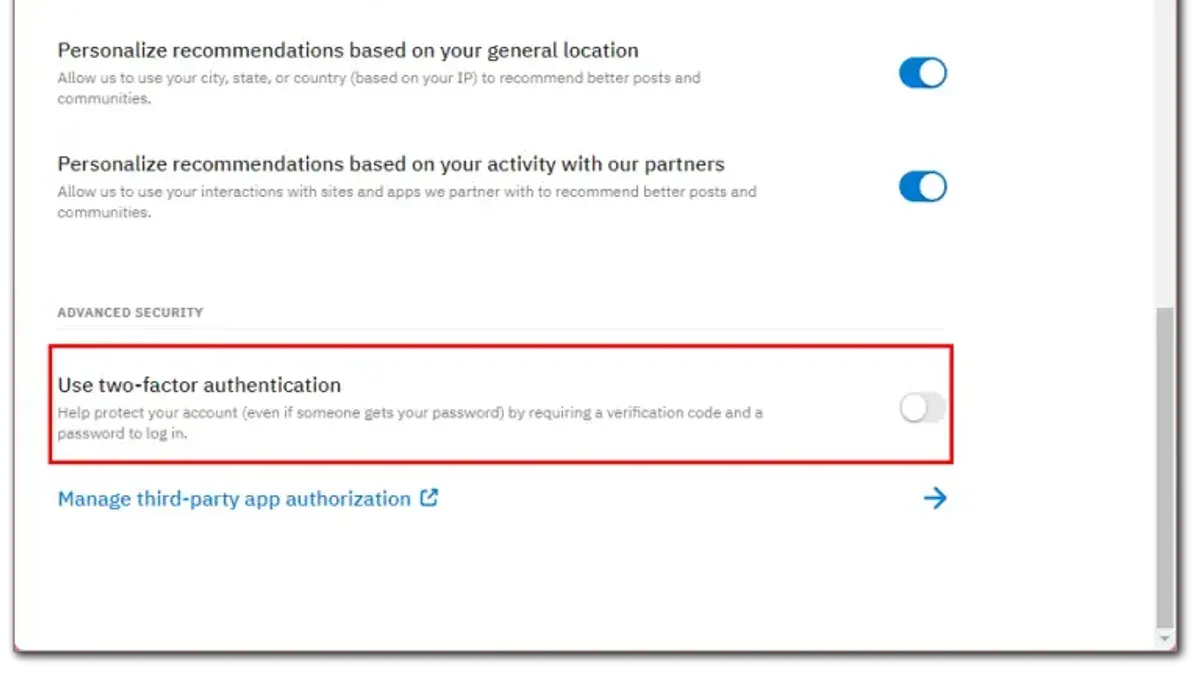
- Navigate to the Privacy & Security tab on the settings page. Scroll down to find the Two-Factor Authentication section, which controls 2FA options.
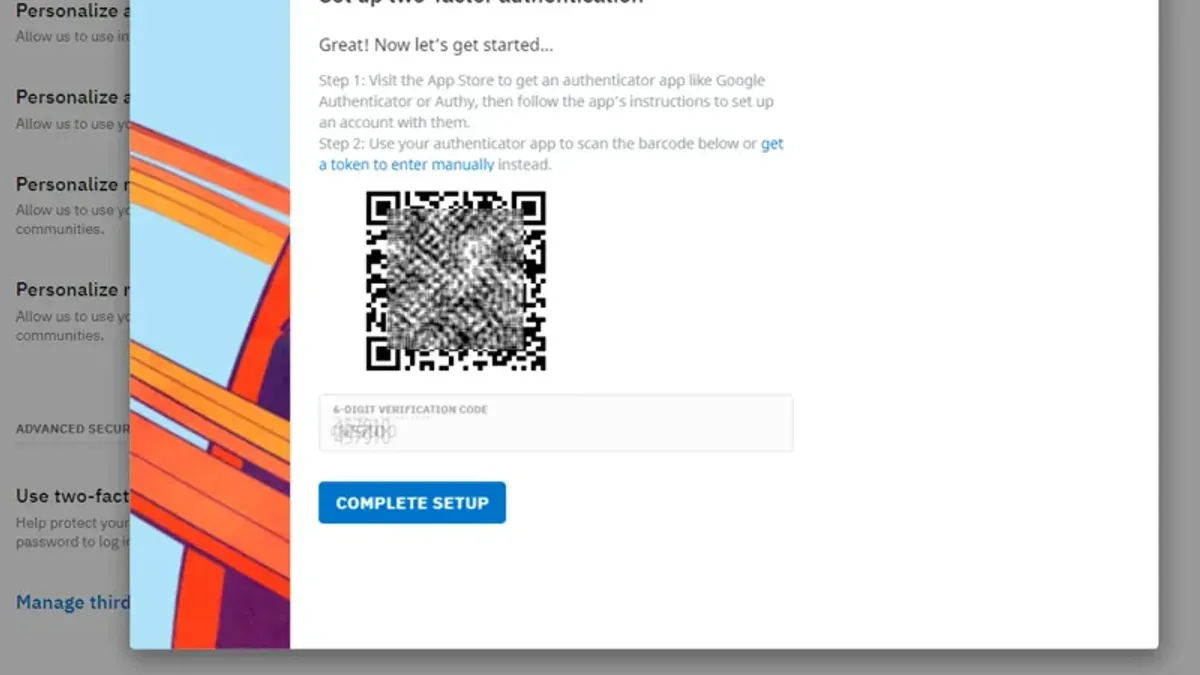
- Click the button labeled Enable Two-Factor Authentication. Reddit will display a QR code along with a manual setup key for authenticator apps.
- Open the chosen authenticator app (such as Google Authenticator or Authy) on the smartphone. Use the app's option to scan the QR code shown on Reddit’s screen. The app will generate a 6-digit verification code.
- Enter the 6-digit code from the authenticator app into the field on Reddit’s page and click Confirm. A success message should appear if the code is correct, confirming 2FA is active.
- Reddit will then display a set of backup codes. These codes allow account recovery if the authenticator device is unavailable. Save these codes securely by downloading them or writing them down in a safe place.
Tip: Enable two-factor authentication on multiple devices if the authenticator app supports it to avoid lockouts.
How to activate two-factor authentication on Reddit if the interface changes
Reddit occasionally updates its user interface, which can shift where security settings and two-factor authentication (2FA) options are located. When this happens, the general approach is to look for keywords like “Security,” “Privacy & Security,” or “Account Settings” in the main menu or user profile dropdown. Icons resembling a shield, lock, or key often indicate security-related settings.
To find 2FA options, navigate through any updated menus and scan for mentions of “Two-Factor Authentication,” “2FA,” or “Login Verification.” If these terms are absent, look under broader security or account protection sections.
For official updates, Reddit maintains a security FAQ at https://www.reddithelp.com/en/categories/account-settings-and-profile and posts announcements in r/announcements or r/redditsecurity. These sources usually highlight significant UI changes affecting security features.
- Log into Reddit and open the user profile menu by clicking the avatar icon; look for a section labeled “User Settings” or similar. When successful, a settings panel should appear.
- Within settings, locate a tab or section named “Privacy & Security” or “Account Security.” If the interface changed, it may be under a new heading but still related to security. Confirmation is seeing options related to passwords, sessions, or authentication.
- Search inside this section for “Two-Factor Authentication” or “Login Verification.” This may be a toggle, button, or link to setup instructions. Success means seeing prompts to scan a QR code or enter an authenticator app code.
- If the 2FA option is missing or hard to find, check Reddit’s official help page or recent posts in r/redditsecurity for guidance on navigating the new layout.
- Complete the 2FA setup by following on-screen prompts, such as scanning a QR code with an authenticator app and confirming the generated code. A confirmation message indicates successful activation.
Tip: Bookmark Reddit’s official security FAQ and monitor r/redditsecurity for the fastest updates on interface changes impacting 2FA.
How to turn off two-factor authentication on Reddit
Disabling two-factor authentication (2FA) on Reddit requires careful steps to ensure identity verification and maintain account security awareness. This process is done through the same security settings where 2FA was initially enabled.
- Log in to the Reddit account and navigate to User Settings by clicking the profile icon in the top-right corner.
- Select the Privacy & Security tab from the left sidebar to access security options.
- Scroll down to the Two-Factor Authentication section and click the option to disable or turn off 2FA.
- Enter the current 2FA code generated by the authenticator app or use a previously saved backup code if the authenticator app is unavailable. Successful code verification allows proceeding.
- Confirm the decision to disable two-factor authentication when prompted. A confirmation message or alert will indicate 2FA has been turned off.
Disabling 2FA increases account vulnerability by removing the additional verification step, making the account reliant on password security alone. This heightens the risk of unauthorized access if the password is compromised.
In cases where the authenticator app is lost or inaccessible, backup codes serve as a critical fallback to disable 2FA. Users should keep these codes secure and accessible to avoid lockout.
Tip: Before disabling 2FA, ensure the account password is strong and consider re-enabling 2FA as soon as possible to maintain protection.
Common issues when turning on two-factor authentication on Reddit and how to fix them
Authenticator app codes not accepted is a frequent problem during 2FA setup. This usually happens if the device's time is out of sync with the authentication server. The error message might read "Invalid code" or "Code expired." To fix this, ensure the smartphone's time settings are set to automatic or network-provided time, then retry entering the code.
Lost access to the authenticator app or backup codes can lock users out of their accounts. If the authenticator app is inaccessible, Reddit allows login using previously saved backup codes. If neither is available, account recovery requires contacting Reddit support with proof of identity, a process that can take several days.
QR code scanning errors often occur due to poor camera focus or screen brightness. The app might fail to recognize the QR code, showing "Scan failed" or not responding. In such cases, manually entering the secret key provided by Reddit into the authenticator app bypasses QR scanning issues.
Repeated failed 2FA attempts can lock the Reddit account temporarily, displaying messages like "Too many attempts" or "Account locked for security reasons." Waiting 10 to 15 minutes before retrying usually resolves this. Persistent lockouts require verifying identity through recovery options or support.
Tip: Double-check time settings and save backup codes securely before enabling 2FA to avoid common setup errors.
How does Reddit’s two-factor authentication compare to other platforms?
Reddit supports two-factor authentication exclusively through time-based one-time password (TOTP) authenticator apps, such as Google Authenticator or Authy. Unlike platforms like Twitter and Facebook, Reddit does not offer SMS-based 2FA, which reduces the risk associated with SIM swapping but also limits options for users without smartphone access. Recovery relies on backup codes generated during setup, similar to Instagram and Facebook, but there is no alternative phone number or email-based recovery method.
| Feature | ||||
|---|---|---|---|---|
| 2FA Methods Supported | TOTP apps only | TOTP apps, SMS, Security Keys | TOTP apps, SMS | TOTP apps, SMS, Security Keys |
| Setup Process | Simple QR code scan and code confirmation | QR code scan or manual key entry; security key option | QR code or manual key; SMS option | QR code or manual key; SMS and security keys |
| Recovery Options | Backup codes only | Backup codes, phone number, email | Backup codes, phone number | Backup codes, phone number, email |
| Security Level | Strong due to TOTP-only method but limited options | High; supports hardware keys | Moderate; SMS option less secure | High; supports hardware keys and multiple recovery paths |
Security experts note Reddit’s reliance on authenticator apps without SMS fallback aligns with best practices to avoid SIM swapping attacks but may inconvenience users who lose device access without backup codes. Unlike Twitter and Facebook, Reddit does not currently support hardware security keys, which offer a higher security standard. The absence of multiple recovery options means users must securely store backup codes to avoid lockout.
Tip: Store Reddit’s backup codes in a secure location to avoid losing account access, as recovery options are limited compared to other platforms.
Why enable two-factor authentication on Reddit: The security benefits
Two-factor authentication (2FA) significantly strengthens Reddit account security by requiring more than just a password during login. It protects against common threats like password theft and phishing attempts, which are frequent causes of unauthorized access. Without 2FA, stolen or guessed passwords can easily lead to account takeovers, exposing private messages, posts, and personal information.
Enabling 2FA reduces the risk of account hijacking by adding an extra verification layer, typically via an authenticator app. This additional step blocks attackers even if they have obtained the password, making unauthorized access substantially harder. Many Reddit users who have experienced breaches without 2FA highlight how quickly attackers gained control and caused damage, from deleting posts to accessing sensitive data.
Beyond protecting personal data, 2FA helps maintain trust within the Reddit community. Accounts compromised through weak security can be used for spam, misinformation, or harassment, damaging the account holder’s reputation. Securing the account preserves credibility and fosters safer interactions across Reddit’s platforms.
Tip: Always keep backup codes in a secure place to regain access if the authenticator device is unavailable.
Frequently asked questions
Does reddit have two factor authentication?
Yes, Reddit supports two-factor authentication (2FA) to add an extra layer of security to user accounts. This feature requires users to enter a verification code from an authenticator app in addition to their password when logging in.
How to turn on two factor authentication on reddit?
To enable 2FA on Reddit, go to User Settings, then the Privacy & Security tab. Under Two-Factor Authentication, click Enable and follow the prompts to scan a QR code with an authenticator app like Google Authenticator or Authy. Enter the generated verification code to activate 2FA.
How to turn off two factor authentication on reddit?
Disabling 2FA on Reddit requires returning to the Privacy & Security settings. Locate the Two-Factor Authentication section and select Disable. Confirm the action by entering a current 2FA code or account password to successfully turn off the feature.
How to turn on two factor authentication?
Turning on two-factor authentication generally involves accessing account security settings on the platform in question. For Reddit, it specifically means enabling 2FA in the Privacy & Security menu within User Settings and linking an authenticator app to receive verification codes.
How to enable 2 factor authentication on reddit?
Enabling 2FA on Reddit starts with signing into the account and navigating to Settings & Privacy. Under Privacy & Security, select the Two-Factor Authentication option, then follow the steps to connect an authenticator app and verify the setup by entering a generated code.
What this advice does not cover and who should do something else
This guide does not cover two-factor authentication setup for Reddit’s mobile app when the interface differs significantly from the desktop site. Users encountering such differences should consult Reddit’s official support pages or app-specific help resources for accurate, device-tailored instructions. While enabling two-factor authentication greatly enhances account security, it does not guarantee absolute protection. Users must continue practicing strong password management, remain vigilant against phishing attempts, and keep backup authentication methods in place.
The most useful next step is to enable two-factor authentication immediately through Reddit’s user settings under Account Settings > Privacy & Security > Two-Factor Authentication. Completing this activation promptly helps reduce the risk of unauthorized access and ensures that account security benefits are applied without delay.
See also: How to Turn On Two-Factor Authentication on Messenger: A Clear Step-by-Step Guide · How to Turn On Two-Factor Authentication on Discord: A Step-by-Step Guide