Comprehensive Guide to WhatsApp Privacy Settings and How They Work
This guide explains WhatsApp privacy settings and how to manage them to protect your personal information and messaging privacy effectively.

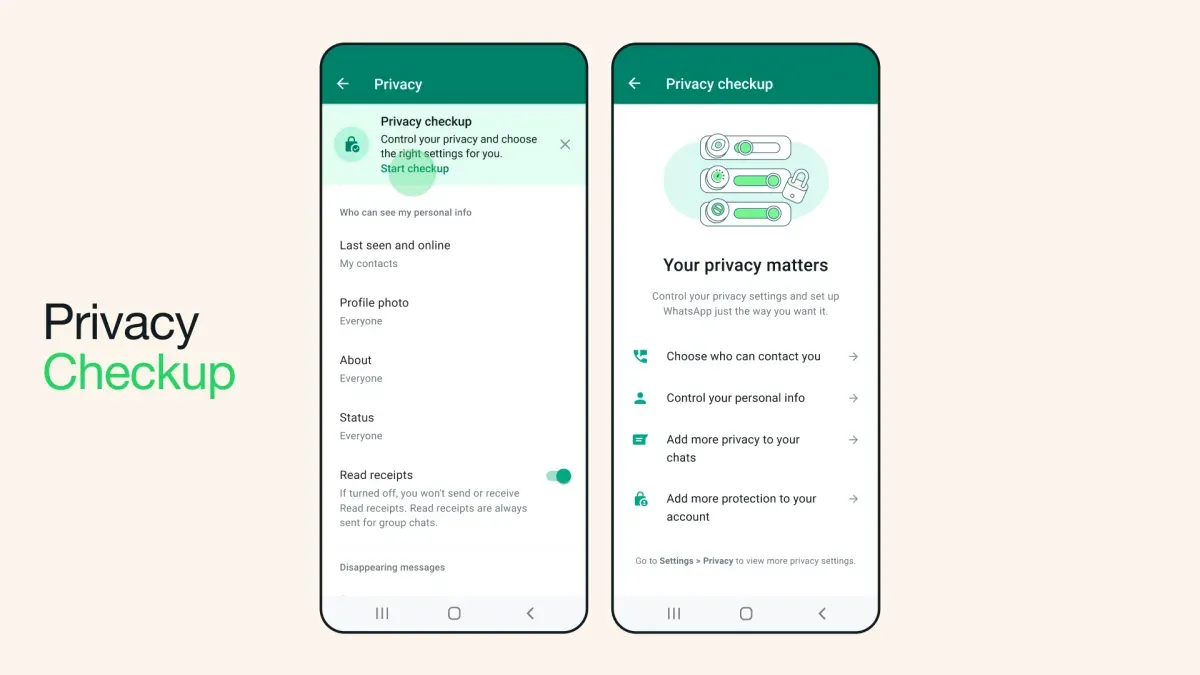
This article explains how WhatsApp privacy settings function and offers practical guidance for managing them effectively. WhatsApp privacy settings control who can see personal information such as profile photos, last seen status, and status updates, as well as how messages and data are shared. Understanding these settings helps everyday users and small business owners protect sensitive information while maintaining communication efficiency.
WhatsApp uses end-to-end encryption to secure messages, but privacy settings add an additional layer of control over visibility and interaction. Users can customize options like "Last Seen & Online," "Profile Photo," "About," and "Status" by choosing who can view this information—everyone, contacts, or nobody. Managing these settings regularly reduces unwanted exposure and potential data misuse.
How WhatsApp privacy settings work
WhatsApp employs end-to-end encryption to secure messages, calls, photos, and videos between users, ensuring that only the sender and recipient can access the content. This encryption protects data from interception by third parties, including WhatsApp itself and its parent company Meta. The cryptographic keys used for this process are stored solely on users’ devices.
Privacy settings on WhatsApp allow users to control who can see personal information such as profile photo, last seen, status updates, and about information. These settings can be adjusted to options like "Everyone," "My Contacts," "My Contacts Except…," and "Nobody." For example, a user might set their "Last Seen" to "My Contacts Except…" to exclude specific people from viewing their activity.
Group privacy settings regulate who can add a user to groups, offering options to limit this to contacts or selected individuals. Message privacy includes features like disappearing messages that delete content after a set period.
WhatsApp’s privacy controls exist within Meta’s broader data ecosystem, where metadata—such as phone numbers, device information, and usage patterns—may be shared with other Meta services for purposes like security and targeted advertising. This contrasts with messaging apps like Signal, which minimize data collection beyond message content.
For instance, when a user changes their profile photo visibility to "My Contacts Except…", the change is enforced server-side to restrict access accordingly, but encrypted message content remains protected end-to-end.
Tip: Regularly reviewing and updating privacy settings can help maintain desired control over personal information visibility.
Why people use WhatsApp privacy settings
Many users adjust WhatsApp privacy settings primarily to protect personal information from unknown or unwanted contacts. For example, restricting "Last Seen & Online" visibility to "My Contacts" or disabling "Profile Photo" visibility for non-contacts helps prevent strangers from accessing sensitive details. This is particularly relevant for individuals who receive unsolicited messages or calls.
Privacy settings also help avoid unwanted communication or visibility in groups. Users can choose who can add them to groups by selecting options under "Groups" settings such as "My Contacts Except..." or "Nobody," reducing the risk of being added to spam or irrelevant groups without consent.
Concerns about data sharing with Meta and third parties motivate many to limit access to their personal data via settings like "Read Receipts" and "Status" visibility. Disabling read receipts, for instance, allows users to control whether others know they have read messages, adding a layer of discretion around communication.
For small business owners using WhatsApp Business, privacy settings are essential for controlling communication visibility. They can hide business hours or address information from non-customers or limit who can see their profile details, helping maintain professional boundaries and protect customer data.
Consider a freelance consultant who uses WhatsApp Business to communicate with clients. By restricting profile visibility and group invites, the consultant avoids unsolicited contacts while maintaining clear communication channels with existing clients.
What WhatsApp privacy settings should be checked regularly
Several WhatsApp privacy settings warrant regular review to ensure users maintain control over their personal and professional data. Profile photo visibility and the 'Last Seen & Online' status are key settings found under Settings > Privacy; adjusting these from the default 'Everyone' to 'My Contacts' or 'My Contacts Except...' limits exposure to unknown users.
Similarly, the 'About' information, which appears in user profiles, should be checked. By default, it is often visible to everyone, but restricting it to contacts or customizing exceptions can enhance privacy.
Message read receipts, toggled under Settings > Privacy > Read Receipts, determine whether others see when messages are read. While disabling this setting increases privacy, it also disables read confirmations in group chats. Live location sharing is another sensitive feature, accessible via individual chats; users should verify active shares and revoke them when no longer needed.
Group privacy settings control who can add a user to groups. This setting, under Settings > Privacy > Groups, defaults to 'Everyone' but can be changed to 'My Contacts' or 'My Contacts Except...' to avoid unwanted additions.
Blocking contacts is a direct way to stop communication and visibility. It is found in contact info under Settings > Privacy > Blocked Contacts.
For WhatsApp Business accounts, additional privacy options include controlling catalog visibility and business profile information. These settings should be reviewed regularly to balance customer engagement with personal data protection.
Example: A small business owner might keep profile photo visibility set to 'My Contacts' to protect personal images while allowing customers to see the business logo, and restrict group additions to contacts only to avoid spam.
Tip: Regularly visiting the Privacy menu helps catch changes made by app updates or accidental setting modifications.
Where privacy settings are located on WhatsApp and how to change them
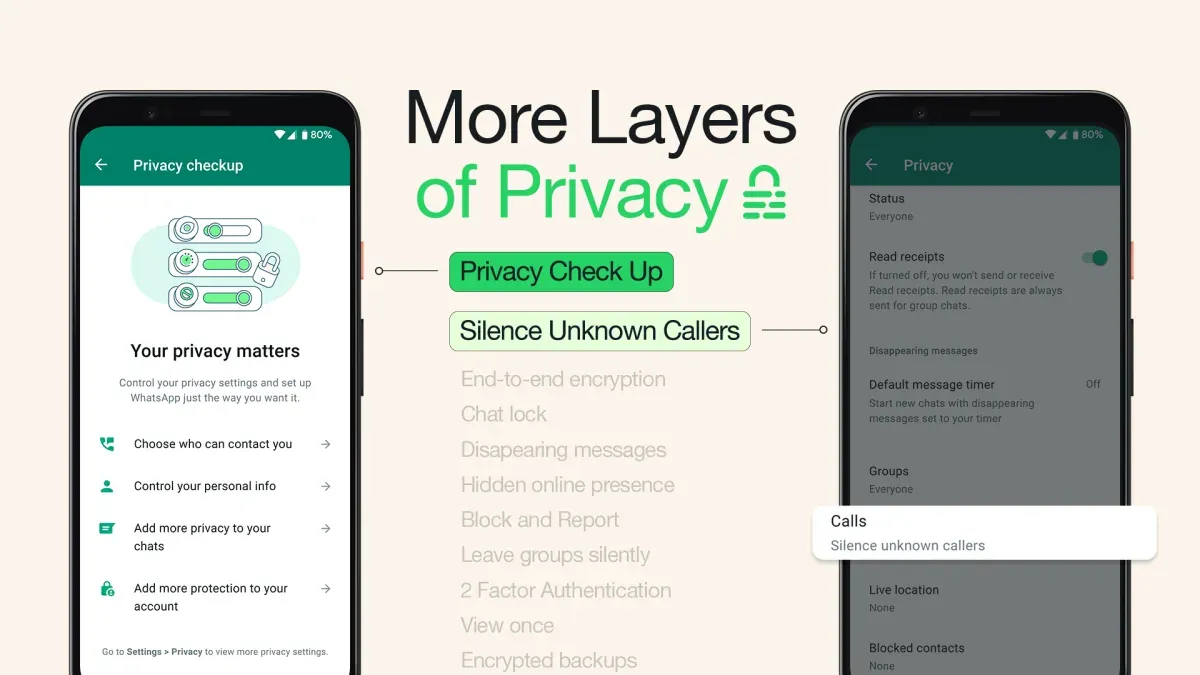
On both iOS and Android devices, WhatsApp privacy settings are accessible through the main app menu but follow slightly different paths. On Android, tap the three vertical dots at the top right corner on the Chats screen, then select Settings. On iOS, tap the Settings gear icon located at the bottom right of the screen. From here, select Privacy to access all privacy-related options.
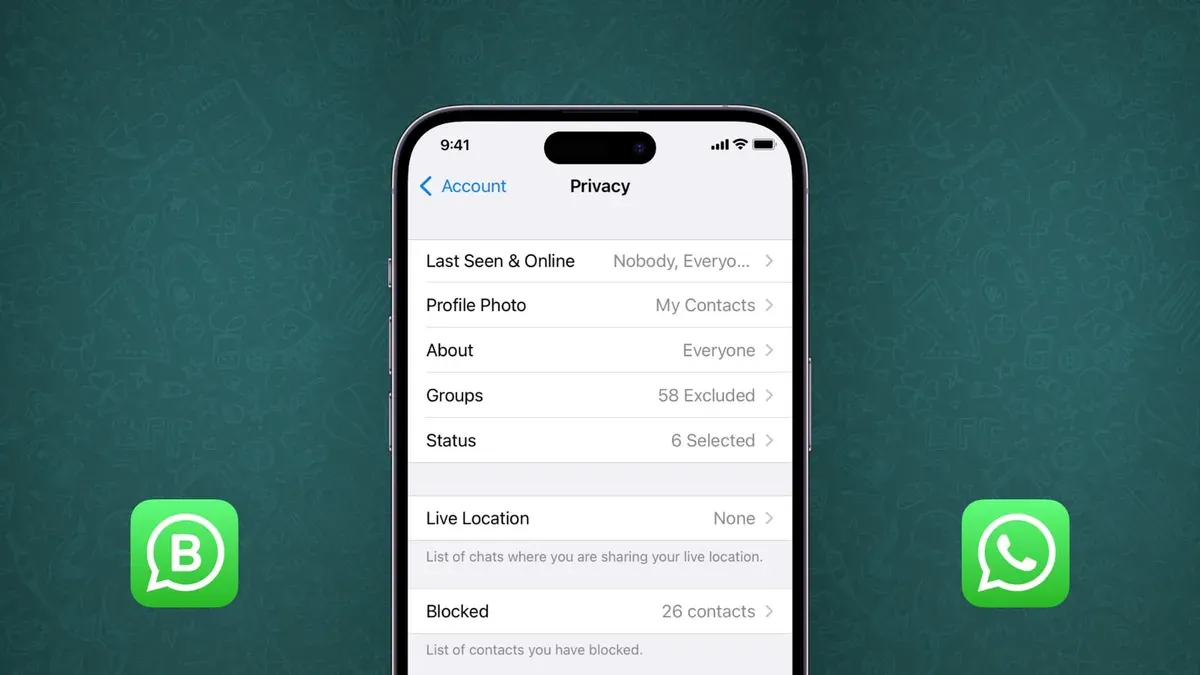
Within the Privacy menu, users can modify specific settings such as Last Seen & Online, Profile Photo, Status, Read Receipts, and Groups. For example, to change who can see the last seen timestamp, tap Last Seen & Online, then choose from options like Everyone, My Contacts, My Contacts Except..., or Nobody. Changes take effect immediately upon selection.
Tip: Some settings like read receipts cannot be enabled for group chats, which is often overlooked.
Common interface issues include the Privacy menu not loading or changes not saving. These problems may arise from app glitches, outdated versions, or connectivity issues. To resolve this, users should ensure their WhatsApp app is updated via the App Store or Google Play Store, restart the device, or uninstall and reinstall the app if necessary.
For instance, if a user changes the Profile Photo visibility to My Contacts but finds strangers still seeing it, this might be due to a sync delay or saving problem. Re-entering the setting and confirming the selection usually resolves it.
Default WhatsApp privacy settings and what they mean
When users first install WhatsApp, several privacy settings are configured with default values that balance ease of use and basic privacy. By default, the profile photo, last seen, and status are visible to "Everyone," meaning any WhatsApp user can view this information unless changed. The default setting for read receipts is enabled, allowing senders to see when their messages are read, except in group chats where this cannot be disabled.
Messages are end-to-end encrypted by default, ensuring that only the sender and recipient can read the content. However, default visibility settings expose some personal information broadly, which may lead to data exposure beyond close contacts.
For example, a user who has not adjusted settings will have their profile photo visible to all WhatsApp users, which can be problematic if the photo is personal or professional. Changing this setting to "My Contacts" limits visibility only to saved contacts, improving privacy without affecting message encryption or delivery.
| Setting | Default | Common Customization |
|---|---|---|
| Profile Photo | Everyone | My Contacts |
| Last Seen & Online | Everyone | My Contacts or Nobody |
| Status | Everyone | My Contacts except... |
| Read Receipts | On | Off (except group chats) |
| Message Encryption | End-to-end (always on) | Not customizable |
Many users do not change these defaults immediately, potentially leaving personal data accessible to unintended audiences. Adjusting privacy settings is a key step to controlling who can see sensitive personal or business-related information on WhatsApp.
Tip: Reviewing and customizing default privacy settings soon after setup helps align WhatsApp use with individual privacy preferences.
Why WhatsApp’s privacy policy is being challenged in India
WhatsApp's privacy policy updates have faced significant scrutiny in India due to concerns over data sharing practices with its parent company, Meta. In 2021, WhatsApp introduced changes requiring users to accept new terms allowing increased data exchange with Meta’s broader ecosystem, sparking alarm among regulators and user groups about potential privacy infringements.
Indian authorities, including the Ministry of Electronics and Information Technology, raised objections citing insufficient clarity and transparency in how user data is processed and shared. User advocacy groups filed complaints emphasizing risks of unauthorized data access and erosion of user consent principles. These concerns led to legal challenges and requests for WhatsApp to modify its policy to comply with India’s Information Technology rules and data protection expectations.
One illustrative example is the dispute over WhatsApp’s requirement for businesses to share transaction and customer data when using WhatsApp Business API. Regulators argued that this could compromise consumer privacy without explicit, informed consent, prompting calls for stricter controls and oversight.
The ongoing legal debates have impacted user trust, with some users hesitant to accept updated terms fearing loss of control over personal information. WhatsApp has responded by clarifying that private chats remain end-to-end encrypted and that users can opt out of certain data sharing, but the challenges highlight the tension between platform functionality and regulatory privacy standards in India.
Common problems with WhatsApp privacy settings and how to resolve them
Users often encounter issues with WhatsApp privacy settings not updating or saving correctly. For example, a user changing the "Last Seen & Online" visibility to "My Contacts" might find it reverting to "Everyone" after reopening the app. This can result from temporary app glitches or connectivity problems interfering with the settings sync.
App glitches sometimes cause privacy settings to reset unexpectedly. Such issues have been reported during WhatsApp updates or when the app cache becomes corrupted. Restarting the device, clearing the app cache (found under Settings > Apps > WhatsApp > Storage on Android), or reinstalling the app often resolves these problems.
WhatsApp Business users may face unique privacy challenges due to additional features like business profiles and automated messaging. Some settings, such as controlling who sees business hours or location, might not behave as expected if the app version is outdated or if conflicting permissions exist.
Modded versions of WhatsApp, which are unofficial and unsupported, frequently exhibit privacy setting failures. These versions can override or block official privacy controls, exposing users to risks. WhatsApp’s official support strongly advises against using such apps to maintain privacy and security.
Tip: After adjusting privacy settings, users should verify changes by revisiting the settings page and testing visibility with a secondary account or a trusted contact to ensure the settings are applied correctly.
Following best practices such as keeping the app updated, avoiding modded versions, and periodically checking privacy settings helps ensure they persist and function as intended.
Balancing privacy and usability on WhatsApp
Adjusting WhatsApp privacy settings involves trade-offs between securing personal data and maintaining smooth communication. For example, enabling "Last Seen & Online" visibility for "Nobody" improves privacy but can lead to misunderstandings when contacts cannot tell if the user is available to respond promptly. Conversely, setting it to "Everyone" facilitates openness but risks unwanted attention or data exposure.
Over-restricting settings such as disabling read receipts or limiting profile photo visibility can frustrate contacts, potentially impacting social interactions and business communications. On the other hand, over-sharing information like status updates or phone number visibility can expose users to spam or privacy breaches.
Behavioral studies indicate that users often adjust settings based on the context of their relationships—personal users may prioritize privacy more, while small business owners might favor accessibility to foster customer trust. Public figures often require a blend, using features like "Group" and "About" visibility settings selectively to manage public image without sacrificing interaction.
For instance, a small business owner might set "Who Can See My About" to "My Contacts" to share professional information only with known clients, while keeping "Read Receipts" enabled to confirm message delivery and maintain responsiveness. This balance supports both privacy and usability.
Tip: Review settings periodically to adapt privacy levels as communication needs evolve, avoiding extremes that hinder either security or connectivity.
Further reading
- How to Block Someone on WhatsApp: Step-by-Step Instructions
- How to Recognize, Respond to, and Recover from a WhatsApp Account Hack
- How to Change Your WhatsApp Password Across Devices: A Complete Guide
- Understanding and Managing Snapchat Privacy Settings Effectively
Frequently asked questions
How does whatsapp privacy settings work?
WhatsApp privacy settings allow users to control who can see personal information such as profile photo, last seen, about, status, and live location. These settings operate by restricting visibility to everyone, contacts only, or specific groups like "My Contacts Except...". Changes are applied through the Settings menu under Privacy, balancing access with encrypted communication.
Why do people use whatsapp privacy settings?
People use WhatsApp privacy settings to protect personal and professional information from unwanted viewers, avoid spam or harassment, and maintain control over their online presence. For small business owners, these settings help separate business contacts from personal ones and regulate what clients or customers can access.
What is whatsapp privacy policy?
WhatsApp's privacy policy outlines how the app collects, uses, and shares user data, including metadata and message content, while emphasizing end-to-end encryption for chats. It also explains data sharing with parent company Meta and the circumstances under which user information may be shared with third parties or law enforcement.
What are the default privacy settings on whatsapp?
By default, WhatsApp sets profile photo, about, and last seen to be visible to "My Contacts" only, while status updates are shared with all contacts. Read receipts are enabled by default, allowing senders to know when messages are read, except in group chats where they cannot be disabled.
Why is whatsapp's privacy policy being challenged in india?
WhatsApp's privacy policy faced legal challenges in India due to concerns over data protection, transparency, and compliance with Indian IT laws. The issues focus on mandatory data sharing with Meta, lack of granular consent options, and perceived risks to user privacy, prompting regulatory scrutiny and calls for clearer user controls.
Limits of this guide
This guide does not cover in-depth technical vulnerabilities such as encryption weaknesses or exploits, nor does it provide legal advice. Users with advanced security needs, such as those requiring end-to-end encrypted backups or protection against spyware, should consult specialized cybersecurity resources. Similarly, individuals facing complex legal privacy concerns should seek professional legal counsel.
For most everyday users and small business owners, the most practical next step is to regularly review and adjust the privacy settings found under WhatsApp’s Settings > Privacy menu. Pay particular attention to options like "Last Seen & Online," "Profile Photo," and "About," setting them to "My Contacts" or more restrictive levels to limit data visibility. Checking the "Blocked Contacts" list and managing who can add users to groups helps maintain control over interactions. These steps balance privacy with usability and reduce unwanted exposure of personal or business information.