How Telegram Privacy Settings Protect Your Chats and Data
Explore how Telegram privacy settings help you control who sees your data and protect your conversations with advanced security options.

This article explains the essential aspects of Telegram privacy settings, offering a balanced view of the app's privacy features alongside independent security insights and actionable user guidance.
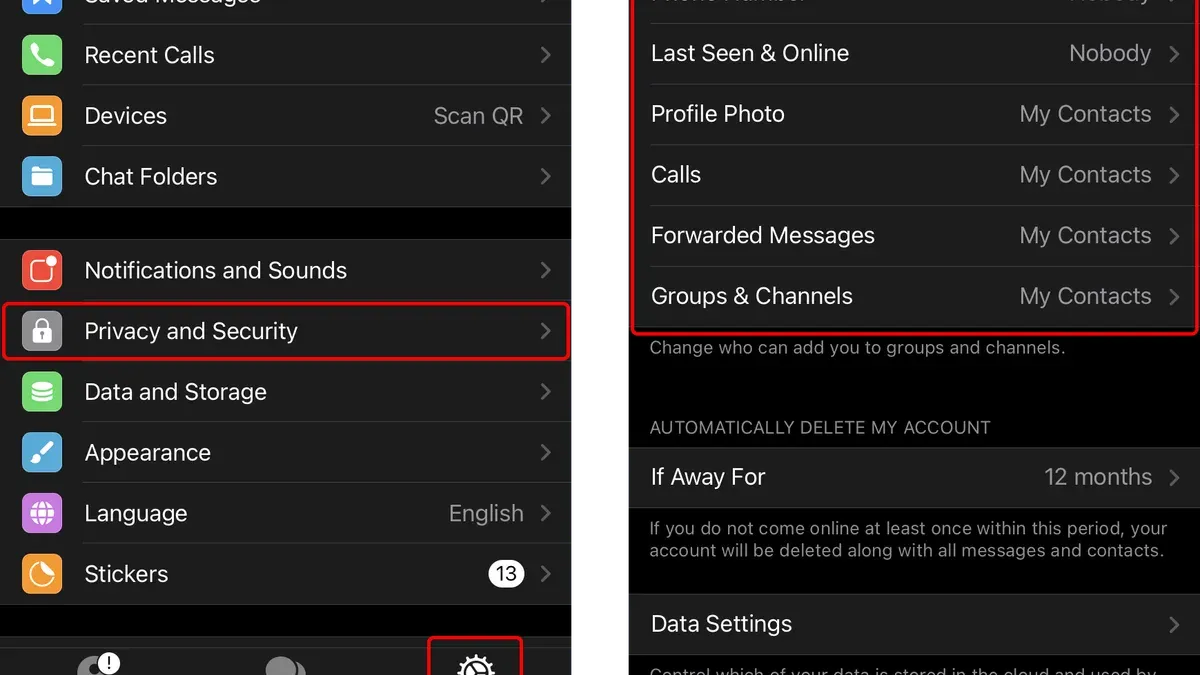
Telegram privacy settings allow users to control who can see their phone number, profile photos, last seen status, and who can add them to groups or calls. These controls are found under Settings > Privacy and Security, where options like "Who can see my phone number" can be set to "Everybody," "My Contacts," or "Nobody," allowing users to fine-tune their exposure. While Telegram uses client-server encryption for most chats, its Secret Chats employ end-to-end encryption, providing stronger privacy for sensitive conversations. Understanding how these settings work and their limitations helps privacy-conscious users make informed decisions beyond Telegram’s marketing claims.
What Telegram privacy settings control and why they matter
Telegram is a cloud-based messaging app known for offering a range of privacy-focused features alongside its core communication tools. It collects user data such as phone numbers, contacts, messages (except for secret chats), and metadata like IP addresses. However, users can control much of this through privacy settings that govern who can see their profile information, last seen status, calls, and message forwarding.
These settings directly affect visibility and data sharing. For example, the “Last Seen & Online” setting allows users to restrict who can view their activity status, reducing chances of unwanted tracking. The “Phone Number” setting lets users control who can see or find them by phone number. Further, options like “Two-Step Verification” enhance account security by requiring an additional password beyond SMS codes, mitigating risks from SIM swapping.
Compared to default privacy settings in other messaging apps, Telegram provides more granular control out-of-the-box. A comparison of default privacy settings in Telegram, WhatsApp, and Signal highlights differences:
| Privacy Setting | Telegram Default | WhatsApp Default | Signal Default |
|---|---|---|---|
| Profile Photo Visibility | Everyone | Contacts | Contacts |
| Last Seen & Online | Everyone (with exceptions) | Contacts | Contacts |
| Read Receipts | On for all chats | On for all chats | On for all chats |
| Two-Step Verification | Optional | Optional | Optional |
A concrete example illustrates the impact: a user who sets their phone number visibility to “My Contacts” prevents strangers from finding their account via number search, reducing unsolicited contacts. Without adjusting this, the default “Everybody” setting in Telegram exposes the user’s phone number to anyone, unlike WhatsApp and Signal which default to more restrictive visibility.
Tip: Review the “Privacy and Security” menu under Settings to customize who can see profile details and enable two-step verification to strengthen account protection.
How secure is Telegram and is it good for privacy
Telegram uses a hybrid encryption model that combines client-server encryption for most chats with end-to-end encryption exclusively in Secret Chats. Regular chats encrypt messages between the user’s device and Telegram’s servers, which then decrypt and re-encrypt messages before sending them to recipients. This approach allows Telegram to offer cloud-based features like multi-device sync but means that Telegram’s servers hold decrypted message data, raising privacy concerns for sensitive communications.
Secret Chats employ the MTProto protocol with end-to-end encryption, ensuring only the sender and receiver can read messages. However, these chats are device-specific and do not sync across devices, which can be inconvenient for some users.
Independent security audits have generally found Telegram’s encryption protocol to be robust but have highlighted that its proprietary MTProto protocol is less scrutinized than widely adopted open standards like Signal Protocol. Some experts caution that Telegram’s default encryption model does not provide the same level of confidentiality as fully end-to-end encrypted apps.
Regarding data storage, Telegram retains some metadata such as IP addresses and connection timestamps for a limited period, and stores messages on its servers unless in Secret Chats. Telegram has stated it has a transparent policy of rejecting third-party data requests when possible, but it has cooperated with authorities in specific jurisdictions. For example, Telegram disclosed that it provided limited user data in response to a lawful request from a government agency, though not full message content.
To picture the difference, imagine sending a postcard versus an encrypted letter. Regular Telegram chats resemble the postcard: the message travels through servers that can read it, while Secret Chats are like sealed letters that only the recipient can open.
How to change Telegram privacy settings to enhance security
Accessing Telegram's privacy settings varies slightly depending on the platform. On the mobile app, tap the three-line menu (top left), then select "Settings" > "Privacy and Security." On desktop, click the three horizontal lines (top left), then "Settings" > "Privacy and Security." For Telegram X, the path is similar: tap the menu, then "Settings" > "Privacy and Security."
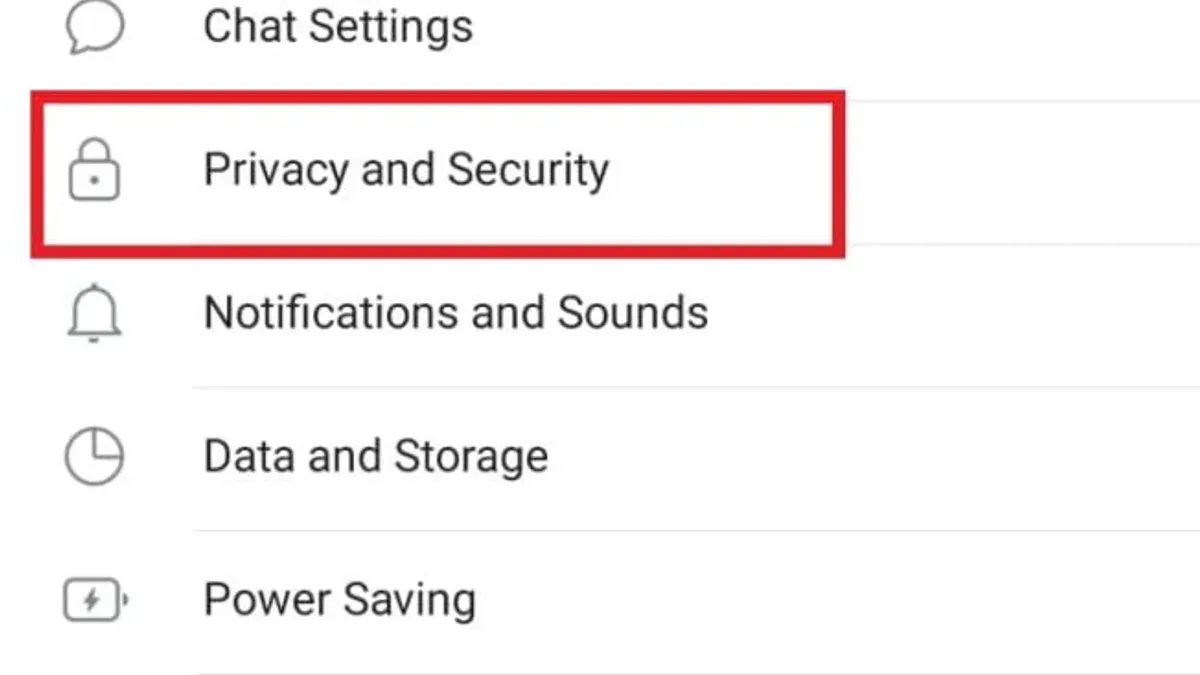
Within "Privacy and Security," users can control who sees their phone number, last seen & online status, profile photo, and bio. Each has options like "Everybody," "My Contacts," or "Nobody," with an additional choice to add exceptions. For example, setting "Who can see my phone number" to "My Contacts" but blocking specific contacts prevents those individuals from viewing it.
Managing group-related privacy involves choosing who can add the user to groups or channels. By selecting "My Contacts" or specific users, it limits unsolicited additions. The "Calls" section similarly controls who may call, reducing unwanted contacts.
Controlling forwarded messages is possible by enabling "Add Link to Forwarded Messages," which can be disabled to prevent recipients from tracing a message back to the sender's profile. Link privacy can also be customized, restricting who can join via invite links.
Two-step verification enhances account security by requiring a password in addition to SMS or app-based login codes. It is set up under "Privacy and Security" > "Two-Step Verification." Active sessions are viewable and can be terminated individually or all at once to prevent unauthorized access.
Example: A privacy-conscious user may limit "Who can see my last seen" to "My Contacts," disable link sharing on forwarded messages, restrict group additions to "My Contacts," and enable two-step verification. This configuration balances visibility with security while reducing spam and unauthorized access.
Tip: Regularly review active sessions to detect unfamiliar devices and revoke access promptly.
Why Telegram might keep connecting and how it relates to privacy
Telegram users sometimes experience the app repeatedly attempting to connect or reconnect. This behavior can stem from various technical issues, including unstable internet connections, server load fluctuations, or app-specific glitches. For example, a user on a public Wi-Fi network with intermittent signal loss may notice Telegram cycling through connecting states, reflecting the app's efforts to maintain a live connection.
Unstable connections pose potential privacy risks. Frequent reconnections can increase exposure to network monitoring, especially on unsecured Wi-Fi or cellular networks. Each reconnection may involve data packets traveling through different network nodes, potentially raising the risk of interception or metadata collection by third parties.
Troubleshooting connection issues without compromising privacy involves several steps. Users should first verify network stability by testing other apps or websites. Switching from public or unsecured Wi-Fi to a trusted cellular network can reduce exposure. Within Telegram, clearing cache and ensuring the app is updated from official stores helps avoid glitches. Disabling features like automatic media download in Settings > Data and Storage may also improve performance.
Using VPNs or proxies with Telegram offers privacy benefits by encrypting traffic and masking IP addresses, but these tools can introduce additional latency or instability. Some users report that certain VPNs cause more frequent Telegram reconnects, which may affect user experience. When configuring proxies under Settings > Data and Storage > Proxy, selecting reliable providers is crucial to balance privacy and connection stability.
Tip: When facing repeated connection attempts, try switching networks or toggling Airplane Mode briefly to reset connections before adjusting app settings.
How to secure Telegram for private chats and overall use
To maximize privacy beyond default settings, users should utilize Telegram's Secret Chats. These provide end-to-end encryption and allow setting self-destruct timers for messages. For example, initiating a Secret Chat involves opening a contact's profile, selecting 'Start Secret Chat,' and choosing a self-destruct timer from 1 second to 1 week. This ensures messages vanish after reading, reducing data exposure.
Users should avoid sharing sensitive information in cloud chats, as these are stored on Telegram’s servers and not end-to-end encrypted. Regularly reviewing active sessions via Settings > Privacy and Security > Active Sessions helps spot unknown devices. Logging out from unfamiliar sessions closes potential backdoors.
Limiting linked devices and revoking app permissions from the same menu reduces attack surfaces. For instance, disconnecting unused devices prevents unauthorized access. Caution is advised with third-party Telegram APKs or unofficial clients, which may not receive regular security updates or could compromise data integrity.
Two-step verification, accessible under Settings > Privacy and Security > Two-Step Verification, significantly lowers the risk of account takeovers by requiring a password in addition to SMS codes. Many account compromises are prevented when users enable this feature.
Common mistakes to avoid when managing Telegram privacy settings
One frequent error is leaving the default privacy settings unchanged. By default, Telegram allows others to find users by their phone numbers and shows this number in certain contexts. This can expose users to unwanted contacts or potential harassment. For example, a user who joins multiple public groups without restricting who can see their phone number might receive unsolicited messages or spam.
Using weak passwords or skipping two-step verification also undermines security. Without strong passwords and two-step verification enabled under Settings > Privacy and Security > Two-Step Verification, accounts are vulnerable to unauthorized access, especially if phone numbers are compromised or SIM swapping occurs.
Sharing a Telegram phone number publicly or in groups without adjusting visibility settings can increase risk. Users often overlook the Who Can See My Phone Number option, which can be set to ‘My Contacts’ or ‘Nobody,’ limiting exposure. Failure to configure this allows third parties to collect phone numbers for phishing or social engineering.
Ignoring app updates is another common mistake. Updates often fix security flaws and improve encryption protocols. Delaying updates leaves users exposed to known vulnerabilities that could be exploited.
Finally, relying solely on Telegram's privacy features without complementary practices, such as cautious link-clicking and device security, limits protection. For instance, even with secret chats, sharing sensitive information on a compromised device can lead to data leaks.
Tip: Regularly review privacy settings and enable two-step verification to close common security gaps.
How Telegram’s privacy features compare to other messaging apps
Telegram offers end-to-end encryption only in Secret Chats, whereas apps like Signal and WhatsApp enable it by default for all messages, a critical distinction for users prioritizing privacy. This means regular Telegram chats use client-server encryption, storing data on Telegram's servers, while Signal and WhatsApp keep message content encrypted solely between users.
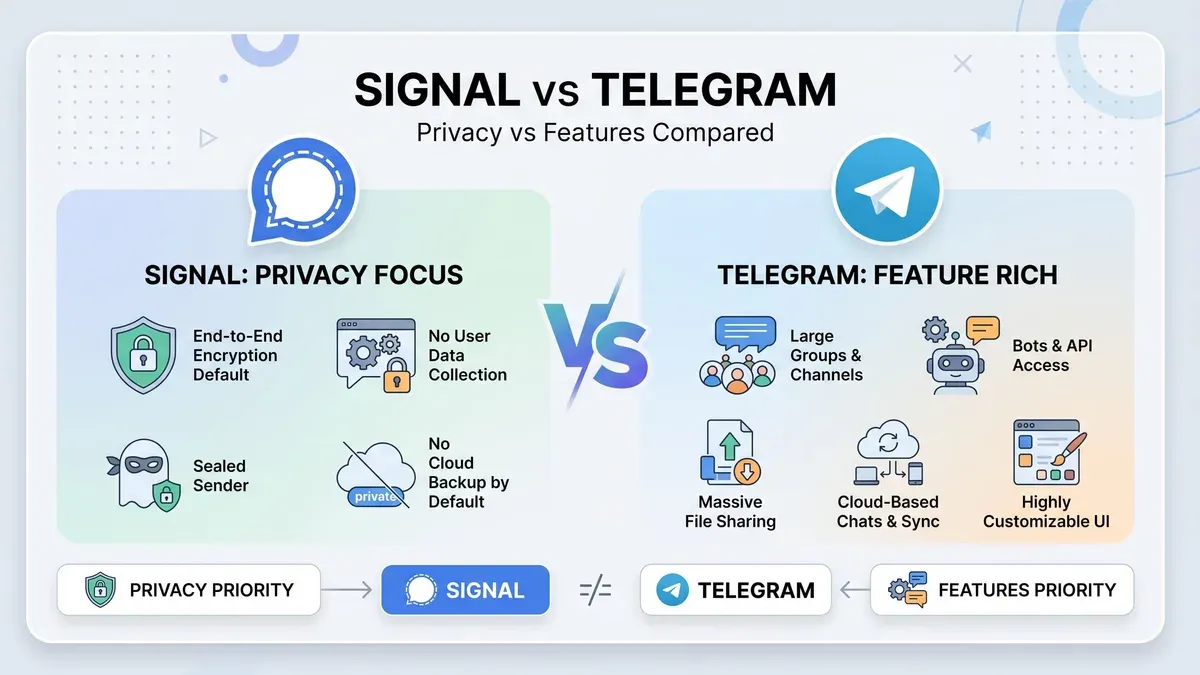
Metadata collection also varies: Telegram retains information such as contact lists and IP addresses, while Signal minimizes stored metadata to enhance privacy. WhatsApp collects more user data due to its integration with Facebook services, which can raise concerns for privacy-conscious users.
User control over data visibility is strong on Telegram, with granular settings for who can see phone numbers, profile photos, and last seen status. Telegram also allows disabling message forwarding and controlling who can add users to groups. However, Signal emphasizes minimal data and automatic forwarding restrictions, and WhatsApp offers similar controls with a simpler interface.
Regarding transparency, Telegram’s client apps are open source, but its server code is proprietary, limiting full auditability. Signal’s entire codebase is open source and independently audited, which contributes to higher trust in its privacy claims. WhatsApp is closed source, which has drawn criticism from security experts.
Example: A user wanting to share sensitive information might prefer Signal, where all chats are end-to-end encrypted by default and metadata is minimal. In contrast, Telegram’s Secret Chats offer similar encryption, but regular chats do not, requiring deliberate action to enhance privacy.
Tip: When comparing apps, consider both encryption defaults and metadata practices to align with personal privacy needs.
Further reading
Frequently asked questions
How to secure telegram app privacy?
Securing Telegram privacy involves adjusting settings under Privacy and Security in the app's main menu. Key options include setting who can see phone numbers, last seen status, and profile photos, as well as enabling two-step verification. Activating Secret Chats adds end-to-end encryption for messages, while disabling cloud backups can limit data exposure. Regularly reviewing active sessions and revoking unknown devices also helps maintain account security.
Is telegram good for privacy?
Telegram offers privacy features like end-to-end encrypted Secret Chats and user-controlled data visibility settings. However, regular chats use client-server encryption which, while secure against casual interception, is not end-to-end encrypted, meaning Telegram servers can access message content. This design balances usability and privacy but may not satisfy users requiring maximum confidentiality.
Is telegram secure and private?
Telegram implements strong encryption protocols and provides options such as Secret Chats for enhanced security. Its privacy controls allow users to limit data visibility and manage sessions. Nonetheless, because typical chats are stored on Telegram’s servers with client-server encryption, the app’s security is strong but not absolute, depending on user choices and threat models.
Why my telegram keep connecting?
Repeated connection attempts often stem from network issues, such as unstable Wi-Fi or mobile data, or restrictions by firewalls and VPNs. Telegram uses persistent connections to maintain message sync, which can appear as constant connecting if the network is weak. Ensuring a stable internet connection and checking app permissions or firewall settings can resolve this behavior.
Is telegram safe for privacy?
Telegram is generally safe for privacy-conscious users when configured properly, especially using Secret Chats and privacy settings to control data exposure. However, its default cloud chat model stores messages on servers, which may pose risks if servers were compromised. Users seeking maximum privacy should utilize available encryption options and consider their threat environment carefully.
Limits of Telegram Privacy Settings
This article does not cover advanced security threats such as state-level surveillance or zero-day exploits, which require specialized tools beyond Telegram’s built-in features. Users needing protection against highly sophisticated attacks should consider additional encryption tools and operational security practices outside of Telegram.
The single most useful next step is to review the Privacy and Security section within Telegram’s settings carefully, focusing on options like Who Can See My Phone Number, Last Seen & Online, and Active Sessions. Regularly updating these settings, enabling two-step verification, and monitoring active sessions can significantly reduce unwanted data exposure and maintain control over personal information.