How to Recover a Pinterest Account Without a Phone Number
This guide explains how to recover a Pinterest account without a phone number using alternative verification methods and support options.

This article explains how to recover Pinterest account without phone number, focusing on alternative verification methods that bypass phone-based recovery.
Losing access to a Pinterest account linked to a phone number can block traditional password reset options. Without access to the phone number, users must rely on other recovery paths such as email verification, linked social media accounts, or identity confirmation through Pinterest support. Understanding the available tools and knowing where to find recovery options in the Pinterest app or website is crucial.
This guide provides clear, step-by-step instructions for regaining account access without a phone number. It covers scenarios including missing email access or forgotten passwords, plus practical troubleshooting tips for common recovery roadblocks.
Before you start: What is needed to recover a Pinterest account
Recovering a Pinterest account requires specific information and a clear understanding of available recovery options. Access to the email address linked to the Pinterest account remains the primary and most reliable method for recovery. If the email address is accessible, users can initiate password resets or verification codes through Pinterest's automated system.
In cases where the phone number is unavailable, alternative login methods such as linked social media accounts (Google, Facebook, Apple ID) can facilitate recovery. Knowing which external accounts were previously used to sign in helps streamline this process. Additionally, having basic account details like the Pinterest username and any remembered previous passwords supports identity verification.
Patience is essential, as automated recovery may not always succeed. If automated attempts fail, contacting Pinterest Support directly becomes necessary, which can take several days. Users should prepare for this possibility to avoid frustration and repeated attempts.
While precise statistics are not publicly available, it is generally understood that a majority of Pinterest account recoveries occur via email verification, with phone number verification being the second most common method. Alternative methods, including social media logins, cover a smaller subset but are critical when phone and email access are lost.
- Confirm access to the email linked to the Pinterest account. Successful access allows receiving password reset emails immediately.
- Identify any social media accounts (Google, Facebook, Apple ID) previously connected for login. Correct identification lets users attempt login via these platforms.
- Gather basic account details such as username and previous passwords. This information is necessary if direct support contact is required.
- Prepare to contact Pinterest Support if automated recovery fails. A response from support indicates the next steps for manual verification.
How to recover Pinterest account without phone number and email
When both the phone number and email linked to a Pinterest account are inaccessible, recovery options narrow but remain viable. The first step is to check for any linked social media accounts, such as Facebook or Google, used previously for login. Using these linked accounts can bypass the need for phone or email verification.
If social logins are not available or do not work, attempt username-based recovery through Pinterest’s Help Center. Enter the username on the account recovery page to prompt Pinterest to verify the account through alternate means.
When automated options fail, submitting a support ticket to Pinterest is essential. The support request should include as much identifying information as possible: username, previous passwords, details of account activity, or linked boards. Pinterest typically requests proof of ownership via screenshots, payment receipts from Pinterest ads (if applicable), or other account-related evidence.
Checking browser or device history for saved passwords, active sessions, or cookies may reveal access tokens or passwords. Browsers like Chrome or Firefox often store login credentials under settings > passwords, which can be a shortcut to regain entry without standard recovery.
- Attempt login using any linked social media accounts (Facebook, Google). Successful login leads directly to the account homepage.
- If unsuccessful, visit Pinterest Help Center and use the username recovery tool. A prompt indicating that recovery options have been sent to the account owner confirms success.
- Submit a support ticket via Pinterest’s Contact Us page, providing detailed ownership proof. A confirmation email from Pinterest acknowledging the ticket confirms the submission.
- Inspect browser/device password managers for saved Pinterest credentials. Finding a saved password allows immediate login.
Worked example: A user who lost access to both phone and email submitted a ticket including recent board details and payment receipt for a promoted pin. Pinterest responded with a request for a screenshot of the account homepage viewed previously. After providing this, the user regained account access within a week.
How to recover Pinterest account without phone number and password
When neither phone verification nor password recall is possible, Pinterest offers several alternative account recovery paths. The primary automated option is the 'Forgot password' flow, which requires access to the registered email or knowledge of the username. This method typically results in quicker recovery but depends on account-linked email availability.
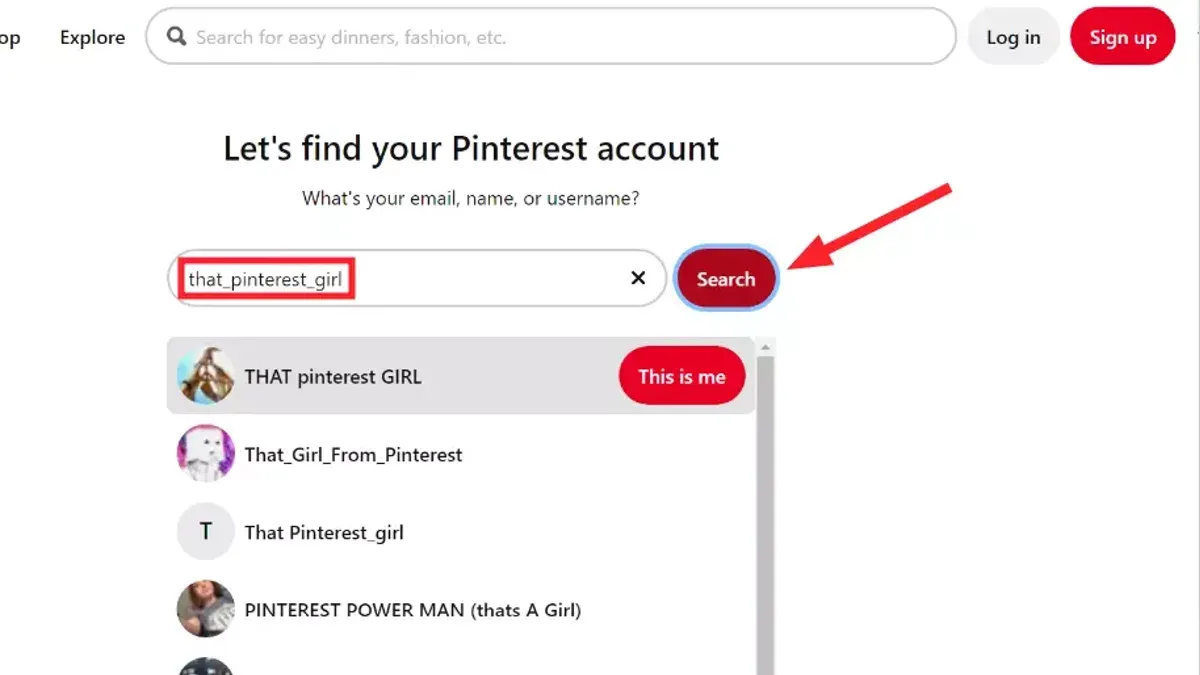
- Go to the Pinterest login page and click "Forgot your password?". A prompt to enter the email address or username associated with the account will appear.
- Enter the email or username and submit. If the email is recognized, Pinterest will send a password reset link. Successful receipt and use of this link leads to password reset confirmation.
- If access to email is unavailable, attempt login via any social accounts linked to Pinterest, such as Facebook or Google, by selecting the corresponding login button. Successful authentication will bypass the password requirement.
- If both automated methods fail, submit a request to Pinterest Support through their Help Center. Provide detailed information including account username, linked email addresses, approximate account creation date, and any screenshots or documentation proving ownership.
- Await support response and follow their instructions for manual verification. This process can take longer and has varied success rates, often depending on the quality of ownership evidence provided.
Tip: Keep records of emails, receipts, or screenshots related to the Pinterest account to strengthen support requests.
Automated password resets have a higher success rate when email access exists, while manual support recovery becomes necessary and less certain without email or phone verification.
How to recover Pinterest account without phone number and Gmail
When the Gmail account linked to the Pinterest profile is inaccessible and there is no phone number on file, alternative recovery routes become essential. Start by confirming if other email addresses are associated with the Pinterest account, such as a work or secondary personal email, which can be used for password reset or verification.
Next, check if the Pinterest login is connected to social media accounts. Common linked services include Facebook, Apple ID, and Google accounts other than Gmail. Attempt logging in using these options via the Pinterest login page under "Continue with Facebook" or "Continue with Apple." Successful login here provides access without needing phone or Gmail access.
If neither linked emails nor social logins work, contact Pinterest support directly. Submit a detailed support request including the Pinterest username, previous passwords, linked email addresses, and any billing information if applicable. Pinterest may request additional identity verification, such as a photo ID or screenshots of the account, to validate ownership.
Also, review whether the Pinterest account is connected to third-party services or apps like social schedulers or marketing platforms. Access to these might allow password reset or account recovery through their interfaces.
- Check for additional linked email addresses under account settings or previous email notifications. Success: Access password reset options via that email.
- Attempt login using social media options on the Pinterest login page. Success: Access Pinterest account without Gmail or phone number.
- Submit a support ticket via Pinterest Help Center with all known account information. Success: Receive instructions or manual account recovery assistance.
- Verify linked third-party apps or services for alternative recovery paths. Success: Reset password or manage account through third-party platform.
How to retrieve Pinterest account without phone number and email
When both the phone number and email linked to a Pinterest account are inaccessible, recovery options narrow but remain possible. The first approach is to use the Pinterest username to attempt account recovery through the login interface. If the account is linked to social logins such as Facebook or Google, signing in with those credentials can bypass the need for phone or email verification.
Another effective method is checking for active Pinterest sessions on other devices. If the account is still logged in on a smartphone, tablet, or browser, it allows password changes and updating contact information directly from the account settings. This step avoids going through the standard recovery process altogether.
If these options fail, contacting Pinterest’s official customer support is the next step. Submitting a detailed support request via Pinterest's Help Center with proof of account ownership—such as previous transaction receipts for promoted pins or linked business accounts—can initiate manual verification. Pinterest’s account recovery policy states that such manual processes may take several business days and are not guaranteed, emphasizing the importance of providing comprehensive information.
Tip: Gather any possible proof of account activity or ownership before reaching out to support to speed up verification.
- Attempt login using the Pinterest username at pinterest.com/login and select “Forgot password” to see recovery options. A successful attempt leads to receiving recovery prompts based on linked social accounts.
- Try signing in with any connected social media accounts by clicking the respective login buttons on the Pinterest login page. Successful sign-in grants full account access.
- Check all personal devices and browsers for existing active sessions. If logged in, navigate to Settings > Account Settings > Email or Phone to update recovery details immediately.
- If access is unavailable, visit the Pinterest Help Center and submit a support ticket under “Account access issues.” Provide detailed account information and any proof of ownership. Await official response within several business days.
How to recover Pinterest account without phone number Reddit tips and community advice
Reddit users often share specific recovery experiences and cautionary advice for those locked out of Pinterest without phone access. A common pitfall is falling for phishing links disguised as Pinterest support; genuine help always comes through Pinterest’s official website or verified social media channels. Users warn against providing passwords or personal info on unofficial forums or via unsolicited messages.
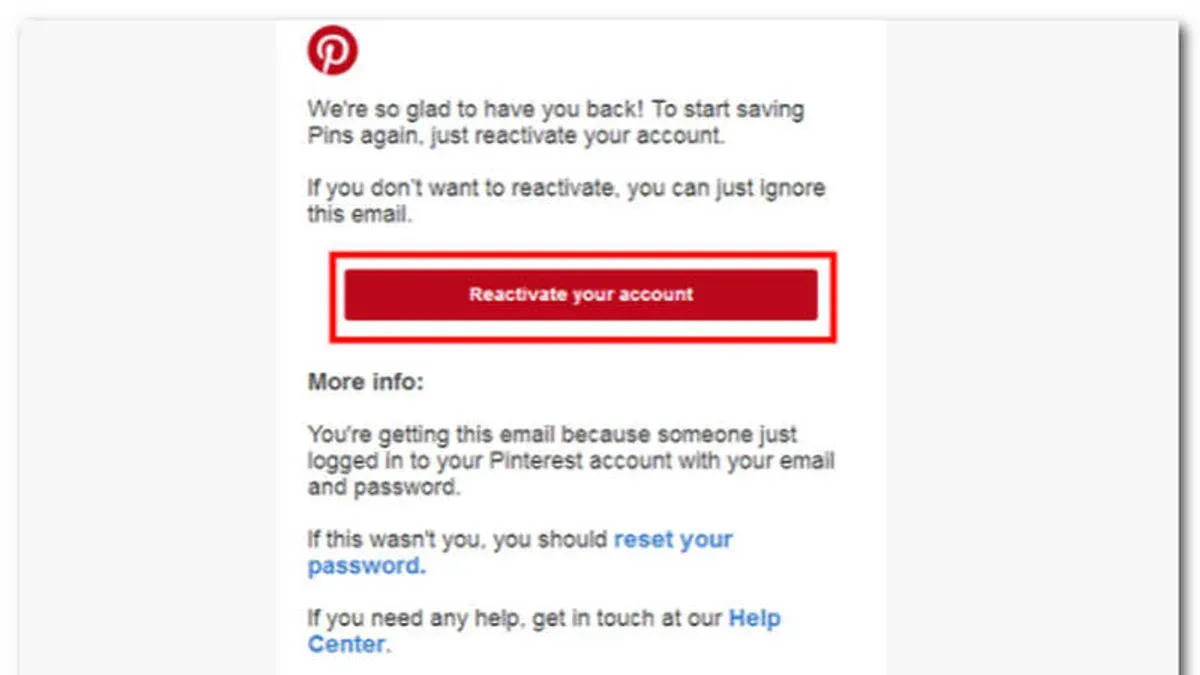
Creative recovery methods reported on Reddit include checking if the Pinterest account is still logged in on any device or browser, allowing password reset from the active session. Some users found success by submitting detailed support tickets with screenshots of previous Pinterest activity, which can help verify ownership beyond email or phone verification.
Verifying legitimate Pinterest support involves confirming the domain of contact emails (e.g., @pinterest.com) and avoiding third-party recovery services. Reddit threads highlight that Pinterest’s official support responds primarily through their help center and not via direct messaging on social platforms.
- Search Reddit for recent Pinterest recovery threads (e.g., r/pinterest or r/accounthelp) to gather current user advice—successful posts often include step-by-step details and screenshots.
- Check all devices and browsers for any active Pinterest sessions—if found, proceed to change the password directly in account settings, confirming control.
- If no active sessions are available, prepare a detailed support request including previous passwords, linked email addresses, and screenshots of the account or pins to submit via Pinterest’s official help center.
- Verify any support contact email addresses end with @pinterest.com and avoid links from unofficial sources to prevent phishing risks.
Tip: Regularly back up login credentials and enable multiple recovery options to avoid relying solely on phone number verification.
Troubleshooting common failure points in Pinterest account recovery
If the recovery email never arrives, first check the spam or junk folder. Ensure the email address entered is correct and that the inbox is not full. Sometimes, email providers delay or block automatic messages from Pinterest; waiting 15-30 minutes before retrying often helps. If repeated attempts fail, try using a different email address if possible or contact Pinterest support for assistance.
Locked accounts or those flagged for suspicious activity trigger error messages like "Account Temporarily Locked" or "Suspicious Login Attempt Detected." In such cases, follow prompts to verify identity, which may include answering security questions or submitting photo ID. Avoid multiple failed login attempts, as this can extend lockout duration. Persistent issues require contacting Pinterest support with detailed information about the account and recent activity.
If a Pinterest support ticket is delayed or denied, review the ticket for reasons such as insufficient information or failure to prove account ownership. Resubmit with clearer evidence, including usernames, linked emails, previous passwords, or screenshots. Check the support portal regularly for updates. If no resolution occurs within days, consider escalating through Pinterest’s help center or official social media channels.
When all recovery attempts fail, creating a new Pinterest account might be necessary. Secure it immediately by linking a verified email address and setting up two-factor authentication. Use a strong, unique password and avoid linking phone numbers or emails previously compromised. Regularly update recovery options to prevent future lockouts.
Frequently asked questions
How to recover instagram account without phone number and email?
Recovering an Instagram account without access to the linked phone number and email requires using Instagram's identity verification tools. Start by selecting "Forgot password?" on the login page, then choose "Need more help?" Follow prompts to submit a government-issued ID or verify identity via other linked accounts. Instagram may also allow recovery through the Facebook account linked to Instagram, if applicable.
How to recover instagram account without phone number email and password?
Without the phone number, email, and password, recovery options narrow significantly. Use the "Need more help?" option after attempting to log in and complete the identity verification process requested by Instagram. Providing a previously used device or IP address and submitting proof of identity can improve chances. Direct support responses may take time and are not guaranteed.
How to recover instagram account without phone number and password?
To recover without a phone number and password, initiate the password reset using the email or username option. If the email is inaccessible, use the "Need more help?" link to verify identity through other means, such as linked Facebook accounts or submitting an ID. Instagram may offer alternative verification steps depending on account settings.
How to recover instagram account without phone number and gmail?
When both phone number and Gmail are unavailable, start the recovery with the username or alternate email address if available. Use the "Need more help?" option to access Instagram’s support form and submit identity verification documents. Having access to devices previously used for login can assist in the recovery process.
How to recover instagram id without phone number and email?
Recovering an Instagram ID without phone number and email requires identity verification through Instagram’s help center. Use the "Forgot password?" flow and select "Need more help?" to request support. Providing a government-issued ID or confirming linked accounts can help regain access, but results depend on Instagram’s assessment.
What This Guide Does Not Cover and When to Seek Other Help
This guide does not cover recovery of Pinterest accounts that have been permanently deleted or banned. Users without any linked email address, social login, or verifiable proof of account ownership may not be able to regain access through the standard recovery methods outlined here. Manual support requests to Pinterest can take several days and do not guarantee restoration of the account.
For accounts lacking all recovery options, the best next step is to contact Pinterest Support directly via their Help Center and provide any identifying information available, such as previous Pinterest usernames, linked social accounts, or payment details if applicable. Persistence and detailed information improve the chances of a successful manual review.
See also: How to Recover a Messenger Account Without Phone Number or Email · How to Recover a LinkedIn Account Without Phone Number or Email · How to Recover a Facebook Account Without a Phone Number: Step-by-Step · How to Recover a Discord Account Without a Phone Number