Disabling Root Login via SSH on Linux: Essential Security Steps
This guide explains how to disable root login via SSH on Linux to improve system security and prevent unauthorized access.

Disabling root login via SSH on Linux is a crucial security measure to reduce unauthorized system access. This guide details the exact configuration changes needed, common pitfalls, and alternative administrative methods.
Why Disabling Root SSH Login Matters
Allowing direct SSH login as root exposes the system to high-risk attacks because the root account has unrestricted privileges. Attackers often target root to bypass privilege escalation steps, increasing the chance of a full system compromise.
- Root login vulnerabilities: Automated brute force attacks frequently focus on the root account, as it grants immediate full control.
- Privilege escalation avoidance: Compromising a non-root user typically requires additional steps, but root access is direct.
- Ongoing threat landscape: Security monitoring consistently shows root as a primary target in SSH attack attempts.
Step-by-Step Guide to Disable Root Login via SSH on Popular Linux Distributions
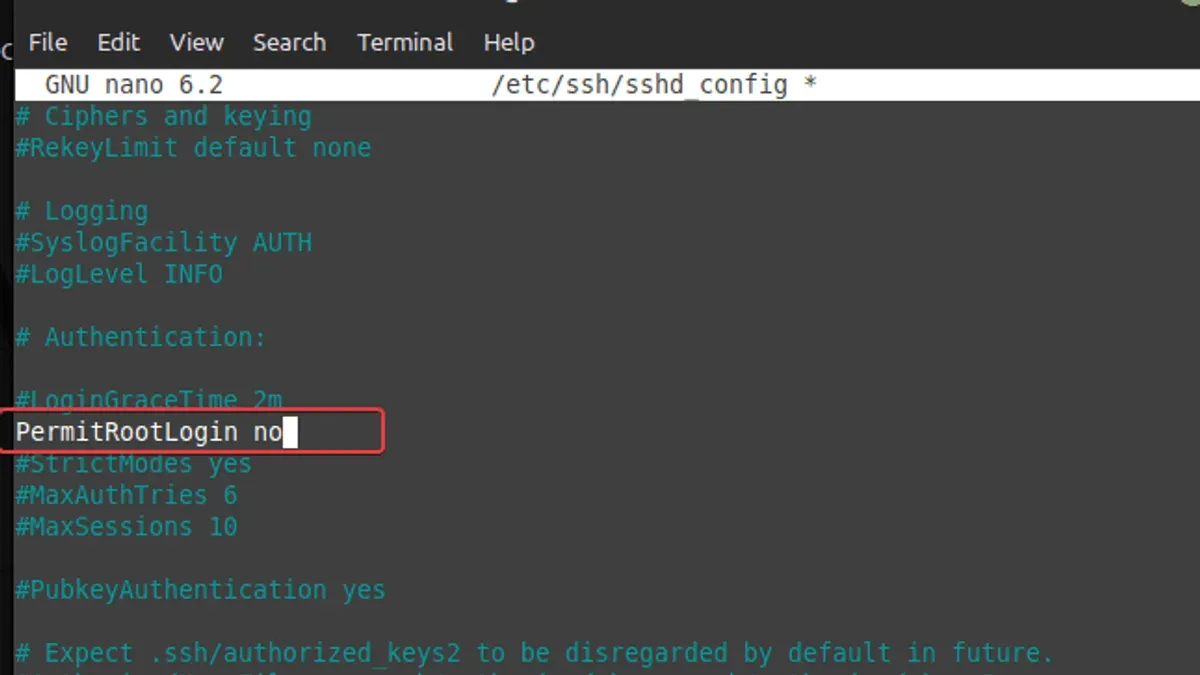
The key configuration file is /etc/ssh/sshd_config. The critical setting is PermitRootLogin. Follow these steps carefully:
- Account for distribution nuances:
- Ubuntu: Defaults often use
prohibit-password. Explicitly settingnodisables all root login. - CentOS/RHEL: Root login is often enabled by default; manual change is necessary.
- Debian: Similar to Ubuntu; verify the setting explicitly.
- Fedora: Aligns with CentOS; confirm and restart
sshd.
- Ubuntu: Defaults often use
Verify root login is disabled: Attempt to SSH as root from another terminal or machine:
ssh root@your-server-ipThe connection should be refused or denied after authentication.
Restart the SSH service to apply changes:
sudo systemctl restart sshdNote: On Ubuntu and Debian, the service may be named ssh instead of sshd. Verify with systemctl status sshd or systemctl status ssh.
Edit the SSH daemon configuration file:
sudo nano /etc/ssh/sshd_configLocate the line starting with PermitRootLogin. If it is commented out or set to yes or prohibit-password, change it explicitly to:
PermitRootLogin noNote: Some distributions default to prohibit-password, which disables password root login but still allows key-based root login. Setting it to no disables all root SSH login methods.
Alternative Secure Access Methods After Disabling Root SSH Login
Since root SSH login is disabled, administrative access must be through other secure means:
- Use sudo with non-root users: Create standard user accounts with
sudoprivileges for administrative tasks. - SSH key-based authentication: Configure SSH keys for these users to enhance security and convenience over passwords.
- Dedicated admin users: Limit privileges to necessary scopes to reduce risk compared to root.
- Manage keys and sessions securely: Use
ssh-agentfor key management and configuresudowith logging and timeout settings to maintain accountability.
Example workflow before and after disabling root login:
# Before disabling root login
ssh root@server
# After disabling root login
ssh adminuser@server
sudo systemctl restart apache2
Common Pitfalls and How to Avoid Locking Yourself Out
Disabling root login without preparation can cause loss of access. To prevent this:
- Test non-root user SSH access: Confirm at least one non-root user with sudo rights can connect before disabling root login.
- Maintain secondary access methods: Keep console, IPMI, or serial access available for recovery.
- Backup configurations: Save copies of
sshd_configand system state for rollback. - Avoid changes on critical systems without verified user setups: Disabling root login prematurely can cause downtime requiring physical intervention.
Administrators have been locked out after disabling root login without testing alternatives, necessitating physical or vendor-assisted recovery.
When Disabling Root Login May Not Be Advisable
In some scenarios, disabling root SSH login may hinder operations or increase risk:
- Emergency remote root access needs: Systems requiring immediate root access during incidents may retain root login with strict controls.
- Legacy systems: Older workflows or automation may depend on direct root login.
- Lack of alternative admin users: Systems without configured sudo users risk lockout if root login is disabled prematurely.
Some organizations restrict root login to SSH keys only and implement monitoring and access controls to balance security and usability.
Frequently Asked Questions
Can I disable root login without losing all administrative access?
Yes. Ensure at least one non-root user has sudo privileges and SSH key access before disabling root login to maintain administrative capabilities.
What is the difference between 'PermitRootLogin no' and 'PermitRootLogin prohibit-password'?
PermitRootLogin no disables all root SSH login methods. PermitRootLogin prohibit-password disables password authentication for root but permits login with SSH keys.
How do I recover if I accidentally lock myself out after disabling root SSH login?
Use alternative access methods such as console or out-of-band management interfaces to log in and revert SSH configuration. Without such access, physical access is required.
Are there any security risks to allowing root login with SSH keys only?
Yes. While SSH keys are more secure than passwords, compromised keys or insufficient monitoring can still lead to unauthorized root access.
Caveats and Limitations
This guide covers disabling root SSH login and basic alternatives. It does not address advanced security measures like multi-factor authentication or intrusion detection, which can further enhance SSH security.