Sucuri vs All In One WP Security: Best WordPress Security Plugin in 2026
Detailed comparison of Sucuri vs All In One WP Security to help choose the best WordPress security plugin in 2026.


This article provides a detailed head-to-head comparison of two leading WordPress security plugins in 2026, focusing on Sucuri vs All In One WP Security. WordPress site owners, developers, and IT decision-makers will find an in-depth evaluation of these plugins’ security features, usability, and integration capabilities tailored to various user profiles.
Both plugins aim to protect WordPress sites from threats such as malware, brute force attacks, and vulnerabilities but differ in approach and complexity. Sucuri offers a cloud-based firewall and comprehensive malware scanning with a premium focus, while All In One WP Security provides a layered, user-friendly interface with extensive manual controls suited for hands-on users. This comparison highlights key differences in malware detection, firewall scope, performance impact, and support to guide users toward the best fit for their technical skill level and security priorities.
Comparison table of Sucuri and All In One WP Security features
This section provides a detailed side-by-side comparison of Sucuri and All In One WP Security, focusing on key security features, pricing, user interface, support, and hosting compatibility as of 2026.
| Feature / Attribute | Sucuri | All In One WP Security |
|---|---|---|
| Firewall | Cloud-based Web Application Firewall (WAF) blocking OWASP top 10 threats, DDoS protection, and virtual patching. | Built-in firewall module with .htaccess and PHP-based rules; protects against common attacks but lacks cloud-based filtering. |
| Malware scanning | Remote malware scanning with automatic alerts and blacklist monitoring; includes integrity checks and scheduled scans. | Local malware scanner integrated into WordPress dashboard; scans core files, themes, and plugins but without remote blacklist monitoring. |
| Login protection | Brute force attack prevention, two-factor authentication (2FA) integration, and login attempt limits. | Login lockdown after failed attempts, CAPTCHA support, and option to enable 2FA via third-party plugins. |
| Pricing tiers (2026) | Starts at $199.99/year for basic firewall and monitoring; Advanced plans up to $499.99/year including incident response and premium support. | Completely free plugin with all features included; no paid plans or premium tiers. |
| User interface complexity | Modern dashboard with guided setup wizard; some advanced configurations require technical knowledge or support. | WordPress-native UI integrated into admin panel; intuitive but can be overwhelming due to granular feature toggles. |
| Support channels | 24/7 ticket support, live chat for premium plans, and detailed knowledge base; typical response times within hours for paid users. | Community support via forums and documentation; no official direct support or SLAs. |
| Hosting environment compatibility | Cloud-based service compatible with all hosting providers; minimal server resource usage due to off-site firewall and scanning. | Plugin runs locally on WordPress server; compatible across hosting types but may increase server load on shared hosting. |
Tip: Users prioritizing comprehensive, cloud-based protection with responsive support may favor Sucuri, while those seeking a cost-free, self-managed solution might prefer All In One WP Security.
Overall, Sucuri excels in firewall sophistication, proactive monitoring, and professional support, making it suitable for medium to large sites or users needing managed security. All In One WP Security offers strong basic protections at no cost, appealing to small sites and users comfortable with manual setup and local resource use.
Effectiveness of malware detection and removal
When evaluating malware detection and removal, both Sucuri and All In One WP Security (AIOS) offer distinct approaches tailored to different user needs and technical environments.
Detection capabilities and scanning
Sucuri provides cloud-based malware scanning that detects a wide range of threats, including SQL injections, XSS attacks, backdoors, and suspicious file modifications. Its scanning frequency can be set from every 4 hours to daily, with deep scans analyzing the entire file system, database, and installed plugins. Detection speed is generally fast due to cloud processing, with scans often completing within 10-15 minutes for medium-sized sites.
In contrast, AIOS performs local scans directly on the server, examining core files, themes, plugins, and database tables. It detects common malware types and suspicious code injections but lacks the extensive cloud intelligence Sucuri leverages. AIOS scans can take longer, especially on large sites, often 20-30 minutes depending on hosting resources.
False positive rates and accuracy
Sucuri's cloud-powered scanning benefits from a large threat intelligence database, resulting in low false positive rates. Its heuristics and signature-based methods balance thoroughness with precision, minimizing unnecessary alerts. AIOS, relying on static pattern matching and local heuristics, sometimes flags benign custom code or less common plugins as suspicious, requiring manual review.
Removal options: automatic vs manual
Sucuri offers automatic malware removal as part of its paid plans, where detected threats are cleaned or quarantined without user intervention. This reduces the risk of human error and speeds up recovery. Users receive detailed reports via the Sucuri dashboard and email alerts.
AIOS provides manual removal tools, highlighting infected files and suspicious code snippets, but the user must perform cleanup actions. This approach suits technically skilled users comfortable with editing files but may be challenging for beginners.
Performance impact during scans
Due to its cloud-based architecture, Sucuri's scanning has minimal impact on website performance or server load. AIOS scans, running locally, can cause noticeable CPU and memory usage spikes, slowing down the site during scanning periods, particularly on shared hosting or resource-limited environments.
| Attribute | Sucuri | All In One WP Security |
|---|---|---|
| Malware types detected | Wide range including advanced threats (SQLi, XSS, backdoors) | Common malware and suspicious code injections |
| Scanning frequency and depth | Configurable (4 hours to daily), deep cloud scans | Manual or scheduled local scans, longer duration |
| Detection speed | Fast (10-15 minutes typical) | Slower (20-30 minutes or more) |
| False positive rate | Low due to cloud intelligence | Moderate, requires manual review |
| Removal | Automatic removal available with paid plans | Manual removal tools only |
| Performance impact during scans | Minimal | Noticeable on resource-limited hosts |
Tip: Users relying on AIOS should schedule scans during low-traffic periods to mitigate performance slowdowns.
Overall, Sucuri excels in fast, accurate malware detection with automated removal and minimal site impact, making it ideal for users seeking hands-off security and rapid response. AIOS suits technically proficient users who prefer free, local scanning with manual control over cleanup but can tolerate longer scans and occasional false positives.
Firewall capabilities and protection scope
Sucuri and All In One WP Security differ fundamentally in their firewall approaches, shaping their protection scopes and user experiences. Sucuri deploys a cloud-based Web Application Firewall (WAF) that filters traffic before it reaches the website server, while All In One WP Security relies on a local firewall integrated within the WordPress environment.
| Feature | Sucuri | All In One WP Security |
|---|---|---|
| Firewall type | Cloud-based WAF, sits at DNS level | Local firewall rules applied via .htaccess and PHP filters |
| DDoS protection | Robust, mitigates large-scale DDoS attacks upstream | Basic rate limiting and login lockdowns, limited against large DDoS |
| Brute force protection | Comprehensive, blocks IPs before reaching server | Enforces login attempt limits and user lockouts within WordPress |
| SQL injection prevention | Signature-based and heuristic blocking at firewall level | Pattern matching in request filtering rules, less extensive |
| Customization and rule sets | Predefined rules updated automatically via cloud service; custom rules available through Sucuri API and dashboard | Manual rule configuration in WP dashboard; advanced users can add custom .htaccess rules |
| False positive management | Low false positives due to cloud-based heuristics; easy whitelist management via dashboard | Higher false positive rate reported due to local rule sensitivity; whitelist requires manual .htaccess edits |
Firewall test scenarios involving simulated SQL injection and brute force attempts show Sucuri blocking malicious requests effectively before server interaction, resulting in minimal server load and downtime risk. All In One WP Security detects brute force attempts by limiting login retries but can generate false positives when legitimate users trigger aggressive lockouts, requiring administrative intervention.
User reports emphasize Sucuri's seamless handling of distributed attacks with minimal false alerts, making it suitable for sites expecting high traffic or targeted attacks. Conversely, All In One WP Security's local firewall is more suited for small to medium sites with users comfortable managing WordPress configurations and who prefer free, hands-on control.
Tip: When using All In One WP Security, regularly review the 'Login Lockdown' settings under the Firewall menu to balance security and reduce lockouts of legitimate users.
Overall, Sucuri's cloud-based firewall provides broader protection with fewer false positives and easier management, fitting for professional, high-traffic sites or users seeking turnkey defense. All In One WP Security offers customizable local firewall rules ideal for technically skilled users managing smaller sites who want in-dashboard control without additional costs.
User interface and ease of configuration
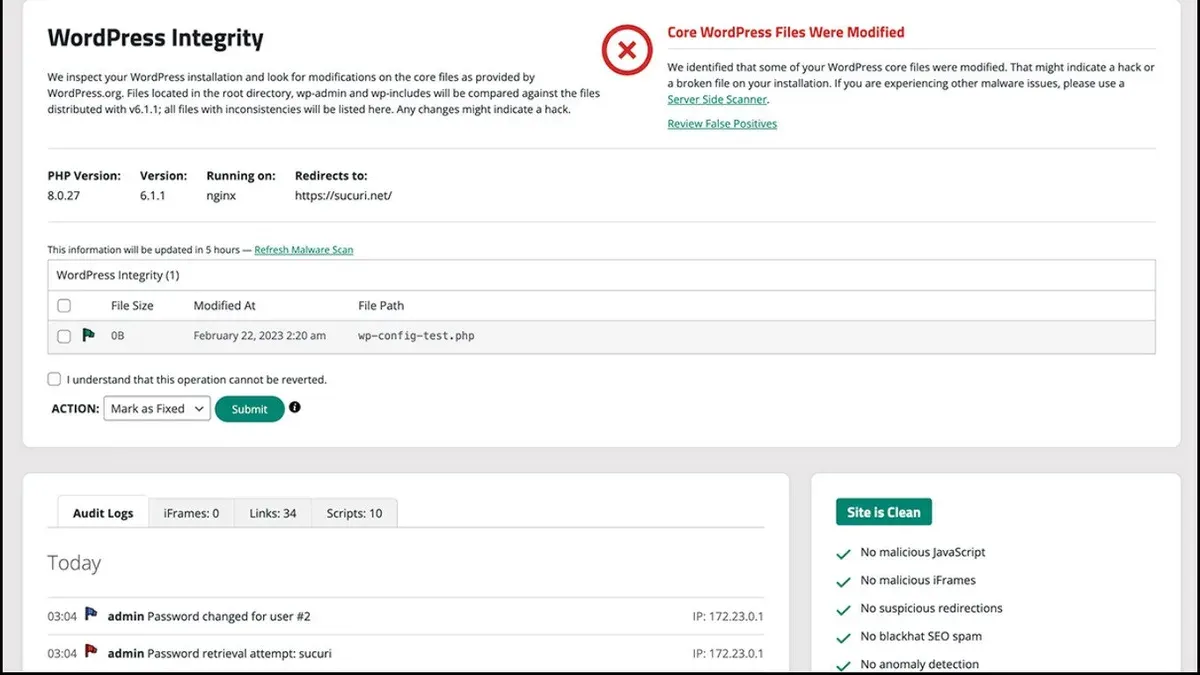
When assessing the user interface and ease of configuration of Sucuri and All In One WP Security, the experience varies significantly depending on the user's technical proficiency.
| Attribute | Sucuri | All In One WP Security |
|---|---|---|
| Setup wizard availability | Offers a simple setup wizard guiding users through basic firewall and security settings immediately after activation, ideal for novices. | No dedicated setup wizard; users must manually navigate to the “Security Strength” page under the dashboard to begin configuration, which can be daunting for beginners. |
| Dashboard clarity and navigation | Features a clean, minimal dashboard with clear tabs such as “Dashboard,” “Firewall,” “Malware Scan,” and “Settings,” enabling quick access to core functions. | Displays a more complex dashboard packed with various submenus like “User Accounts,” “Firewall Rules,” “Brute Force,” and “Database Security,” which may overwhelm new users but appeals to those seeking granular control. |
| Granularity of settings | Focuses on essential options with limited but impactful customization, such as enabling/disabling firewall rules and setting security levels, streamlining decision-making. | Offers highly granular settings, including adjustable brute force thresholds, detailed file permission controls, and extensive login lockdown options, suited for advanced users. |
| Documentation quality | Provides comprehensive, well-structured online documentation and video tutorials directly linked within the plugin, supporting both beginners and experienced users. | Includes extensive written documentation and community forums; however, the lack of official video guides and the sometimes technical language can present a barrier to novices. |
User testing feedback consistently highlights Sucuri’s intuitive UI as more accessible for non-technical WordPress owners. Novices appreciate the guided setup and uncluttered interface, reducing confusion during initial configuration.
Conversely, All In One WP Security is favored by developers and IT professionals who value control and customization, despite its steeper learning curve. The abundance of options requires more time to master, and screenshots from user forums illustrate dense menus that can be intimidating.
Tip: Users unfamiliar with WordPress security settings may find it helpful to start with Sucuri for its guided approach, while those comfortable with security concepts might prefer All In One WP Security for its detailed configuration.
Overall, Sucuri wins in ease of use and accessibility for beginners and intermediate users, whereas All In One WP Security suits expert users who prioritize deep customization over simplicity.
Performance impact on WordPress sites
Assessing the performance impact of Sucuri and All In One WP Security involves examining their effects on page load times, CPU and memory consumption, compatibility with caching solutions, and resource use during active scans or firewall events.
| Performance Metric | Sucuri | All In One WP Security |
|---|---|---|
| Page load time impact | Minimal increase, often under 0.1 seconds due to cloud-based firewall handling most filtering externally | Moderate increase, typically 0.2–0.4 seconds as security checks run locally |
| CPU usage on server | Low during normal operation; spikes during firewall rule updates handled offsite | Noticeable increase during scans and firewall activity, potentially up to 15% CPU load on shared hosting |
| Memory usage | Small footprint locally, most processes offloaded to cloud infrastructure | Higher local memory consumption, especially when enabling advanced features like login lockdowns and file integrity monitoring |
| Caching compatibility | Fully compatible with major caching plugins (e.g., WP Rocket, W3 Total Cache), no conflicts reported | Generally compatible but requires manual exclusions for firewall rules to avoid cache conflicts |
| Impact during active scans/firewall activity | Negligible impact on site speed; scanning performed on cloud servers | Significant temporary impact; scans and firewall checks can slow page responses during peak activity |
Sucuri’s cloud-based architecture means most resource-intensive tasks run offsite, minimizing load on the WordPress server and preserving site speed even during security operations. This model suits sites with limited server resources or higher traffic volumes. Conversely, All In One WP Security operates entirely within the WordPress environment, increasing server load and potentially slowing sites during scans or firewall enforcement, which can be impactful on shared hosting or lower-spec servers.
Tip: For All In One WP Security users, scheduling scans during off-peak hours and configuring caching exclusions in the plugin’s Firewall > Settings can reduce performance degradation.
Overall, Sucuri offers a lighter performance footprint with cloud-based processing, making it preferable for users prioritizing speed and minimal server resource use. All In One WP Security, while more demanding on local resources, provides robust protection suitable for technically adept users who can optimize server settings accordingly.
Pricing and value for different user types
Both Sucuri and All In One WP Security offer distinct pricing structures reflecting their target users and feature sets. Sucuri operates primarily on a subscription basis with tiered premium plans, while All In One WP Security is free to use, with no official premium upgrades.
| Feature | Sucuri | All In One WP Security |
|---|---|---|
| Basic Cost | Starts at approximately $199.99/year for the Basic plan | Free, open-source plugin |
| Premium Plans | Basic, Pro, Business tiers ranging from $199.99 to over $499.99/year | No premium tiers; all features included free |
| Included Features | Cloud-based firewall, malware removal, DDoS protection, uptime monitoring (varies by plan) | Local firewall, manual malware scanning, brute force protection, login lockdown |
| Renewal Policy | Annual subscription with automatic renewal; discounts may apply for multi-year plans | Free with ongoing community updates and support |
| Support | Professional 24/7 support included in paid plans | Community forums and documentation; no official support team |
For small blogs and hobby sites, All In One WP Security provides compelling value due to its zero cost and comprehensive local security features. However, the trade-off is a steeper learning curve and manual intervention for tasks like malware scanning and firewall tuning.
Agencies and developers managing multiple client sites may find Sucuri’s subscription model more cost-effective despite its upfront price. The automated cloud firewall, professional malware removal, and 24/7 support reduce maintenance overhead and security risks, justifying the investment for higher-risk or revenue-generating sites.
Enterprises with complex infrastructure and high traffic benefit from Sucuri’s Business tier, which offers advanced features such as DDoS mitigation and detailed security analytics. The ability to integrate seamlessly with hosting environments and receive prioritized support often outweighs the higher subscription cost.
Tip: When considering Sucuri’s plans, evaluate the expected traffic and security needs against the annual subscription to determine ROI, especially if uptime and automated protection reduce downtime costs.
Overall, All In One WP Security wins on upfront cost and accessibility for technically confident users and smaller sites, while Sucuri offers superior value for professional users and enterprises needing comprehensive, low-maintenance protection.
Support quality and community resources
Support and community resources play a crucial role in how effectively WordPress site owners can resolve security issues and optimize plugin use. Sucuri and All In One WP Security differ markedly in their official support channels, response times, and user community engagement.
| Aspect | Sucuri | All In One WP Security |
|---|---|---|
| Official support channels | 24/7 support via email ticket system, live chat during business hours, and phone support for premium plans | No official live support; relies on community forums and GitHub issues |
| Average response time | Typically within a few hours to 24 hours based on plan level; priority support for enterprise clients | Variable; community forum replies often take 1–3 days; no guaranteed turnaround |
| Community forums and tutorials | Active Sucuri community forums and knowledge base with official articles and videos | Large WordPress.org plugin support forum, supplemented by numerous third-party tutorials and user blogs |
| Issue resolution effectiveness | High, especially for subscribers; proactive malware removal and configuration assistance | Moderate; effectiveness depends heavily on community activity and user technical skill |
Sucuri’s official support is robust and accessible, particularly benefiting agencies and enterprise users who require fast, reliable assistance. The availability of phone support and live chat in addition to email tickets ensures users can address urgent concerns promptly. The company’s knowledge base and community forums offer structured resources that complement direct support.
Conversely, All In One WP Security lacks formal live support channels, relying primarily on the WordPress.org plugin support forum and a vibrant user community. This setup favors developers and experienced site owners comfortable troubleshooting with peer assistance. Many third-party tutorials, blog posts, and video guides fill gaps, but the absence of guaranteed response times can delay critical problem resolution.
Tip: Users with limited time or technical skills may find Sucuri’s dedicated support more effective, while technically proficient users who prefer self-service can benefit from All In One WP Security’s active community and extensive documentation.
Overall, Sucuri leads in support quality and responsiveness, making it the preferred choice for users prioritizing timely expert help. All In One WP Security serves well those who value free community-driven assistance and are comfortable with a less formal support structure.
Integration with other WordPress plugins and hosting environments
Both Sucuri and All In One WP Security plugins demonstrate compatibility with a broad range of popular WordPress plugins, but differences emerge depending on plugin type and hosting configurations.
| Plugin/Environment | Sucuri | All In One WP Security |
|---|---|---|
| Caching Plugins (e.g., WP Rocket, W3 Total Cache) | Seamless operation due to cloud-based firewall; caching handled at server edge, avoiding conflicts with local cache plugins. | Some reported conflicts with aggressive cache purging settings; requires manual exclusion rules in plugin settings to prevent false positives. |
| SEO Plugins (e.g., Yoast SEO, Rank Math) | No known conflicts; security features do not interfere with SEO metadata or sitemaps. | Generally compatible; advanced users may need to adjust firewall rules to avoid blocking legitimate SEO tools accessing site resources. |
| E-commerce Plugins (e.g., WooCommerce, Easy Digital Downloads) | Cloud firewall supports e-commerce well, including protection against common web attacks and bot traffic without disrupting checkout flows. | Local firewall rules require careful configuration to avoid blocking AJAX calls essential for cart and checkout functions; some users report initial setup complexity. |
| Hosting Environments (Shared, VPS, Managed WordPress) | Optimized for all major hosting types; cloud firewall offloads security processing, minimizing server load and compatibility issues. | Performance and compatibility vary; local scanning and firewall rules can strain shared hosting resources and may conflict with host-level security policies. |
| Multi-site Network Support | Supports WordPress multisite with centralized management via Sucuri dashboard; firewall settings apply network-wide. | Compatible with multisite but requires network admin to configure rules per site; lacks centralized interface for multisite security settings. |
Reports from user forums and plugin support channels indicate that Sucuri presents fewer integration hurdles due to its cloud-based architecture, which isolates security functions from local plugin and hosting configurations. All In One WP Security, while powerful, demands more manual tuning and technical understanding to maintain compatibility, especially in complex environments like multisite networks or e-commerce setups.
Tip: When using All In One WP Security with caching or e-commerce plugins, review firewall logs regularly to identify and whitelist legitimate traffic blocked by default rules.
Overall, Sucuri wins in integration flexibility and ease of use across diverse WordPress environments, making it more suitable for users seeking hassle-free compatibility. All In One WP Security appeals to technically proficient users who prefer local control and are willing to manage occasional conflicts.
Which should different WordPress users choose?
Choosing between Sucuri and All In One WP Security depends largely on the user’s technical skill, site size, and security priorities. The following decision matrix summarizes typical user scenarios alongside the strengths of each plugin in 2026.
| User Type | Key Needs | Sucuri Strengths | All In One WP Security Strengths | Recommended Option |
|---|---|---|---|---|
| Beginners and Small Blogs | Easy setup, affordable protection, minimal maintenance | Guided interface, cloud firewall reducing local load, automated malware removal | Free, local firewall, granular settings for users willing to learn | Sucuri is better for users wanting straightforward, low-maintenance security; All In One WP Security fits those comfortable with manual configuration and no cost. |
| Agencies Managing Multiple Sites | Scalable protection, centralized management, reliable support | Cloud-based firewall with centralized dashboard, priority support channels | Lacks built-in centralized management, community-based support | Sucuri excels for agencies needing consistent, automated protection and fast issue resolution. |
| High-Traffic or Enterprise Sites | Robust firewall, minimal performance impact, professional assistance | Advanced cloud firewall, low server impact, automatic threat mitigation | Local firewall increases resource use, manual tuning required to avoid conflicts | Sucuri is the preferred option due to scalability and professional support. |
| Users Considering Both or Alternatives | Maximizing protection layers, cost constraints, technical capacity | Can complement local plugins by offloading firewall and scanning to cloud | Provides in-depth local configuration and alerts not covered by cloud-only solutions | Combining Sucuri's cloud firewall with All In One WP Security's local controls is viable for technically skilled users seeking layered defense; otherwise, dedicated enterprise solutions may be preferable. |
Tip: For beginners, activating Sucuri's automatic malware removal and firewall is often the quickest way to secure a site, while more experienced users can customize All In One WP Security’s modules via its “User Login” and “Firewall” menu sections.
Further reading
- Solid Security vs MalCare: Which WordPress Security Plugin Fits Your Needs in 2026?
- Solid Security vs All In One WP Security: Which Protects WordPress Best in 2026?
- Solid Security Review 2026: Real-World Effectiveness for SMBs and Agencies
- MalCare Review 2026: In-Depth Security Performance and Alternatives
Frequently asked questions
Can Sucuri and All In One WP Security be used together safely?
Using both Sucuri and All In One WP Security simultaneously is generally safe but requires careful configuration to avoid overlapping features causing conflicts. For example, it is recommended to disable one plugin’s firewall if the other’s firewall is active to prevent blocking legitimate traffic. Site owners should monitor performance and error logs closely after enabling both plugins to ensure compatibility.
How often should malware scans be run with these plugins?
Malware scans are best scheduled weekly for typical WordPress sites using either plugin to maintain consistent protection. More frequent scans, such as daily, may be beneficial for high-traffic or high-risk sites. Both plugins allow configuring automatic scans via their respective settings panels to maintain regular checks without manual intervention.
Do these plugins affect SEO rankings due to site performance?
Both plugins have options to minimize performance impact, but excessive feature activation—especially firewalls and real-time scanning—can slightly affect page load times. Since site speed is a ranking factor, users should configure caching and resource usage settings carefully. Disabling unnecessary modules and testing site speed after setup helps prevent negative SEO consequences.
Which plugin offers better protection against brute force login attacks?
All In One WP Security has a more granular brute force protection module with configurable login attempt limits, lockout durations, and IP whitelisting directly within its Login Security section. Sucuri also protects against brute force but relies more on its cloud-based firewall to block attacks before reaching the site. For detailed login attempt controls, All In One WP Security provides more user-facing customization.
Limits of this comparison
This comparison focuses on general WordPress security needs and does not cover every niche security feature or custom enterprise deployments. Organizations with highly specialized security requirements, such as those handling regulated data or advanced threat models, should consult dedicated security professionals for tailored solutions beyond the scope of standard plugins.
Choosing between Sucuri and All In One WP Security depends on site size, technical expertise, and specific security priorities. The most useful next step is to perform a hands-on trial of each plugin’s free or demo versions, paying close attention to configuration workflows in the WordPress dashboard under their respective menu paths—"Sucuri Security" and "WP Security"—and testing core features like malware scanning and firewall rules. This practical evaluation helps identify which plugin aligns best with the site’s operational context and security goals, ensuring the chosen tool integrates smoothly without compromising performance or usability.