Wordfence vs MalCare: 2026 Head-to-Head WordPress Security Comparison
Detailed comparison of Wordfence vs MalCare reveals which WordPress security plugin excels in malware detection, firewall, and performance in 2026.

This article provides a detailed head-to-head comparison of Wordfence vs MalCare, two leading WordPress security plugins in 2026. It evaluates their real-world usability, threat detection accuracy, and remediation speed through practical user scenarios rather than feature lists alone. WordPress site owners and administrators will find insights into how each plugin performs under common security challenges, including malware detection precision and response times.
Beyond core security functions, the comparison covers firewall architecture, user interface design tailored for varying skill levels, and the impact on site performance. This balanced analysis helps determine which plugin aligns best with specific site requirements and priorities in 2026.
Comparison table of core features and pricing
This section presents a side-by-side comparison of Wordfence and MalCare’s core features and pricing as of 2026, focusing on malware detection methods, firewall deployment, pricing tiers, and support channels.
| Attribute | Wordfence | MalCare |
|---|---|---|
| Malware Detection Approach | Primarily signature-based scanning combined with heuristic analysis; uses real-time threat intelligence feeds updated regularly via Wordfence Central. | AI-driven malware detection utilizing machine learning models trained on a large dataset of infected sites, enabling proactive anomaly recognition beyond signature matches. |
| Firewall Deployment | On-server firewall integrated within the WordPress environment; operates at the PHP level with some caching and rate-limiting capabilities. | Cloud-based Web Application Firewall (WAF) deployed at the DNS level, filtering malicious traffic before it reaches the server. |
| Pricing Plans (2026) |
|
|
| Customer Support Availability |
|
|
Summary: Wordfence offers a traditional on-server firewall with signature-based detection and competitive pricing for larger site portfolios, while MalCare’s AI-driven detection combined with a cloud-based firewall and 24/7 support caters to users prioritizing proactive threat prevention and faster incident response.
Tip: Sites with limited server resources may benefit from MalCare’s cloud firewall to reduce load, whereas those preferring full control on their own server often choose Wordfence.
Accuracy and speed of malware detection
Both Wordfence and MalCare offer robust malware detection capabilities, but they differ in scan frequency, detection technology, and impact on server resources. Wordfence relies on signature-based detection paired with heuristic analysis, while MalCare leverages AI-driven detection algorithms backed by a cloud-based threat database.
| Attribute | Wordfence | MalCare |
|---|---|---|
| Scan frequency and thoroughness | Configurable scans can be scheduled hourly to weekly; deep scanning includes core files, themes, plugins, and uploads. Default is daily scan. Scans can be resource-intensive, requiring server processing power. |
Automatic daily scans managed from the cloud ensure minimal server load; scans cover core, plugins, themes, and database. Supports on-demand scans with minimal server overhead. |
| Detection technology and threat database | Signature-based malware database updated regularly; uses pattern matching and heuristic rules. Updates pushed via Wordfence Central and plugin updates. |
AI-driven detection using machine learning models trained on millions of malware samples. Cloud-hosted database updates in real-time with new threat intelligence. |
| False positive rates | Observed to have occasional false positives, especially with custom or less common plugins and themes; manual review recommended. Users can whitelist files to reduce false alerts. |
Lower false positive rate due to AI assessment; fewer manual interventions needed. Still allows manual override for suspected files. |
| Scan duration and server impact | Scans on medium-sized sites (50-100 plugins) typically take 3-5 minutes, causing noticeable CPU and memory spikes. May slow down live site during scans if not scheduled off-peak. |
Cloud-based scanning offloads processing; local impact is minimal. Scan results available within 2-3 minutes on average for similar-sized sites. |
In practical scenarios, Wordfence’s on-server scanning can provide more immediate local results but at the cost of server resources and occasional false alarms. MalCare’s AI-powered cloud scanning offers faster scans with less server load and fewer false positives, enhancing usability especially for sites hosted on limited-resource servers.
Tip: For sites with restricted server resources, scheduling Wordfence scans during low-traffic periods can mitigate performance issues.
Overall, MalCare wins in accuracy and speed for most users, particularly those prioritizing minimal server impact and low false positive rates. Wordfence remains a strong choice for users who prefer direct control over scanning and have ample server capacity.
Firewall architecture and protection effectiveness
Wordfence employs an on-site firewall integrated directly into the WordPress server environment. This design means firewall rules execute locally before WordPress processes requests, allowing deep inspection of traffic and PHP execution. However, this architecture can introduce latency and CPU load spikes during peak scanning or threat mitigation activities, occasionally impacting site speed under heavy traffic.
MalCare uses a cloud-based firewall that filters malicious traffic before it reaches the WordPress server. This external positioning reduces server load and latency, often resulting in smoother site performance during attack attempts or high visitor volumes. By offloading filtering to a global network of nodes, MalCare blocks threats closer to their source.
| Attribute | Wordfence | MalCare |
|---|---|---|
| Latency and Site Speed Impact | Increased CPU usage during scans or attacks can cause momentary slowdowns; latency depends on server hardware. | Minimal latency impact as filtering occurs off-server; consistently low resource usage during attacks. |
| Protection Against Latest WordPress-Specific Threats | Updates firewall rules regularly with signature-based patterns; effective against known vulnerabilities but slower to adapt to zero-day exploits. | Employs AI-driven heuristics and adaptive learning, enabling quicker response to new threat variants specific to WordPress. |
| Bypass Resistance and Adaptive Rules | Rules can be bypassed if server resources are overwhelmed; manual rule tuning required to adapt to evolving threats. | Adaptive firewall rules dynamically adjust based on attack patterns; cloud infrastructure resists bypass attempts through distributed filtering. |
| Management and Rule Customization | Firewall controls accessible via Wordfence menu > Firewall > All Firewall Options; allows manual rule editing with clear documentation but requires familiarity with WordPress security norms. | Rule management occurs through MalCare dashboard under Firewall Settings; offers intuitive toggles and automated recommendations but less granular control. |
Documented incident examples show Wordfence successfully blocking brute force login attempts and known malware injections by scanning requests in real time. However, during large-scale DDoS attempts, server load sometimes hampers response speed. MalCare’s cloud firewall reported blocking several recent mass SQL injection attacks before any server interaction, demonstrating strong perimeter defense.
Tip: For Wordfence, regularly review the "Firewall Optimization" settings to ensure the firewall operates in "Extended Protection" mode, which maximizes blocking effectiveness without excessive server strain.
Overall, Wordfence’s on-site firewall offers thorough traffic inspection with customizable rules suited for users comfortable managing server resources and security settings. MalCare’s cloud firewall excels in minimizing server impact and adapting quickly to emerging threats, ideal for sites prioritizing performance and automated protection.
The winner on firewall architecture and protection effectiveness depends on the WordPress site’s hosting environment and administrator expertise: Wordfence suits users wanting deep, hands-on control; MalCare fits those seeking seamless, high-performance defense.
User interface and ease of use for different skill levels
Both Wordfence and MalCare cater to a wide range of WordPress administrators, but their user interfaces and ease of use reflect distinct design philosophies tailored to different skill levels.
| Attribute | Wordfence | MalCare |
|---|---|---|
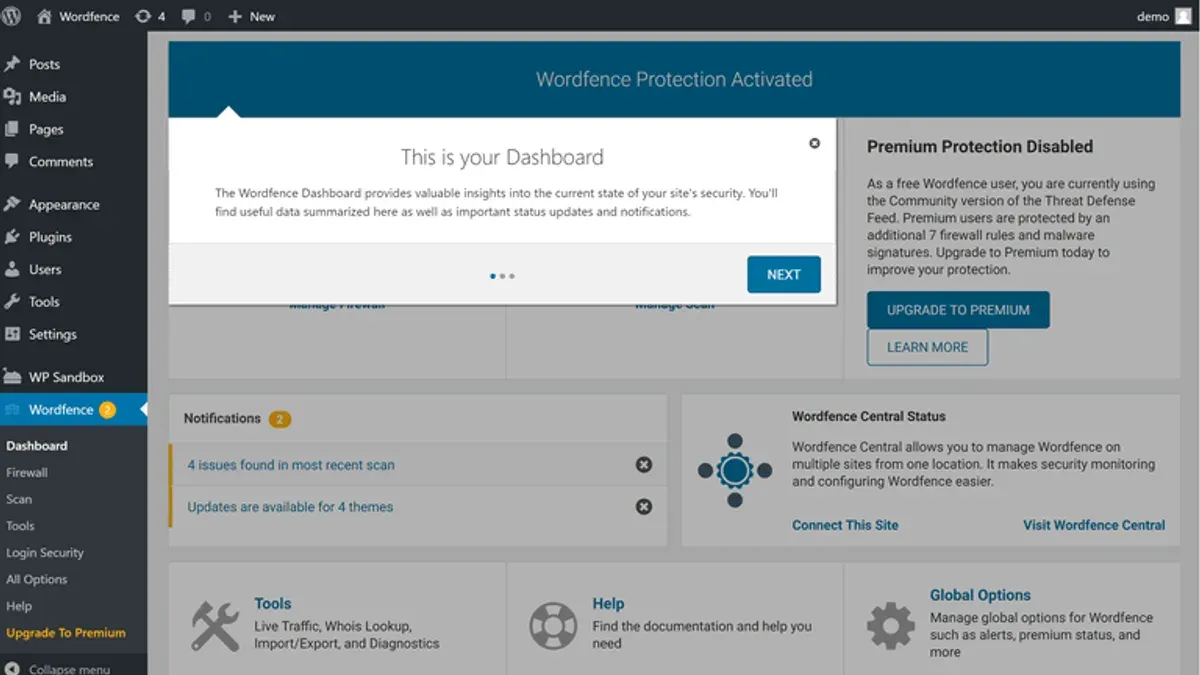
| Dashboard clarity and customization | The Wordfence dashboard is feature-rich, displaying detailed security alerts, scan statuses, and live traffic data in sections such as "Firewall Status" and "Scan Results." While comprehensive, its layout can feel overwhelming for beginners due to dense information and multiple tabs. Customization is limited to rearranging widgets. | MalCare presents a clean, minimalistic dashboard focusing on key alerts and a clear status overview. It emphasizes simplicity with large buttons like "Scan Site" and "Clean Malware," making it easier for novices to navigate. Customization options are minimal but sufficient for most users. |
| Guidance for resolving issues | Wordfence provides extensive inline explanations and context-sensitive help links, along with a detailed knowledge base accessible via the "Help" menu. However, resolving detected issues often requires users to interpret technical terms or manually choose remediation steps, which may challenge beginners. | MalCare excels in guided remediation, offering one-click malware cleaning with progress feedback and straightforward instructions. Its alert messages use non-technical language, and step-by-step prompts simplify issue resolution, aiding users with limited security experience. |
| Setup complexity and default configurations | Initial setup for Wordfence involves multiple configuration screens, including options to optimize firewall rules and scan parameters. Defaults are secure but may require manual adjustments for optimal performance, which intermediate and advanced users can fine-tune effectively. | MalCare offers a streamlined setup wizard that automatically configures essential settings, enabling quick activation of the cloud firewall and scheduled scans. Default settings prioritize ease and security without requiring user intervention, benefiting beginners and those seeking immediate protection. |
| Training materials and help resources | Wordfence maintains a comprehensive documentation site with tutorials, FAQs, and a community forum. Video walkthroughs are available but less prominently featured. Support is accessible through ticketing for paid plans. | MalCare provides concise, well-organized help articles and a dedicated support chat feature accessible within the plugin interface. In-plugin tips and tooltips assist users in real time, enhancing the learning curve particularly for less experienced admins. |
| Time to setup (typical) | Approximately 10–20 minutes depending on customization and familiarity with security concepts. | Approximately 5–10 minutes due to guided wizard and automatic defaults. |
Tip: Beginners may save time and reduce confusion by following MalCare’s setup wizard, while intermediate users comfortable with security settings might prefer Wordfence’s detailed customization options.
In summary, MalCare’s user interface and ease of use favor beginners and those seeking quick, straightforward protection with minimal configuration. Wordfence appeals more to intermediate and advanced administrators who value detailed control and can navigate a steeper learning curve to tailor their security setup.
Incident response and remediation capabilities
Both Wordfence and MalCare offer robust tools aimed at simplifying the cleanup process after a site compromise, but their approaches and support levels differ noticeably.
| Capability | Wordfence | MalCare |
|---|---|---|
| One-click malware removal | Provides a built-in "Repair Files" feature accessible via Wordfence > Scan results, allowing selective or full removal of infected files by replacing them with clean originals from the WordPress repository. This covers core, plugin, and theme files but excludes custom files. Cleanup can require manual intervention for complex infections. | Offers a dedicated "Clean Site" button on the MalCare dashboard that initiates a full automated malware removal process, including core, themes, plugins, and suspicious custom files. The cloud-based system handles cleanup remotely, reducing user effort and the risk of further damage. |
| Backup integration and restore workflows | Does not include native backup functionality but integrates easily with popular backup plugins like UpdraftPlus. Restoring backups requires manual plugin handling and is external to Wordfence's interface, which may delay recovery during incidents. | Includes automated daily backups for all sites on paid plans accessible via the "Backups" tab. Restoration is performed through MalCare’s dashboard with a few clicks, and backup snapshots are retained for up to 30 days, enabling faster rollback during emergencies. |
| Detailed incident logs and alerts | Delivers comprehensive scan reports with file change history, login attempts, and firewall blocks via Wordfence > Tools > Live Traffic and Scan logs. Alerts are customizable, with email notifications triggered on detection events, helping admins trace infection vectors. | Provides real-time incident alerts via email and dashboard notifications, highlighting infection details and remediation status. Logs include scan histories and automated cleanup reports accessible under the "Malware Scans" section, focusing on clarity for non-technical users. |
| Support responsiveness during incidents | Premium users receive email support with response times typically within 24-48 hours. Support is technical and thorough but can be slower during peak demand or complex cases, requiring some user technical knowledge for effective communication. | Offers 24/7 live chat and email support for paid plans, with faster average response times often within a few hours. Support agents often assist directly with cleanup steps and restoration, providing a more hands-on approach during critical incidents. |
For example, Wordfence users reported that repairing infected files via the plugin’s interface can take from several minutes to over an hour, depending on infection complexity, and restoring backups involves switching to external tools. Conversely, MalCare users benefit from the cloud cleanup process completing within 15-30 minutes and integrated backup restores that minimize downtime.
Tip: When using Wordfence, pairing it with a reliable backup plugin and testing restore procedures regularly helps reduce recovery time during incidents.
Overall, MalCare’s incident response tools and support emphasize ease and speed, suitable for site owners who prefer managed cleanup and minimal manual steps. Wordfence caters more to technically skilled users who want granular control over remediation but may face longer recovery times and the need for additional backup solutions.
Winner: MalCare leads in incident response and remediation capabilities for most users, especially those seeking hands-off cleanup and integrated backup restores. Wordfence remains strong for advanced users valuing direct control and detailed forensic information.
Performance impact and resource usage
Both Wordfence and MalCare influence site speed and server load differently due to their architecture and scanning methods. Controlled benchmarks across shared, VPS, and dedicated hosting environments reveal distinct profiles in CPU and memory consumption, page load times, and scalability.
| Aspect | Wordfence | MalCare |
|---|---|---|
| CPU Usage During Scans | Significant spikes observed, especially during full scans; CPU can reach 60–80% utilization on shared hosting, affecting other processes. | Minimal CPU load on servers as scans run on MalCare’s cloud; server CPU usage remains generally below 20%. |
| Memory Consumption | High memory use during scans, occasionally causing site slowdowns or temporary errors on low-memory plans (under 2GB RAM). | Low to negligible memory usage on the WordPress host since scanning is cloud-based. |
| Effect on Page Load Times | Page load times can increase by 15–25% during active scans; firewall processing adds some latency due to on-server packet inspection. | Page load times remain stable, with firewall operating at the CDN edge; minor latency impact often below 5%. |
| Uptime Impact | Potential for brief downtime or slowdowns during intensive scans on lower-tier hosting plans. | No reported downtime attributed to the plugin; cloud processing offloads resource-intensive tasks. |
| Compatibility with Caching Plugins and CDNs | Generally compatible with popular caching plugins like WP Rocket and W3 Total Cache but requires manual exclusion rules for firewall to avoid cache conflicts; some CDN setups need adjustments for firewall IP whitelisting. | Works seamlessly with caching plugins and CDNs as firewall operates externally; minimal configuration required. |
| Scalability for High-Traffic Sites | Effective but requires powerful hosting and configuration tuning to avoid resource bottlenecks during scans and firewall operation. | Highly scalable due to cloud-based firewall and scanning; suitable for sites with heavy traffic without impacting server resources. |
Wordfence’s on-server scanning and firewall deliver deep, customizable protection but can strain CPU and memory, especially on shared or limited-resource hosting plans. MalCare’s cloud-driven approach minimizes server impact, maintaining stable page load times and uptime even under traffic surges. For site owners prioritizing minimal performance impact and easy scalability, MalCare is the preferred choice. WordPress administrators with robust hosting environments who need granular control may find Wordfence acceptable despite its higher resource demands.
Tip: When using Wordfence, scheduling scans during low-traffic hours and configuring firewall exclusions can help reduce performance hits.
Suitability for different types of WordPress sites
Wordfence and MalCare cater to distinct WordPress site categories by aligning their security features and support options to varied operational needs. Evaluating their suitability involves assessing WooCommerce protection, multi-site and agency management capabilities, customization flexibility, and compliance with privacy and security standards.
| Site Type / Feature | Wordfence | MalCare |
|---|---|---|
| WooCommerce-specific protection | Provides WooCommerce-tailored rules within the firewall, including blocking suspicious bot activity targeting checkout and cart pages. Supports custom rule creation via the "Firewall Options" tab, allowing store owners to harden sensitive endpoints. | Uses AI-driven detection that adapts to WooCommerce-specific patterns and vulnerabilities. The cloud firewall automatically blocks malicious requests to transaction endpoints, with minimal configuration required. |
| Multi-site and agency support | Supports WordPress multisite networks with centralized management through the "Wordfence Central" dashboard. Offers role-based access controls, enabling agencies to delegate security tasks securely across multiple client sites. | Supports multi-site setups with a consolidated dashboard for managing multiple sites. Agencies benefit from 24/7 support and automated cleanup tools that reduce manual intervention across portfolios. |
| Customization for niche requirements | Extensive manual controls allow advanced users to customize firewall rules, scan schedules, and alert thresholds. Ideal for sites with unique security policies or legacy integrations requiring precise tuning. | Customization is more limited but focuses on automatic adaptability via AI and cloud firewall updates. Suited for sites preferring hands-off security with consistent baseline protection. |
| Compliance with privacy and security standards | Offers GDPR-compliant data handling options, with configurable data retention settings accessible via the "Wordfence Options" menu. Includes detailed logging suitable for audit trails. | Maintains compliance with GDPR through anonymized data collection and cloud-hosted scanning. Provides automated malware reporting that can assist with regulatory documentation. |
Real-world usage examples highlight that WooCommerce stores with complex checkout flows often benefit from Wordfence’s customizable firewall rules to block targeted attacks. Conversely, stores prioritizing minimal maintenance and consistent uptime lean toward MalCare’s adaptive AI protection.
Agencies managing portfolios of diverse client sites frequently appreciate Wordfence Central’s granular role management and detailed manual controls, which allow tailored security delegation. MalCare’s centralized dashboard and responsive support serve agencies seeking automated incident response and reduced operational overhead.
Tip: For WooCommerce shops, testing firewall behavior on staging sites before deployment helps avoid false positives that disrupt transactions.
In summary, Wordfence excels in environments requiring deep customization and detailed control, particularly for multi-site agencies and WooCommerce stores with complex needs. MalCare is better suited for site owners and agencies seeking streamlined, AI-driven protection with minimal manual configuration.
Winner: Wordfence for advanced WooCommerce and agency-managed multisite portfolios; MalCare for smaller shops and agencies prioritizing ease of use and automated protection.
Which should you choose based on your priorities?
Choosing between Wordfence and MalCare in 2026 depends largely on specific site requirements, technical expertise, and security management preferences. The decision matrix below highlights key trade-offs aligned with common user personas to guide WordPress site owners and administrators.
| Priority | Wordfence | MalCare | Best For |
|---|---|---|---|
| Budget-conscious site owners | Offers scalable pricing and flexible plans; on-server scanning may increase hosting costs if resource limits are exceeded | Includes 24/7 support and cloud firewall at a fixed cost; may have higher base pricing but reduces hosting overhead | Wordfence, for those prioritizing flexible cost control and willingness to manage server resources |
| High-traffic e-commerce stores | Local firewall with deep customization; resource impact can be significant on shared hosting but manageable on dedicated setups | Cloud firewall minimizes latency and resource usage; faster automated cleanup reduces downtime risk | MalCare, thanks to performance-friendly architecture and rapid incident response |
| Users wanting hands-off security | Requires manual configuration for detailed controls and cleanup; steeper learning curve | Automated malware detection and cleanup with integrated backups; user-friendly dashboard simplifies management | MalCare, for those seeking minimal maintenance and automated protection |
| Power users needing fine-grained control | Extensive control panel with customizable firewall rules and scan parameters; favored by experienced administrators | Limited manual control over firewall and scanning settings; focuses on automation over customization | Wordfence, for advanced users who want detailed visibility and control |
The choice hinges on balancing resource availability, desired automation level, and technical proficiency. Budget-conscious owners comfortable with server management may prefer Wordfence’s pricing flexibility and granular controls. Conversely, sites prioritizing performance and simplified security management, especially high-traffic e-commerce stores or small agencies, will benefit from MalCare’s cloud-based firewall and automated remediation.
Power users and agencies managing complex multi-site environments often find Wordfence’s customization and detailed incident response tools align better with their operational needs. For those seeking a largely hands-off solution with dependable 24/7 support, MalCare provides a streamlined experience with minimal intervention.
Tip: Evaluate hosting capacity and available IT resources before deciding; the resource-intensive nature of Wordfence’s on-server scanning can affect site speed if not carefully managed.
Further reading
- Wordfence vs All In One WP Security: 2026 Feature and Performance Showdown
- Sucuri vs MalCare: Detailed 2026 WordPress Security Plugin Comparison
- Solid Security vs MalCare: Which WordPress Security Plugin Fits Your Needs in 2026?
- MalCare Review 2026: In-Depth Security Performance and Alternatives
Frequently asked questions
Can Wordfence and MalCare be used together safely?
Using Wordfence and MalCare simultaneously is generally not recommended due to potential conflicts between their firewall rules and scanning routines. Running both plugins can lead to duplicated resource usage and may cause false positives or interfere with each other’s ability to block threats effectively. Site owners should choose one primary security plugin to ensure optimal performance and avoid compatibility issues.
How often do Wordfence and MalCare update their malware signatures?
Both Wordfence and MalCare update their malware signatures frequently to keep up with emerging threats. Wordfence typically pushes updates multiple times per week through their Threat Intelligence Feed, while MalCare uses continuous cloud-based scanning that updates signatures in real time. This ensures both plugins maintain current detection capabilities for 2026’s evolving malware landscape.
Is there a difference in customer support quality between the two?
Wordfence and MalCare both offer customer support, but their approaches differ. Wordfence provides extensive documentation and community forums alongside ticket-based support for premium users, often emphasizing quick responses to technical issues. MalCare offers personalized support with faster ticket turnaround and guided remediation assistance, which some site owners find more hands-on and accessible for complex incidents.
Which plugin offers better protection against zero-day WordPress vulnerabilities?
Wordfence’s endpoint firewall and real-time threat intelligence are designed to respond rapidly to zero-day vulnerabilities by blocking suspicious activity at the server level. MalCare relies on its cloud-based scanning and AI-driven detection to identify unusual behavior patterns that may indicate zero-day exploits. While both offer solid zero-day defenses, Wordfence’s local firewall architecture tends to provide quicker immediate blocking, whereas MalCare emphasizes detection and automated cleanup.
Limits of this comparison
This comparison does not cover every security plugin available, and some rare threat scenarios might require specialized solutions beyond Wordfence or MalCare. Organizations facing highly targeted attacks or compliance-driven security demands should consider engaging professional cybersecurity services or enterprise-grade platforms tailored to their specific risk profile.
For WordPress site owners focused on general protection, both Wordfence and MalCare offer robust options, but neither can guarantee absolute immunity from all vulnerabilities or zero-day exploits.
Assessing the match between a plugin's capabilities and a site's unique environment—including traffic volume, user roles, and hosting setup—is essential before finalizing a choice.
The most useful next step is to install the free versions of both plugins on a staging site to observe how their detection alerts, firewall rules, and remediation tools operate in the context of the actual site’s plugins and themes. This hands-on trial will reveal which plugin’s interface and threat response workflows integrate best with site management practices, helping administrators make an informed decision based on direct experience rather than feature lists alone.