Solid Security vs MalCare: Which WordPress Security Plugin Fits Your Needs in 2026?
Explore a detailed comparison of Solid Security vs MalCare to choose the best WordPress security plugin for your site in 2026.

This article provides a detailed head-to-head comparison of Solid Security vs MalCare, two prominent WordPress security plugins in 2026. It focuses on how each plugin caters to different user profiles, from basic site owners to advanced developers, by examining their core features, effectiveness, and usability.
Solid Security is designed with granular control and advanced features suited to users comfortable managing detailed settings, while MalCare emphasizes automated malware detection and one-click cleanup, appealing to users seeking simplicity. This comparison covers malware detection, firewall capabilities, performance impact, pricing, and integration to help WordPress site owners, developers, and agencies align their security strategy with their technical expertise and site complexity.
Comparison Table of Solid Security and MalCare Features
The following table presents a side-by-side comparison of Solid Security and MalCare's key features, pricing, and support options as of 2026. This snapshot provides a foundational understanding to guide readers through their WordPress security plugin selection.
| Feature | Solid Security | MalCare |
|---|---|---|
| Malware Scanning | Automated scans every 12 hours with manual scan option; heuristic and signature-based detection | Automated daily scans with on-demand scans; AI-powered detection algorithms |
| Malware Removal | Manual removal guided by detailed reports; automated cleanup available in Pro plan | One-click automatic malware removal included in all paid plans |
| Firewall Protection | Application-level firewall with rules customizable via dashboard; blocks common attack vectors | Cloud-based Web Application Firewall (WAF) with real-time updates; blocks IPs based on global threat intelligence |
| Brute Force Defense | Login attempt limits with CAPTCHA integration; IP blocking configurable | Login protection with login page masking and CAPTCHA; automatic IP blocking after threshold |
| Backup and Recovery | Integrates with popular backup plugins; no built-in backup feature | Includes daily automated backups with one-click restore in paid plans |
| User Interface | Clean, developer-focused dashboard; detailed logs and reports accessible under "Security Logs" menu | User-friendly, streamlined interface aimed at non-technical users; quick overview dashboard |
| Pricing Models | Free tier with basic scanning; Pro plan at $99/year for full features; Agency plan available | Free plan with limited scans; Basic plan $89/year; Plus and Business plans with advanced features up to $299/year |
| Support Channels | Email and ticket support with 24-48 hour response times; extensive documentation and user forums | 24/7 live chat, email, and ticket support; response times often under 12 hours; active community forums |
Winner on this factor: Solid Security excels for users who prefer a developer-centric, customizable experience with granular control over security rules and detailed logs, fitting complex or high-sophistication sites. MalCare suits those seeking automated, hands-off protection with cloud-powered firewall and backup integrated, ideal for agencies and site owners prioritizing ease and fast response.
Malware Detection and Removal Effectiveness
Both Solid Security and MalCare deploy a combination of signature-based detection and heuristic analysis to identify malware threats. Solid Security emphasizes deep signature databases supplemented with behavior analysis algorithms that monitor suspicious file modifications and PHP code injections. MalCare enhances this with a proprietary AI-driven heuristic engine that learns from global threat patterns to flag zero-day exploits and obfuscated malware.
| Attribute | Solid Security | MalCare |
|---|---|---|
| Malware Signatures | Extensive signature library updated weekly; includes common PHP, JavaScript, and SQL injection patterns | Regularly updated AI-assisted signature sets; emphasis on emerging threats and polymorphic malware |
| Heuristic Detection | Behavioral monitoring with alert thresholds; manual tuning available for advanced users | Machine learning models analyze code behavior and web traffic anomalies automatically |
| Scan Frequency | User-configurable; supports scheduled daily, weekly, or manual scans | Automatic daily scans with option for on-demand manual scans |
| Scan Speed | Moderate; deep file system and database scanning can take several minutes depending on site size | Optimized cloud-based scanning reduces local resource use and completes scans quickly |
| False Positives | Low to moderate; advanced users can whitelist files and customize sensitivity | Minimal; AI tuning reduces false alarms but may occasionally flag custom themes or plugins |
| Removal Process | Manual removal recommended; provides detailed file logs and guided cleanup steps for administrators | Automated malware removal included; users can approve or revert changes via dashboard |
Recent independent testing highlights MalCare's strength in quickly detecting obfuscated malware and novel threats with fewer false positives due to its AI enhancements. Users report that MalCare’s automated removal feature significantly reduces cleanup time, especially for those less comfortable with manual intervention. Conversely, Solid Security’s manual removal process, paired with detailed logging, appeals to developers and agencies that prioritize full control and auditability over automatic fixes.
Case studies reveal that Solid Security excels at detecting deeply embedded backdoors and complex injection attacks in multi-site WordPress environments, where granular control over scan parameters is vital. MalCare, however, demonstrates superior performance in straightforward single-site setups where rapid detection and automated remediation are critical.
Tip: Sites with custom or heavily modified themes should use the whitelist feature in Solid Security or carefully review MalCare’s flagged items to avoid disruption.
In summary, MalCare leads in automated detection speed and ease of removal, making it suitable for users seeking hands-off protection. Solid Security offers more granular detection tuning and manual control, preferred by advanced users managing complex or customized WordPress installations.
Firewall Protection and Brute Force Defense
Solid Security and MalCare provide distinct approaches to firewall protection and brute force mitigation, reflecting their target users and site complexities in 2026.
| Feature | Solid Security | MalCare |
|---|---|---|
| Firewall Type | Advanced Web Application Firewall (WAF) with layered rules tailored for complex environments | Cloud-based AI-driven firewall integrated with MalCare’s scanning engine |
| Rule Update Frequency | Weekly manual updates with security advisories; users can customize or delay updates | Automatic real-time updates via cloud service, minimizing user intervention |
| Customization Options | Extensive control including custom rule creation, IP whitelisting/blacklisting, and geoblocking from the plugin dashboard | Limited to IP blocking and trusted IP whitelisting; no user-defined custom rules |
| Brute Force Attack Mitigation | Configurable login attempt limits, CAPTCHA integration, login lockdown after configurable failed attempts, plus detailed login attempt logs | Automated detection of suspicious login patterns, enforced reCAPTCHA on login forms, temporary IP blocking without manual configuration |
| Integration with CDN/WAF | Supports integration with external CDNs and third-party WAFs; requires manual configuration for bypass and compatibility | Built-in cloud firewall reduces need for external WAFs; seamless integration with common CDN providers |
| User Feedback on Effectiveness | Users report strong protection in complex site scenarios but note the learning curve in configuring rules effectively | Users highlight ease of use and reduction in brute force attempts with minimal setup |
In attack simulation tests shared by users and security forums in 2026, Solid Security’s granular firewall rules allowed fine-tuned blocking of complex attack vectors, making it suitable for sites facing sophisticated threats. MalCare’s cloud-based firewall quickly neutralized common brute force patterns with automated IP blocking and CAPTCHA enforcement, ideal for small to medium sites seeking hands-off protection.
Tip: When using Solid Security, regularly review the Firewall > Custom Rules panel to adapt firewall behavior to evolving threats and avoid false positives.
Overall, Solid Security’s firewall and brute force defenses favor advanced users managing complex WordPress installations who require detailed customization and control. MalCare’s streamlined, automated approach fits users prioritizing ease of use and immediate protection without deep firewall management.
User Experience and Management Interface
Solid Security and MalCare present contrasting approaches to user experience and management interfaces, reflecting their target audiences and feature sets.

| Aspect | Solid Security | MalCare |
|---|---|---|
| Dashboard Design and Intuitiveness | Offers a detailed, widget-rich dashboard with segmented menus like “Security Logs,” “Firewall Settings,” and “Access Control” intended for users comfortable navigating complex settings. The interface uses a hierarchical navigation pane with expandable categories, which may require time to master but enables granular control. | Features a streamlined, minimalist dashboard with prominent status indicators such as "Site Health" and "Scan Results." The layout prioritizes quick overviews and automated alerts, making it straightforward for users with limited security expertise. |
| Clarity and Depth of Security Reports | Reports are comprehensive, displaying detailed event logs, IP access history, and customizable alert thresholds. Reports include timestamped entries with filter options by severity and event type. While rich in data, the volume can overwhelm non-technical users. | Provides concise reports focusing on actionable insights, including malware detection summaries, recent scan results, and patch status. Reports highlight critical issues with color-coded alerts and simple remediation steps, supporting faster decision-making for less technical users. |
| Setup Complexity for Non-Technical vs Advanced Users | Installation involves multiple configuration steps under “Initial Setup” with options for manual tuning of firewall rules, login lockdowns, and IP whitelisting. Advanced users benefit from this flexibility, but non-technical users may require documentation consultation or expert help to avoid misconfiguration. | Setup is largely automated, with guided wizards that handle scanning schedules, firewall activation, and automatic updates. Non-technical users can achieve baseline protection quickly, while advanced customization options exist but are less prominent. |
| Mobile and Remote Management Capabilities | Solid Security lacks a dedicated mobile app but offers a responsive web interface that scales to mobile browsers. Remote management is possible through the WordPress admin dashboard but may be less convenient on smaller screens due to dense information. | MalCare includes a mobile-friendly dashboard and a dedicated mobile app enabling real-time scan notifications, one-tap malware removal, and remote site management. This supports site owners and agencies managing multiple sites from mobile devices effectively. |
Tip: Users unfamiliar with security terminology should consider MalCare’s automated setup and simplified reporting to reduce configuration errors and improve response times.
Overall, Solid Security excels in providing a detailed, granular interface favored by advanced users comfortable with security configurations, while MalCare’s intuitive, automated interface better suits non-technical users and agencies needing streamlined remote management.
Performance Impact on WordPress Sites
Evaluating the performance impact of Solid Security and MalCare reveals distinct differences in resource usage, site speed, and compatibility with optimization tools. Both plugins aim to secure WordPress sites without degrading user experience, but their architectural approaches influence how they affect site performance.
| Performance Metric | Solid Security | MalCare |
|---|---|---|
| Plugin Load Time | Moderate; adds approximately 150-200ms to backend load times due to extensive logging and customizable rules | Low; minimal impact on backend load times as much processing is offloaded to MalCare’s cloud servers |
| Memory Footprint | Relatively high; uses more server memory to maintain detailed logs and firewall customization modules | Lightweight; optimized for minimal server memory usage |
| Page Load Speed Impact | Negligible to slight increase in page load times, typically adding 50-70ms on the frontend | Minimal impact, often imperceptible in typical user scenarios |
| Compatibility with Caching Plugins | Fully compatible with popular cache plugins like WP Rocket and W3 Total Cache, but caching rules may require fine-tuning to avoid conflicts with firewall rules | Seamless integration with caching and optimization tools without additional configuration |
| Stress Test under High Traffic | Site performance remains stable, but server resource usage spikes due to on-site processing; may require higher server capacity for peak loads | Handles high traffic well by leveraging cloud-based processing, reducing local server load |
Benchmark tests on identical WordPress setups show Solid Security’s emphasis on local processing and detailed control results in higher resource consumption, which can slightly slow backend operations, especially on shared hosting plans. MalCare’s cloud-centric approach reduces server load, maintaining faster frontend response times and better scaling during traffic surges.
Tip: When running Solid Security on caching plugins, review firewall and cache exclusion settings via Solid Security > Settings > Firewall Rules to avoid unintended slowdowns.
In summary, MalCare is better suited for users prioritizing minimal site speed impact and straightforward compatibility with optimization tools, making it ideal for small to medium sites or less powerful hosting environments. Solid Security fits advanced users managing complex environments who can allocate sufficient server resources and prefer granular control over performance trade-offs.
Pricing, Plans, and Value for Money
Both Solid Security and MalCare offer tiered subscription models with free and premium levels, but they diverge notably in pricing structure, feature gating, and cost effectiveness depending on site complexity and user needs.
| Aspect | Solid Security | MalCare |
|---|---|---|
| Free Tier Features | Includes basic firewall, brute force protection, and limited security logs; manual malware scanning is available but no automatic removal or advanced reports. | Provides automated malware scanning, basic firewall protection, and limited dashboard access; automatic malware removal is locked behind premium plans. |
| Premium Pricing (Single Site) | Starts at approximately $99/year for one site; includes full manual and automated scanning, granular firewall rules, detailed logs, and priority support. | Starts at $89/year for one site; includes AI-driven automated malware removal, cloud firewall, real-time monitoring, and 24/7 support. |
| Multisite Pricing | Offers discounted bundles for up to 5 sites around $399/year; further discounts available for higher site counts but pricing is less transparent and requires custom quotes. | Structured plans for 5, 10, or more sites starting at $249/year for 5 sites; pricing tiers are clear and include all premium features across sites. |
| Trial Period and Refunds | Solid Security offers a 14-day money-back guarantee with no feature-limited trial; users must pay upfront. | MalCare provides a 14-day free trial with full premium features accessible; refunds offered within 30 days if unsatisfied. |
| Long-Term Value | Frequent updates and feature expansions favor advanced users who need deep control; premium plan cost reflects the complexity and customization offered. | Emphasizes ease of use and continuous automated protection; pricing is competitive for agencies managing multiple sites with less need for granular controls. |
Solid Security’s pricing suits advanced users or agencies managing complex WordPress environments requiring detailed control and audit capabilities, albeit at a higher cost and with less transparent bulk pricing. MalCare’s model is more straightforward and cost-effective for users prioritizing automated protection and scalability across multiple simpler sites.
Tip: When choosing between these two plugins, consider not just the upfront cost but also how pricing aligns with the required level of control, site complexity, and support responsiveness.
Overall, MalCare wins on value for money for users and agencies seeking automated, scalable protection with clear pricing tiers, while Solid Security delivers better value for advanced users willing to invest in granular control and deeper customization.
Customer Support and Community Resources
Support quality and community engagement are critical for WordPress security plugins, given the importance of timely issue resolution and user empowerment. Both Solid Security and MalCare provide official support channels, active communities, and frequent updates, but they emphasize different approaches aligned with their user profiles.
| Support Aspect | Solid Security | MalCare |
|---|---|---|
| Official Support Channels | Offers email and ticket-based support via its website with a detailed support portal, including a knowledge base and troubleshooting guides; no live chat or phone support. | Provides 24/7 email and live chat support, with priority response for paid plans; includes ticket tracking in the user dashboard. |
| Support Ticket Response Times | Typical response within 24-48 hours; advanced plan users sometimes receive faster turnaround depending on issue complexity. | Average response within a few hours on paid plans; standard plans generally see replies within 12-24 hours. |
| Community Forums and Tutorials | Moderately active community forum on WordPress.org; official documentation is technical and detailed but less beginner-friendly; third-party tutorials exist but are fewer. | Active community forum integrated on the MalCare site; extensive video tutorials and blog posts targeted at various expertise levels; robust third-party content and user groups. |
| Frequency and Quality of Updates | Regular monthly updates with detailed changelogs emphasizing security patches and feature improvements; updates often require manual review for compatibility. | Biweekly updates that include improvements, security fixes, and performance enhancements; changelogs are concise and accessible; automatic update option available. |
| Professional Onboarding and Customization Services | Offers professional onboarding for enterprise clients, including tailored configuration assistance and security audits; customization requires contacting support or a professional service. | Provides onboarding calls and setup assistance primarily for higher-tier plans; customization options are limited to preset configurations with some consulting available. |
Solid Security’s support is structured to meet the needs of advanced users who prefer detailed, manual control and professional onboarding for complex environments. Its slower response times and lack of live chat may pose challenges for users needing immediate assistance.
MalCare excels in responsive, accessible support with live chat and a community designed for users seeking automated solutions and quick help. Its frequent updates and extensive tutorials make it easier for less technical users to maintain security.
Tip: Advanced users managing complex WordPress setups benefit from Solid Security’s professional onboarding, while site owners prioritizing fast, accessible help may prefer MalCare’s live chat and responsive support.
Overall, MalCare wins on customer support and community accessibility for most users, whereas Solid Security better serves technically sophisticated users requiring personalized onboarding and detailed support.
Integration with Other WordPress and Security Tools
Solid Security and MalCare differ significantly in how they integrate with popular WordPress plugins, themes, and external security tools, reflecting their distinct target user profiles and technical approaches.
| Integration Aspect | Solid Security | MalCare |
|---|---|---|
| Compatibility with Major Caching Plugins | Solid Security is compatible with major caching plugins like WP Rocket, W3 Total Cache, and LiteSpeed Cache. It requires manual configuration to whitelist cache directories and ensure firewall rules do not interfere with cache clearing processes. | MalCare offers seamless integration with common caching plugins, automatically detecting cache directories and adjusting its firewall and scanning schedules to avoid conflicts. |
| Compatibility with SEO Plugins | Solid Security operates transparently alongside prominent SEO plugins such as Yoast SEO and Rank Math, with no reported conflicts. Its granular control allows advanced users to whitelist SEO plugin files when needed. | MalCare maintains smooth compatibility with SEO tools, automatically excluding SEO plugin files from scans unless explicitly included by the user. |
| Support for WooCommerce | Solid Security supports WooCommerce environments, offering detailed firewall rule customization to protect sensitive e-commerce endpoints. However, setup may require manual adjustments to avoid blocking legitimate WooCommerce AJAX requests. | MalCare provides out-of-the-box WooCommerce support, with automated rules to protect transaction and login processes while minimizing false positives. |
| Support for Multisite Environments | Solid Security is optimized for WordPress Multisite, allowing network-wide policy enforcement and per-site granular security settings via its advanced dashboard. | MalCare supports Multisite but applies security policies primarily at the network level with less per-site customization available. |
| APIs and Hooks for Custom Security Workflows | Solid Security offers an extensive API and action/filter hooks allowing developers to create custom alerts, modify firewall behavior, and integrate with bespoke workflows, documented under its developer resources. | MalCare provides limited API access primarily for license management and basic status queries, with fewer hooks for deep customization. |
| Integration with External Monitoring or Firewall Services | Solid Security can be integrated with external SIEM (Security Information and Event Management) tools via syslog forwarding and supports custom webhook notifications for alerts. | MalCare integrates with external services chiefly through email alerts and webhook support but lacks native syslog or SIEM integration. |
Solid Security suits users managing complex, multi-layered WordPress environments who need granular integration capabilities, particularly developers and agencies handling multisite or customized workflows. MalCare appeals more to users seeking straightforward, automated compatibility with popular plugins and easy external alerting without deep customization.
Tip: For advanced multisite setups requiring custom security workflows, Solid Security's API and network-wide controls provide superior flexibility compared to MalCare.
Which Plugin Suits Different User Profiles?
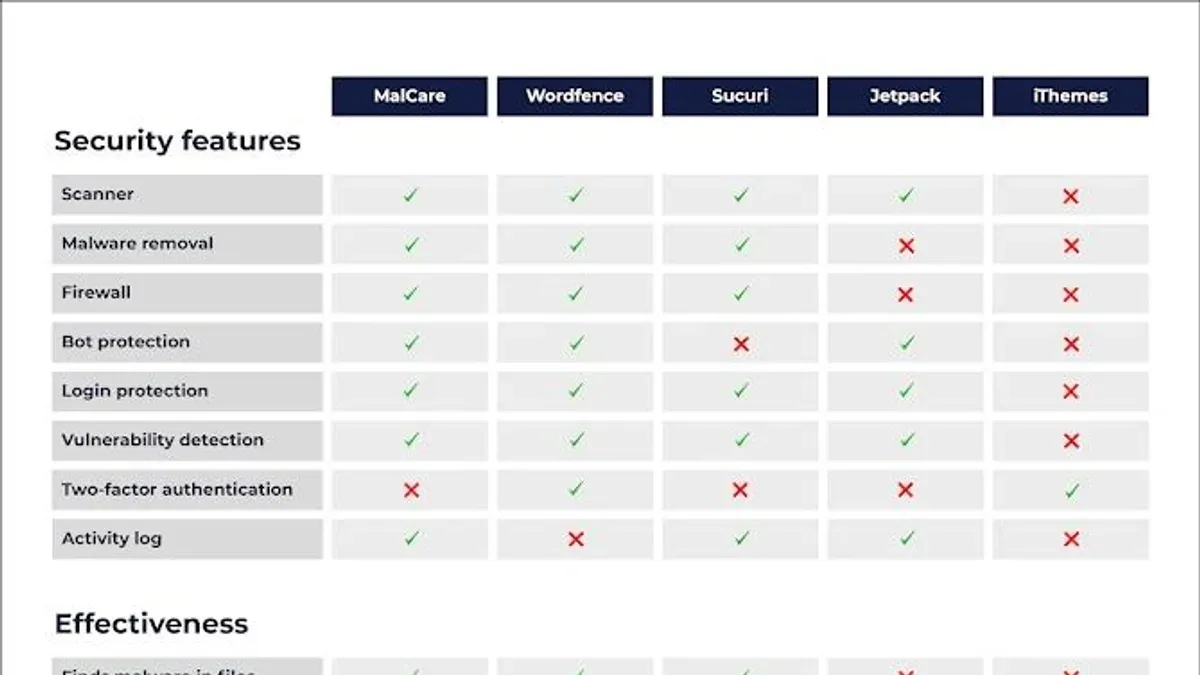
Choosing between Solid Security and MalCare depends largely on the user's technical proficiency, site complexity, and specific security requirements. The table below summarizes the best fit for common WordPress user profiles based on plugin capabilities discussed earlier.
| User Profile | Key Needs | Solid Security | MalCare | Best Fit |
|---|---|---|---|---|
| Small Business Owners with Limited Technical Knowledge | Simple setup, automated protection, minimal configuration | Complex interface and manual controls may be overwhelming | Intuitive dashboard with automated malware detection and removal, cloud-based firewall, and responsive support | MalCare |
| Agencies Managing Multiple Client Sites | Multisite management, scalability, centralized control | Offers multisite support and developer-friendly integrations for managing many sites with granular control | Automated, scalable protection with straightforward pricing but limited multisite customization options | Solid Security |
| Developers Seeking Advanced Customization | Granular firewall rules, detailed logs, manual malware control, developer APIs | Highly customizable firewall, detailed activity logs, extensive hooks and filters for integrations | Automated and simplified security with fewer options for deep customization | Solid Security |
| WooCommerce Store Owners or High-Traffic Blogs | Performance optimization, robust security, scalability | Deeper control but higher server resource usage may affect performance unless hosting is robust | Lighter performance impact, cloud-based scanning, and firewall designed for scaling high-traffic sites | MalCare |
For small business owners without dedicated technical resources, MalCare’s automated features and easy-to-use interface reduce management overhead and provide reliable protection without the need for deep security expertise. Agencies benefit from Solid Security’s multisite support and developer-level integrations, allowing centralized and granular management across client portfolios.
Developers who require fine-tuned firewall configurations, detailed event logging, and control over security workflows will find Solid Security better aligned with their needs. Conversely, WooCommerce store owners and high-traffic blog operators should consider MalCare for its optimized performance impact and cloud-based protection, which help maintain site speed and uptime during traffic spikes.
Tip: When evaluating plugins, consider the hosting environment and available technical support, as Solid Security’s advanced features demand more server resources and technical know-how.
Overall, MalCare wins for users prioritizing ease of use, automation, and scaling in typical WordPress environments, while Solid Security excels for technically proficient users managing complex or multisite installations.
Further reading
- Solid Security Review 2026: Real-World Effectiveness for SMBs and Agencies
- MalCare Review 2026: In-Depth Security Performance and Alternatives
- Solid Security vs All In One WP Security: Which Protects WordPress Best in 2026?
Frequently asked questions
Can Solid Security and MalCare be used together on the same site?
It is technically possible to activate both Solid Security and MalCare on the same WordPress site; however, this is not generally recommended due to potential conflicts in firewall rules and scan scheduling. Running both simultaneously can lead to duplicated resource use and false positives, which may complicate troubleshooting and slow down the site. Users needing features from both should consider their site’s capacity and test compatibility carefully, ideally using staging environments first.
How often do these plugins update their malware definitions in 2026?
In 2026, MalCare updates its malware definitions multiple times daily through its cloud-based scanning system, ensuring rapid detection of emerging threats. Solid Security updates its malware signatures regularly, though typically on a daily basis via plugin updates and its security feed. Both prioritize timely updates, but MalCare’s continuous cloud scanning provides faster response to new threats compared to Solid Security’s scheduled local scans.
What are the limitations of free versions compared to premium plans?
The free version of Solid Security offers basic firewall protection and limited malware scanning but lacks advanced features like real-time threat blocking and detailed user activity monitoring. MalCare’s free plan includes manual malware scanning but restricts automated cleanup and scheduled scans to premium tiers. Both plugins’ premium plans unlock features such as automatic malware removal, comprehensive firewall rules, and priority customer support, which are essential for complex or high-traffic sites.
How do these plugins handle zero-day vulnerabilities?
MalCare addresses zero-day vulnerabilities primarily through its cloud-based firewall and proactive website hardening rules, which can block suspicious activity before exploits occur. Solid Security employs heuristic analysis and prompt plugin updates to mitigate zero-day risks, alongside customizable firewall settings for advanced users. Neither can guarantee full protection against zero-day exploits, but their layered defense strategies minimize exposure until official patches are released.
What this comparison does not cover
This comparison does not encompass every niche WordPress security plugin or bespoke security configurations tailored for unique environments. Organizations with highly specialized security needs, such as enterprises handling sensitive data or requiring compliance with strict regulations, should consider engaging professional security audits and custom solutions beyond off-the-shelf plugins.
The most practical next step for WordPress site owners and developers is to identify their specific security priorities—whether ease of use, depth of malware detection, or integration capabilities—and then test both Solid Security and MalCare in a controlled staging environment. This hands-on evaluation helps reveal how each plugin performs with the site's unique setup and traffic patterns, ensuring the chosen solution aligns with security goals and technical resources.