How to Protect and Recover Your Evernote Account from Hacking
This guide explains how to protect and recover your Evernote account after a hacking incident with clear, actionable steps.

This article explains how to protect and recover an Evernote account after a security breach. Users searching for guidance on what to do when their Evernote account hacked will find clear instructions tailored to Evernote’s specific security features and common user errors that lead to account compromises.
Evernote stores personal notes, documents, and sensitive information, making account security critical. Understanding Evernote’s security measures, recognizing signs of unauthorized access, and knowing how to respond quickly can prevent data loss or misuse. The guide also covers downloading data safely before recovery attempts, steps to regain control, and when deleting an account might be necessary.
What Evernote Is and Why Account Security Matters
Evernote is a digital note-taking platform designed to help users capture, organize, and access a wide range of information across devices. It allows for the creation of text notes, to-do lists, saving web clippings, attaching files such as PDFs and images, and even storing sensitive credentials or personal documents. This versatility makes it popular among everyday users and professionals alike.
The types of data stored in Evernote often include confidential business plans, login details, financial information, and personal reminders. If an account is compromised, unauthorized access can lead to identity theft, financial loss, and permanent data loss. Unlike generic cloud storage, Evernote’s notes often contain a concentrated amount of sensitive and interconnected information, increasing the potential damage from hacking.
For example, a user who stores passwords and personal identification scans in Evernote could face serious risks if a hacker gains entry. Compromised accounts have been linked in the past to unauthorized transactions and privacy breaches, underscoring why users must prioritize securing their Evernote accounts.
Tip: Avoid storing unencrypted sensitive credentials in Evernote to reduce risk if the account is ever breached.
How Evernote Handles Security and Data Protection
Evernote encrypts data in transit using Transport Layer Security (TLS), which protects information as it moves between devices and Evernote’s servers. However, data at rest—meaning notes stored on Evernote’s servers—is not encrypted with user-specific keys, limiting protection if server data is accessed by unauthorized parties.
Unlike some secure note apps, Evernote does not offer end-to-end encryption for all notes. This means Evernote’s servers can potentially access unencrypted content, which is a trade-off for features like search indexing and syncing across devices.
Two-factor authentication (2FA) is available and recommended. Users can enable 2FA via Settings > Security > Two-step verification, choosing between authenticator apps or SMS codes. This extra layer reduces risk from compromised passwords.
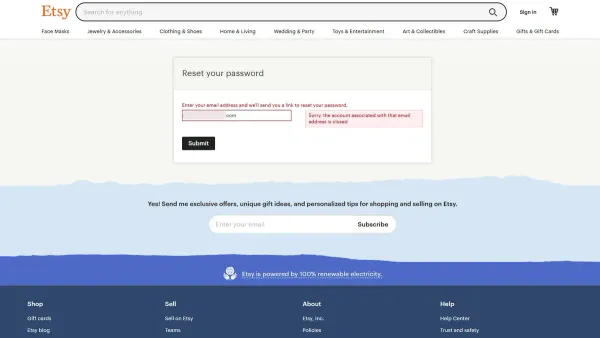
Evernote expects strong, unique passwords but does not enforce specific complexity rules. Users can reset passwords through an email link if access is lost, but this process depends on the security of the registered email account.
For example, a user enabling 2FA and using a password manager to create a complex password significantly reduces the chance of unauthorized access, though the lack of end-to-end encryption means note content remains accessible to Evernote’s systems.
How to Know If Your Evernote Account Has Been Hacked
Detecting that an Evernote account has been compromised involves watching for unusual activity and signs that do not align with the user's normal behavior. One clear indicator is receiving login alerts or notifications for password resets that were not initiated by the account owner. For example, if an email arrives stating a password reset request was made but the user did not perform this action, it suggests a potential breach.
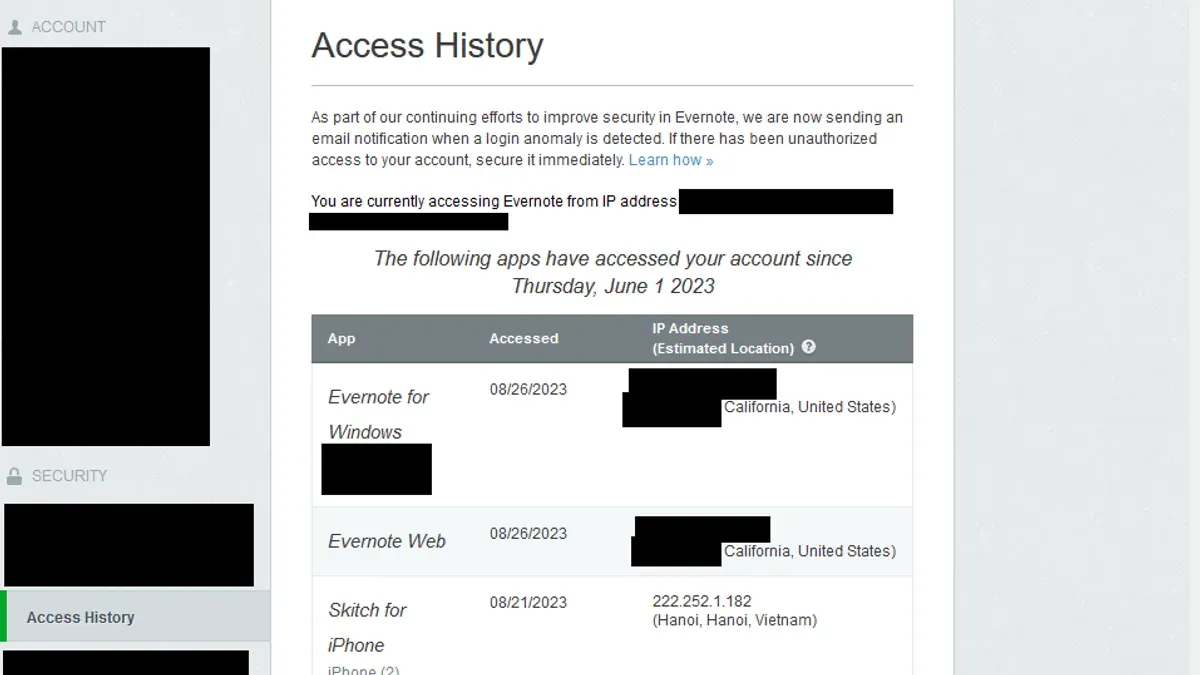
Another sign is unexpected changes within the account, such as missing or altered notes and notebooks. If important notes suddenly disappear or show unauthorized edits, this is a red flag. Suspicious logins from unfamiliar devices or geographic locations can also suggest unauthorized access. Evernote allows users to review recent login activity in the account security settings, revealing IP addresses and device types that accessed the account.
Failed login attempts may indicate someone is trying to guess the password. For instance, if a user notices multiple failed attempts followed by a successful login from an unknown device, this suggests a compromise. An illustrative scenario is a user reviewing their login history and spotting access from a foreign country hours after a password reset email was sent without their request. Such evidence calls for immediate action to secure the account.
How to Download Everything from Evernote Before Taking Action
Exporting data from Evernote promptly is essential to safeguard notes and attachments before changing passwords or deleting the account. Delays can risk permanent data loss if the account is compromised.

On the Evernote desktop app, users can export notes by selecting one or multiple notes, then choosing File > Export Notes... from the menu. The export dialog allows saving files in ENEX format, which preserves note metadata and attachments, making it suitable for full backups or transfers to other Evernote accounts. Alternatively, notes can be saved as HTML files for easy viewing in browsers or as PDF documents for fixed-layout archives.
For example, selecting an entire notebook and exporting as ENEX creates a single.enex file containing all notes and attachments within that notebook.
Using the Evernote web client, exporting is more limited—users can print individual notes to PDF but cannot bulk export notebooks. For comprehensive backups, the desktop app is recommended.
After export, store the resulting files securely offline on a trusted external drive or in encrypted cloud storage. Avoid leaving exported backups on the compromised device or an unprotected cloud folder.
Step-by-step export on desktop:
- Open Evernote desktop and sign in.
- Select notes or notebooks to back up.
- Go to File > Export Notes...
- Choose ENEX format for full fidelity or HTML/PDF for readable archives.
- Name the file and select a secure storage location.
- Confirm and save.
Tip: Exporting notes immediately before resetting passwords or deleting the account ensures access to data even if recovery is impossible.
Steps to Secure or Recover a Hacked Evernote Account
When an Evernote account shows signs of compromise, immediate action is crucial. Start by changing the Evernote account password via the account settings page under “Security & Privacy.” Ensure the new password is strong and unique, avoiding reuse of passwords from other services.
Next, enable or re-enable two-factor authentication (2FA) in the same “Security & Privacy” section. This adds an extra layer of protection by requiring a time-sensitive code upon login, significantly reducing unauthorized access risks.
Review connected third-party apps by navigating to “Apps” in account settings. Revoke access to any unfamiliar or suspicious applications to prevent further data leaks.
Update security questions and verify the recovery email address under “Account Settings.” This helps secure account recovery options against attacker manipulation.
Contact Evernote support immediately using their official help portal. Reporting the breach initiates a review process, which typically takes a few days, during which the support team may provide additional recovery assistance or account lockdowns.
After these steps, monitor account activity for unusual behavior, such as unexpected note deletions or new device logins. For example, a user reported that after resetting their password and enabling 2FA, Evernote support responded within three days, restoring full account control and advising on further security practices.
Tip: Always log out of all devices via the “Security & Privacy” menu after recovery to block any lingering unauthorized sessions.
How to Delete an Evernote Account If Recovery Is Not an Option
Deleting an Evernote account is a final step when recovery attempts fail or the user no longer wishes to use the service. Before deletion, exporting all notes is essential because once the account is deleted, all data, including notes, notebooks, tags, and attachments, are permanently removed and cannot be restored.
To delete the account, first export notes via the desktop app: select the desired notes, choose File > Export Notes, and save them in ENEX or HTML format. Then, log into the Evernote web version, navigate to Account Settings > Security > Delete Account, and follow the confirmation prompts.
Account deletion immediately cancels any active subscriptions and removes access to premium features. Evernote retains no data linked to the deleted account, contrasting with some competitors who may keep data backups for a limited time. For example, users switching to Microsoft OneNote should ensure that all exported notes are compatible with the new platform before deletion.
Tip: Exporting notes in ENEX format preserves metadata and attachments, making the transition to other apps smoother.
Evernote Pricing, Free vs Paid Plans, and Cost Concerns
Evernote offers a free Basic plan with a monthly upload limit of 60 MB and syncing across two devices, which includes core features like note creation, web clipping, and basic search. Paid plans such as Premium and Business increase upload limits substantially (up to 10 GB per month for Premium), enable unlimited device sync, and provide advanced security options including offline access and priority customer support.
Two-factor authentication (2FA) is available on all plans, but paid tiers may offer more robust account management features suitable for professional use. For example, a user relying heavily on Evernote for work might find the Premium plan's higher upload capacity and enhanced search capabilities justify the monthly cost.
Common concerns about Evernote’s pricing revolve around whether its subscription fees align with competitors like Microsoft OneNote, which is free and integrates with Office apps but lacks some specialized note management features Evernote provides. Users weighing cost against security should note that while Evernote does not offer end-to-end encryption, its paid plans support 2FA and more frequent backups, which can enhance data protection.
Tip: Reviewing the specific upload limits and device sync needs before upgrading can prevent paying for unused features.
How to Use Evernote Safely: Best Practices and Common Mistakes
Using Evernote securely requires consistent habits to reduce the risk of hacking. One common error is password reuse across multiple sites, which increases vulnerability if any other service is breached. For example, if a user employs the same password for Evernote and a less secure website, attackers can try that password to access the Evernote account.
Strong, unique passwords generated by reputable password managers help prevent such breaches. Regularly updating these passwords and reviewing security settings in the Evernote app’s Account Settings > Security section also helps maintain protection.
Phishing remains a frequent cause of account compromise. Users should be cautious with emails claiming to be from Evernote, especially those requesting login details or containing suspicious attachments. Official Evernote communications typically come from addresses ending with @evernote.com.
Storing extremely sensitive information—such as financial records or passwords—directly in Evernote without additional encryption can be risky. Using third-party encryption tools before saving such data adds a layer of security.
Lastly, running Evernote only from official sources is critical. Downloading executables like “evernote.exe” from unknown websites can introduce malware or fake apps designed to steal credentials.
Tip: Enable two-factor authentication and periodically review connected devices under Account Settings > Security > Devices to spot unauthorized access early.
How to Contact and Use Evernote Support and Features Like Email to Evernote
Evernote includes a feature allowing users to email notes directly into their account using a unique Evernote email address accessible under Settings > Account Info > Evernote Email. This method is convenient for saving information quickly, but users should ensure emails come from trusted sources to avoid phishing or malware risks.
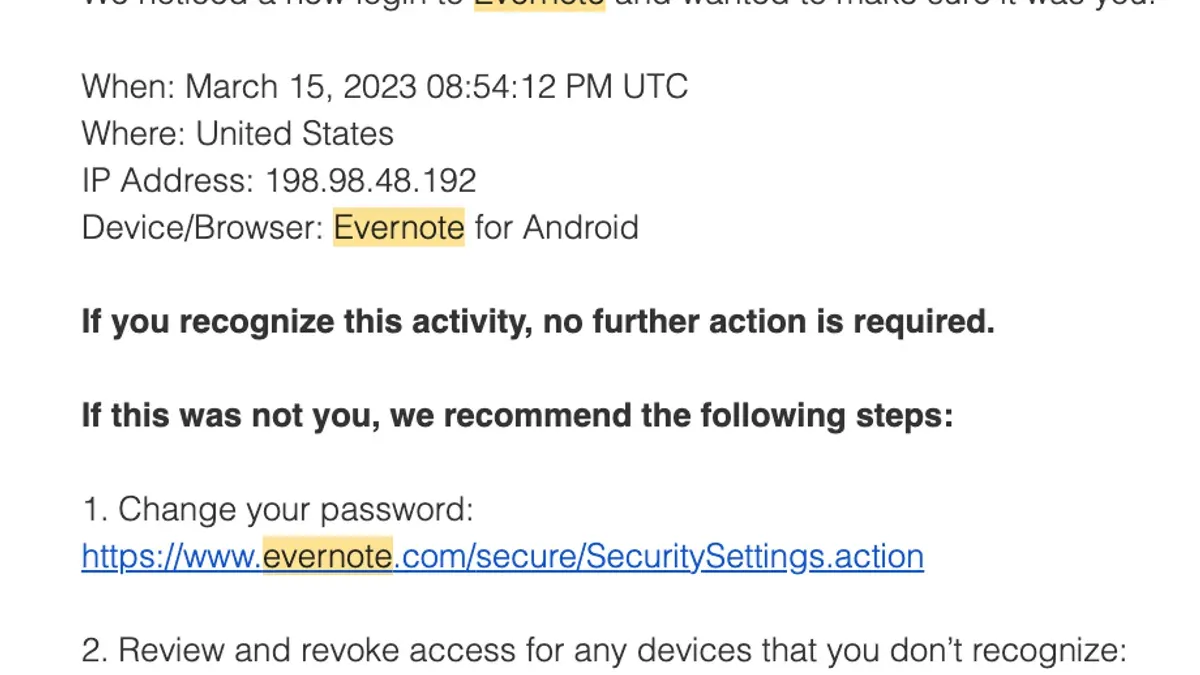
For account issues such as suspected hacking, Evernote’s official support can be reached via their Help & Learning portal where users can submit tickets or browse troubleshooting guides. Logging in to the support site requires the usual Evernote credentials, so securing these details is vital.
Checking Evernote’s service status at status.evernote.com helps determine if login or sync problems stem from platform outages rather than account compromise.
When logging into Evernote, users should verify they are on the official evernote.com site and use the correct username and password combination. Common login issues include forgotten passwords, which can be reset via the “Forgot Password” link, or problems with two-factor authentication that may require recovery codes.
Example: A user who notices notes missing after an unusual login receives a suspicious email prompting a password reset. They confirm the email’s legitimacy by checking sender details and then contact Evernote support through the Help portal, providing screenshots of the email and login history. Meanwhile, they use their Evernote email address to back up new notes safely.
Further reading
- How to Understand, Protect, and Recover an AOL Mail Account After Hacking
- How to Recognize, Report, and Recover a Hacked YouTube Account
- How to Recognize, Respond to, and Recover from a WhatsApp Account Hack
- How to Identify, Respond to, and Recover from an Instagram Account Hack
Frequently asked questions
How to delete evernote account?
To delete an Evernote account, sign in on the web, go to Account Settings, and select the option to close your account. This action removes your profile, notes, and notebooks permanently after a set grace period. Make sure to download any important data before initiating deletion, as restoration is not possible afterward.
What happened to my evernote?
Issues with Evernote may result from app updates, server outages, or account security problems such as unauthorized access. Checking Evernote's status page or official social media channels can clarify if widespread problems exist. If the account behaves abnormally, reviewing security settings and recent activity is advisable.
Is evernote a scam?
Evernote is a legitimate and widely used note-taking service, not a scam. However, users should be cautious of phishing attempts or fraudulent emails pretending to be from Evernote. Always verify communications through official Evernote channels and avoid sharing sensitive information outside the app.
How secure is evernote?
Evernote uses encryption for data in transit and at rest, along with multifactor authentication options to enhance account security. While it offers robust protections, security also depends on user practices such as strong passwords and vigilance against phishing. Evernote does not provide end-to-end encryption by default, so highly sensitive data requires additional caution.
Does evernote cost money?
Evernote offers both free and paid subscription plans. The free tier includes basic note-taking features with monthly upload limits, while paid plans provide advanced functionality like increased storage, offline access, and premium customer support. Users can choose a plan based on their feature needs and usage frequency.
Limits of This Advice
This guide focuses specifically on Evernote account security, recovery, and safe usage within the app’s ecosystem. It does not cover physical device security measures such as securing smartphones or computers, nor does it address vulnerabilities introduced by third-party applications connected to Evernote. Users concerned about broader digital security or those experiencing complex breaches involving multiple services should consider consulting cybersecurity professionals.
The most effective next step after securing an Evernote account is to enable two-factor authentication (2FA) through the Security settings menu. This additional verification layer significantly reduces the risk of unauthorized access even if passwords are compromised.