Magento Site Hacked: Essential Steps to Diagnose and Recover Securely
This guide provides clear, actionable steps to diagnose, recover, and secure your Magento site after a hack.

This guide explains clear, actionable steps for Magento site owners and developers facing the challenge of a compromised e-commerce platform. Understanding "Magento site hacked what to do" is crucial because Magento’s complex architecture requires tailored diagnostics and recovery strategies that generic advice often overlooks.
Magento sites face unique threats due to their modular design and extensive use of third-party extensions, which can introduce vulnerabilities if not updated regularly. Immediate identification of suspicious activity, such as unauthorized admin logins or unexpected file changes, is essential to contain damage. The recovery process includes thorough breach analysis, cleaning infected files, restoring data integrity, and hardening configurations to prevent recurrence.
Tip: Check the Magento Admin under System > Tools > Compilation status and disable it immediately if enabled, as compilation can mask malicious code during a hack.
Understanding Magento Security Vulnerabilities
Magento’s robust and flexible architecture is designed to support complex e-commerce operations, but this complexity can introduce unique security gaps. The platform’s modular design, extensive use of third-party extensions, and frequent customization increase the attack surface, making Magento sites attractive targets for cybercriminals.
Common vulnerabilities exploited in Magento sites include outdated extensions, weak administrative credentials, and unpatched core software. Extensions, often installed via Magento Marketplace or third-party vendors, may contain bugs or security flaws that attackers exploit to gain unauthorized access. For example, outdated payment gateway modules with known vulnerabilities have been used as entry points in multiple breaches.
Weak admin passwords or default usernames like "admin" provide an easy path for attackers using brute force or credential stuffing. Unpatched core software remains one of the most critical risks—Magento regularly releases security patches addressing issues such as remote code execution and cross-site scripting (XSS), but many sites lag behind in applying these updates.
The impact of a hack extends beyond technical damage. E-commerce operations can be disrupted by injected malicious code, data theft, or defacement, leading to downtime and lost sales. Customer trust erodes quickly if personal and payment information is compromised. Additionally, regulatory compliance requirements like PCI DSS impose heavy penalties for data breaches, making swift and thorough recovery essential.
A concrete example involves a Magento store that suffered a breach through an outdated third-party extension allowing remote code execution. Attackers injected malicious scripts that harvested customer credit card data and redirected traffic to phishing sites. The breach went unnoticed for weeks, causing significant reputational damage and requiring a costly forensic investigation and full site rebuild.
Tip: Regularly audit installed extensions via the Magento Admin Panel under System > Web Setup Wizard > Component Manager to identify outdated or unsupported modules that pose security risks.
Signs and Symptoms of a Magento Site Hack
Detecting a hack on a Magento site requires attention to unusual behaviors that deviate from normal operations. Unexpected site behavior is often the first and most visible indicator. Common signs include automatic redirects to unknown websites, defacement where the homepage or other key pages display altered content or messages, and missing pages that previously existed but now return 404 errors.
A concrete example is a Magento store whose homepage suddenly redirects visitors to a suspicious third-party site advertising unrelated products or services. Another example is a defaced homepage showing a hacker's message or altered branding. These changes are usually the result of injected malicious code or altered theme files.
Suspicious activity within the Magento Admin Panel is another critical symptom. Site owners may notice unexpected changes in admin user roles, new unknown admin accounts created without authorization, or legitimate accounts locked out without clear reason. For instance, an admin account that was previously accessible might suddenly be disabled, or the site owner might find new admin users with full privileges that were never created through the usual process.
Server logs provide concrete evidence of compromise. Web server access logs may show unusual spikes in requests from unfamiliar IP addresses or repeated login failures followed by successful access from suspicious sources. For example, entries like repeated POST requests to /admin/login with invalid usernames or numerous requests containing suspicious parameters can indicate brute force or injection attempts.
Additionally, error logs might reveal attempts to execute unauthorized scripts or access restricted directories. An example log entry might include requests to /index.php with suspicious query strings or references to known Magento vulnerabilities.
Resource usage metrics on the hosting server can also signal trouble. A sudden increase in CPU or memory usage without a corresponding rise in legitimate traffic may indicate malicious scripts running in the background, such as cryptocurrency miners or spam bots embedded via the hack.
Security tools and monitoring services often provide alerts that can confirm suspicions. Google Safe Browsing warnings appearing when accessing the Magento site notify users of potential malware or phishing activity. Similarly, third-party security plugins integrated with Magento might flag suspicious files or unusual admin panel behavior.
Tip: Regularly review server access and error logs via your hosting control panel or SSH access to spot anomalies early.
Immediate Actions After Discovering a Hack
Upon detecting a Magento site hack, the first priority is to contain the breach to prevent further damage. Isolating the affected system from the network is critical; if feasible, disconnect the web server or place it behind a firewall that blocks all incoming and outgoing traffic except for essential administrative connections. This step halts ongoing unauthorized access and limits data exfiltration.
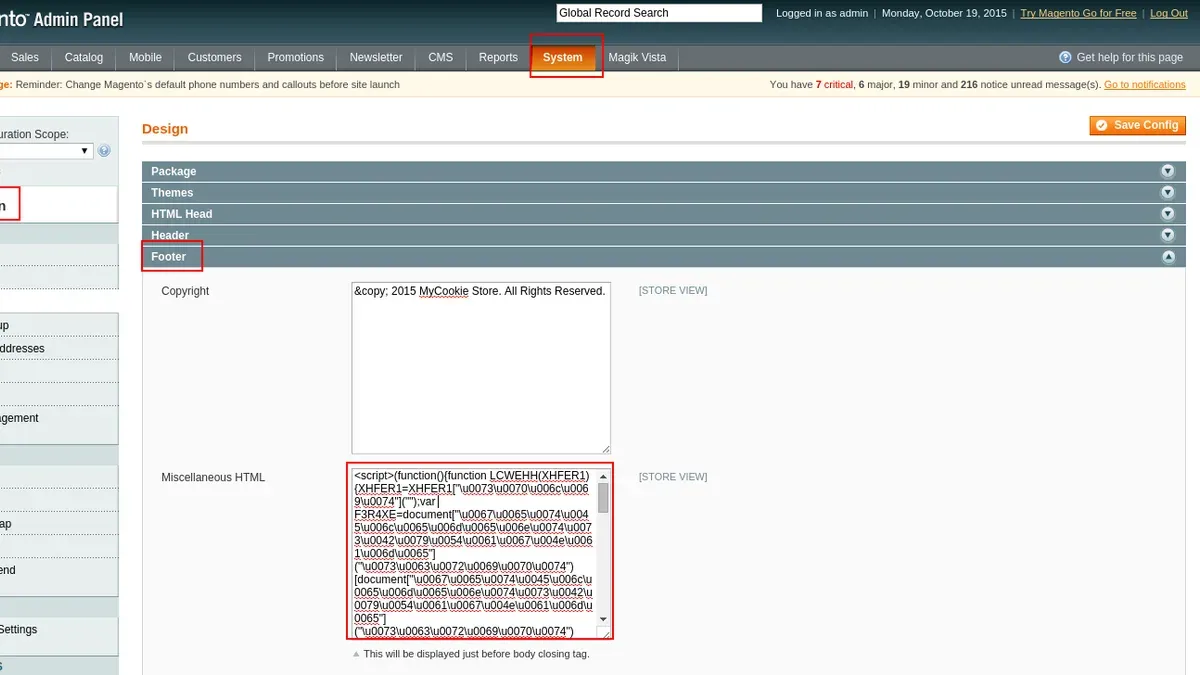
Next, all administrative and database passwords must be changed immediately and securely. For Magento admin users, navigate to the backend under System > Permissions > All Users to reset passwords, ensuring that strong, unique passwords are set for each account. Database credentials, typically stored in the app/etc/env.php file, should also be updated both in the database user settings via the hosting control panel or command line and in the Magento configuration file to maintain site functionality following the reset.
Tip: Use a password manager to generate and store complex passwords, and avoid reusing credentials from other systems.
Notifying the hosting provider is another essential step. Hosting teams can assist by analyzing server logs, identifying suspicious processes, and sometimes temporarily suspending the compromised site to prevent collateral damage. Additionally, informing key stakeholders—including IT teams, security officers, and possibly legal advisors—ensures coordinated response efforts and compliance with any breach notification requirements.
Preserving forensic data is crucial for thorough investigation. Make complete copies of server logs, Magento logs (found in var/log), database snapshots, and any suspicious files before performing cleanup. Avoid making changes to these files before copying, as alterations can compromise the integrity of the evidence.
For example, a Magento site owner noticing unauthorized admin logins should first disable network access by modifying firewall rules to restrict IP addresses. Then, they would reset admin passwords via the Magento backend and update the database password in both the hosting panel and the env.php file. After contacting the hosting provider for assistance, they would download server and Magento logs to a secure location for later analysis.
A common oversight is delaying password changes while investigating, which can allow attackers to maintain access. Immediate password resets combined with site isolation offer the best chance to halt ongoing malicious activity quickly.
Checklist for Immediate Containment:
- Isolate the Magento site by disconnecting or restricting network access.
- Reset all Magento admin user passwords via System > Permissions > All Users.
- Change database user password and update
app/etc/env.phpaccordingly. - Notify hosting provider and internal stakeholders.
- Preserve server and Magento logs, database snapshots, and suspicious files before cleanup.
Analyzing the Breach: How to Investigate the Hack
Investigating a Magento site breach requires a methodical approach to identify the root cause and scope of the compromise. The process begins by systematically reviewing server and Magento logs to trace unauthorized activities and changes.
Server logs, typically found in /var/log/ directories on Linux servers, include access logs, error logs, and audit logs. Access logs can reveal unusual IP addresses, suspicious request patterns, or unexpected HTTP methods such as PUT or DELETE. Error logs may show repeated failed login attempts or script errors indicating exploitation attempts. Magento logs, located in var/log/ within the Magento installation, provide additional insight into application-level events. Key files to examine are system.log and exception.log. For example, a sudden spike in exceptions related to payment modules could indicate tampering.
After logs review, checking Magento’s backend users is crucial. Navigate to Admin Panel > System > Permissions > All Users to identify any unauthorized admin accounts. Hackers often create stealth accounts with high privileges. Similarly, examining user roles under System > Permissions > User Roles helps detect privilege escalations.
Verifying code integrity is another critical step. Comparing core files and custom modules against known clean versions can reveal unauthorized modifications. Tools like Magento Security Scan provide automated vulnerability detection, flagging outdated components or injected code. Complement this with malware scanners such as Malwarebytes or Sucuri SiteCheck, which can detect malicious scripts or backdoors. Each tool has strengths; Magento Security Scan focuses on Magento-specific issues, while general malware scanners detect a broader range of threats. Using both in conjunction offers more thorough coverage.
Assessing potential data exfiltration involves reviewing database access logs and server outbound connections. Magento’s database logs, if enabled, can show unusual queries or bulk data exports. Network monitoring tools can reveal if large amounts of data were transmitted externally. If customer information or payment data exposure is suspected, it is essential to comply with legal and regulatory notification requirements promptly.
Example: Suppose a Magento site shows a sudden influx of requests from a foreign IP range in access logs, coinciding with new admin users created in the backend. Further, malware scanning detects an injected PHP backdoor in a custom module. Database logs reveal queries exporting customer email lists. This combination indicates a targeted breach aiming at data theft.
Tip: Enable detailed logging before a breach occurs to facilitate effective investigation afterward.
Cleaning and Restoring a Magento Site Post-Hack
Before starting any cleanup, create a full backup of the compromised Magento site, capturing both files and databases. This snapshot preserves the current state for forensic analysis or recovery if needed. Use secure protocols such as SFTP for file transfer and export databases via command line or phpMyAdmin.
Malicious code and files often reside in unexpected locations. Running targeted malware scans using tools like ClamAV or MageReport helps identify infected files. For example, a command like clamscan -r --remove --log=scan.log /var/www/html/magento recursively scans and removes detected malware, logging all actions for review.
Manually review suspicious files flagged by scans, especially PHP scripts with obfuscated code or unexpected write permissions. Remove only confirmed malicious code to avoid damaging legitimate functionality. Prioritize files in app/code, lib, and pub directories, as attackers often target these.
If a clean backup exists from before the breach, restoring it can quickly return the site to a safe state. However, ensure no vulnerabilities remain that allowed the initial compromise. Restoration involves overwriting current files and importing the backup database, followed by password resets and security patching.
Validating Magento core and extension integrity is critical to confirm no backdoors remain. Use the Magento CLI bin/magento module:status to audit enabled modules and cross-reference with official extension sources. Employ tools like diff or md5sum to compare core files against a clean Magento installation. For instance, running md5sum -c md5sums.txt on the core files verifies their authenticity.
Concrete example: After detecting malware, an administrator first backs up the site via tar -czvf backup.tar.gz /var/www/html/magento and exports the database with mysqldump -u root -p magento_db > backup.sql. Next, they scan for malware using ClamAV, removing infected files. They restore core Magento files from a verified clean source and use md5sum to confirm no altered files remain. Finally, they reinstall necessary extensions from official repositories and reset all access credentials.
Tip: Always keep an offline, verified clean backup of Magento core files and extensions to expedite restoration and validation after a security incident.
Hardening Magento Security to Prevent Future Hacks
Post-recovery security hardening is critical to protect Magento sites from recurring attacks. Regularly updating the Magento core and extensions closes known vulnerabilities. Magento’s Admin Panel under System > Web Setup Wizard > Component Manager allows seamless extension updates. Neglecting updates often leaves sites exposed due to outdated code.
Strong admin credentials are essential. Magento’s admin user passwords should follow complexity rules, combining uppercase, lowercase, numbers, and symbols. Enforcing two-factor authentication (2FA) further reduces risk; Magento supports 2FA via Stores > Configuration > Security > Two-Factor Authentication. This extra layer prevents unauthorized access even if passwords are compromised.
Implementing Web Application Firewalls (WAFs) and security plugins provides an additional defense line. Popular Magento security extensions like MageFence, Amasty Security Suite, and Watchlog offer features such as IP blocking, login attempt limits, and real-time malware scanning. Among these, MageFence is noted for its comprehensive firewall rules and automated malware detection, while Amasty emphasizes user activity monitoring. Combining a WAF service like Cloudflare or Sucuri with a Magento security plugin enhances protection. Sites with layered defenses have reported markedly fewer breaches.
File permissions and service configurations also impact security posture. Magento’s recommended file permissions are 644 for files and 755 for directories, set via command line or hosting control panels. Misconfigured permissions can allow unauthorized file modifications. Disabling unnecessary services such as FTP or legacy protocols reduces attack surfaces. For example, turning off FTP access in favor of secure SSH limits exposure to credential interception.
Consider a scenario where a Magento site was compromised through a vulnerable third-party extension. After recovery, the site owner not only updated the extension but also activated 2FA and installed a security plugin with firewall capabilities. Permissions were audited and tightened, and FTP was disabled on the server. This multi-layered approach effectively prevented subsequent intrusion attempts.
Tip: Schedule monthly security audits within Magento’s Admin Panel and on the server to verify updates, permissions, and security plugin statuses remain optimal.
Common Mistakes to Avoid During Hack Recovery
Recovering a hacked Magento site demands a careful, methodical approach; rushing through the process often leads to incomplete remediation and repeated breaches. One frequent error is restoring the site from backups or reinstalling without comprehensive malware scanning. For example, a retailer restored their site from a backup dated just before the hack but did not scan for injected backdoors hidden in custom modules. Within days, attackers exploited these backdoors again, causing prolonged downtime and reputational damage.
Ignoring compromised credentials or lingering backdoors is another critical misstep. Attackers often create hidden admin accounts or place malicious scripts in obscure directories. Failure to audit all user accounts under System > Permissions > All Users and to search directories like app/code or var for unauthorized files can leave the site vulnerable. A notable example involved a developer who reset only the main admin password but overlooked a secondary admin account with full privileges, enabling persistent unauthorized access.
Failing to update all Magento components and third-party plugins after a breach also undermines recovery efforts. Attackers exploit known vulnerabilities in outdated extensions or the core. A case in point is a site that patched the Magento core but neglected to update a popular payment gateway plugin, which remained a vector for reinfection.
Lastly, not communicating transparently with customers and stakeholders can damage trust and complicate recovery. After a breach, clear notifications about potential data exposure, action steps, and ongoing protections build confidence. A business that withheld breach information faced customer backlash and regulatory scrutiny, prolonging the recovery phase and increasing costs.
Tip: Conduct an exhaustive audit of all user accounts, installed extensions, and file system contents before restoring a Magento site to ensure no hidden threats remain.
When to Seek Professional Help
Determining when to engage Magento security professionals is critical to effectively address a hack. Complex breaches that involve data theft, persistent backdoors, or advanced malware often exceed the capabilities of in-house teams, especially if expertise with Magento's architecture and security nuances is limited.

For example, a Magento site suffering a breach that results in unauthorized access to customer payment information requires immediate, expert intervention not only to contain the breach but also to comply with data protection regulations. Professionals can perform thorough forensics, identify hidden backdoors in the codebase or server environment, and apply specialized tools to eradicate threats that automated scanners or basic cleanups might miss.
Organizations lacking dedicated IT security personnel or Magento-specific experience should strongly consider outside help. Security consultants or incident response firms bring deep knowledge of Magento's ecosystem, including understanding how customized extensions may be exploited and ensuring core files are intact and unaltered. They also help avoid common pitfalls such as incomplete cleanup or overlooking compromised API keys.
Tip: Engaging professionals early can reduce downtime and prevent recurring attacks, potentially saving costs associated with extended outages or regulatory fines.
From a cost versus risk perspective, professional services might represent a significant upfront investment, but the financial and reputational damage from unresolved breaches often far outweigh these expenses. For instance, a mid-sized Magento retailer that delayed professional help after a data breach faced prolonged site instability and lost customer trust, which impacted sales for months.
In addition, legal and compliance requirements may mandate expert involvement. When breaches involve sensitive customer data, regulations such as PCI DSS or GDPR require documented incident response processes and secure handling of the investigation. Professionals are familiar with these standards and can guide recovery efforts to meet regulatory expectations, reducing the risk of penalties.
Ultimately, if the breach complexity, internal resource constraints, or compliance demands exceed organizational capabilities, seeking professional help ensures a thorough, compliant, and secure recovery of the Magento site.
Monitoring and Maintaining Security After Recovery
After restoring a Magento site from a hack, continuous monitoring and maintenance are vital to prevent recurrence and ensure quick detection of suspicious activity. Setting up real-time alerts and log monitoring provides immediate visibility into potential threats. Tools like Magento’s built-in security logging or external SIEM (Security Information and Event Management) platforms can track login attempts, file changes, and admin actions. For example, configuring alerts for repeated failed admin logins or unexpected changes to critical files such as app/etc/env.php helps identify attacks early.
A practical monitoring dashboard might display metrics such as daily login success/failure rates, number of file integrity violations detected, and frequency of changes to custom code directories. This dashboard should be reviewed daily by the security team or assigned personnel to catch anomalies quickly.
Regular security audits and penetration testing complement real-time monitoring. A quarterly audit schedule is recommended, including vulnerability scans of Magento core and extensions, review of server configurations, and simulated attacks to probe for weaknesses. Maintaining a documented audit template listing these checks ensures consistency. For instance, the audit can verify that all extensions are up to date, file permissions adhere to the principle of least privilege, and two-factor authentication is enforced for admin accounts.
Educating admin users on security best practices is often overlooked but critical. Regular training sessions or newsletters can cover topics like recognizing phishing attempts, using strong passwords, and avoiding unsafe extensions. This helps reduce risk from social engineering and internal errors.
Backup and recovery plans must be reviewed and updated regularly. Testing backups ensures that data can be restored quickly if a new incident occurs. It is advisable to keep multiple backup copies, including offsite storage, and verify backup integrity monthly. Documenting recovery procedures and assigning clear roles accelerates response time in emergencies.
Tip: Schedule monthly reviews of security logs alongside quarterly audits to maintain continuous oversight and adapt defenses to evolving threats.
Further reading
- Joomla Site Hacked: Clear Steps to Diagnose and Recover Securely
- How to Scan a Website for Malware: A Clear Step-by-Step Guide
- How to Remove Pharma Hack: A Step-by-Step Guide for Website Owners
- How to Remove Japanese Keyword Hack from a Website: A Step-by-Step Guide
Frequently asked questions
How can one tell if a Magento site has been hacked without obvious signs?
Subtle signs include unexpected changes in website performance, new or altered admin users, and unusual outbound network activity. Reviewing server logs for unfamiliar IP addresses or requests to unknown scripts can also reveal covert breaches. Regular integrity checks of core Magento files help detect unauthorized modifications even when visible symptoms are absent.
What are the most effective tools for scanning a hacked Magento site?
Magento-specific security scanners like MageReport provide a comprehensive vulnerability assessment tailored to Magento platforms. General tools such as ClamAV or Maldet can detect malware on the server, while tools like OWASP ZAP help identify web application vulnerabilities. Combining file integrity monitoring with malware scanning improves the detection of hidden threats.
Is it safe to continue running a Magento site immediately after a hack?
Continuing to operate a hacked Magento site without completing a thorough investigation and cleanup risks further data compromise and damage to reputation. It is advisable to temporarily disable the site or switch to maintenance mode while diagnosing and removing malicious code. Resuming operations should only happen after confirming the breach is fully remediated and security hardening measures are in place.
How often should Magento security updates and patches be applied?
Security patches should be applied as soon as they are released by Magento to minimize exposure to known vulnerabilities. Monitoring the official Magento Security Center and subscribing to security mailing lists ensures timely awareness of updates. Regularly scheduled maintenance windows for testing and applying patches help maintain site stability alongside security.
Limitations and When to Seek Specialized Assistance
This guide does not cover recovery from physical server breaches or advanced persistent threats requiring forensic investigation. Some steps detailed here may require technical expertise beyond typical Magento users and should be performed by qualified professionals, especially when dealing with complex root cause analyses or deep codebase alterations.
For many Magento site owners and developers, the single most useful next step is to establish a robust, routine security audit process using Magento's built-in Security Scan Tool accessible via the Magento Admin under System > Security Scan. Regular scans help detect vulnerabilities early, enabling timely interventions before issues escalate.