How to Remove Pharma Hack: A Step-by-Step Guide for Website Owners
This guide explains how to remove pharma hack from compromised websites and secure them against future infections.

This guide explains how to remove pharma hack from compromised websites and secure them against future infections.
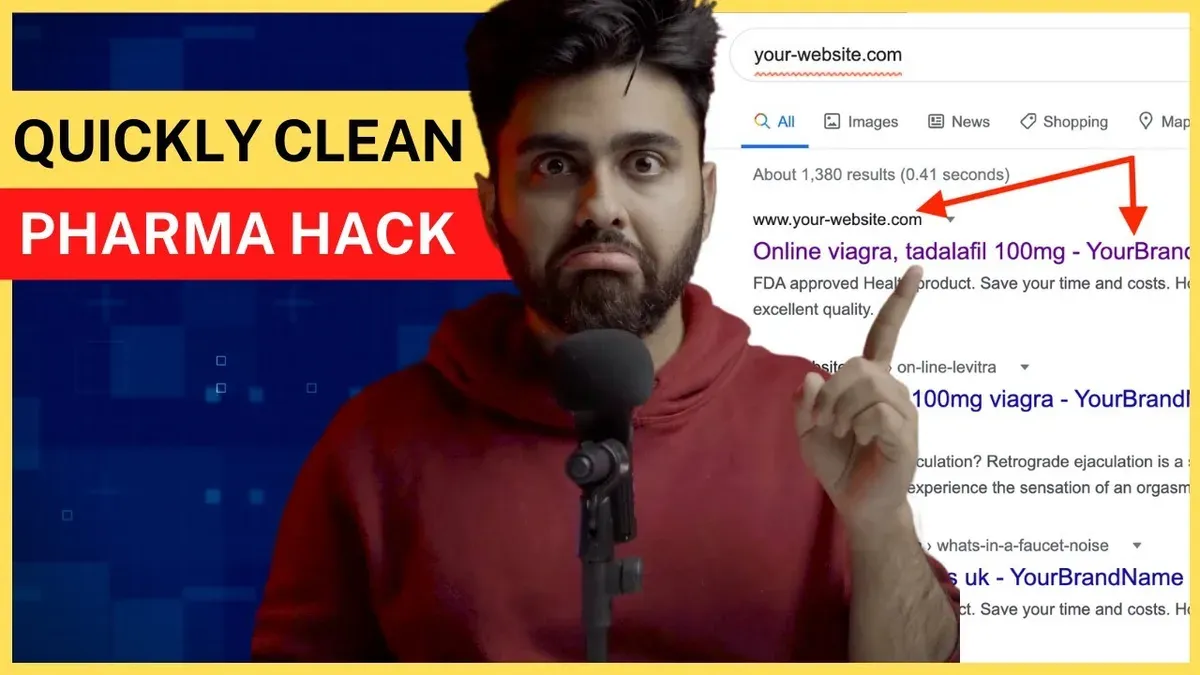
Pharma hack involves unauthorized modifications to website code, typically injecting spammy pharmaceutical-related links or content that harm search rankings and user trust. Understanding how these injections operate is essential for effective removal.
Website owners often detect pharma hack through unusual redirects, suspicious scripts in source code, or spammy content appearing on their pages. This article outlines a practical, step-by-step process—from safely backing up the site and identifying infected files to resetting access credentials and implementing ongoing monitoring. Emphasis is placed on balancing thorough technical clean-up with long-term preventive measures tailored for small to medium websites.
Tip: Regularly scanning for unexpected file changes can help catch pharma hack infections early before widespread damage occurs.
Before you start: What is needed to remove pharma hack
Removing a pharma hack requires specific tools, access permissions, and foundational knowledge of the website's structure and management systems. Without these prerequisites, attempts to clean the site may be ineffective or could inadvertently cause further issues.
- Obtain access to the website hosting control panel and FTP or SSH: Gain credentials for the web hosting control panel (such as cPanel, Plesk, or a proprietary panel) alongside FTP or SSH login details. Successful access will allow direct interaction with website files and server settings.
- Familiarize with the website file structure and CMS admin panel: Understand the directory layout, especially the locations of key files like index.php,.htaccess, and CMS-specific folders (e.g., wp-content for WordPress). Access to the CMS dashboard provides control over plugins, themes, and user accounts. Confirmation of this step is the ability to navigate directories and CMS menus without error.
- Prepare backup tools to create a full site backup: Use hosting backup options, plugins like UpdraftPlus or Duplicator, or manual methods via FTP and database export tools like phpMyAdmin. A complete backup includes all files and databases. Verification involves storing a copy offsite or on a local machine, ensuring restoration capability.
- Employ security scanning tools for malware detection: Utilize scanners such as Sucuri SiteCheck, Wordfence, or MalCare to identify known malware signatures and injected code. Complement these with file integrity checkers that compare current files against clean originals to detect unauthorized changes. Running these tools successfully produces a report highlighting infected files or suspicious modifications.
- Use a capable text editor for reviewing and editing code files: Select editors like Visual Studio Code, Sublime Text, or Notepad++ that support syntax highlighting and large file handling. This facilitates the identification and removal of malicious code snippets. Confirmation is the ability to open and safely edit PHP, JavaScript, HTML, and configuration files without corruption.
Checklist of essential access credentials:
- Hosting control panel login (e.g., cPanel username and password)
- FTP or SFTP credentials (host, username, password, port)
- SSH access credentials if available
- CMS administrator account credentials
- Database access credentials (user, password, database name) if separate
Comparison of common security scanning tools:
| Tool | Features | Scope | Ease of Use |
|---|---|---|---|
| Sucuri SiteCheck | Remote scanning, blacklist monitoring | Detects known malware and blacklisting | Web interface, no installation required |
| Wordfence | File scanning, firewall, login security | Deep CMS (WordPress) scanning and firewall | Plugin within WordPress dashboard |
| MalCare | Automated malware detection, cleanup service | Comprehensive WordPress malware detection | Cloud-based, simple dashboard |
| File Integrity Monitoring tools | Compare files against clean baselines | Detect unauthorized changes at file level | Varies; usually requires setup |
Tip: Having read-only access to backups before removal attempts ensures the original state is preserved in case of errors during cleanup.
Understanding how pharma hack works on websites
Pharma hack is a type of website compromise that injects unauthorized content or redirects to promote pharmaceutical products, often without the site owner’s knowledge. It typically involves inserting malicious code into website files or databases, which then deliver spam content or redirect users to external sites selling pharmaceuticals.
Injected code often takes the form of obfuscated JavaScript or PHP snippets that are hidden within legitimate files. For example, attackers may insert base64-encoded PHP functions that decode and execute malicious payloads. A common visible symptom is the injection of spammy links or text related to pharmaceutical products appearing on pages where they do not belong.
Common injection points include vulnerable plugins that have not been updated, outdated themes with security flaws, and older versions of content management systems (CMS) that lack recent patches. Attackers exploit these weak points to gain write access and insert their code. For instance, WordPress plugins with known vulnerabilities are frequent targets, as are themes that do not follow secure coding practices.
The pharma hack can act in two primary ways: redirecting users to external sites or injecting spam content directly into the infected pages. Redirects often happen via JavaScript or meta refresh tags that send visitors to pharmaceutical sales sites. Spam content injections may appear as keyword-stuffed paragraphs or hidden links designed to manipulate search engine rankings.
There is a critical difference between visible and hidden injections. Visible injections alter the content shown to users, such as adding spammy text or links. Hidden injections, however, operate silently by embedding code that runs in the background, often redirecting traffic or loading malicious scripts without any obvious signs on the page.
Below is a simplified example of a pharma hack code snippet often found in infected PHP files:
| Code snippet | Description |
|---|---|
| <?php eval(base64_decode('c3VzcGVjdGl2ZV9jb2RlX2hlcmU='));?> | Obfuscated PHP code that decodes and executes hidden commands |
Infected websites may show symptoms such as unexpected pop-ups, unusual redirects to pharmaceutical sites, or the appearance of unfamiliar keywords related to medication on seemingly unrelated pages.
Step-by-step identification of pharma hack injections:
- Scan the website files using a malware scanner capable of detecting obfuscated code and suspicious injections. Successful detection shows flagged files with injected code.
- Review the source code of key pages in a browser or code editor to look for unexpected JavaScript snippets or hidden iframes. If injections are present, suspicious code will be visible in the page source.
- Check the plugins and themes list in the CMS dashboard for outdated or unsupported components. Identifying these weak points indicates possible entry paths.
- Observe user behavior reports or server logs for unusual redirects or traffic patterns pointing to pharmaceutical URLs. Confirmed redirect activity signals ongoing compromise.
Tip: Use file comparison tools to detect recently changed files, as pharma hacks often modify core or theme files to insert malicious code.
Identifying pharma hack infections on a website
Detecting pharma hack infections involves combining automated scanning tools with manual inspection methods to uncover hidden malicious code and unusual site behavior. This dual approach helps confirm the infection and guides effective cleanup.
Using website scanners and malware detection plugins
- Install a reputable malware scanner compatible with the website's CMS, such as Wordfence for WordPress or Sucuri SiteCheck for general scanning.
- Run a full site scan focusing on file integrity, suspicious scripts, and known malware signatures.
- Review the scan report for flagged files or injections, which often include obfuscated code, strange iframes, or unexpected external links.
- Note any alerts about modified core files or unusual PHP functions like eval(), base64_decode(), or unexpected iframe insertions.
Tip: Some scanners may generate false positives; verify suspicious results by cross-checking with manual code inspection.
Checking source code for suspicious iframes, scripts, or links
- Access the website's front-end HTML source via a browser's developer tools or by downloading the page source.
- Search for unexpected <iframe> tags that load content from unfamiliar domains; pharma hacks often use hidden iframes to inject spam content.
- Look for obfuscated JavaScript, such as long strings of encoded data or multiple nested eval() calls.
- Identify suspicious outbound links containing pharma-related keywords or domains unrelated to the website's niche.
Example suspicious code fragment found on an infected page:
<iframe src="http://suspiciousdomain.com/ad.php" style="display:none"></iframe>
<script>eval(function(p,a,c,k,e,d){...})</script>
Reviewing server logs and access patterns for anomalies
- Access server logs through the hosting control panel or via SSH, focusing on access logs and error logs.
- Look for repeated requests to unusual scripts or URLs, such as /wp-includes/js/tinymce/wp-tinymce.php or other non-standard paths.
- Identify spikes in requests from specific IP addresses or geographic locations inconsistent with normal traffic.
- Note any POST requests attempting to inject code or upload files, which may signal active exploitation attempts.
Detecting SEO spam keywords and pharma-related redirects
- Perform site searches on search engines using queries like site:example.com combined with pharma-related keywords (e.g., “Viagra,” “Cialis,” “pharmacy”).
- Check if the site appears in search results with irrelevant pharma content or spammy titles and descriptions.
- Visit the site using different devices or IP addresses to detect redirects to pharma-related sites or suspicious landing pages.
- Use tools like Google Search Console or Bing Webmaster Tools to review crawling errors, manual actions, or security issues reported.
Worked example: A test site scanned with Sucuri SiteCheck revealed several files flagged for hidden iframe injections and obfuscated scripts. Manual review confirmed <iframe src="http://maliciouspharma.com/ad.php" style="display:none"></iframe> embedded in the homepage source. Server logs showed repeated POST requests targeting wp-config.php, indicating an exploit attempt. Google Search Console reported manual actions for spammy content, confirming the infection.
Backing up the website safely before removal
Creating a complete backup of the website before starting any pharma hack removal is essential to prevent irreversible data loss. This backup must include all website files and the associated databases, capturing the site’s entire state. A reliable backup ensures that if anything goes wrong during the cleanup process, restoration to the pre-removal condition remains possible.
Creating full backups of files and databases
- Access the web hosting control panel (such as cPanel or Plesk) and navigate to the “File Manager” or “Backup” section. Upon success, the interface for managing backups should be visible.
- Download a full copy of the website’s root directory, which contains all files, including the CMS, themes, plugins, and uploads. When the download completes, the local storage should contain a compressed archive of these files.
- Export the website database using the hosting panel’s database management tool (commonly phpMyAdmin). Select the relevant database, then choose the “Export” option and save the SQL file. A successful export results in a database file stored locally.
Storing backups securely offline
After creating backups, store them securely offline to protect against server corruption or compromise. Copy the backup files to an external drive or an encrypted cloud storage service with restricted access. Avoid leaving backups on the same server to prevent simultaneous infection.
Verifying backup integrity before proceeding
- Open the downloaded website archive using a file extraction tool to verify that all expected folders and files are present, including wp-content or equivalent CMS directories. A successful check shows no extraction errors and complete folder structures.
- Test the database export file by opening it in a text editor or loading it into a local database environment. It should contain valid SQL commands and no signs of corruption.
- Optionally, restore the backup to a local or staging environment to confirm site functionality before removal attempts. The restored site should load without errors or missing components.
Tip: Regularly scheduled backups reduce pressure during emergencies and improve recovery speed.
| Backup Best Practices Checklist |
|---|
| Create full backups including all files and databases |
| Store backups offline or in secure encrypted storage |
| Verify backup file integrity by extraction and inspection |
| Test restore backups on a local or staging environment |
| Keep multiple backup versions to safeguard against corrupted files |
Popular backup tools like UpdraftPlus for WordPress or Duplicator provide interface screenshots showing successful backup completion, including progress bars and confirmation messages, which reassure users of a completed process.
Removing infected files and cleaning injected code
Removing pharma hack infections requires a methodical approach that combines both automated tools and manual inspection to ensure thorough cleaning. Infected files often contain obfuscated or suspicious code segments that may be injected into core CMS files, plugins, themes, or other website components.
- Scan the website files with reputable malware removal tools. Use tools such as Malwarebytes, Sucuri, or Wordfence to generate a list of potentially infected files; successful scanning reveals flagged files and suspicious code snippets.
- Manually review flagged files and suspicious code segments. Open these files in a capable code editor and look for anomalies such as base64 encoded strings, eval() functions, or unexpected script injections; when cleaned, these segments should be removed or replaced without breaking site functionality.
- Replace or restore core CMS files from official sources. For CMS like WordPress, Joomla, or Drupal, download a fresh copy of the core files from the official repository and overwrite the existing core files except for configuration files and uploads; this step ensures removal of well-hidden malware in core components and should result in files matching the official checksum.
- Remove or reinstall suspicious plugins and themes. Identify plugins or themes not updated recently, with low reputation, or flagged during scans; deactivate and delete these, then reinstall clean copies from trusted sources to eliminate injected code; successful removal stops recurring malware found within these components.
- Verify file integrity and repeat scans after cleaning. Run subsequent malware scans to confirm no residual infections remain; a clean scan report indicates successful removal of pharma hack code.
Tip: Before manual code edits, create a working copy of the infected file to compare changes and avoid accidental data loss.
Effectiveness varies between automated and manual methods. Automated tools can quickly detect and clean many infections but may miss deeply obfuscated code or cause false positives. Manual editing allows targeted removal and verification but requires technical skill and is time-consuming. Combining both approaches generally leads to more reliable cleanup.
Before cleaning, infected files might include lines such as eval(base64_decode('...')) or hidden iframe injections. After cleaning, these lines should be fully removed, restoring the file to its legitimate form.
Resetting credentials and access points
Securing access credentials is essential to prevent reinfection after removing a pharma hack. Attackers often exploit weak or stolen passwords and dormant user accounts to regain control. A thorough review and reset of all access points—hosting, CMS admin, FTP, and database—is necessary to close these vulnerabilities.
- Change the hosting control panel password via the hosting provider's dashboard. After updating, a successful reset is confirmed by being able to log in with the new password without errors.
- Reset the CMS administrator passwords by navigating to the user management section (e.g., WordPress: Users > All Users). Select administrators, update their passwords to strong, unique values, and verify by logging in as each user or confirming password change notifications.
- Update FTP/SFTP account passwords through the hosting panel, usually found under FTP Accounts. Strong passwords mixing uppercase, lowercase, numbers, and symbols are recommended. Confirm success by connecting to the FTP server using the new credentials.
- Change the database user password via the hosting control panel or database management tool (e.g., phpMyAdmin). After the update, test website functionality to ensure database connections remain intact.
- Review all user accounts in the CMS and hosting control panel. Remove or disable any unknown or inactive users to reduce attack surfaces. The absence of suspicious accounts after cleanup is the goal.
- Enable two-factor authentication (2FA) wherever possible, commonly found under security settings in CMS admin panels or hosting dashboards. After activation, test login flows to confirm 2FA prompts appear and function correctly.
Implementing these steps reduces the risk of reinfection by eliminating compromised credentials and tightening access controls. Strong password policies—such as at least 12 characters with complexity requirements—significantly enhance security versus weak or reused passwords. Additionally, 2FA adds a crucial barrier against unauthorized logins, even if passwords are compromised.
Tip: Use a reputable password manager to generate and store complex passwords securely, minimizing the risk of weak credentials and easing the reset process.
Updating software and patching vulnerabilities
Keeping all software components up to date is crucial for closing the security gaps exploited by pharma hacks. Attackers often leverage known vulnerabilities in the CMS core, plugins, and themes that remain unpatched. Ensuring these are current significantly reduces the risk of reinfection.
- Update the CMS core to the latest stable release. Navigate to the CMS dashboard's update section, typically labeled "Updates" or "Dashboard > Updates." After initiating the update, the CMS should confirm successful installation with a message like "Your software is up to date." This step addresses critical security patches regularly issued by CMS developers.
- Update all plugins and themes. Access the plugins and themes management pages within the CMS. Select all plugins and themes flagged as outdated and apply updates. A confirmation such as "All plugins are up to date" or "Theme updated successfully" should appear. Plugin and theme vulnerabilities are common entry points for pharma hacks.
- Remove unsupported or deprecated plugins and themes. Identify any plugins or themes no longer maintained or compatible with the current CMS version. Deactivate and delete these to eliminate unpatched vulnerabilities. The CMS usually provides warnings or notes on plugin/theme status in their details or update pages.
- Configure automatic updates where possible. Enable automatic updates for the CMS core, plugins, and themes if supported. For example, many CMS platforms offer settings under "Updates" or "Advanced" to activate this feature. Automatic updates reduce the window of exposure to known vulnerabilities by applying fixes promptly.
Tip: Some hosting providers offer automatic CMS and plugin update services, which can further secure the website with minimal manual intervention.
Regular patching of software components is a proven method to lower reinfection rates after pharma hack removal. Critical security releases often address remote code execution, cross-site scripting, and privilege escalation vulnerabilities commonly exploited by attackers. Neglecting updates leaves a website exposed even after cleaning.
Implementing ongoing monitoring and security measures
Continuous monitoring and layered security approaches are essential to detect and prevent future pharma hack infections. Installing comprehensive security plugins that offer real-time monitoring, file integrity checks, and alert notifications helps website owners react swiftly to threats.
- Install a security plugin known for robust features such as Wordfence or Sucuri Security. After installation, configure the plugin to enable real-time malware scanning and set up email alerts for suspicious activities. When configured correctly, alerts appear promptly after unauthorized changes or malware detections.
- Schedule regular scans of website files and server logs through the plugin’s dashboard or hosting control panel. This routine uncovers hidden infections or unauthorized access patterns early. Success is indicated by scan reports showing clean status or detailing detected issues for immediate action.
- Set up a Web Application Firewall (WAF) either via a plugin or through your hosting provider’s control panel. This firewall filters malicious traffic before it reaches the website, blocking common pharma hack attack vectors. Confirmation comes from firewall logs showing blocked requests and a reduction in suspicious activity alerts.
- Harden the server by disabling unused services, restricting file permissions, and enforcing secure protocols such as HTTPS and SFTP. Server hardening tools or control panel settings typically provide status indicators or reports verifying applied measures.
- Educate all site administrators on recognizing phishing attempts and social engineering tactics. Regular training sessions or sharing security guidelines ensure administrators understand how attackers may gain access through deceptive means. Effectiveness is reflected in fewer successful phishing attempts and quicker reporting of suspicious messages.
Tip: Comparing security plugins reveals that Wordfence offers comprehensive firewall and malware scanning with detailed alert customization, while Sucuri provides strong cloud-based firewall protection and incident response support; choosing depends on the desired balance between local control and outsourced defense.
A case study involving a small e-commerce site demonstrated that after implementing real-time monitoring and alerts via a security plugin, an attempted pharma hack was detected within hours. Early detection allowed the administrators to isolate and remove the infection before it affected search rankings or customer trust.
Troubleshooting common pharma hack removal failures
Persistent reinfections despite thorough cleaning are often caused by hidden backdoors or overlooked malicious code fragments. Attackers embed these backdoors in obscure file locations or disguise them using obfuscation techniques, making detection challenging.
Difficulty identifying all infected files arises when malware scanners miss modified core files or custom plugin scripts. Performance issues after removal may result from incomplete cleanup, corrupted files, or heavy security plugins configured without optimization.
Steps to resolve persistent reinfections and hidden backdoors
- Perform a deep file comparison against a clean CMS installation and known plugin versions. A successful step shows discrepancies only in expected custom files, with no unknown or suspicious files present.
- Use advanced malware scanners that support heuristic and behavior analysis, such as MalCare or Wordfence Premium. Confirmation comes from zero alerts or only previously identified safe files flagged.
- Manually review recently modified files using FTP or SSH sorted by modification date. Success is indicated by no unexpected recent changes beyond legitimate updates or edits.
- Inspect server configuration files (.htaccess, web.config) and database content for injected scripts or redirects. A clean configuration without unfamiliar rules or code means this step is complete.
- Reset all passwords again and invalidate active sessions to eliminate persistent unauthorized access. Verified by forced logouts and inability to log in with old credentials.
Addressing performance issues after removal
- Temporarily disable all security plugins and monitor site speed. If performance improves, identify resource-heavy plugins using plugin health checks or server logs.
- Clear all caches including CDN, server, and CMS caches. A successful action results in fresh content loading without delay.
- Check error logs for PHP warnings or fatal errors caused by corrupted files or incompatible versions. No recent critical errors indicates resolution.
- Optimize databases by removing overhead and cleaning transient options. Confirmed by reduced database size and improved query times.
Tip: Security professionals recommend maintaining a documented removal checklist and conducting multiple scans across different tools to catch elusive malware components.
Tip: Persistent reinfections often stem from overlooked plugins or themes; consider temporarily switching to a default CMS theme and disabling non-essential plugins during cleanup.
Further reading
- How to Remove Japanese Keyword Hack from a Website: A Step-by-Step Guide
- How to Get Off the Google Safe Browsing Blacklist: A Step-by-Step Guide
- How to Fix Mixed Content Warning on Websites: A Step-by-Step Guide
Frequently asked questions
What is pharma hack and how does it affect my website?
Pharma hack is a type of malware infection that injects unauthorized pharmaceutical-related content, often hidden, into website pages. This can lead to search engine penalties, damage to the site’s reputation, and loss of visitor trust. It typically exploits vulnerabilities to insert spammy links or redirects without the owner’s consent.
Can I remove pharma hack without technical expertise?
While basic steps like changing passwords and updating software can be done without deep technical knowledge, fully removing pharma hack often requires identifying and cleaning injected code within files and databases. Collaborating with a web security professional or using trusted security plugins can help ensure thorough removal and prevent reinfection.
How can I prevent pharma hack from happening again?
Prevention involves regularly updating all website software, including CMS, themes, and plugins, and using strong, unique passwords for all access points. Implementing security measures such as two-factor authentication, file integrity monitoring, and web application firewalls can significantly reduce the risk of future infections.
Will removing pharma hack affect my website’s SEO?
Removing pharma hack typically improves SEO by eliminating spam content and restoring the site’s credibility with search engines. However, improper removal or deleting legitimate content by mistake could temporarily impact rankings. Careful cleaning and monitoring post-removal help maintain or recover SEO performance effectively.
What this guide does not cover and when to seek professional help
This guide does not cover advanced forensic analysis or legal steps related to cybercrime incidents. For complex, persistent, or large-scale infections, professional cybersecurity assistance is recommended. Specialized experts can provide in-depth investigation, trace the source of breaches, and coordinate with law enforcement if necessary. Additionally, organizations handling sensitive data or operating under strict compliance requirements should consult with qualified security professionals to ensure thorough remediation and regulatory adherence.
The single most useful next step for website owners is to establish a regular schedule for website security audits and backups. Consistent monitoring combined with frequent backups—in formats stored offsite or in secure cloud environments—helps detect and mitigate infections early, minimizing damage and downtime. Automating updates for core software, plugins, and themes further reduces vulnerability exposure, making ongoing vigilance the cornerstone of effective pharma hack prevention.