How to Remove Japanese Keyword Hack from a Website: A Step-by-Step Guide
This guide explains how to detect and remove Japanese keyword hack from your website to protect SEO and prevent future infections.

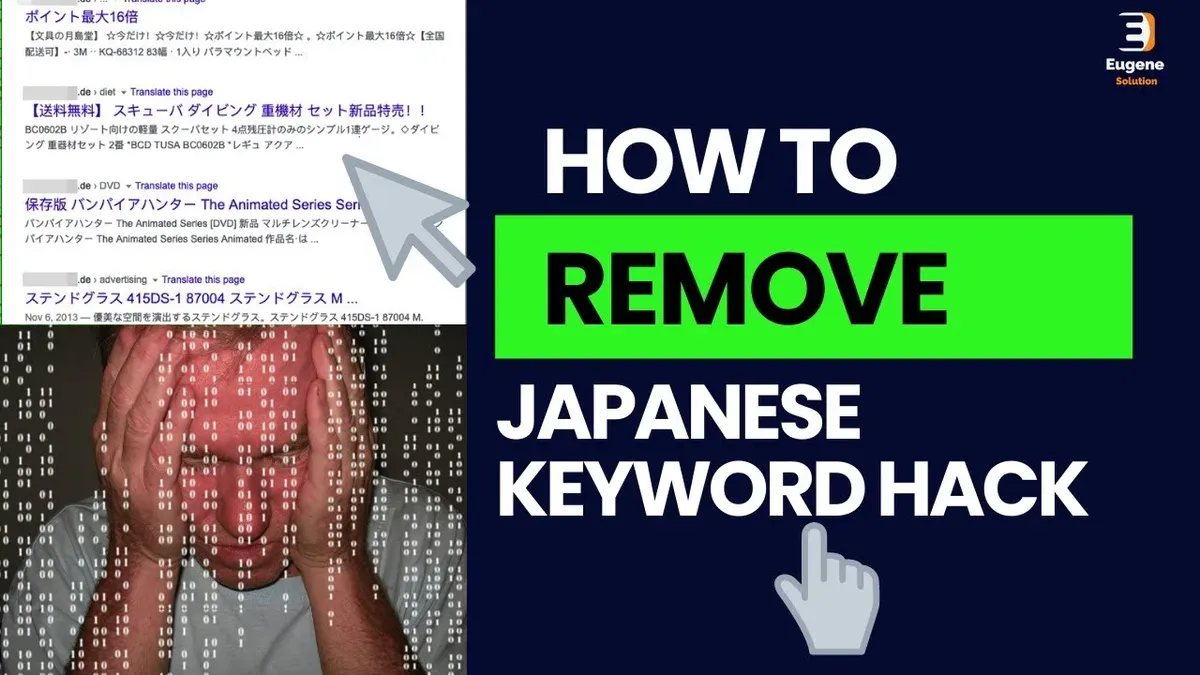
This article provides a detailed, step-by-step guide on how to remove Japanese keyword hack from a website, focusing on thorough detection and cleanup methods to protect SEO integrity.
The Japanese keyword hack typically involves injecting hidden or visible spammy Japanese keywords into website pages, often without the owner's knowledge. This manipulation can harm search rankings and damage user trust.
Removing this hack requires both technical file and database cleansing alongside content review to ensure no legitimate data is lost. It also involves securing the site to prevent reinfection and requesting search engines to reindex clean pages. Understanding the nature of the hack and following a structured process helps website owners, SEO specialists, and webmasters restore their website’s health effectively.
Before you start: prerequisites and tools needed
Proper preparation is essential before initiating the removal of a Japanese keyword hack. Having the right access, backups, and security tools in place ensures the cleanup process is effective and minimizes the risk of further damage.
- Verify full access to website hosting, FTP/SFTP, and CMS admin panel. Successful cleanup requires control over the hosting environment and content management system. Confirm that login credentials to the hosting control panel (such as cPanel or Plesk), FTP/SFTP accounts, and the CMS admin dashboard (e.g., WordPress, Joomla, Drupal) are current and provide full permissions. When access is correct, users will be able to browse all website files, upload/download content, and manage site settings.
- Create a complete backup of website files and database. Before making any changes, generate a full backup to restore the site if needed. This includes all website files, themes, plugins, and the database containing site content. Popular backup plugins for WordPress include UpdraftPlus and BackWPup. Hosting providers often offer backup tools as well. A successful backup typically results in downloadable zip or archive files stored locally or on a remote service.
- Set up security scanning tools to detect malware and file changes. Employ malware scanners and file integrity checkers to identify infected files and unauthorized modifications. Tools such as Sucuri SiteCheck, Wordfence Security (for WordPress), and MalCare can scan for malicious code and suspicious scripts. File integrity monitoring can be done using plugins or server-side tools that compare current files against clean baselines. After setup, these tools will generate detailed reports highlighting potential threats.
- Ensure access to server logs and SEO monitoring platforms. Access to server logs (available via hosting control panels or SSH) helps trace unauthorized activity and infection sources. Additionally, integrate SEO tools like Google Search Console, Bing Webmaster Tools, or Ahrefs to monitor indexing status and detect any abnormal keyword injections or traffic drops. Confirming access means users can view raw logs and SEO performance dashboards without restrictions.
Tip: Establishing these prerequisites before cleanup reduces the chance of accidental data loss and streamlines the identification of all compromised areas.
Understanding the Japanese keyword hack: what it looks like and how it works
The Japanese keyword hack is a form of SEO spam where attackers inject unrelated Japanese keywords and phrases into a website’s content or metadata. This often aims to manipulate search engine rankings by inserting spammy terms that drive traffic to malicious or affiliate sites. These keywords typically appear as seemingly random strings of Japanese characters or common Japanese search terms unrelated to the legitimate content.
Hackers employ several techniques to hide this spam from regular visitors while still making it visible to search engines. One common method is cloaking, where different content is served to search engine crawlers than to users. Hidden text, such as Japanese keywords using font sizes set to zero, white text on white backgrounds, or CSS positioning off-screen, is another frequent tactic. Additionally, injected meta tags with spammy keywords or descriptions can be inserted into the HTML head section without visible changes to the page.
Typical infection vectors include vulnerabilities in outdated content management systems (CMS), insecure or outdated plugins and themes, and compromised administrative credentials. For example, a popular WordPress plugin with a known security flaw can allow attackers to upload malicious scripts that automate the insertion of Japanese spam keywords.
Identifying the hack requires careful examination of both visible content and source code. Inspecting page source for unusual Japanese text in meta tags or inline styles is essential. Examining server files for recently modified scripts or unfamiliar PHP files may reveal injected code.
- View the page source in a browser: Right-click the page and select "View Page Source" to scan for unexpected Japanese keywords in meta descriptions or title tags. When successful, spammy Japanese terms will appear embedded in these sections.
- Check for hidden text: Search the source code for HTML elements styled with "display:none", "visibility:hidden", "font-size:0", or positioned off-screen (e.g., "position:absolute; left:-9999px;"). If present, these often contain spammy Japanese text invisible to users.
- Review server files for suspicious changes: Access the website’s file system via FTP or hosting control panel. Look for recently modified files or unfamiliar scripts in core directories. Discovery of PHP files with obfuscated code or embedded Japanese keywords indicates infection.
- Scan the database entries: Using tools like phpMyAdmin, search database tables, especially those storing posts or pages, for injected Japanese phrases. Visibility of such entries confirms database-level contamination.
Example of injected meta tag with Japanese keywords:
<meta name="keywords" content="格安, 日本語, SEO, 旅行, 安全">
Example of hidden spam text in HTML:
<div style="display:none;">激安ホテル, 日本観光, 格安航空券</div>
Recognizing these characteristics helps differentiate the Japanese keyword hack from other SEO problems or malware, focusing efforts on the specific removal and remediation required.
Tip: Use specialized security plugins with malware scanning features designed to detect hidden spam and cloaking techniques for more efficient identification.
Step 1: Identify all affected pages and content
Locating every instance of the Japanese keyword hack is essential before beginning cleanup. This step involves inspecting indexed pages, website files, server logs, and security reports to uncover all compromised content.
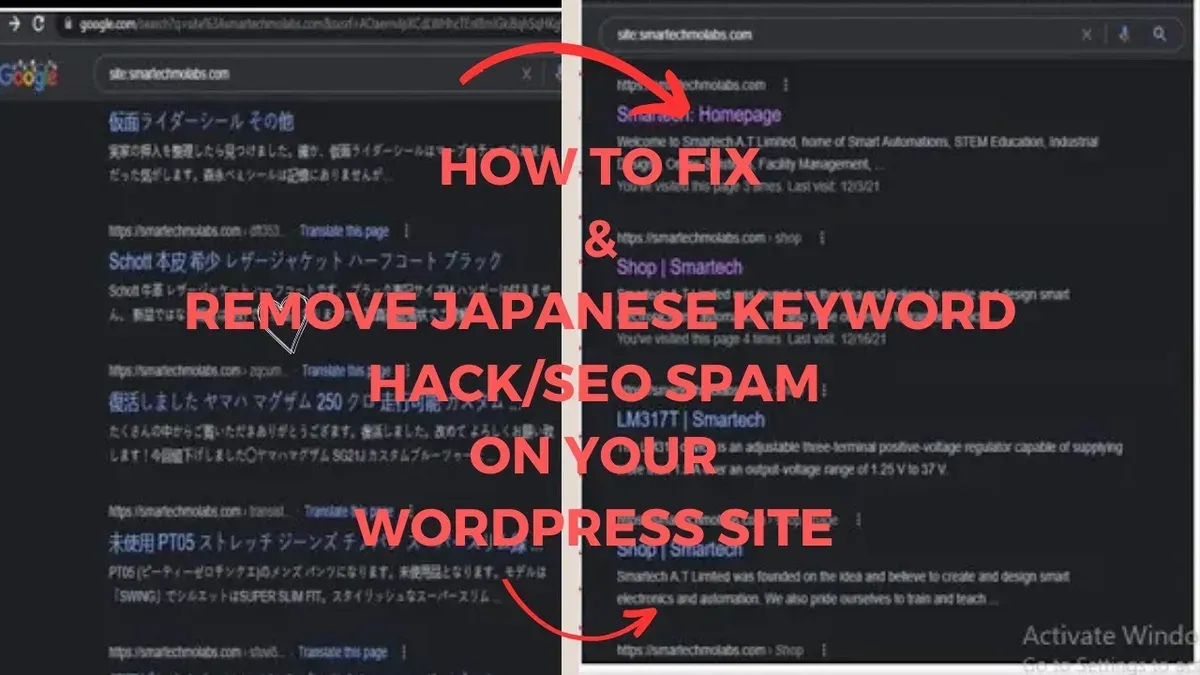
- Use search engine site operators to find indexed spammy pages. Enter queries like site:example.com followed by suspicious Japanese keywords or phrases observed in the hack. For instance, searching site:example.com 日本語 キーワード may reveal several pages injected with the spam. When effective, the search results display URLs that contain the hack, providing a list of compromised pages visible to search engines.
- Scan website files for injected code and unusual content. Use file search tools or code editors to look for common hack indicators such as obfuscated JavaScript, hidden meta tags, or strange iframe elements. Files containing suspicious patterns or Japanese text unrelated to the site’s content should be marked for review.
- Analyze server logs for suspicious requests and redirects. Review access logs for unusual URL parameters, repeated requests to unknown scripts, or redirects to external sites. Identifying such anomalies helps pinpoint files or pages serving the hack or acting as infection points.
- Check Google Search Console’s Security Issues and Manual Actions reports. Navigate to the Security Issues section under the Security & Manual Actions menu. Any alerts about malicious content or spam injections indicate hacked pages flagged by Google. These reports often list affected URLs, which should be compared against findings from other methods.
Worked example: A search using the query site:example.com 情報 (meaning “information”) returns several URLs containing injected Japanese keyword phrases unrelated to the site’s usual topics. This confirms these pages are compromised and indexed with spam content.
Tip: Cross-reference findings from search engines and server logs to ensure no infected page is overlooked during cleanup.
Step 2: Clean infected files and database entries
Removing the Japanese keyword hack requires a thorough cleanup of infected files and database entries to eliminate injected spam code and prevent further SEO damage. This step involves manual inspection, automated tools, and restoring compromised files to original versions.
Cleaning infected files
- Access the website files via FTP or a control panel file manager and locate theme, plugin, and core files often targeted by hackers, such as
header.php,footer.php,functions.php, orindex.php. When successful, these files will contain suspicious Japanese keywords or obfuscated JavaScript not present in clean backups. - Use malware scanning and removal tools such as Wordfence, Sucuri, or MalCare to automate detection and removal of injected scripts. These tools can scan all files and highlight suspicious code, making cleanup more efficient. After running the scan and cleanup, verify no suspicious scripts or keywords remain.
- Replace or update compromised core files, themes, or plugins by downloading fresh copies from official sources and overwriting infected versions. This ensures all hidden modifications are removed and reduces the chance of reinfection from backdoors.
Manually remove injected code snippets. For example, a compromised header.php may contain a hidden <script> tag injecting Japanese keywords:
Before cleanup:
<script>var a='悪意のあるコード';</script>
After cleanup:
Injected script tags and Japanese keyword variables should be fully removed, restoring the file to its original structure without hidden scripts.
Cleaning database entries
- Access the website database using phpMyAdmin or a similar database management tool. Focus on tables commonly targeted by injections, such as
wp_posts,wp_options, andwp_usermeta. - Search for injected Japanese keywords by running queries that look for suspicious content. For example, searching for Japanese characters or known spam keyword phrases:
SELECT * FROM wp_posts WHERE post_content LIKE '%悪意%'; - Manually remove or edit spam content found in posts, site options, or user metadata fields. Replace infected entries with clean versions or delete spam entries entirely. For example, if a post contains hidden Japanese keyword spam appended to legitimate content, remove the spam portion without deleting the valid content.
- After cleanup, verify the database no longer contains injected spam by rerunning queries and cross-checking suspicious entries. This ensures complete removal of hidden keywords that harm SEO.
Tip: Backing up both files and the database before making changes allows quick restoration if mistakes occur during cleanup.
Step 3: Secure website to prevent reinfection
After removing the Japanese keyword hack, reinforcing the website's defenses is crucial to prevent future attacks. This involves updating software components, strengthening access credentials, implementing security tools, and setting strict file permissions.
- Update CMS, plugins, and themes to the latest versions. Access the website’s administration dashboard or hosting control panel and apply all available updates. Successful completion is confirmed when the system reports "All components are up to date" or a similar message. Updated software reduces vulnerabilities exploited by attackers.
- Change all passwords related to hosting, FTP, database, and CMS admin accounts. Use strong, unique passwords combining uppercase, lowercase, numbers, and symbols. After updating, log out and log back in to verify the new credentials work. This step blocks unauthorized access from compromised credentials.
- Install security plugins or web application firewalls (WAF). Choose reputable security tools compatible with the CMS. Configure settings to enable malware scanning, login attempt limits, and firewall protection. Confirmation appears as active status or dashboard alerts indicating protection is enabled. These tools add proactive layers of defense.
- Set proper file and folder permissions on the server. Use FTP or hosting file manager to check permissions. Before hardening, common insecure settings include 777 for folders and 666 for files, allowing write access to all users. Change folder permissions to 755 and file permissions to 644. This configuration allows the owner to write while restricting others to read and execute only. After adjustment, verify the permissions reflect these values. Proper permissions prevent unauthorized file modifications that enable hacks.
Comparison of permissions before and after hardening:
| Item | Before | After |
|---|---|---|
| Folders | 777 (read/write/execute for all) | 755 (owner: read/write/execute; group/others: read/execute) |
| Files | 666 (read/write for all) | 644 (owner: read/write; group/others: read only) |
Tip: Regularly schedule updates and permission audits to maintain security and reduce the risk of reinfection.
Step 4: Request reindexing and monitor SEO impact
After removing the Japanese keyword hack, promptly requesting reindexing from search engines is essential to restore SEO health. Google Search Console provides tools to submit cleaned URLs for faster crawling and indexing, helping to update search results with the corrected content.
- Log into Google Search Console and select the affected property. Navigate to the URL Inspection tool and enter a cleaned page URL. When the page details appear, click "Request Indexing." Successful submission will prompt Google to recrawl the page, with confirmation shown directly in the tool.
- Repeat this process for all critical pages that were compromised. Prioritize high-traffic and important ranking pages to accelerate recovery in search results. Bulk submission via sitemap updates can also be helpful, but individual URL requests ensure quicker attention.
- Use SEO monitoring tools, such as Ahrefs, SEMrush, or Google Analytics, to track keyword rankings and organic traffic trends. Expect gradual improvement over several weeks; rankings may initially fluctuate as the search engine processes the changes. Consistent upward trends indicate successful cleanup and indexing.
- Regularly check search engine results pages (SERPs) for any lingering spammy Japanese keywords or content snippets. Residual spam in snippets or meta descriptions suggests incomplete cleanup or delayed indexing, requiring a review of files and database entries.
- Set up alerts for unusual website changes or keyword shifts. Tools like Google Alerts or custom scripts can notify the webmaster of suspicious content injections or rapid ranking drops, enabling timely intervention before issues escalate.
Sample recovery timeline: Following a thorough cleanup and reindexing request, many sites begin to see noticeable ranking improvements within 2 to 4 weeks. Organic traffic typically rebounds gradually over 1 to 3 months, depending on site size, crawl frequency, and the extent of the hack.
Tip: Continuously monitoring SEO metrics and search results after cleanup ensures the site fully recovers and helps identify any hidden reinfection early.
Troubleshooting common failure points
Persistent Japanese keyword spam after cleanup often indicates hidden backdoors or scheduled tasks maintaining the infection. These can be overlooked if only visible files and database entries were addressed.
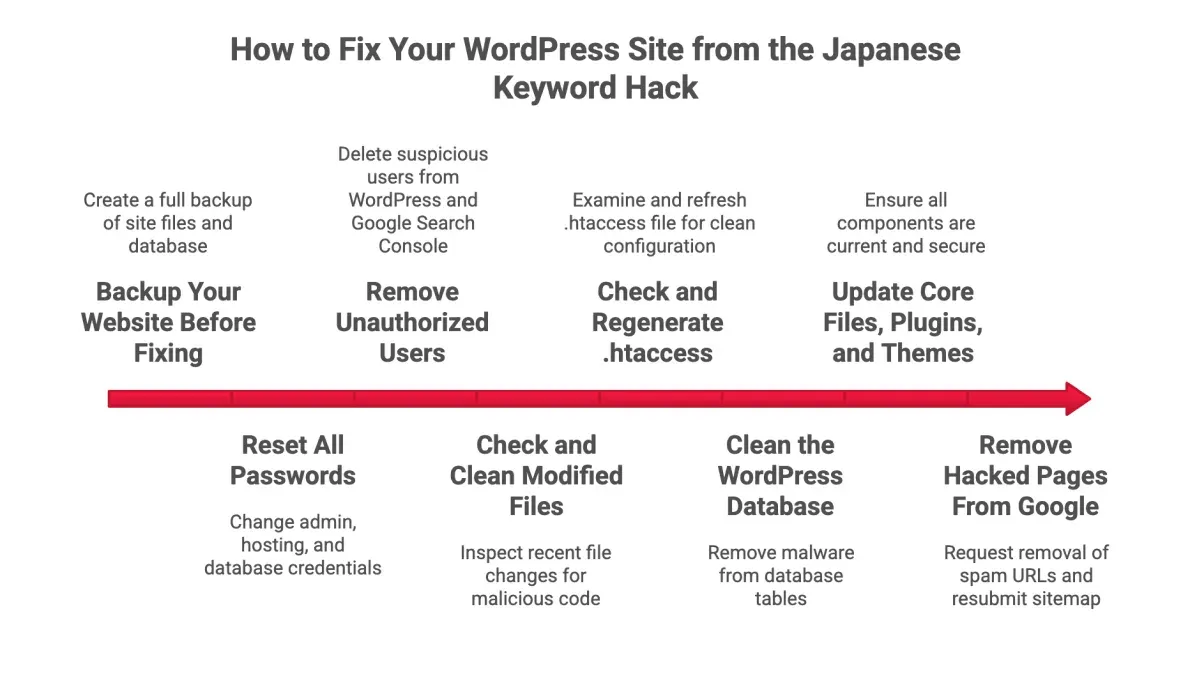
- Check for hidden backdoors: Search the entire server, including less obvious directories like /tmp, /cache, or /uploads, for unfamiliar PHP,.htaccess, or JavaScript files. A successful check reveals no suspicious files outside the expected website structure.
- Inspect cron jobs and scheduled tasks: Review server cron jobs using
crontab -lor hosting control panel task schedulers. Remove any tasks that execute unauthorized scripts or connect to suspicious domains. When cleared, no unknown scheduled tasks remain. - Verify malware scanner results: False positives can cause unnecessary cleanup. Cross-check flagged files with multiple reputable scanners such as Sucuri SiteCheck, VirusTotal, or local antivirus tools. Confirm suspicious files by manual inspection before deletion. Accurate verification ensures only genuinely infected files are removed.
- Resolve database access issues: If cleaning database entries is challenging, confirm correct credentials and sufficient privileges for tools like phpMyAdmin or command-line clients. Backup the database before making changes. Successful access allows safe removal of injected keywords and scripts.
- Address SEO penalties persisting post-cleanup: Sometimes search engines retain penalties despite a clean site. Submit reconsideration requests via Google Search Console detailing cleanup efforts. Monitor crawl errors and manual action reports. Gradual ranking recovery and removal of manual penalties indicate resolution.
Case study: A mid-sized e-commerce site experienced recurring Japanese keyword spam despite multiple cleanups. Investigation revealed a hidden PHP backdoor in the /uploads/temp directory and a cron job reinjecting spam every hour. Removing the backdoor and disabling the cron job ended the persistent infection. Subsequent Google Search Console reconsideration led to recovery of SEO rankings.
Tip: Regularly audit server tasks and obscure directories as part of ongoing website security maintenance to catch hidden reinfection sources early.
When professional help is needed
Not all website owners or SEO specialists can fully resolve a Japanese keyword hack on their own. Certain conditions warrant seeking expert assistance to avoid further damage or incomplete cleanup.
Large and complex websites with deeply embedded infections often require professional investigation. Hackers may implant hidden backdoors, malicious scripts, or database compromises spread across numerous pages. Without specialized forensic tools and experience, manual cleanup risks missing critical elements.
Limited technical expertise or lack of access to essential diagnostic and security tools is another common barrier. Professionals use advanced malware scanners, server log analyzers, and database auditing software that are not always user-friendly or affordable for all site owners.
Severe SEO damage caused by the hack, such as dramatic drops in ranking, deindexing, or manual penalties from search engines, may need recovery specialists. These experts can craft tailored reinclusion requests and implement SEO restoration strategies beyond basic reindexing submissions.
Ongoing attacks or repeated hacks indicate deeper vulnerabilities or persistent attacker access. Professional security audits and continuous monitoring services help identify and seal these weaknesses to prevent relapse.
Security professionals often highlight that over 30% of website hack cases involve hidden backdoors missed by initial cleanup, leading to reinfection. This underscores the complexity and risk of solo remediation efforts.
- Assess the extent of infection: If the hack affects hundreds of pages or includes unknown malicious files, the website is likely beyond simple DIY fixes.
- Evaluate available skills and tools: Without access to server-level logs, shell access, or malware scanning software, effective cleanup is unlikely.
- Review SEO impact: Significant drops in traffic or manual search engine penalties signal the need for specialized SEO recovery expertise.
- Monitor for recurring issues: If the hack reappears after cleanup attempts, professional security services should be engaged.
- Engage a trusted cybersecurity firm: Look for providers with proven experience in CMS security, malware removal, and SEO recovery to ensure thorough remediation.
Tip: Always ensure a full backup is made before handing over site access to professionals to safeguard original data.
Further reading
- How to Get Off the Google Safe Browsing Blacklist: A Step-by-Step Guide
- How to Fix Mixed Content Warning on Websites: A Step-by-Step Guide
- How to Install Fail2Ban on Linux
- How to Harden Your Ubuntu Server
Frequently asked questions
What exactly is the Japanese keyword hack and how can I recognize it?
The Japanese keyword hack is a type of SEO spam where unauthorized Japanese keywords and phrases are injected into a website’s pages, often hidden from normal view. It can appear as invisible text, hidden links, or unusual meta tags associated with Japanese content. Indicators include sudden drops in SEO rankings, unexpected Japanese characters in source code, or alerts from search engine webmaster tools about foreign spam.
Can I remove the hack without losing any of my legitimate content?
Yes, it is possible to remove the hack while preserving legitimate content by carefully identifying and isolating injected elements. This involves comparing suspicious files or database entries against clean backups and removing only unauthorized code fragments or keywords. However, thorough backups and cautious editing are essential to avoid accidental deletion of valid site material.
How long does it typically take for search engines to update after cleanup?
Search engines usually take between a few days and several weeks to re-crawl and update the site’s status after cleanup, depending on site size and crawl frequency. Requesting reindexing via tools like Google Search Console can accelerate this process. Monitoring for ranking recovery and search visibility changes over the following month is advisable.
Are there any plugins or tools recommended for detecting this specific hack?
Security plugins such as Wordfence, Sucuri, and MalCare offer malware scanning that can identify unusual injected code, including Japanese keyword spam. Additionally, tools like Google Search Console and manual source code audits help detect suspicious content. No single tool guarantees perfect detection, so combining automated scans with manual review yields the best results.
Scope and limitations of this guide
This guide focuses exclusively on removing Japanese keyword hack infections from websites and does not address other types of malware, phishing attempts, or broader SEO issues such as algorithmic penalties or link profile problems. Website owners should confirm the specific nature of their compromise through thorough diagnostics or professional assessment before applying these steps. If other forms of malicious code or security breaches are detected, specialized remediation may be required.
For those unfamiliar with website security protocols or server management, seeking professional assistance can prevent accidental data loss or further site damage.
The single most effective next step after completing this cleanup is to implement continuous monitoring using tools like Google Search Console and security plugins such as Wordfence or Sucuri. These tools provide timely alerts for reinfection attempts and help maintain SEO health by tracking indexing status and crawl errors.