Is csrss.exe a Virus? Identifying Safe vs Malicious Processes
Discover how to determine if csrss.exe is a virus and ensure your system's safety by identifying genuine versus malicious processes.

Windows users often encounter the process csrss.exe and wonder: is csrss.exe a virus? Understanding its role and how attackers mimic it is essential to protect your system effectively. This article explains the genuine function of csrss.exe, common spoofing methods, and practical ways to verify its legitimacy.
What is csrss.exe and Its Legitimate Role in Windows 11 and 12
csrss.exe stands for Client/Server Runtime Subsystem. It is a core Windows system process responsible for managing the graphical subsystem and user sessions. Without it, Windows cannot properly display graphics or handle user logins.
- Critical system component: csrss.exe manages graphical elements such as console windows and thread creation for processes.
- Session management: It handles user logon sessions and is essential for system stability.
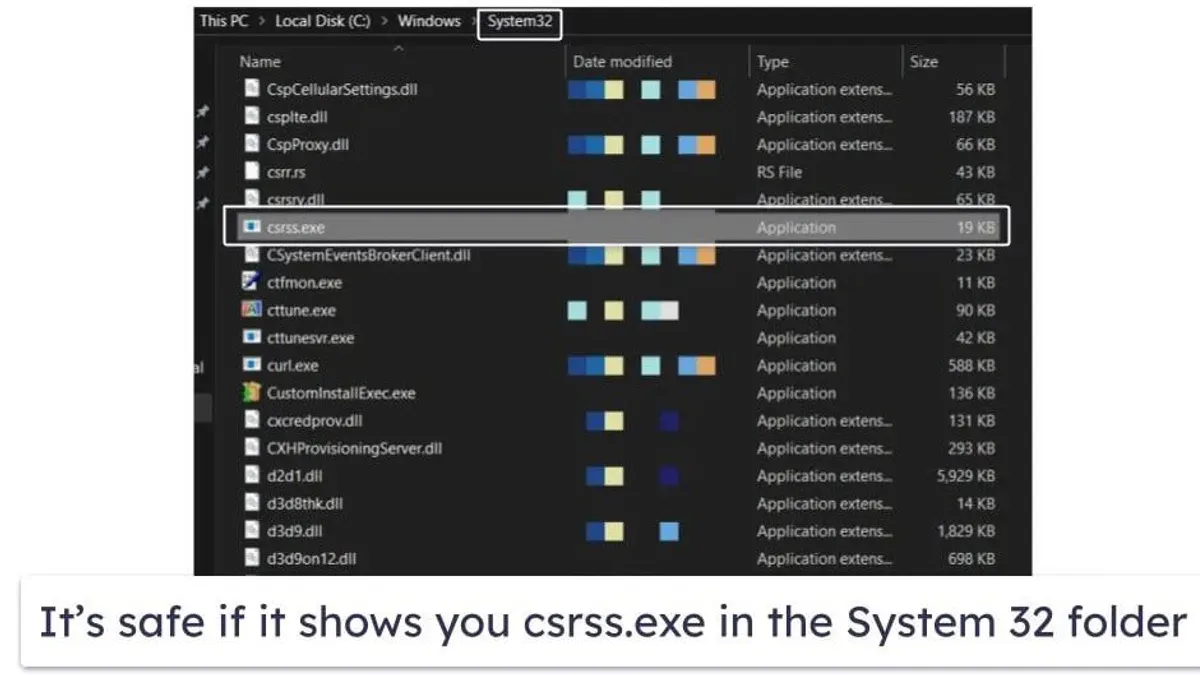
- Typical file location: The legitimate csrss.exe resides in the
C:\Windows\System32folder. - Normal resource usage: It usually consumes minimal CPU and memory under normal operation.
Microsoft documentation confirms csrss.exe as a trusted system process. In Windows Task Manager, you will typically see one or two instances running under the SYSTEM user, with low resource footprints.
How Malware Mimics csrss.exe: Common Spoofing Techniques
Attackers use advanced methods to disguise malware as csrss.exe, making detection harder.
- Filename spoofing: Using characters that look like "csrss.exe" but contain subtle Unicode substitutions or misspellings, such as "csrs.exe" (with a Cyrillic 'ѕ').
- Process injection: Malware injects code into legitimate csrss.exe processes, hiding its activity within a trusted process.
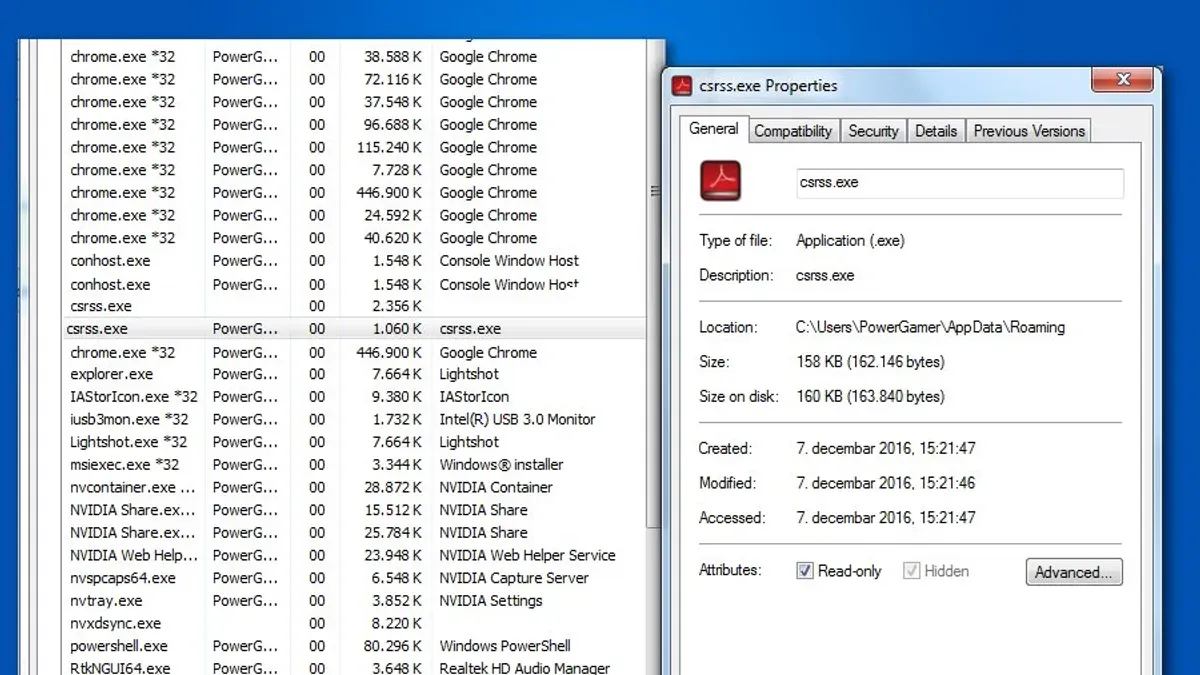
- Alternate file paths: Malicious versions may run from unusual directories outside
System32, such as user folders or temporary locations.
For example, a side-by-side process tree comparison shows a legitimate csrss.exe launched by the system, while a spoofed one may appear under a user process or from an unusual directory. Tools like Process Explorer can reveal injected code causing suspicious network connections or CPU spikes.
Steps to Verify if Your csrss.exe is Legitimate
Follow this checklist to confirm the authenticity of csrss.exe on your system:
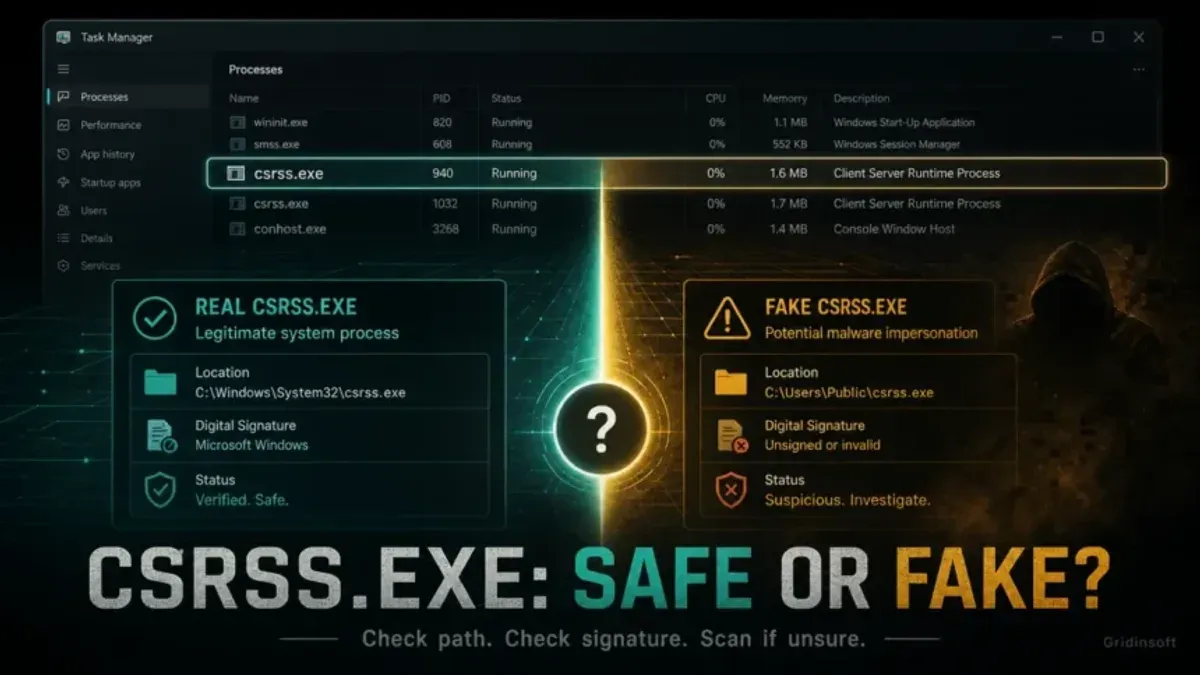
- Check file location: Open Task Manager, right-click csrss.exe, select "Open file location." It must be in
C:\Windows\System32. A common misstep is trusting the process name without verifying this path. - Verify digital signature: Right-click the file, select Properties > Digital Signatures, and confirm it is signed by Microsoft Windows. Unsigned files or invalid signatures indicate potential threats.
- Use Windows Resource Monitor and Process Explorer: Examine the process for unusual CPU, memory, or network activity. Legitimate csrss.exe is stable and low on resources; spikes during login are normal but sustained high usage is suspicious.
- Run antivirus and anti-malware scans: Use updated security tools to scan csrss.exe specifically for threats. Some malware can evade basic scans, so ensure your tools support heuristic and behavior-based detection.
- Look for behavioral signs: Excessive CPU usage, unexpected network connections, or repeated crashes may indicate infection.
Below is a comparison table illustrating typical vs suspicious csrss.exe indicators:
| Indicator | Legitimate csrss.exe | Possible Malware |
|---|---|---|
| File location | C:\Windows\System32 | Outside System32 (e.g., C:\Users\AppData\) |
| Digital signature | Signed by Microsoft | Unsigned or invalid signature |
| CPU usage | Low, under 5%, occasional brief spikes during login | High or spiking frequently without clear cause |
| Network activity | None or minimal | Unexplained outbound connections |
What to Do if You Suspect csrss.exe is a Virus
If you determine csrss.exe may be malicious, proceed carefully. Abruptly terminating the process can cause system instability or crashes.
- Do not kill csrss.exe directly: Instead, use specialized malware removal tools designed to safely detect and quarantine threats. These tools handle injected code and spoofed files without destabilizing the system.
- Backup your data: Before remediation, ensure important files are backed up to prevent data loss.
- Run full system scans: Use reputable antivirus and anti-malware software with updated definitions to remove infections.
- Seek professional IT support: If unsure, or if the system is unstable after cleanup attempts, consult an expert to avoid further damage.
Manual deletion or interference with csrss.exe often leads to blue screen errors. Trusted removal tools that detect spoofed files and injected code can clean infections while preserving system stability.
Why Some Security Tools Flag csrss.exe and How to Interpret These Alerts
Security tools sometimes produce false positives on csrss.exe due to its critical role and complex behavior.
- Common false positives: Heuristic scans may flag legitimate csrss.exe if it exhibits unusual but benign activity, such as temporary CPU spikes during user login.
- How heuristic scanning works: It analyzes behavior patterns rather than fixed signatures, which can cause misidentification.
- Configuring alerts: Adjust your antivirus settings to reduce false alarms, whitelist verified csrss.exe, and monitor alerts contextually.
Scan results often vary across engines, emphasizing the need to verify file location and signatures before taking action.
Limitations and Important Caveats
This article focuses on csrss.exe-related malware and does not cover threats unrelated to this filename or advanced persistent threats using other evasion techniques. Users without technical expertise should avoid manually terminating or deleting system processes and instead seek professional help to avoid system damage.
Frequently Asked Questions
Can csrss.exe itself ever become infected or corrupted?
While the csrss.exe file can be targeted by malware or corrupted by system issues, direct infection of the genuine file is rare. More often, attackers use spoofed copies or process injection to evade detection.
Is it safe to delete or rename csrss.exe if suspected malicious?
No. Deleting or renaming csrss.exe can cause serious system instability and crashes. Use trusted malware removal tools instead of manual file manipulation.
How can I distinguish csrss.exe from a similarly named malware file?
Verify the file location is C:\Windows\System32, check the digital signature is from Microsoft, and use tools like Process Explorer to inspect process behavior and parentage.
Are there any known csrss.exe-related malware outbreaks?
Malware campaigns increasingly use csrss.exe spoofing and injection techniques. However, no widespread outbreaks have solely targeted this process; attackers typically use it as part of broader infection strategies.