How to Manage and Secure a Stripe Account After a Hack
Discover essential steps to manage and secure a Stripe account hacked, protecting your payment data and restoring control safely.


A Stripe account hacked poses immediate risks: unauthorized transactions, data breaches, and loss of control over payment flows. Recovery hinges on a precise sequence of actions that secure API keys and reset credentials before restoring normal operation. Missteps, like rotating keys before revoking access or neglecting to use restricted API keys, can prolong exposure and increase damage.
Checked in November 2026 against Stripe; details like these change, so the date matters.
How to access a Stripe account safely
Avoid logging in via emailed links or third-party sites to prevent credential interception. During login, watch for unusual prompts or unexpected password reset requests; these often signal attempted account compromise.
Exposing keys in browsers or mobile apps allows attackers to capture them and gain unauthorized access. Instead, store all secret keys securely on server platforms using environment variables or secrets vaults designed for sensitive data protection.
Within the Stripe Dashboard, API keys can be managed under Dashboard → Developers → API keys. Employ restricted API keys (starting with rk_live_) wherever possible to minimize permissions and limit potential damage if a key is exposed. This control reduces risk by segregating access according to specific use cases.
For example, a business owner should keep secret keys only on backend servers, never in frontend code. If a login attempt triggers a password reset email without initiation, it indicates the account may be under attack. Immediate secure login via the official site, followed by a review of API key usage, prevents further damage.
- Always log in at the official Stripe Dashboard website.
- Do not embed secret or restricted API keys in client-side code.
- Store API keys securely using server-side secrets vaults or environment variables.
- Monitor login attempts for unusual activity or unexpected password resets.
Following these steps ensures the initial point of access remains secure and reduces the chance of a successful breach through compromised credentials or exposed API keys. For managing and reviewing API keys, navigate to Dashboard → Developers → API keys in the Stripe Dashboard.
How to find my Stripe account ID
Locate the Stripe account ID through the Stripe Dashboard to ensure accurate support requests and proper API integration. The account ID uniquely identifies each Stripe account and differs from API keys, which control access permissions. Access it by navigating to the Dashboard, then selecting Settings usually found in the lower-left corner of the interface.
Within Settings, look for the Account details section. The account ID appears as a string beginning with acct_, followed by a series of letters and numbers. This identifier is essential for developers configuring API requests or for customer service to verify account ownership during troubleshooting.
Keep in mind that API keys, accessible via Dashboard → Developers → API keys, serve a different purpose. API keys authorize actions on the account but do not identify the account itself. Confusing the two can cause errors in integrations or delays in support communications.
For example, a Stripe account ID might look like acct_1Gqj58LZyO4h3F, whereas API keys will start with prefixes like rk_live_ for restricted keys. Recognizing this distinction prevents missteps when managing account settings or communicating with Stripe support.
How to create a Stripe account for personal or business use
Start by visiting Stripe’s sign-up page and entering the required personal or business information. The setup process tailors the account based on whether it is for an individual or an organization, adjusting settings to fit the intended use case. Choosing the correct account type ensures compliance with Stripe’s verification requirements and proper tax handling.
This wide coverage helps simplify global transactions and reduces currency conversion costs. When setting up payment methods, select those that align with the primary customers’ locations and preferences to streamline revenue collection.
These tools allow business owners to integrate payment processing quickly and securely with minimal technical overhead.
They can then use a no-code plugin from a partner app to accept payments through their e-commerce platform without writing any code, ensuring fast and secure setup.
How to get a Stripe account if locked out or hacked
Begin recovery by resetting the password through Stripe’s official account recovery process. This step restores login access but does not address compromised API keys, which pose the greatest ongoing risk. After regaining access, immediately sign in to the Stripe Dashboard and navigate to Dashboard → Developers → API keys. Review all active API keys, focusing on unrestricted live mode secret keys starting with sk_live_. Revoke any keys that appear suspicious or that may have been exposed, as these keys grant full access to all Stripe API resources and can cause extensive damage if misused.

Once API keys are secured, enable all available account security features and carefully audit access logs for unauthorized activity. This confirms the account is stable and prevents further intrusion. For cases where direct account access is impossible, contact Stripe support with the account ID and verification details to initiate official recovery procedures. Follow their instructions precisely to avoid delays.
For example, if a developer notices unexpected charges and cannot log in, the first step is a password reset. After logging in, they should revoke all sk_live_ keys via the API keys menu to cut off illicit API access before resetting any other settings. Reversing this order risks continued unauthorized operations despite login restoration.
- Reset password via official recovery.
- Log in and review API keys at Dashboard → Developers → API keys.
- Revoke suspicious or unrestricted
sk_live_keys immediately. - Enable all security features and review access logs.
- Contact Stripe support if locked out with account ID ready.
This order of operations ensures compromised credentials are neutralized systematically and prevents attackers from maintaining access after login restoration. Skipping or reordering steps creates security gaps that prolong exposure and increase damage.
How to delete or deactivate a Stripe account
Stripe account closure is managed through the Stripe Dashboard. To initiate the process, navigate to Settings, then to the Account section where the option to close the account appears. Closing the account is permanent and immediately stops all payment processing, which affects any ongoing transactions and subscriptions tied to that account.
Before closing, consider whether a temporary suspension might suffice. Instead of deleting the account, revoke or rotate API keys found under Dashboard → Developers → API keys. This action cuts off application access without disabling the entire account.
For example, a business pausing operations might revoke all unrestricted API keys to halt payment interactions temporarily while keeping the account active for future use. When ready to resume, new keys can be generated without re-registering.
Deleting the account erases the ability to accept payments and cannot be undone. All related data access and integrations stop at once. This step should only be taken when sure no further transactions or account activities will occur.
In summary, the Stripe Dashboard provides clear paths for both permanent account closure and API key management, enabling decisions based on whether the goal is permanent shutdown or temporary suspension of payment capabilities.
How to give access to a Stripe account securely
Granting access to a Stripe account requires strict control to prevent unauthorized actions. Using the Stripe Dashboard’s team management features, assign roles based on the principle of least privilege, ensuring each member has only the permissions necessary for their tasks. Avoid sharing secret keys or account login credentials directly, as this exposes the account to unnecessary risk.
Create restricted API keys for external integrations or developers. These keys start with rk_live_ and limit permissions to specific capabilities, reducing damage if compromised. For example, a marketing tool that only needs to create charges should receive a restricted key allowing charge creation but not refunds or account modifications.
Regularly audit the list of active team members and API keys. Revoke unused keys and remove access for users who no longer require it. This proactive cleanup prevents lingering access points that can be exploited by attackers.
In practice, navigate to Dashboard → Developers → API keys to generate and manage restricted keys. Use the Team section in the Dashboard to update user roles and permissions. Combining these methods keeps control tight and limits exposure to breaches.
Is a Stripe account safe? Understanding Stripe’s security measures
This means sensitive information is stored separately from other system components, minimizing exposure if one area is compromised. For a business owner, this equates to trusted protection for credit card and payment data.
Radar automatically identifies and blocks suspicious transactions, improving authorization rates without manual intervention. This AI-driven approach adapts to emerging fraud patterns, reducing chargebacks and losses.
This ensures payment processing remains uninterrupted, crucial for maintaining business cash flow and customer trust.
While no system is immune to breaches, Stripe’s measures significantly reduce risk and provide a resilient platform for payment processing.
Common pitfalls that lead to Stripe account compromise
Exposing secret or restricted API keys in client-side code is a critical error. Keys such as rk_live_ (restricted live keys) or sk_live_ (unrestricted live secret keys) embedded in front-end code become accessible to anyone inspecting the site, allowing attackers to misuse them. For instance, placing a secret API key in JavaScript served to browsers hands full access to the Stripe account, risking unauthorized charges or data leaks.
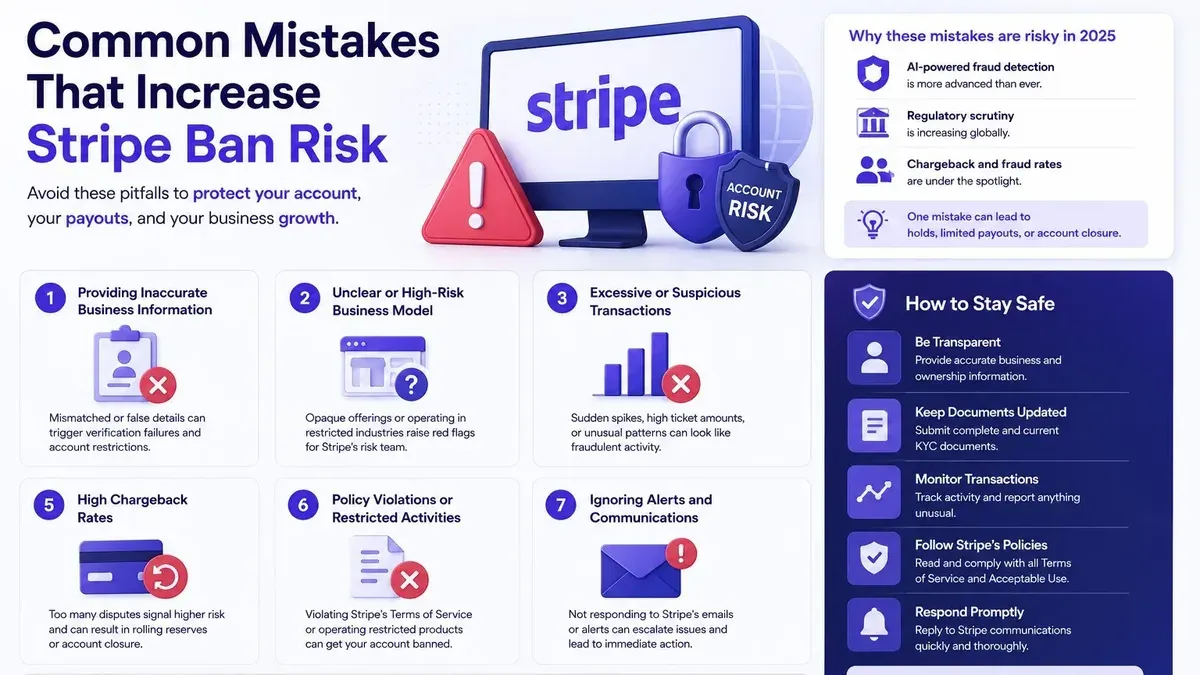
Using unrestricted live mode secret keys (sk_live_) without applying permission limits maximizes damage if keys are stolen. These keys grant full access to all Stripe API resources, including creating charges, issuing refunds, or viewing sensitive data. Instead, restricted API keys starting with rk_live_ should be created for specific tasks to limit exposure.
Failing to audit API keys and account access regularly is another common mistake. Old, unused, or over-permissioned keys often remain active, increasing attack surface. A periodic review of keys under Dashboard → Developers → API keys helps identify and revoke unnecessary credentials.
Not segmenting API keys by use case also increases risk. Assigning a single key to all operations means a leak compromises everything. Using restricted API keys with minimal necessary permissions per integration or service reduces the blast radius of any compromise, aligning with Stripe’s security recommendations.
In summary, avoid exposing keys in client code, prefer restricted keys over unrestricted ones, perform regular audits, and apply the principle of least privilege to API keys to maintain account security.Stripe API documentation
The order of operations that actually matters after a Stripe account hack
Begin by immediately revoking any suspicious API keys via the Stripe Dashboard under Developers → API keys. Unrestricted secret keys (sk_live_) without limits pose the greatest risk; if compromised, they grant full access to your Stripe resources. Removing these keys first stops further unauthorized activity. Next, reset account passwords and verify identity with Stripe support to regain full control and prevent repeated breaches.
After access is secured, audit all connected integrations and payment methods to identify hidden vulnerabilities or unauthorized connections. Replace any unrestricted keys with restricted API keys (starting with rk_live_) that limit permissions to only what each integration needs. This practice minimizes damage if keys are exposed again.
Finally, enable and configure Stripe Radar to leverage its AI-powered fraud detection. Monitor account activity continuously to detect unusual patterns early. Reversing this order risks losing control or missing ongoing threats; for instance, auditing before revoking keys allows attackers to persist. A concrete example: if a compromised unrestricted key remains active while password reset occurs, attackers can still manipulate the account despite new credentials.
- Revoke suspicious API keys first
- Reset passwords and verify identity with support
- Audit integrations and payment methods
- Create restricted API keys for ongoing use
- Enable Stripe Radar and monitor continuously
This precise sequence ensures the breach is contained, access restored securely, and future risks minimized through proper permission controls and fraud detection. Managing API keys through the Dashboard is central to this process, making restricted keys a critical defense.
Essential steps to secure a hacked Stripe account
Resetting the password must come first to stop active intrusion. Next, revoking API keys before generating new restricted keys avoids accidental exposure through still-active keys. Adjusting user access only after these steps prevents compromised users from regaining entry. This sequence preserves control and minimizes further damage. The most useful next step is to systematically audit the account’s access points and credentials following this order to ensure no lingering vulnerabilities remain.
Sources checked
- Stripe API Reference — Stripe
- Stripe Payments | Global Payment Processing Platform — Stripe
See also: How to Protect and Recover an OKX Account After a Hack · How to Identify, Respond to, and Recover from a PayPal Account Hack · How to Identify, Respond to, and Prevent Google Pay Account Hacks · How to Recover and Secure a Hacked Skrill Account