How to Check If a Website Is Legit: A Step-by-Step Guide
This guide shows how to check if a website is legit using practical steps to avoid scams and ensure online safety across devices and regions.

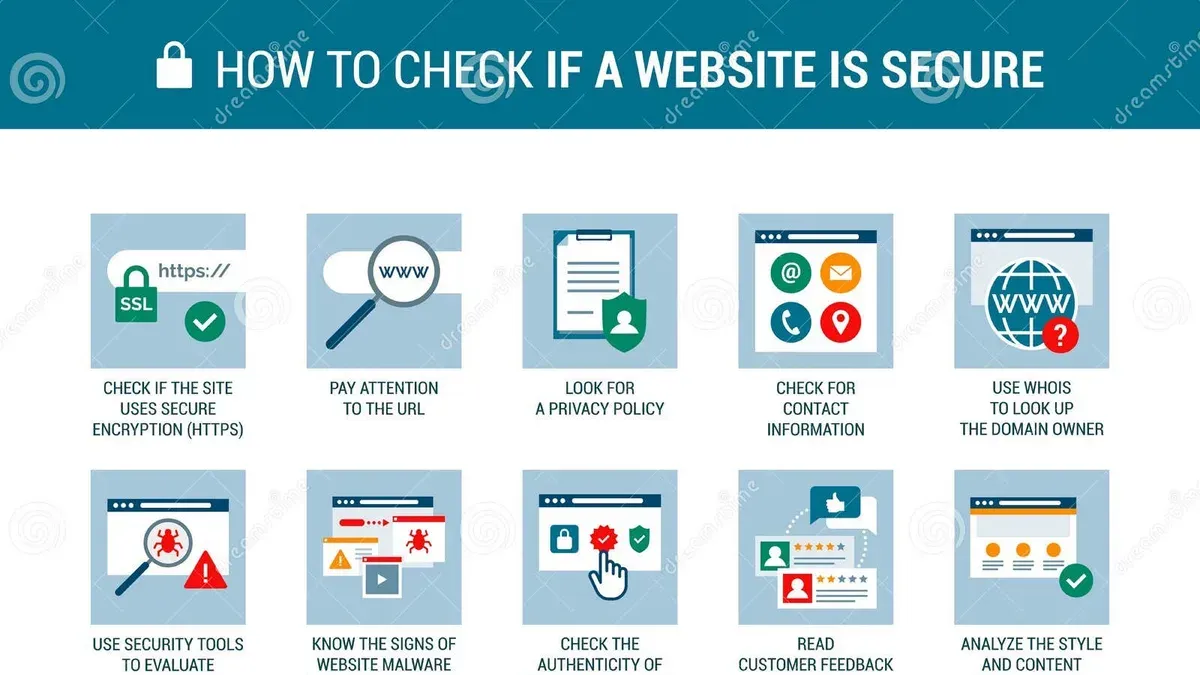
This article explains how to check if a website is legit by guiding readers through detailed, practical steps applicable across devices and regions. Determining a website’s legitimacy is essential before sharing personal or payment information to avoid scams and data breaches.
Starting with the basics, verifying a website involves examining its domain details, security certificates, contact information, and user reviews. For those using specific devices like iPhones, additional checks can enhance safety. Regional considerations also affect how legitimacy is assessed, as some countries have unique regulatory frameworks and verification tools.
Throughout the article, readers will find instructions on using third-party services such as Legitscript, alongside tips on recognizing common red flags. This balanced approach highlights both the strengths and limitations of each method, ensuring cautious online shoppers and everyday users can make informed decisions about website trustworthiness.
Before you start: What is needed to check a website’s legitimacy
Checking whether a website is legitimate requires certain tools and a clear understanding of the process. Basic internet access and a device such as a computer or smartphone are essential to begin the verification steps. Access to modern web browsers like Google Chrome, Mozilla Firefox, Safari, or Microsoft Edge is also necessary, as they offer developer tools and extensions that assist in inspecting website details.
Numerous free online verification tools and lookup services can provide valuable insights into a website’s registration, reputation, and security status. These include services like WHOIS lookup, SSL certificate checkers, and domain reputation checkers. However, no single method guarantees 100% certainty; combining multiple approaches improves confidence in the assessment.
- Open a web browser with developer tools or extension support. Upon success, the browser’s menu should display options like “Inspect” or “Developer Tools.”
- Prepare access to online verification platforms such as WHOIS databases, SSL Labs, or third-party reputation checkers. Testing these tools should yield domain registration info or security reports.
- Ensure the device is connected to the internet to perform live lookups and real-time security checks. Successful connection allows access to all necessary websites and tools.
Tip: Using multiple browsers or devices can help identify inconsistencies in how a website behaves, which may be a red flag.
How to check if a website is legitimate
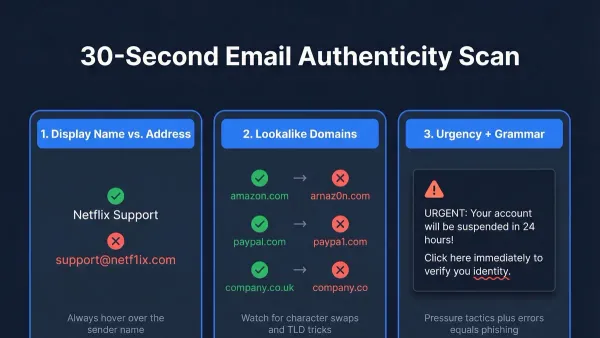
- Verify the URL carefully. Check for misspellings, extra characters, or unusual domain endings (e.g.,.com vs.co or.net). For example, a legitimate site might be www.example.com, while a fake could be www.examp1e.com or example-secure.net. A correct URL usually matches the brand exactly and uses common domain extensions.
- Check for HTTPS and security certificates. Confirm the URL begins with "https://" and look for a padlock icon in the browser address bar. Clicking the padlock reveals the certificate details and issuer. Warnings such as "Not Secure" or certificate errors indicate potential risks. Legitimate sites have valid, current certificates issued by trusted authorities.
- Review website design quality and content professionalism. Legitimate sites generally have well-organized layouts, consistent fonts, and error-free text. Poor grammar, broken links, or low-quality images can be red flags. Look for content that aligns with the brand's reputation and industry standards.
- Look for clear contact information and physical addresses. Trusted websites usually provide a phone number, email, and a verifiable physical address. Absence of contact details or use of generic email addresses (e.g., Gmail or Yahoo) may indicate a suspicious site.
- Search for external reviews and ratings on trusted platforms. Use review sites like Trustpilot, BBB, or Google Reviews to see user experiences. Multiple negative reviews or unresolved complaints suggest caution, while generally positive feedback supports legitimacy.
- Use domain lookup and WHOIS information. Access WHOIS databases to check domain ownership, registration date, and contact details. Older domains with consistent ownership history are more trustworthy. Recent registrations or hidden ownership details can be warning signs.
- Check for privacy policy, terms of service, and refund policies. Legitimate websites typically provide these documents, accessible via footer links. They should be clear, detailed, and relevant to the site's operations. Missing or vague policies raise concerns about trustworthiness.
Example: The URL "https://secure-payments.example.com" with a valid certificate and clear contact info is more credible than "http://example-payments.net" without HTTPS or contact details.
Tip: Use browser tools to quickly view certificate details and verify the domain's legitimacy before proceeding.
How to check if a website is legit or scam
Distinguishing legitimate websites from scams requires vigilance for common red flags and scam indicators. Scams often feature unrealistic offers such as extremely low prices or promises of quick financial gains, designed to lure users into hasty decisions. Pressure tactics like countdown timers or urgent messages demanding immediate action are typical warning signs.
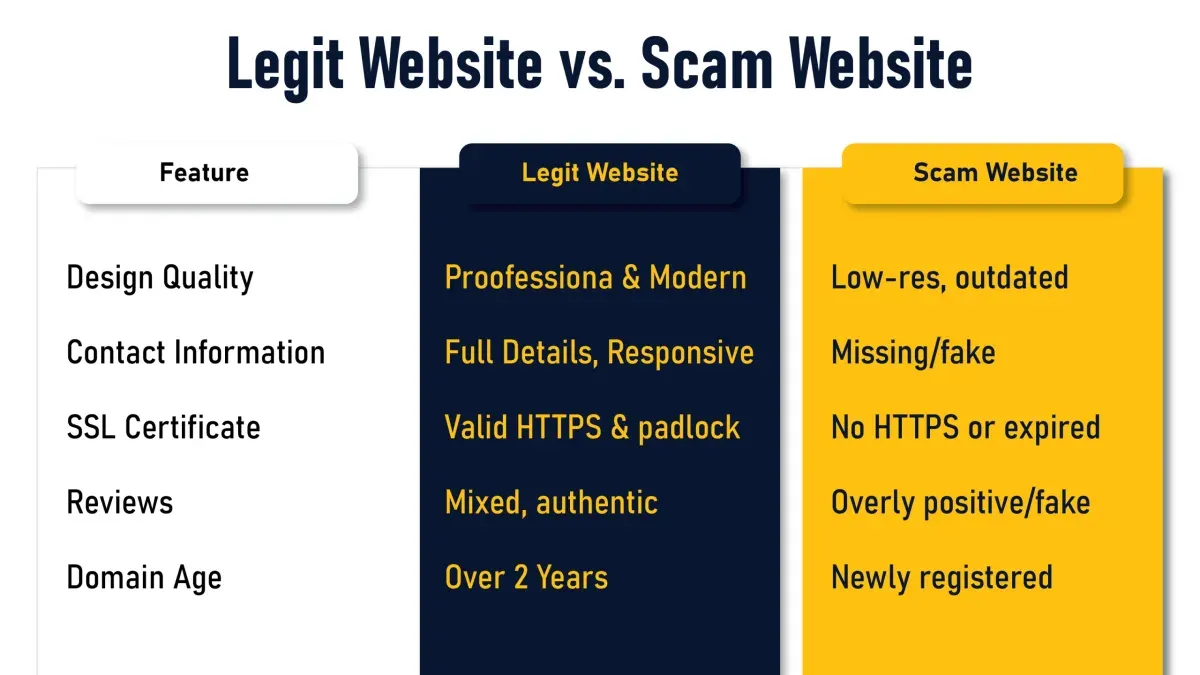
Excessive requests for personal information beyond what is necessary, including Social Security numbers or full banking details, should raise suspicion. Scam sites frequently contain spelling and grammar errors, reflecting rushed or unprofessional content creation. Payment methods limited to wire transfers or cryptocurrencies without secure, widely accepted options can indicate fraudulent intent.
Using scam reporting databases and consumer protection sites helps validate concerns by showing if others have reported issues. According to consumer protection resources, scam websites often share features such as lack of transparent contact information and unverifiable business credentials.
- Examine the website's offers and pricing for plausibility; legitimate sites generally avoid too-good-to-be-true deals. If offers seem unrealistic, this is a red flag.
- Look for pressure tactics like countdown clocks or urgent calls to action; their presence usually indicates a scam attempt.
- Check the amount and type of personal information requested; if the site asks for sensitive data without explanation, it is suspect.
- Review the website's text for spelling and grammar errors; numerous mistakes typically warn of low credibility.
- Analyze payment methods; legitimate websites offer secure options like credit cards or PayPal, while scam sites may insist on wire transfers or cryptocurrency only.
- Search scam reporting databases such as the Better Business Bureau or consumer forums for any negative reports related to the website.
Tip: A side-by-side comparison table of scam versus legit website features can clarify common differences and aid decision-making.
How to check if a website is legit or not on an iPhone
- Open the Settings app, scroll down and tap Safari, then ensure Fraudulent Website Warning is enabled; this setting prompts Safari to warn about known malicious sites.
- While browsing in Safari, tap the aA icon in the address bar to view the Privacy Report, which shows trackers blocked and can indicate suspicious website activity.
- Use trusted third-party apps like WHOIS Lookup or Domain Info available on the App Store to obtain domain registration details; entering a website URL reveals ownership and registration date, helping assess legitimacy.
- For links received via Messages or Mail, long-press the link to preview its full URL before opening; this helps spot disguised or suspicious web addresses.
- Consider installing reputable browser extensions or apps designed for website verification, such as LegitCheck or security suites with iOS-compatible web safety features, to add an extra layer of protection.
Tip: Regularly update iOS and Safari to benefit from the latest security patches and improved fraud detection capabilities.
How to check if a website is legitimate online in different regions
Legitimacy checks vary by region due to different regulations, consumer protections, and common fraud patterns. Checking local resources enhances reliability.
- Visit official government or consumer protection websites specific to the region. For example, New Zealand users can check the Consumer Protection website, South African users the National Consumer Commission, UK users the Trading Standards, and Australian users the Australian Competition and Consumer Commission (ACCC). Successful access provides official guidance on scams and fraud prevention.
- Check if the website or business is registered with local business or trade authorities. For instance, the UK’s Companies House or Australia’s Australian Business Register. Finding the business confirms its legal presence.
- Consult region-specific scam alert platforms. South Africa’s Cybercrime Unit and New Zealand’s CERT NZ provide current scam warnings. Seeing alerts or absence thereof informs risk levels.
- Research common scams or fraud trends unique to the region. For example, UK consumers should be aware of “vishing” phone scams linked to fake websites, while Australian users watch for bogus online retailers exploiting popular events. Recognizing these trends helps interpret website behavior.
- Look for region-specific trust marks or certifications such as the UK’s TrustMark or Australia’s eSafety Commissioner badges displayed on websites. Presence of these marks suggests adherence to local standards, though verification on official sites is recommended.
Tip: Always cross-check trust marks with the issuing authority’s website to confirm authenticity.
How to use Legitscript and other third-party website legitimacy checkers
Third-party verification services like LegitScript provide an additional layer of confidence when assessing a website’s safety. LegitScript maintains a comprehensive database focused on health, wellness, and e-commerce sites, offering certifications and compliance reports that indicate whether a site meets specific regulatory and safety standards.
To check a website using LegitScript:
- Visit the LegitScript website and locate their search tool.
Expectation: A search bar appears to enter the website URL or business name. - Enter the target website URL and submit the query.
Expectation: LegitScript returns a status such as “Certified,” “Not Certified,” or “In Review,” often with details on regulatory compliance. - Review the displayed certification status and any notes about warnings or restrictions.
Expectation: Clear indicators of legitimacy or potential issues.
Free alternatives include VirusTotal, Google Safe Browsing, and ScamAdviser. These tools analyze URLs for malware, phishing, and user reviews but may lack the industry-specific focus of LegitScript. Using multiple services can provide a broader perspective.
Interpreting results requires caution: a “Not Certified” status does not always mean a site is unsafe, as some legitimate sites may not have applied for certification. Similarly, no single tool guarantees total accuracy.
Comparison of popular checkers:
| Service | Focus | Certification | Free Access | Limitations |
|---|---|---|---|---|
| LegitScript | Health, wellness, e-commerce | Yes | Partial (search) | Industry-specific, partial free access |
| VirusTotal | Malware, phishing | No | Yes | General security, no certs |
| Google Safe Browsing | Phishing, malware | No | Yes | Limited website context |
| ScamAdviser | Reputation, trust scores | No | Yes | Based on public data and algorithms |
Tip: Cross-checking several third-party tools helps compensate for individual limitations and provides a more reliable assessment.
Troubleshooting common issues when checking if a website is legit
Some legitimacy checks may yield unclear or conflicting results. Understanding how to interpret these scenarios helps avoid false conclusions.
- Check WHOIS information privacy: If WHOIS data is redacted or private, verify the domain's registration date and registrar via services like ICANN Lookup. A recently registered domain, even with private WHOIS, can indicate caution. Confirm other factors such as contact details and reviews to compensate for hidden ownership.
- Handle ambiguous or mixed reviews: When online feedback varies widely, focus on verified purchaser reviews and reputable consumer protection sites. Look for patterns in complaints, such as repeated mentions of non-delivery or poor customer service, which are stronger scam indicators than isolated negative comments.
- Evaluate websites without HTTPS: Some legitimate sites lack HTTPS due to oversight or cost. Confirm legitimacy through other means like recognized contact information, business registration, and consistent branding. Avoid submitting sensitive data on such sites despite other positive signs.
- Recognize phishing attempts: Phishing sites often mimic trusted brands but have subtle URL differences or misspellings. Cross-check official URLs from brand websites or authoritative sources. Suspicious pop-ups or requests for unusual permissions are red flags.
- Err on the side of caution: If multiple checks raise doubts or the site exhibits suspicious behavior, avoid sharing personal or payment information. A clear decision tree is: (1) Verify domain and HTTPS; (2) Assess reviews and contact info; (3) Use third-party checkers; (4) If uncertainties persist, do not proceed.
Worked example: A site with private WHOIS, mixed reviews, and no HTTPS was investigated by confirming its business registration through a regional government site and checking for trust seals. Despite some positive signs, the absence of secure connection and inconsistent reviews suggested avoiding purchases.
Further reading
- How to Scan a Website for Malware: A Clear Step-by-Step Guide
- How to Set Up Cloudflare WAF Rules for Effective Website Protection
- How to Secure a Squarespace Website: Step-by-Step Guide
Frequently asked questions
How to check if a website is legit reddit
Reddit users often recommend verifying website legitimacy by searching for the site's name alongside keywords like “scam” or “reviews” within relevant subreddit communities such as r/scams or r/InternetIsBeautiful. Additionally, checking user comments for firsthand experiences and warnings can provide practical insights. It is also useful to cross-reference findings with established website reputation tools.
How to check if a website is legit nz
In New Zealand, checking if a website is legitimate involves confirming its registration with the New Zealand Companies Office or the domain's registration details via the.nz domain registry. Local consumer protection agencies like Consumer Protection NZ provide advice and alerts about fraudulent websites. Using tools that verify SSL certificates and website security also helps ensure trustworthiness.
How to check if a website is legit in south africa
South African users should verify the website’s registration with the Companies and Intellectual Property Commission (CIPC) and look for compliance with the Protection of Personal Information Act (POPIA). Checking for contact information with a local address or phone number and searching for reviews or warnings on sites like Scamwatch SA can help identify scams. Secure payment options and verified SSL certificates are additional indicators of legitimacy.
How to check if a website is legit uk
In the UK, legitimacy can be assessed by checking the website’s registration with Companies House and looking for Trustmark accreditation or similar consumer protection badges. The UK’s National Cyber Security Centre advises verifying the presence of HTTPS and a valid SSL certificate. Reviews from British consumer forums and the Financial Conduct Authority (FCA) register can also help confirm authenticity.
How to check if a website is legitimate in australia
Australian users can verify a website’s legitimacy by searching the Australian Business Register (ABR) and checking for Australian domain extensions such as.com.au. The Australian Competition and Consumer Commission (ACCC) provides warnings about known fraudulent websites. Ensuring the site uses secure payment gateways and SSL encryption further supports trustworthiness.
What this advice does not cover and who should do something else
This advice cannot guarantee complete safety; some sophisticated scams may bypass common checks and appear legitimate even under scrutiny. Users with high-risk needs, such as financial professionals or legal entities, should rely on specialized verification services that offer detailed background investigations and compliance assessments. Regional advice provided here may not cover all local variations or emerging scams, as fraud tactics evolve continuously and differ widely across jurisdictions.
The single most useful next step is to combine multiple verification methods rather than relying on one alone. For example, cross-checking website details using device-specific settings, regional considerations, and trusted third-party legitimacy checkers will provide a more comprehensive assessment. Maintaining vigilance and updating knowledge about common scam patterns will further enhance the ability to identify questionable websites before sharing personal or payment information.