How to Block Someone on Bumble: A Clear Step-by-Step Guide
This guide offers clear, step-by-step instructions on how to block someone on Bumble to manage unwanted contacts and maintain your privacy.

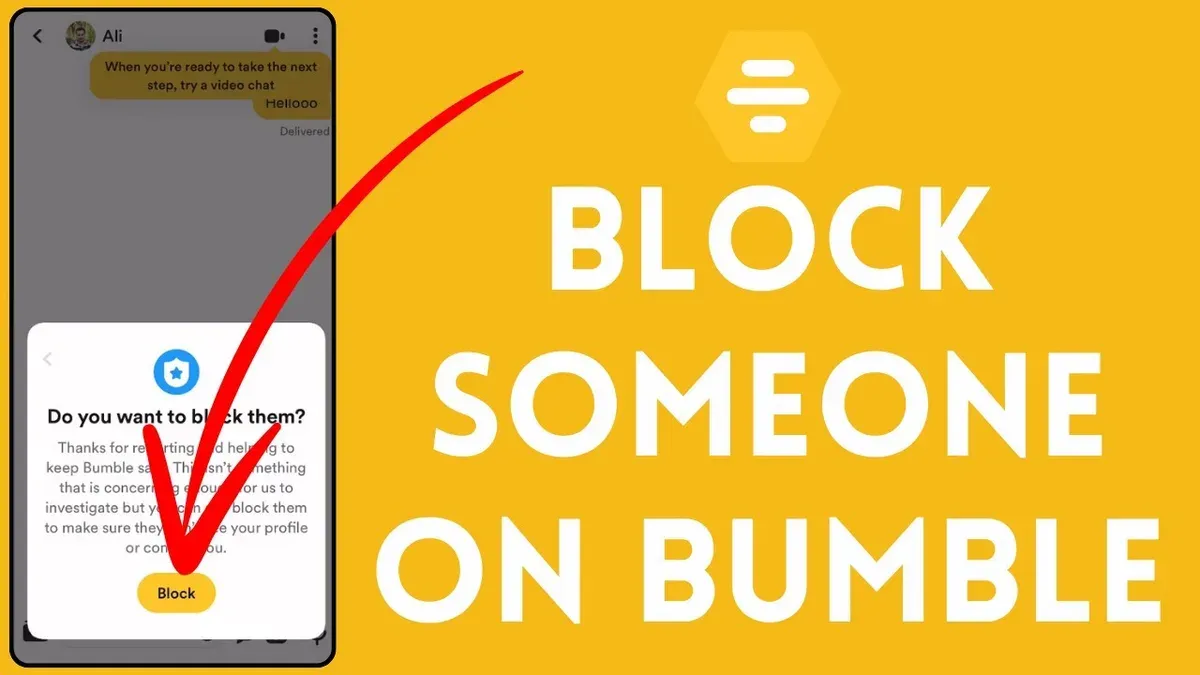
This article explains how to block someone on Bumble with straightforward, practical instructions. Blocking unwanted contacts is essential to control the dating experience and maintain privacy. Users will find clear, step-by-step guidance on using Bumble’s blocking features, including navigating profile menus and managing matches.
The guide also addresses common issues, such as what to do if an account gets blocked and clarifies what Bumble’s blocking does and does not accomplish. Understanding these limits helps users set realistic expectations and explore alternatives when necessary.
Whether dealing with harassment, spam, or simply unwanted interactions, this article provides a no-nonsense approach to managing contacts effectively on Bumble.
Before you start: What is needed to block someone on Bumble
Blocking a contact on Bumble requires access to the app with a logged-in account. Without signing in, the blocking feature is unavailable. Users should also have a basic understanding of the Bumble interface, including how to navigate to profiles and message threads.
Blocking on Bumble is a one-way action that restricts the blocked user from sending messages and viewing the blocker’s profile. This action does not delete the user or remove the match; it only limits interaction and visibility from the blocker’s side. It is important to distinguish blocking from reporting or deleting a user, as each serves different purposes within the app.
According to Bumble’s official interface, blocking is accessible from a user’s chat or profile menu. The feature is designed to give users control over unwanted contacts while maintaining overall account integrity.
- Open the Bumble app and log in; the home screen or chat list should appear.
- Locate the conversation or profile of the user to be blocked; the user’s profile page or chat window should be visible.
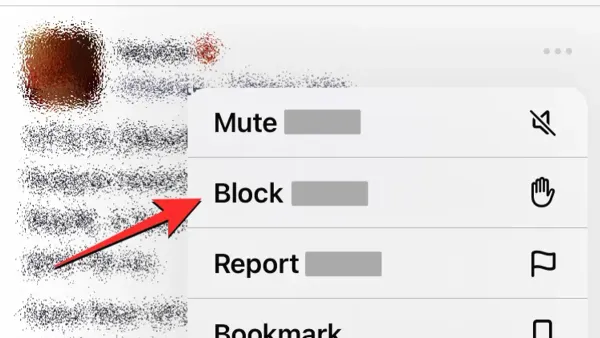
- Tap the menu icon (usually three dots) on the profile or chat screen; a list of options including "Block" should appear.
- Select "Block" and confirm the action; the user will no longer be able to message or view the profile.
Can you block someone on Bumble?
Yes, Bumble allows blocking users, but only after a match is made or a message is sent. Blocking a contact removes them from the match list and prevents any further communication from that user. This feature limits unwanted interactions but does not delete the other person's profile or account.
Blocking on Bumble differs from reporting abusive behavior. Blocking simply ends contact with that user, while reporting notifies Bumble’s moderation team to review and potentially remove the offending account if it violates policies. Users should use reporting for harassment or serious misconduct.
Unlike some dating apps that allow blocking without a prior match, Bumble requires a connection between users before blocking is possible. Also, if a user deletes their account, they are no longer visible, but this does not automatically remove them from the blocker’s match list; manual blocking or unmatching may still be necessary.
Overall, Bumble’s blocking feature focuses on controlling direct communication within matches, with clear limits compared to other apps that offer broader blocking or invisibility options.
How to block contacts on Bumble step-by-step
- Open the Bumble app on the device. The home screen shows matches and conversations.
- Navigate to the chat or match list by tapping the chat icon at the bottom of the screen. This lists all current conversations and matches.
- Find and select the conversation or profile of the person to block. The chat window with that user will open.
- Tap the info icon (usually an “i” in a circle) or the menu button within the chat screen. This opens the chat settings.
- Choose the option labeled “Block & Report” or simply “Block” from the menu. This initiates the blocking process.
- Confirm the block action when prompted. A confirmation pop-up ensures the block is intentional.
- After blocking, the conversation and match with the blocked user will be removed from the chat list. The blocked user can no longer send messages.
Tip: Blocking a user removes them from matches and chats but does not delete their profile from Bumble.
How to search someone on Bumble and find their profile
Bumble does not offer a traditional search function to locate user profiles outside of established matches or active conversations. Unlike apps that allow username or name searches, Bumble relies primarily on its swipe-based interface to discover new people. Users must swipe through profiles in their set preferences, such as age range and distance, until they find the person they are looking for.
To find someone already matched, open the Matches tab where all current connections appear. From here, access their profile directly to manage interactions or block if needed. If the user is not matched, locating them depends on swiping within the app’s discovery pool, which may be limited by filters and geographic constraints.
If the goal is to block an unwanted user who is not matched or messaged, the lack of a searchable directory means first attempting to match or message them. Alternatively, users can check Bumble’s Backtrack feature to revisit profiles recently swiped left on, in case the person was missed.
- Open Bumble and tap the Matches icon at the bottom of the screen. The list of all matched users will appear.
- Scroll or use the search bar within Matches to find the specific user. Their profile should be visible if matched.
- If not matched, return to the Swipe section to browse profiles based on preferences.
- Use the Backtrack button, if available, to review recently passed profiles and find the user.
- Once the profile is located, tap to open it and access further options including blocking.
Troubleshooting: Bumble blocked my account — what to do
Blocking another user on Bumble is different from having your own account blocked or restricted by the platform. Bumble may block or restrict accounts due to policy violations, suspicious activity, or breaches of community guidelines. Common reasons include sending inappropriate messages, using fake profiles, or engaging in spam-like behavior. When an account is restricted, users often lose access to key features or the app entirely.
To determine if an account is blocked or restricted, check for notifications upon login or via email. Bumble typically informs users of the block reason and duration. If the account is inaccessible without explanation, it may be a permanent ban or technical issue. Reviewing Bumble’s Community Guidelines and Terms of Use helps understand potential violations that triggered the block.
Follow these steps to address a blocked account:
- Open the Bumble app and attempt to log in. If access is denied, look for any on-screen messages explaining the block status.
- Check the registered email inbox for messages from Bumble about account restrictions or bans. These often contain instructions or appeal options.
- Visit Bumble’s Help Center and locate the contact or support section.
- Submit a detailed support request explaining the issue, including the Bumble username and any relevant screenshots.
- Wait for Bumble’s response, which may include account reinstatement steps or a final decision.
Tip: Avoid creating multiple accounts to circumvent a block, as this violates Bumble’s policies and can lead to further restrictions.
How to use Bumble for free while managing blocking and matches
Blocking on Bumble is fully accessible with the free version of the app. Users do not need a paid subscription to block, unmatch, or report other users. These features enable effective control over communication and interactions without additional cost.
Free users can unmatch to end conversations and remove matches, and can block to prevent unwanted contacts from messaging again. Reporting remains available to flag inappropriate behavior, which also does not require payment. Paid subscriptions mainly add perks like unlimited swipes, advanced filters, and the ability to see who liked the profile, rather than expanding blocking or match management capabilities.
| Feature | Free | Paid |
|---|---|---|
| Block users | Yes | Yes |
| Unmatch users | Yes | Yes |
| Report users | Yes | Yes |
| Unlimited swipes | No | Yes |
| See who liked profile | No | Yes |
| Advanced filters | No | Yes |
Tip: Regularly review matches and block or unmatch promptly to keep the free Bumble experience focused and manageable.
- Open the Bumble app and go to the chat screen; all conversations and matches appear here.
- Select a conversation with the user to be blocked or unmatched; the chat window opens.
- Tap the menu icon (three dots) in the upper right corner of the chat screen.
- Choose "Block & Report" to block or "Unmatch" to remove the match without blocking.
- Confirm the action when prompted; the conversation will disappear, and the user will no longer be able to contact you if blocked.
What blocking on Bumble does not cover: limits and alternatives
Blocking on Bumble stops communication and removes matches but does not guarantee complete invisibility. In some cases, users with public profiles or those encountered through Bumble’s swipe interface may still appear. Blocking does not erase previously sent messages from the other user’s device or external chat logs.
Blocking is not a replacement for reporting harassment or abuse. If behavior violates Bumble’s guidelines, reporting through the app’s “Report” feature is necessary to alert moderators and trigger potential account review or removal.
Additional safety measures include adjusting privacy settings such as limiting who can see profile details or disabling location sharing. Users can also manage who can contact them by adjusting filters and preferences under Settings > Filters.
Tip: Use the “Report” option alongside blocking for serious concerns, as blocking alone does not address abusive behavior.
How to block yourself from gambling: a brief note for users concerned about app addiction
Bumble does not offer gambling features or any built-in mechanisms related to gambling. Blocking within Bumble only restricts communication with other users and does not control behavioral issues like gambling addiction. Users seeking to block themselves from gambling should use specialized apps, services, or support networks designed for that purpose.
For effective self-exclusion from gambling, consider these steps:
- Identify a reputable gambling self-exclusion service or app, such as GamStop (UK) or state-specific programs in other countries. When registered, the user’s gambling access will be restricted across participating platforms.
- Contact gambling operators directly to request self-exclusion if available. Successful registration will typically prevent the user from opening accounts or placing bets.
- Seek support from professional organizations like the National Council on Problem Gambling (ncpgambling.org) or Gamblers Anonymous (gamblersanonymous.org). These groups provide counseling and resources to manage addiction.
Tip: Behavioral controls require dedicated tools and support beyond app blocking features; ensure to use specialized services for gambling concerns.
This section is included because some users searching for blocking on Bumble also look for help with gambling addiction, confusing app blocking with behavioral controls. Bumble’s blocking features do not address addiction or gambling-related issues.
Frequently asked questions
How to block someone on rumble?
Blocking on Rumble involves navigating to the user’s profile, tapping the three-dot menu icon, and selecting the block option. This prevents the blocked user from commenting on or interacting with your content. It is distinct from blocking on Bumble, which is a dating app with different features and procedures.
Can i block someone on bumble?
Yes, Bumble allows blocking of users to prevent unwanted contact. The feature is accessible through the chat screen by tapping the profile icon or menu and selecting the block option. Blocking removes the user from matches and stops them from messaging.
How to find someone on bumble?
Finding someone on Bumble requires searching through matches or recent conversations, as the app does not offer a global search feature. If the person is not matched yet, they cannot be searched by name. Users must swipe through profiles or wait for mutual matches to connect.
How to block on bumble?
To block on Bumble, open the chat with the person, tap the profile icon in the top right corner, then select the three-dot menu. Choose “Block & Report” to both block the user and optionally report inappropriate behavior. Blocking immediately removes the user from matches and prevents future contact.
Can I block someone on Bumble?
Blocking someone on Bumble is possible and straightforward. It is done within a chat by accessing the profile settings and selecting “Block & Report.” This action removes the user from matches and disables messaging but does not suspend the user’s entire Bumble account.
What blocking on Bumble does not cover and who should do something else
Blocking on Bumble only affects interactions within the app. It prevents the blocked user from messaging or matching but does not guarantee complete invisibility. Blocked users may still see parts of a profile through shared matches or external sources. Blocking does not prevent contact outside Bumble via other platforms or phone numbers.
This guide does not cover reporting or managing abuse beyond the blocking feature. Users facing harassment or abusive behavior should use Bumble’s in-app reporting tools found under the profile or chat menu. For serious or ongoing issues, seeking external support or legal advice is recommended.
Tip: Use the “Report” option alongside blocking for harmful behavior to ensure Bumble’s moderation team is alerted promptly.
To maintain control of the Bumble experience, periodically review matches and messages, and update privacy settings. The most effective next step is to familiarize oneself with Bumble’s privacy and safety settings under Account > Settings > Privacy to better manage interactions and maintain a comfortable app environment.
See also: How to Block Someone on BeReal: A Clear Step-by-Step Guide · How to Manage Fortnite Privacy Settings and Game Preferences · How to Manage Tinder Privacy Settings for Safer Dating · How to Master WeChat Privacy Settings for Safe, Smooth Use