How to Recognize and Avoid McAfee Renewal Scam Emails Safely
This article explains how to identify and avoid the McAfee renewal scam email to protect your security and finances.

This article explains how to recognize and avoid the McAfee renewal scam email, focusing on the subtle differences between genuine renewal notices and fraudulent messages.
Many internet users and McAfee subscribers receive emails about subscription renewals, but not all are legitimate. Scammers often use social engineering tactics such as urgent language, fake payment links, or spoofed sender addresses to trick recipients into providing personal or financial information.
Understanding when McAfee sends authentic renewal emails and identifying common signs of scams can help users make informed decisions without risking their security or finances.
What is the McAfee renewal scam email and why it matters
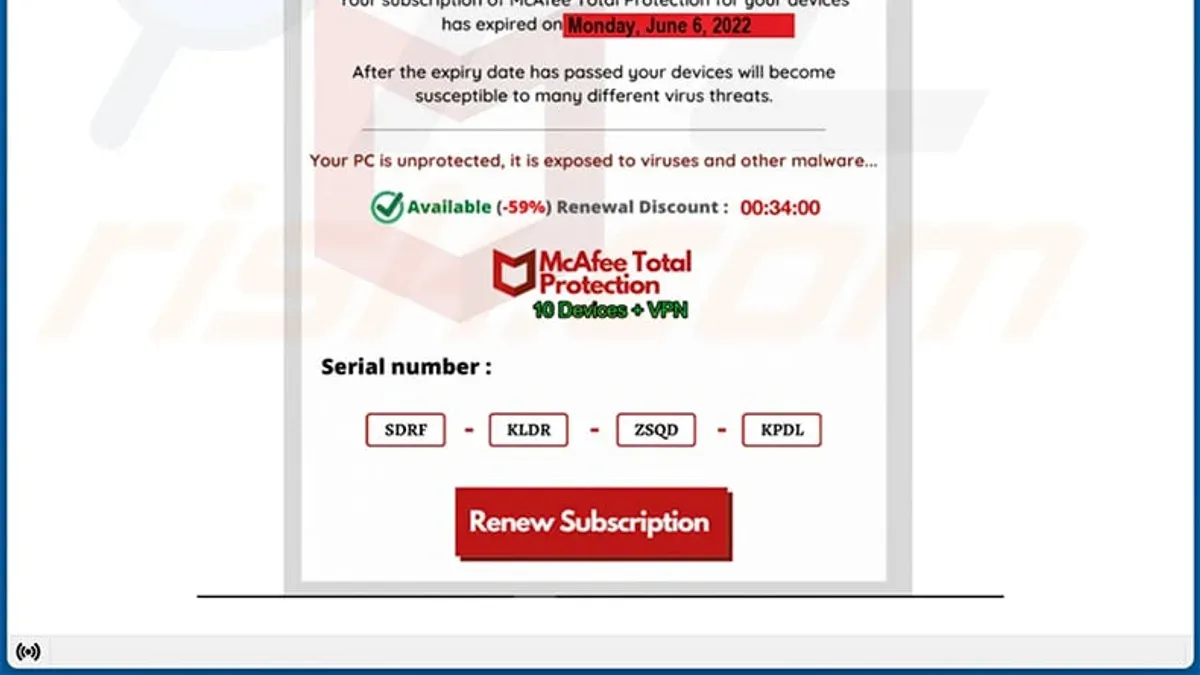
The McAfee renewal scam email is a fraudulent message designed to trick recipients into believing it is a legitimate communication from McAfee about their antivirus subscription renewal. These emails often replicate official McAfee branding, logos, and language to appear authentic. Scammers use this tactic to lure users into providing payment details or clicking malicious links, leading to financial loss or identity theft.
For example, a typical scam email may state that the recipient’s subscription is about to expire and prompt immediate payment through a provided link. However, the link directs to a fake website capturing credit card information. Cybersecurity reports indicate a steady number of incidents where users have reported receiving such deceptive emails, resulting in unauthorized charges and compromised personal information.
This scam remains widespread because McAfee has millions of subscribers, making its name a frequent target for fraudsters. The combination of urgency and familiar branding can cause users to act without verifying the source, escalating the risk to both security and finances.
Does McAfee send emails about subscription renewals?
McAfee does send emails to notify subscribers about upcoming subscription renewals, but these messages follow strict formatting and personalization rules. Official renewal emails typically come from sender domains like @mcafee.com or @mcafee.net. They include specific account details such as the subscriber’s name, the product name, and the renewal date.
Besides email, McAfee also notifies users through the McAfee app, where renewal information appears in the subscription or account settings section. These notifications provide a direct link to the official McAfee website for managing or canceling subscriptions.
| Feature | Legitimate McAfee Email | Common Scam Email |
|---|---|---|
| Sender Address | From @mcafee.com or @mcafee.net | Generic or misspelled domains, e.g., @mcafee-renewal.com |
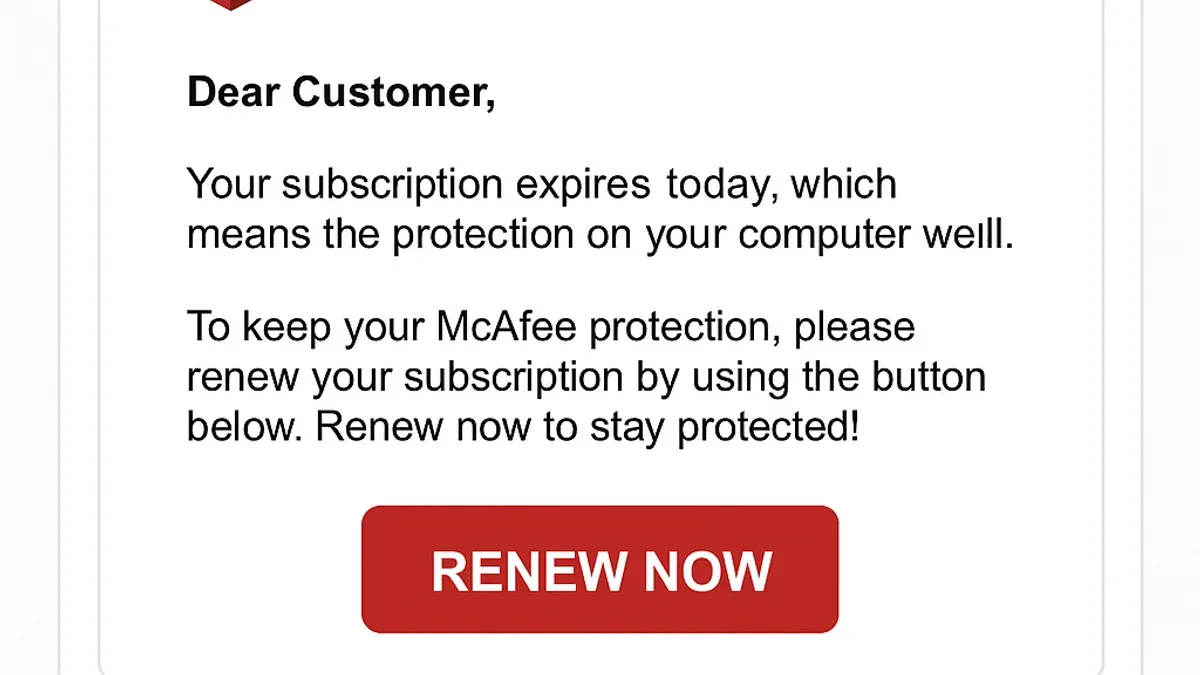
| Personalization | Includes subscriber name and product details | Generic greetings like "Dear Customer" |
| Renewal Information | Clear renewal date and subscription details | Vague or urgent renewal warnings without specifics |
| Links | Direct to official McAfee site (https://www.mcafee.com) | Links to suspicious or unrelated websites |
For example, a typical legitimate email might say, "Dear John Smith, your McAfee Total Protection subscription will renew on October 20, 2026. To review your account, visit your McAfee portal." A suspicious email might only say, "Your subscription is expiring soon! Click here to avoid service interruption," without any personal details or clear sender domain.
Tip: Always hover over links to verify they lead to official McAfee domains before clicking.
Why am I getting emails from McAfee and when to be cautious
McAfee sends emails for several legitimate reasons, including subscription updates, promotional offers, and security alerts related to account activity or threats detected on devices. For instance, a subscriber might receive a renewal reminder shortly before their subscription expires, or an alert about a newly identified vulnerability affecting their software version.
To confirm if an email about a subscription renewal is genuine, checking the active status of the subscription is crucial. This can be done by logging into the official McAfee website at https://www.mcafee.com/en-us/account, navigating to the "My Account" section, and reviewing the subscription details. If the subscription is active and paid up, renewal requests in the email may be a scam attempt.
Warning signs in scam emails include urgent or threatening language urging immediate payment, unexpected attachments that could contain malware, and links that do not direct to official McAfee domains. For example, an email demanding immediate payment to avoid service interruption but linking to a non-McAfee URL or using a generic greeting like "Dear Customer" rather than the user’s name should be treated with suspicion.
Tip: Always verify renewal emails by accessing your account directly through the official McAfee website instead of clicking embedded links.
Common tactics used in McAfee auto renewal scam emails
Scammers often use fake invoices or renewal notices claiming immediate payment is required to avoid service interruption. These emails create urgency by stating the subscription will be canceled within hours unless action is taken. The message usually includes a link labeled "Renew Now" or "Update Payment" which redirects to phishing websites designed to capture payment details or login credentials.
For example, clicking a link may first lead to a page resembling McAfee’s official site, then automatically redirect through several domains before landing on a fraudulent payment portal. This multi-step redirection is intended to bypass basic security filters and increase the chance of data capture.
Pop-up scams and unsolicited calls mimicking McAfee representatives are also common. They pressure recipients to confirm or cancel subscriptions immediately, often requesting credit card information or remote access to devices under the guise of resolving subscription problems.
Social engineering tactics emphasize urgency and fear, such as threats of data loss or account suspension, to rush recipients into hasty payments without verifying authenticity.
Tip: Hover over links to check URLs before clicking and verify any renewal communication directly from the official McAfee website or app.
How to verify and respond if you suspect a McAfee renewal scam
Begin by carefully examining the sender's email address. Official McAfee messages typically come from domains ending with @mcafee.com. Be cautious of slight misspellings or additional characters, such as mcafee-support.net or renewal-mcafee.xyz. Hover over any links without clicking to reveal the actual URL; genuine McAfee links will direct to mcafee.com or its subdomains.
Next, verify subscription status independently by visiting McAfee’s official website at mcafee.com/consumer-support. Log into the account section or use the McAfee app to confirm if a renewal is pending. For example, if an email claims a payment is overdue but the account dashboard shows an active subscription, the email is likely fraudulent.
Report suspicious emails to McAfee by forwarding them to [email protected]. Additionally, notify local consumer protection authorities or use online scam reporting platforms to help prevent wider victimization.
If uncertain, avoid clicking links or downloading attachments, and never share payment or login information in response to unsolicited emails. Instead, initiate contact directly through McAfee’s official website or customer service channels.
Example checklist for verifying a suspicious renewal email:
- Check sender's email domain for authenticity.
- Hover over links to verify destination URLs.
- Log into the official McAfee account to confirm subscription status.
- Report suspicious messages to [email protected].
- Do not provide personal or financial information via email.
Mistakes to avoid when dealing with McAfee renewal emails
One common error is ignoring legitimate renewal notices, which can lead to unexpected service interruptions. For example, a user named Sarah dismissed an email she thought was a scam and later found her antivirus subscription had expired, leaving her device unprotected.
Another frequent mistake is clicking on links or downloading attachments from emails without confirming their authenticity. John, a subscriber, clicked a link in a fraudulent email, leading to unauthorized charges on his credit card and personal data compromise.
Providing personal or payment information without verification is risky. Users should avoid entering details directly from an email prompt without first logging into their McAfee account through the official website.
Relying solely on the email's appearance can be misleading. Scam emails often mimic official branding well. Verifying sender addresses, checking subscription status via the McAfee website, or contacting customer support are essential steps.
Tip: When in doubt, access your account by typing "mcafee.com" directly into the browser rather than following email links.
Further reading
- Understanding and Reporting Geek Squad Scam Emails Safely
- Types of Cyber Attacks: A Comprehensive Explainer Guide
- Understanding Advance Fee Scams: How They Work and How to Avoid Them
Frequently asked questions
Is there a mcafee renewal notice scam?
Yes, there are scam emails pretending to be McAfee renewal notices. These fraudulent messages often mimic McAfee branding and urge recipients to provide payment or personal information to avoid service interruption. Recognizing these scams is crucial to prevent unauthorized charges and data theft.
Do mcafee send emails?
McAfee does send emails regarding subscription renewals, product updates, and security alerts. Legitimate emails usually come from official McAfee domains and include details consistent with the user’s subscription. Caution is advised to verify the sender and content before acting on such emails.
Is there a mcafee scam email?
Yes, scam emails targeting McAfee users are common. These emails often claim urgent subscription issues or offer fake discounts to trick recipients into clicking malicious links or sharing sensitive data. Users should carefully check email authenticity before responding.
What is the mcafee scam?
The McAfee scam generally involves fraudulent emails or calls that impersonate McAfee representatives. Scammers attempt to steal money or personal information by claiming there is a problem with a subscription or that a payment is due. These scams exploit trust in McAfee’s brand and can lead to financial loss or identity theft.
Is the mcafee email a scam?
Not all emails claiming to be from McAfee are scams, but many phishing attempts use McAfee’s name. Evaluating email sender addresses, checking for grammatical errors, and avoiding unsolicited links help determine legitimacy. When in doubt, contacting McAfee directly through their official website is the safest approach.
Limits of this advice and when to seek further help
This article does not cover technical malware removal related to scam emails; readers experiencing compromised devices should seek specialized cybersecurity assistance promptly. Advice here focuses on email scams and may not apply to other forms of McAfee-related fraud such as phone scams or fake websites, which require different detection and response strategies.
The most useful next step is to verify any suspicious renewal email by logging directly into the official McAfee account portal through a browser, not via email links. Reviewing subscription status and payment methods there can confirm legitimacy and prevent falling victim to scams.