Understanding and Reporting Geek Squad Scam Emails Safely
Learn how to identify and report Geek Squad scam emails to avoid phishing and protect your personal information.

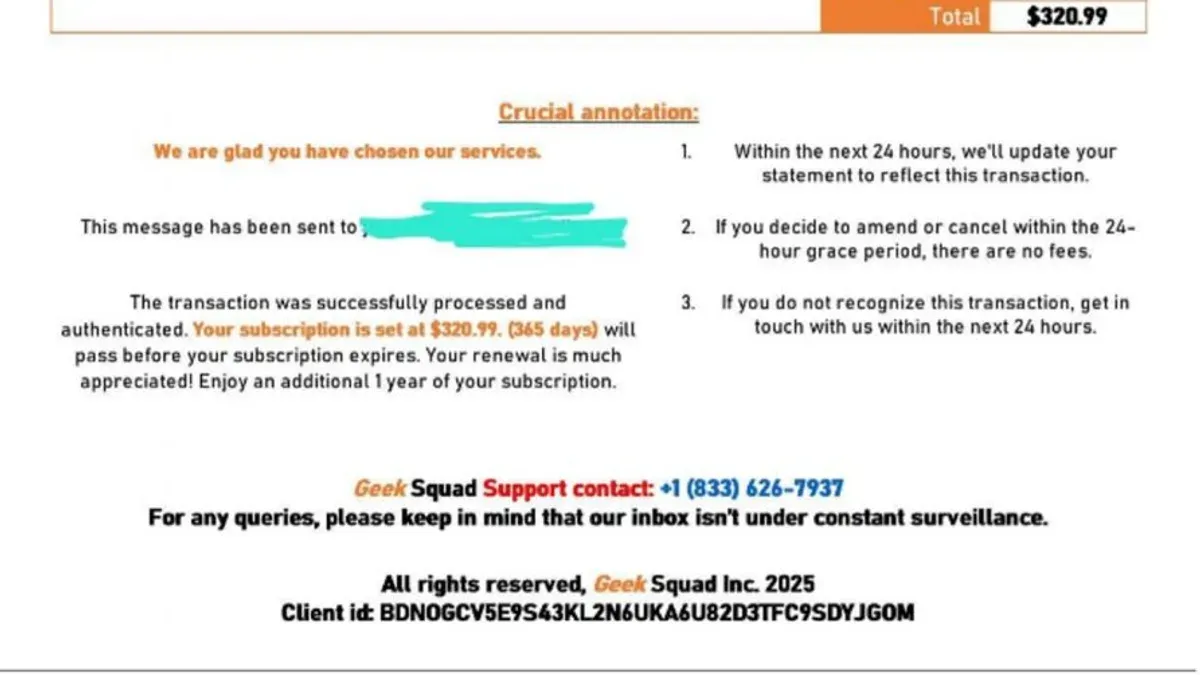
This article explains how to identify and report a Geek Squad scam email, providing clear guidance to avoid falling victim to these increasingly common phishing attempts.
Scammers often impersonate Geek Squad, a technology support service, to trick recipients into revealing personal information or paying for unnecessary services. These emails can appear convincing, using official logos and urgent language to create a sense of legitimacy. Understanding the specific signs of a Geek Squad scam email, such as suspicious sender addresses, unexpected payment requests, or unusual links, is crucial for protection.
Beyond recognition, this guide outlines effective methods to report such emails to the proper authorities and explains why these scams continue to proliferate, helping readers navigate the issue with confidence and clarity.
What is a Geek Squad scam email
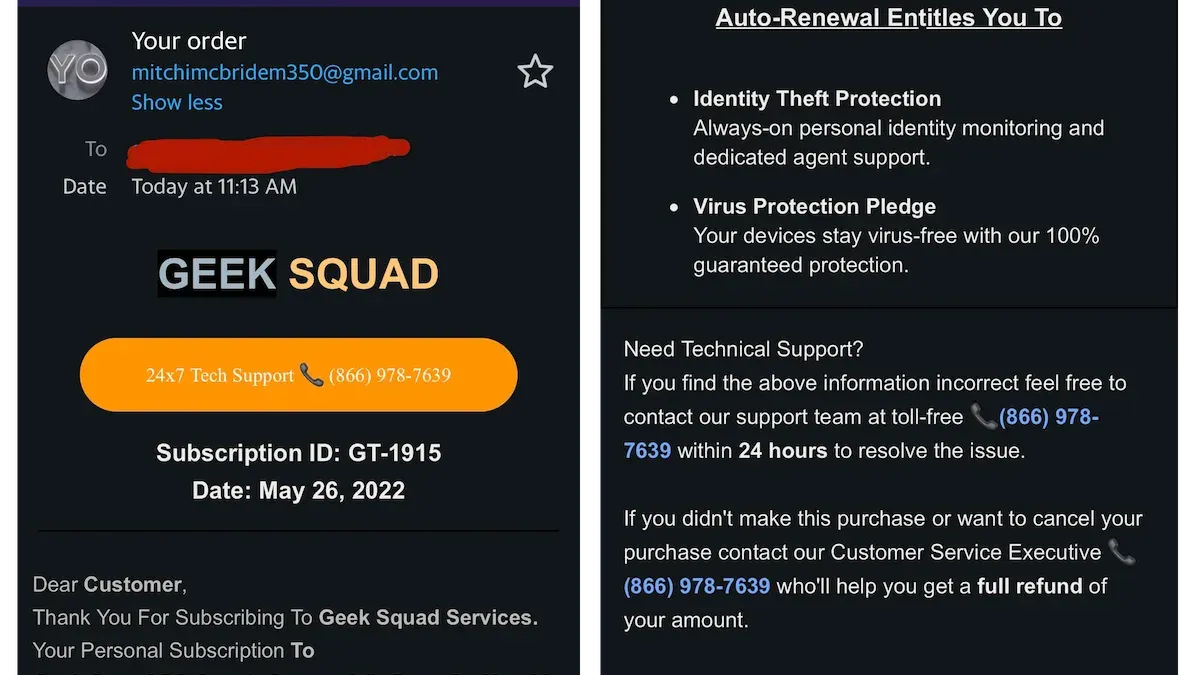
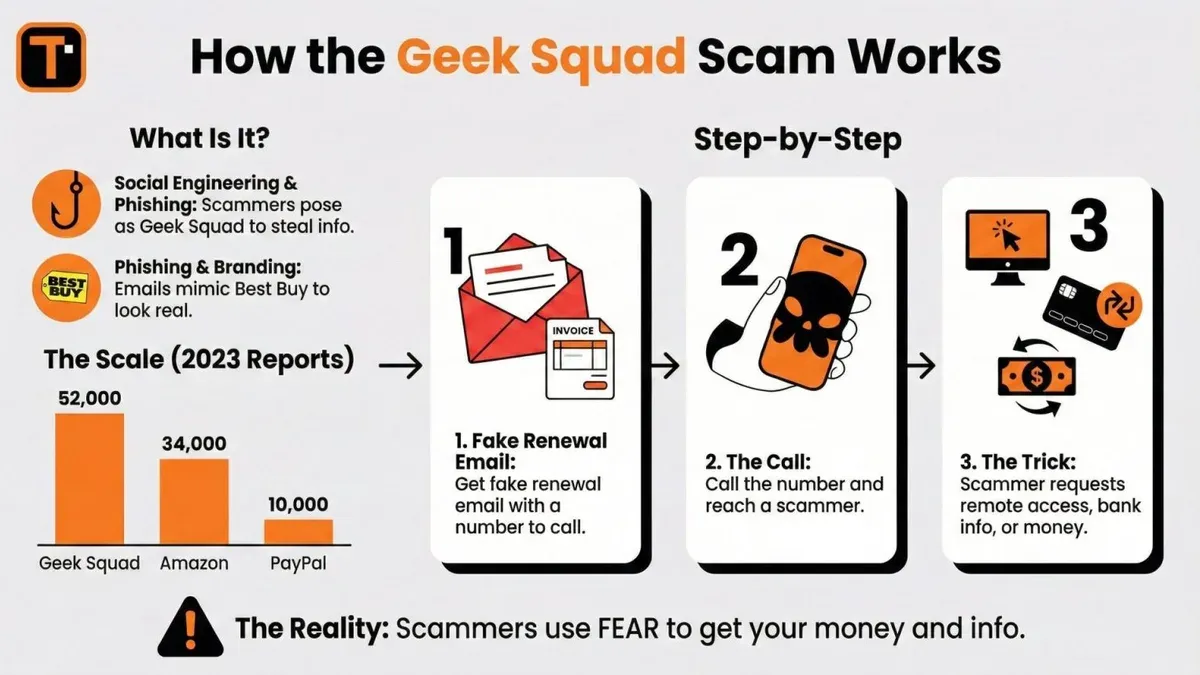
A Geek Squad scam email is a fraudulent message designed to deceive recipients by impersonating the Geek Squad brand. These emails often claim to be official communications, such as fake renewal invoices for services or notifications about care plans, aiming to trick individuals into providing personal information, payment details, or clicking malicious links.
Scammers target Geek Squad customers because of the brand's association with trusted tech support and device protection. The familiarity and credibility of Geek Squad make recipients more likely to engage with these emails without suspicion.
Unlike legitimate Geek Squad emails, which typically come from verified @bestbuy.com addresses and include clear branding, order numbers, and secure links, scam emails often use generic or misspelled sender addresses. For example, a scam email may state: "Your Geek Squad Care Plan is expiring, please pay immediately to avoid service interruption," while the official communication would include specific customer details and direct users to their verified Best Buy account portal.
A concrete example might include an email urging immediate payment with a suspicious link labeled "Renew Now," originating from an address like "[email protected]" rather than an official Best Buy domain. These email discrepancies, combined with urgent language and unusual requests, distinguish scam attempts from authentic Geek Squad correspondence.
Does Geek Squad send scam emails or spam
Geek Squad, a well-known technology support service, does not send scam emails or unsolicited spam. Its official communications primarily consist of service updates, appointment reminders, and promotional offers sent to customers who have opted in.
Official emails from Geek Squad typically come from addresses ending with “@bestbuy.com” or “@geeksquad.com.” These emails include clear branding, contact information, and often reference recent service interactions. In contrast, scam or spam emails may use suspicious sender addresses, such as generic free email domains or misspelled versions of official domains.
For example, a legitimate Geek Squad email confirming a scheduled appointment might come from [email protected], contain specific details about the service, and include a direct phone number for verification. A scam email, however, may claim urgent action is required, ask for payment or personal information immediately, and exhibit poor grammar or unusual formatting.
Some users mistakenly identify legitimate marketing emails as scams because these messages promote new services or discounts. While these promotions are genuine, they are only sent to subscribers or customers who have agreed to receive marketing communications, and they respect unsubscribe requests.
How to recognize a Geek Squad phishing email
Phishing emails impersonating Geek Squad often use urgent language to pressure recipients into quick action, such as warning about expired subscriptions or pending invoices. These messages may include suspicious attachments labeled as invoices or service reports, which can contain malware or links to fraudulent websites.
Technical indicators include sender email addresses that do not match official Geek Squad domains, such as addresses from generic providers or misspelled domains. Hyperlinks embedded in the email typically lead to URLs that differ from genuine Geek Squad web pages; hovering over links without clicking reveals these discrepancies. Grammar and spelling errors are common, reflecting the hurried or careless creation of phishing content.
Social engineering plays a key role by exploiting trust in the Geek Squad brand and creating a sense of urgency or fear of service interruption. For example, a phishing email might claim the recipient’s computer needs immediate repair, prompting them to click a malicious link or download harmful files.
Example: An email stating “Your Geek Squad protection plan has expired. Please see the attached invoice and renew immediately to avoid service loss” with a sender address like “[email protected]” and a link directing to a non-Geek Squad website is a strong phishing indicator.
Recognizing these signs helps prevent falling victim to scams that continue to succeed partly because many users overlook subtle inconsistencies or respond to urgent demands.
How to report a Geek Squad scam email or phishing email
Reporting a suspicious Geek Squad scam email promptly helps protect others from falling victim and assists authorities in tracking scam sources. Begin by forwarding the email to Geek Squad’s official support email address: [email protected]. Include the full email header and any attachments without clicking on any links or downloading files.
Next, report the phishing attempt to the email provider. For example, in Gmail, open the email, click on the three-dot menu next to the reply button, and select “Report phishing.” This action alerts Google’s security team to investigate and block the sender if necessary.
Additionally, report the scam email to cybersecurity organizations such as the Anti-Phishing Working Group (APWG) by forwarding the suspicious message to [email protected]. These organizations collect data on phishing trends and help coordinate responses across platforms.
Example: Receiving a fake Geek Squad invoice email, a recipient forwards the message to [email protected] and reports it through Gmail’s “Report phishing” option. This combined reporting can lead to the scammer’s sender address being blacklisted, reducing future scam emails reaching inboxes.
Tip: Always preserve the original email headers when reporting, as they contain crucial information to trace the source.
Common Geek Squad scam email themes and variations
Scammers often reuse a few core themes in Geek Squad scam emails to increase the chances of deceiving recipients. One prevalent tactic is the renewal scam, where emails claim an urgent need to renew a Geek Squad subscription or service plan. These messages often include convincing details such as a plausible due date and payment link, prompting recipients to provide sensitive information or payment details.
Another common variant involves fake care service notifications or invoice scams. These emails assert that a recent service was performed or an issue was detected with a device, followed by a request for payment or remote access. For example, an email might state, "Your device was serviced on September 30th. Please review the attached invoice for $199.99," nudging recipients to open malicious attachments or enter payment data.
Regional differences appear in scam styles, particularly in the UK, where scam emails often mimic UK-specific payment methods and currency formats. These UK-targeted scams sometimes refer to local consumer protection policies or use British spelling to appear authentic.
Across these themes, scammers rely on urgency, plausible details, and professional branding to trick recipients. Awareness of these recurring patterns can equip users to identify and avoid falling victim to such emails.
What to do if you’ve interacted with a Geek Squad scam email
Immediate action is essential after engaging with a suspicious Geek Squad scam email. If links were clicked or information submitted, change passwords on affected accounts immediately, starting with email and banking credentials. Use strong, unique passwords and enable two-factor authentication where possible.
Next, scan devices with updated antivirus and anti-malware software to detect any malicious downloads. Check bank and credit card statements for unauthorized transactions. If financial information was shared, contact the bank or credit card provider promptly to report potential fraud and request account monitoring or card replacement.
Identity theft is a critical risk. Monitor credit reports and consider placing a fraud alert or credit freeze through major credit bureaus. Many consumers recover successfully with timely intervention, but delays can complicate recovery.
Professional help may be necessary if sensitive data was compromised or if suspicious activity persists. Cybersecurity experts or consumer protection agencies can assist in containment and recovery. For example, a person who entered payment details into a scam link reported unusual charges; after immediate bank notification and identity monitoring, further loss was prevented.
Tip: Document all communications and actions taken after interacting with scam emails to support investigations or dispute claims.
Mistakes to avoid when dealing with Geek Squad scam emails
One common mistake is responding directly to suspicious emails. Replying or clicking any links can expose personal information or activate malware. For instance, a user who replied to a fake renewal notice ended up with unauthorized charges on their credit card, illustrating the risk of immediate engagement.
Ignoring official warnings or advice is another frequent error. Some recipients dismiss alerts from legitimate sources about ongoing scam campaigns, which delays protective actions and allows scammers to continue targeting others. Cybersecurity experts emphasize following recommended steps promptly to mitigate harm.
Failing to verify the sender's identity before taking action often leads to unintended consequences. Scammers use email addresses that closely mimic official domains, and without careful examination, recipients might trust the message. A concrete example is someone who called a phone number listed in the email, giving scammers direct access to sensitive information.
Tip: Always check sender email addresses through official Geek Squad contact pages and avoid using contact details provided in suspicious emails.
How to protect yourself against future Geek Squad scam emails
Employing robust email hygiene and security practices significantly reduces vulnerability to Geek Squad scam emails. Activating spam filters within email clients like Gmail or Outlook helps block many phishing attempts before they reach the inbox. Additionally, enabling email authentication tools such as SPF (Sender Policy Framework), DKIM (DomainKeys Identified Mail), and DMARC (Domain-based Message Authentication, Reporting & Conformance) can verify sender legitimacy and prevent spoofing.
Regularly updating passwords and monitoring account activity serve as critical defenses. Using complex, unique passwords for email and related accounts, combined with two-factor authentication, limits unauthorized access even if credentials are compromised. For example, setting a new password every 3 to 6 months and reviewing login histories can detect suspicious activity early.
Staying informed about evolving scam techniques is equally important. Scam emails continuously adapt their language and tactics, so understanding common phishing indicators and reviewing cybersecurity resources helps maintain vigilance. For instance, recognizing that scammers may now use more personalized messages or new urgency tactics allows quicker identification and avoidance.
A practical scenario: enabling Gmail’s spam filter, setting up DMARC for your domain, routinely changing your password via the account settings menu, and subscribing to cybersecurity newsletters collectively create a strong barrier against these scams.
Tip: Combining multiple email security layers offers far greater protection than relying on any single measure alone.
Further reading
- Types of Cyber Attacks: A Comprehensive Explainer Guide
- Brushing Scam Explained: What It Is and How to Protect Yourself
Frequently asked questions
What is geek squad scam email?
A Geek Squad scam email is a fraudulent message pretending to be from Geek Squad, the tech support service. These emails often claim there is a problem with a device or account and urge recipients to click links or provide personal information. Their goal is usually to steal data, install malware, or extract money.
How to report geek squad scam email?
To report a Geek Squad scam email, forward the suspicious message to [email protected], the official Best Buy email for reporting scams. Additionally, it can be reported to the Federal Trade Commission (FTC) through their complaint assistant on ftc.gov. Avoid interacting with links or attachments before reporting.
How to report geek squad phishing email?
Reporting a Geek Squad phishing email involves sending the message as an attachment or forwarding it to Best Buy’s dedicated fraud email at [email protected]. Users can also report phishing attempts to anti-phishing organizations or their email provider’s abuse address. Keeping the original headers intact helps authorities track the source.
Is geek squad scam email?
Not all emails claiming to be from Geek Squad are scams, but many phishing attempts misuse the brand name. Legitimate Geek Squad emails typically come from official bestbuy.com addresses and do not pressure for immediate action. Verifying sender details and contacting Geek Squad directly can clarify authenticity.
Is geek squad email spam?
Geek Squad may send legitimate marketing or service-related emails, but unsolicited messages with suspicious content or unknown origins are likely spam. Spam emails often contain generic greetings, misspellings, or unexpected attachments. Filtering settings and reporting unwanted emails help reduce spam.
Limits of this advice
This article does not cover scams impersonating other similar tech support brands, nor does it substitute for legal or financial advice in cases of identity theft or fraud. Individuals facing financial loss or suspected identity theft should contact appropriate authorities, such as the Federal Trade Commission (FTC) or local law enforcement, and consider consulting a qualified professional for tailored assistance.
The most effective next step for anyone concerned about a suspicious email claiming to be from Geek Squad is to report it directly to Best Buy’s official fraud reporting channels at bestbuy.com and forward the email to [email protected]. This not only helps protect personal accounts but also aids Best Buy in tracking and mitigating ongoing scam campaigns.