Is Apple ID Safe? A Clear Look at Security and Risks
This article explores whether Apple ID is safe by examining its security features and common user risks.

This article examines the question: is Apple ID safe? It provides a balanced overview of Apple's security measures alongside common user vulnerabilities and real-world risks.
Apple ID secures access to key services such as iCloud, the App Store, and device backups. Its safety depends on built-in protections like two-factor authentication (2FA), end-to-end encryption, and device-based verification. However, user practices, such as password strength and phishing awareness, significantly affect overall security.
Understanding both the technical strengths and potential weak points helps users make informed decisions about managing their Apple ID and protecting personal data.
Is Apple ID safe?
Apple ID is generally safe due to its integration of strong encryption, mandatory two-factor authentication (2FA), and support for biometric verification such as Face ID and Touch ID. These features protect user credentials and personal data by requiring multiple layers of verification before granting access.
Apple publishes detailed security measures, including end-to-end encryption for sensitive information like passwords and payment details stored in iCloud Keychain. Compared to other major identity systems, Apple ID benefits from hardware-based security elements in Apple devices, which reduce the risk of remote hacking.
However, the safety of an Apple ID often depends on user behavior. Phishing attacks remain a significant threat, as attackers attempt to trick users into revealing credentials or verification codes. Weak or reused passwords also increase vulnerability despite Apple's security infrastructure.
Overall, when users enable two-factor authentication, create strong, unique passwords, and remain vigilant against phishing attempts, Apple ID provides a robust and reliable level of security for personal data and identity.
Tip: Always enable two-factor authentication via Settings > [Your Name] > Password & Security to enhance Apple ID protection.
Is Face ID safe on iPhone?
Face ID on iPhone is a highly secure biometric authentication method that significantly enhances Apple ID protection. It uses a TrueDepth camera system combined with advanced neural networks and a Secure Enclave chip to create and store a detailed depth map of the user’s face, making it difficult to spoof.
Technically, Face ID has a very low false acceptance rate, estimated to be about 1 in 1,000,000, which is much lower than typical fingerprint sensors and traditional passcodes. This means the likelihood of someone else unlocking the phone with their face is extremely rare. Apple’s Secure Enclave ensures facial data never leaves the device, maintaining privacy and security.
However, there are limitations. Rare false acceptances can occur, especially among close relatives like identical twins or children under a certain age. Additionally, concerns have been raised about privacy when Face ID data is accessed during legal situations or by coercion. Some users may also worry about facial data collection, though Apple does not store or share this data externally.
Tip: To maximize security, users can enable the "Require Attention for Face ID" setting under Face ID & Passcode, which requires the user's eyes to be open and looking at the device before unlocking.
Is Sign in with Apple safe?
Sign in with Apple is a secure and privacy-focused alternative to traditional social logins. It protects users by generating unique, randomized email addresses for each app, preventing the sharing of a user's real email and reducing the risk of tracking across services.
This feature leverages the robust Apple ID security infrastructure, including strong encryption and two-factor authentication, to safeguard credentials and minimize the likelihood of leaks. Unlike many other social login options, Sign in with Apple allows users to control exactly what personal information is shared with third-party apps, such as choosing whether to share their name or email address.
Apple’s privacy policy emphasizes minimizing data collection and protecting user identity, contrasting with notable breaches involving other social login providers where leaked credentials or extensive personal data exposure occurred. For example, past incidents with other platforms have shown how centralized login systems can be exploited to gain access to multiple connected services.
Tip: To maximize security, users should enable two-factor authentication on their Apple ID and review app permissions regularly to control data sharing.
Apple ID security and common warnings
Common Apple ID security warnings such as “Apple ID locked for security reasons” or “Apple ID not valid” typically indicate suspicious activity or multiple failed login attempts on the account. These alerts act as protective measures designed to prevent unauthorized access by temporarily restricting account functions.
However, these warnings can also be triggered by phishing scams that mimic official Apple messages to deceive users into revealing credentials or personal information. Users often report receiving convincing fake emails or pop-ups that look like legitimate Apple notifications but direct them to fraudulent websites.
Apple’s official support advises users to verify warnings by checking the source carefully and never clicking links in unsolicited messages. Instead, users should visit the official Apple ID website or contact Apple Support directly through trusted channels to resolve any account issues.
In some cases, genuine warnings are caused by user error, such as entering incorrect passwords repeatedly or using Apple ID on unfamiliar devices. Responding promptly by resetting the password via Apple’s official process can restore account access securely.
Tip: Always access Apple ID settings through the device’s Settings app or appleid.apple.com rather than links in emails to avoid phishing risks.
Apple ID safety tips and best practices
Enhancing Apple ID security requires proactive steps beyond default protections. First, enabling two-factor authentication is crucial; it can be activated by going to Settings > [Your Name] > Password & Security > Two-Factor Authentication and following the prompts. Using a strong, unique password—ideally generated and stored by a reputable password manager—adds an essential layer of defense.
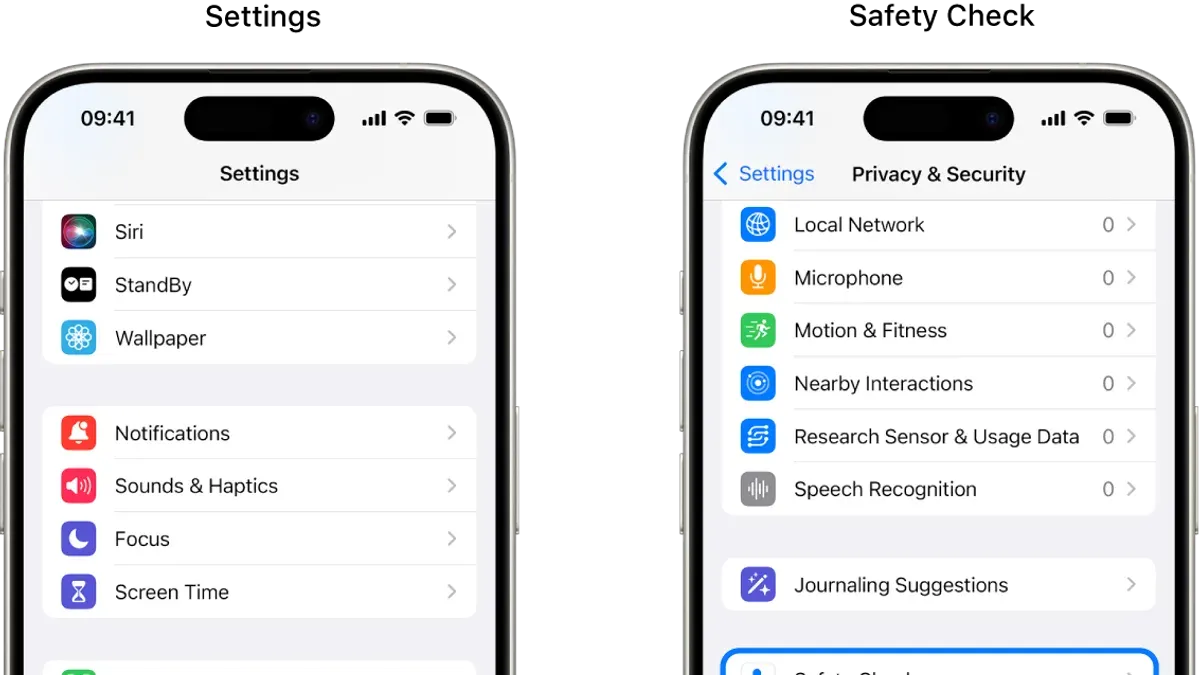
Regularly reviewing saved passwords, payment methods, and connected devices helps spot unauthorized access early. This can be done in Settings under Passwords, Payment & Shipping, and Devices sections respectively. Removing unfamiliar devices or outdated payment cards reduces exposure to compromise.
Vigilance against phishing remains vital. Users should avoid clicking suspicious links or providing credentials outside official Apple interfaces. Additionally, sideloading apps through tools like Sideloadly introduces risks not mitigated by Apple’s App Store review process and is not recommended for safeguarding Apple ID.
Understanding Apple ID data storage—including passwords, photos via iCloud, and payment information—enables informed decisions about sharing and syncing settings. Users can customize what data is shared by navigating to Settings > [Your Name] > iCloud and toggling app-specific options to limit exposure.
These practices align with official Apple recommendations and have prevented security breaches by minimizing attack surfaces and making unauthorized access more difficult.
Further reading
- How to Recover and Secure a Facebook Account After a Hack
- How to Handle and Prevent a Hinge Account Being Hacked
- How to Check If an Online Store Is Legit: A Step-by-Step Guide
- Is Adobe Safe? A Clear Guide to Using Adobe Software Securely
Frequently asked questions
Is apple face id safe?
Apple Face ID is designed with advanced security features, including a TrueDepth camera system and neural networks that map and recognize a user's face. It stores facial data securely in the device’s Secure Enclave, making it difficult to hack or spoof. However, Face ID may be less effective with identical twins or in cases where the user changes their appearance significantly.
Is appleid id apple legit?
Apple ID is the official account system used by Apple to access its services and devices. Any legitimate Apple ID-related communication will come from Apple domains such as apple.com or icloud.com. Users should be cautious of phishing attempts that impersonate Apple ID services and always verify the URL before entering credentials.
Is sideloadly safe apple id?
Sideloadly is a third-party tool used to sideload apps onto iOS devices, which requires an Apple ID for signing apps. Using an Apple ID with Sideloadly carries risks, as it involves sharing credentials outside Apple's official ecosystem. It is recommended to use a secondary Apple ID and enable two-factor authentication to reduce potential security issues.
Is an apple id free?
Creating an Apple ID is free and allows access to Apple services such as the App Store, iCloud, iMessage, and FaceTime. While the account itself is free, some services accessed through the Apple ID may require payment or subscriptions.
Is it safe to use id.me?
Id.me is a third-party digital identity verification service used by various organizations. It employs multi-factor authentication and encryption to protect user data. While generally considered secure, users should review privacy policies and understand what personal information is shared before using the service.
Limitations of this advice
This article does not cover enterprise-level Apple ID management or the legal implications of data breaches, which require specialized guidance from IT security professionals or legal experts. Users dealing with corporate accounts or sensitive organizational data should consult dedicated resources tailored to those environments.
The security suggestions here focus on individual Apple ID users and general consumer scenarios. They do not address advanced threat models such as nation-state attacks or highly targeted phishing campaigns that may require more sophisticated defenses.
The single most effective next step for enhancing Apple ID security is enabling two-factor authentication (2FA) via Settings > [your name] > Password & Security > Two-Factor Authentication. This simple but powerful feature drastically reduces the risk of unauthorized access even if passwords are compromised.