How to Delete an Airbnb Account Permanently: A Step-by-Step Guide
This guide provides clear, step-by-step instructions to permanently delete your Airbnb account, protecting your personal data and closing your profile.

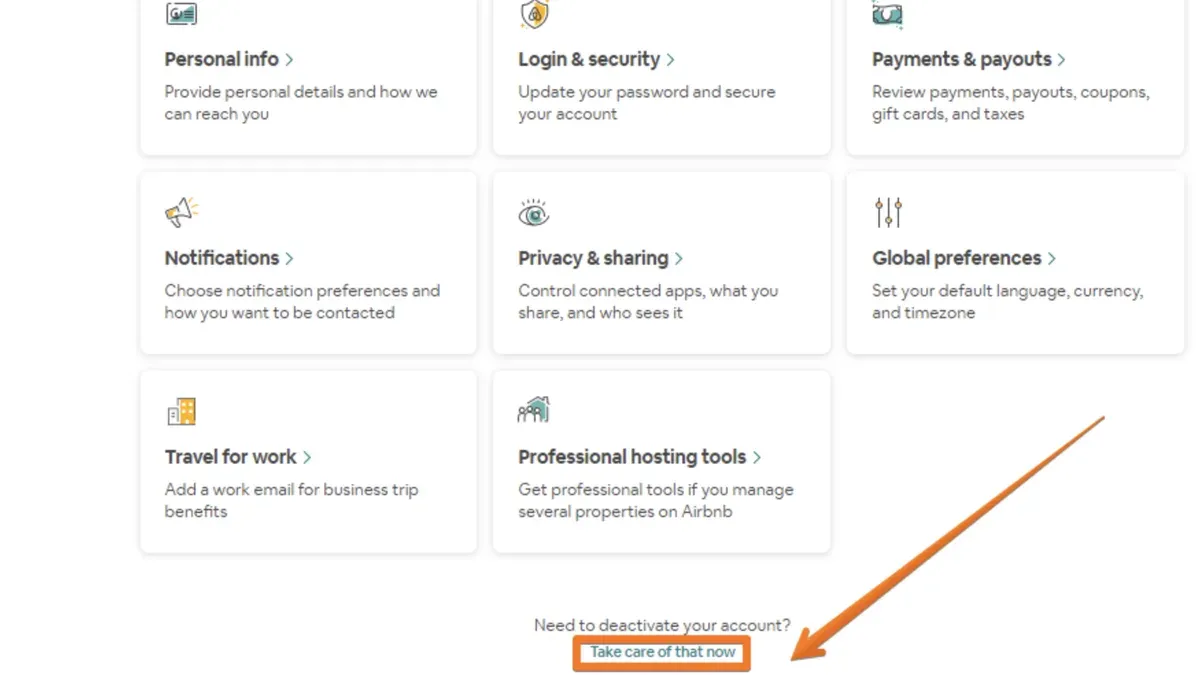
This guide explains how to delete Airbnb account permanently, providing clear, direct instructions for both guests and hosts. It distinguishes permanent deletion from account deactivation, a common source of confusion. Readers will find precise steps to close an Airbnb account, along with practical advice on managing profiles and protecting personal data. The process involves navigating Airbnb’s settings, verifying identity, and understanding the consequences of deletion.
Deleting an Airbnb account is irreversible and removes access to all reservations, reviews, and messages. Before starting, ensure there are no pending reservations or financial transactions linked to the account. This article also covers troubleshooting tips for common obstacles encountered during the deletion or deactivation process.
Before you start: What is needed to delete an Airbnb account
Deleting an Airbnb account requires access to the registered email and password to verify identity and complete the process. It is critical to understand the difference between deactivation and permanent deletion: deactivation temporarily hides the account but retains data, while permanent deletion removes all data irreversibly. Users should back up essential information such as booking history, messages with hosts or guests, reviews left or received, and any saved listings. This data cannot be recovered once the account is deleted.
Before initiating deletion, clear any pending transactions, upcoming bookings, or unresolved disputes as these may block the deletion process or cause complications. Airbnb’s official policy states that account deletion is permanent and final, with no option to restore the account or its data afterward.
Common data to save includes screenshots or exports of past reservations, receipts for tax or reimbursement purposes, and copies of reviews or ratings. Having this information outside Airbnb ensures continuity if needed for future reference.
- Log in to the Airbnb account using the registered email and password. Successful login confirms access.
- Review and cancel any upcoming bookings or resolve any pending payments. The account dashboard should show no active trips or unpaid balances.
- Download or save personal data such as booking history and reviews from the profile or transaction history sections.
- Confirm understanding of the difference between account deactivation and deletion by reviewing Airbnb’s help center documentation on account closure.
Tip: Save important communication threads and receipts before deletion, as these are permanently lost once the account is deleted.
How to delete Airbnb account permanently
- Log in to the Airbnb account using a web browser. The Airbnb homepage should display the user dashboard or booking summary upon successful login.
- Click on the profile icon located at the top right corner of the page, then select Account from the dropdown menu. This redirects to the Account Settings page.
- In the Account Settings menu, choose Privacy & Sharing or Privacy depending on the interface version. The section related to data and account controls will appear.
- Scroll down to find the Delete your account option. It is usually near the bottom of the privacy settings page.
- Click on Delete your account. Airbnb will prompt for identity verification, which may include re-entering the password or confirming via email or phone.
- Complete the verification steps as instructed. Once verified, a confirmation page explaining the consequences of account deletion will appear.
- Confirm the deletion request by clicking the final confirmation button. The account enters a locked state with a grace period before permanent deletion.
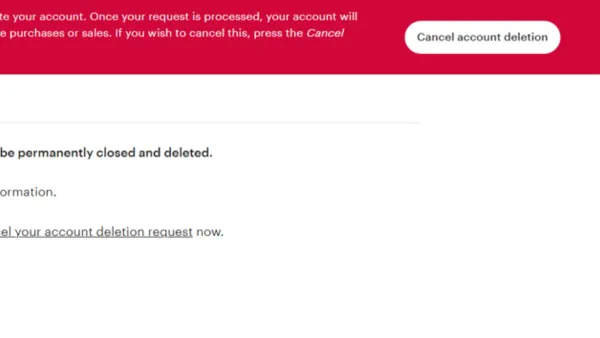
After submitting the deletion request, the account is locked immediately, preventing any bookings or communication. Airbnb usually allows a short grace period during which the user can reverse the deletion by logging back in. After this period, the account and all associated data are permanently removed.
Tip: Deleting the account from the Airbnb mobile app is not supported; use a desktop or mobile browser instead.
How to deactivate Airbnb account and how it differs from deletion
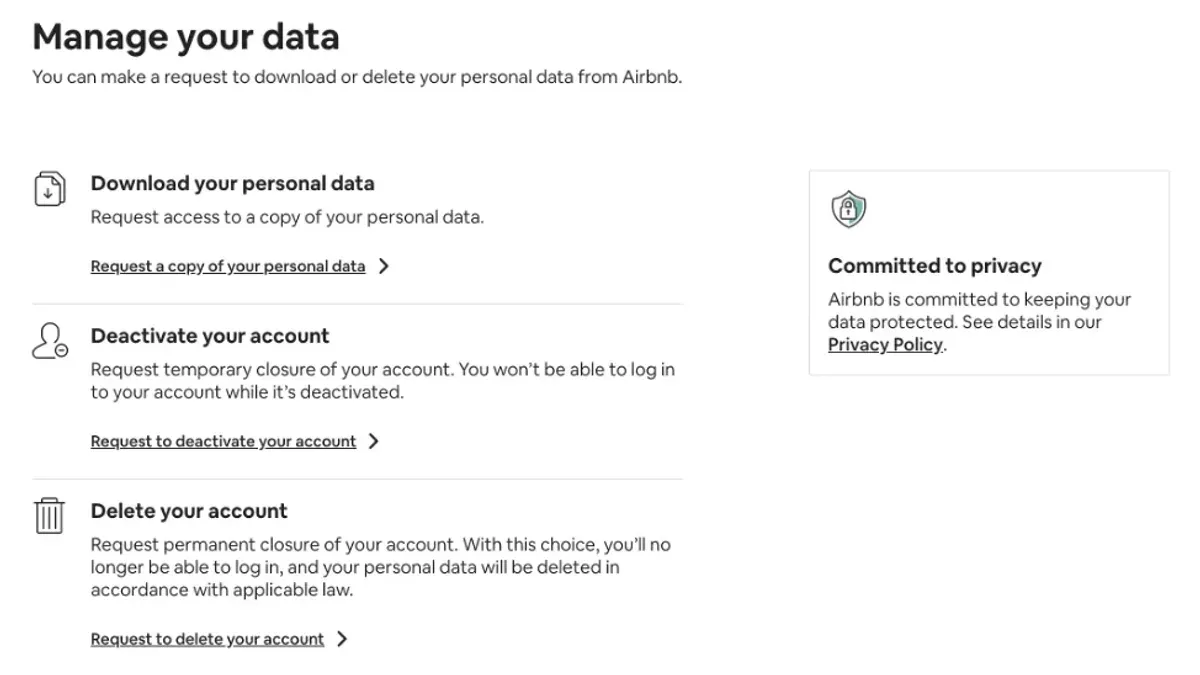
Deactivation and deletion of an Airbnb account serve different purposes. Deactivation temporarily suspends the account, making the profile invisible to others but retaining data and bookings. Deletion permanently removes the account and all associated information, with no option for recovery.
During deactivation, the profile and listings are hidden from search results and other users. However, Airbnb retains the data to allow reactivation. This option suits users taking a break from the platform or wanting privacy without losing account history.
Reactivation restores full access and visibility without needing to create a new account. In contrast, deletion is irreversible and should be chosen only when permanently leaving Airbnb.
| Feature | Deactivation | Deletion |
|---|---|---|
| Visibility | Profile hidden from others | Account and data removed completely |
| Data retention | Data retained for reactivation | Data deleted permanently |
| Bookings | Bookings remain active but not visible publicly | Account closure after clearing bookings required |
| Reversibility | Can reactivate anytime | Irreversible |
| Use case | Temporary break or privacy | Permanent account closure |
How to temporarily deactivate an Airbnb account:
- Log in to Airbnb and go to "Account Settings" via the profile icon; the settings page should load.
- Navigate to "Privacy & Sharing" or a similarly named section; the privacy controls will appear.
- Find the option "Deactivate Account" or "Take a break from Airbnb" and select it; a confirmation prompt will display.
- Confirm the deactivation by following on-screen instructions; a notification will confirm the account is deactivated.
Tip: Deactivation does not cancel existing bookings; ensure all reservations are managed before deactivating.
How to delete Airbnb host account specifically
Hosts face unique challenges when deleting their Airbnb account due to active listings, upcoming reservations, and ongoing guest obligations. Before deletion, all current bookings must be completed or canceled according to Airbnb’s policies to avoid penalties and protect guest experience. Hosts should close or remove all listings to prevent new reservations during the deletion process.
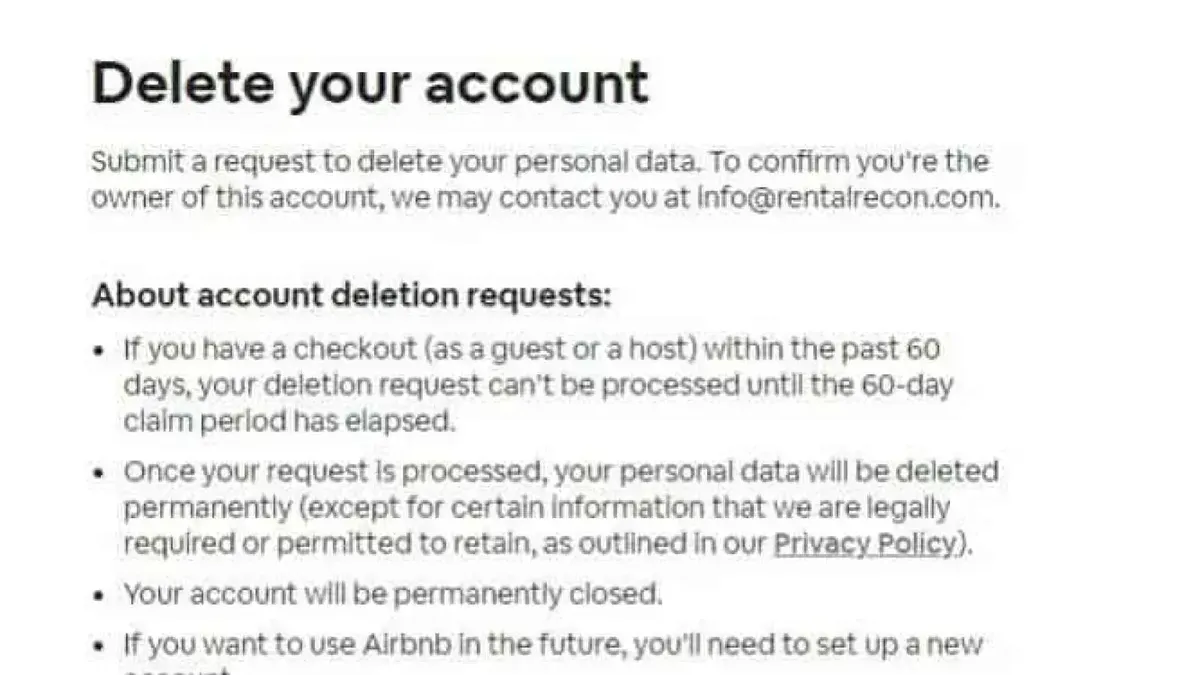
Host reviews and earnings history remain accessible to guests and Airbnb even after account deletion, as this information is tied to past transactions and community trust. Hosts cannot delete reviews or earnings records. Complex cases, such as disputes or unresolved payments, require contacting Airbnb support directly for assistance before proceeding with account closure.
- Log into the Airbnb host account and navigate to the Listings section.
- Close each active listing by selecting Listing status and choosing Deactivate or Remove listing. Confirm the status changes to Inactive.
- Check the Reservations tab for any upcoming stays; complete or cancel these as per guest agreements and Airbnb rules. Confirm no active reservations remain.
- Ensure all guest obligations, including communication and refunds if necessary, are fulfilled to avoid penalties.
- Navigate to the Account Settings > Privacy & Sharing section and select Delete Account. Follow the prompts to verify identity and submit the deletion request.
- If there are unresolved issues like disputes, contact Airbnb Support via the Help Center before finalizing deletion. Support may provide guidance or delay deletion until resolution.
Tip: Closing listings before deleting prevents accidental bookings and protects host reputation.
How to delete or cancel Airbnb profile and account: differences and options
Deleting an Airbnb profile is not a standalone option; profile information is tied directly to the Airbnb account. It is not possible to delete or remove profile details without deleting the entire account. Users seeking to limit exposure of personal data must delete their account entirely, as partial profile deletions or edits will not remove historical data stored by Airbnb.
Canceling bookings is a separate process from account deletion. Bookings must be canceled individually through the Reservations page before initiating account deletion. This prevents automatic penalties and unresolved reservations that could block deletion. If active bookings exist, Airbnb will prompt to resolve these before allowing account closure.
Typical user scenarios illustrate these differences: a guest wanting to stop using Airbnb but retain past reviews must delete the account to remove profile access; a host closing their business cancels all bookings first, then deletes the account to remove all associated listings and data. Simply canceling bookings does not affect profile visibility or stored information.
- Access the Reservations tab to review all upcoming bookings. Confirm cancellations for each reservation, following Airbnb's cancellation policies. Successful cancellations will show "Canceled" status.
- Navigate to Account Settings > Privacy to adjust visible profile information. Note: this does not delete or remove data from Airbnb servers.
- Proceed to Account Settings > Delete Account to initiate permanent deletion once all bookings are canceled. The system will verify eligibility and confirm the action.
Tip: Cancel all bookings before deleting the account to avoid delays or restrictions during deletion.
Troubleshooting common issues when deleting or deactivating Airbnb account
Some users cannot find the deletion option because it is only available through the Airbnb web interface under Account Settings > Privacy > Delete Your Account. Mobile apps may not display this option. Ensure all active reservations are canceled since accounts with ongoing bookings cannot be deleted.
When Airbnb removes an account due to policy violations, users cannot delete or deactivate it themselves. In such cases, contacting Airbnb customer support is necessary to understand the account status and possible next steps.
If an email confirms only account deactivation instead of deletion after requesting account closure, verify that the deletion request was completed on the correct page. Sometimes users initiate deactivation by mistake. Re-submit the deletion request via the official deletion link to trigger permanent removal.
Common errors during deletion submission include messages like "Unable to process request" or "Error 500." Clearing browser cache, using a different browser, or disabling extensions often resolves these issues. Persistent errors require contacting Airbnb support with a screenshot of the error.
Contact Airbnb customer support if deletion options remain inaccessible, errors persist, or account removal is unclear. Support response times vary but generally range from a few hours to several days. Use the Help Center chat or phone support for faster assistance.
What happens after deleting or deactivating an Airbnb account
After an Airbnb account is deleted, access to the account is permanently lost, with no option for recovery or reinstatement. Airbnb states that some personal data may be retained for legal, safety, and business purposes, typically for a period consistent with their data retention policies, which can extend for several years. However, the account itself and its associated profile become inaccessible to the user and others.
Past reviews and booking history linked to the deleted account generally remain visible on Airbnb listings to preserve the integrity of the platform's review system. This means that while the user cannot access their booking records or profile, other users may still see past reviews left by or about the deleted account. Payment methods and linked external services are disassociated upon deletion and cannot be recovered.
In contrast, deactivating an Airbnb account temporarily hides the profile and listings from public view but retains all data and booking history. Deactivation allows the user to reactivate the account later with full restoration of data and access. Unlike deletion, there is no permanent loss or extended data retention beyond normal active account policies.
How to protect personal data when closing an Airbnb account
Before closing an Airbnb account, removing saved payment methods and personal information reduces retained data risks. Navigate to Account Settings > Payments > Payment Methods to delete stored cards or bank accounts. Confirm removal by checking that no payment methods appear under the section.
Review connected third-party apps and services linked to the Airbnb account. Go to Account Settings > Security > Connected Apps to revoke access for any apps no longer needed. Successfully disconnected apps will no longer have permissions or data access.
Under privacy regulations such as GDPR and CCPA, Airbnb users can request a copy of their personal data or ask for its deletion. Use the Privacy Center accessible via Account Settings > Privacy to submit a data export or deletion request. Airbnb will acknowledge the request with a confirmation and estimated response time.
Unsubscribing from Airbnb marketing and transactional emails helps avoid further data exposure. Adjust email preferences in Account Settings > Notifications > Email Preferences to opt out from promotional messages. Confirmation appears as the updated preferences are saved.
Tip: Use Airbnb’s Privacy Center tools thoroughly before initiating account deletion to maximize control over personal data.
Frequently asked questions
How to cancel airbnb account?
To cancel an Airbnb account, the user must permanently delete it through the account settings. Navigate to Account Settings > Privacy > Delete Your Account and follow the prompts. Simply stopping use or removing the app does not cancel the account.
How to delete airbnb profile?
Deleting an Airbnb profile is part of deleting the entire account. There is no separate function to delete only the profile without deleting the account. To remove the profile information, proceed with the account deletion process.
How to close airbnb account?
Closing an Airbnb account means permanently deleting it. This is done by accessing the Privacy section under Account Settings and selecting the option to delete the account. Follow the verification steps to complete closing it.
Can you delete airbnb account?
Yes, Airbnb accounts can be deleted permanently. The option is available under Privacy settings. Deletion removes access to bookings, listings, and personal data but cannot be undone.
How to deactivate an airbnb account?
Airbnb does not offer a traditional account deactivation option. Instead, users can choose to log out or stop using the account. Deactivation differs from deletion as it keeps the account and data intact for future use.
What this advice does not cover and who should do something else
This article does not cover the legal implications of deleting Airbnb accounts, such as tax or contractual obligations for hosts. Hosts with ongoing rental agreements, pending payouts, or tax reporting responsibilities should consult a professional before proceeding. Some account deletion steps may vary depending on Airbnb’s interface updates or regional policies, so the available options might differ slightly. Users with unresolved disputes, pending transactions, or active reservations may not be able to delete their accounts immediately until these issues are resolved.
The most useful next step is to review the Airbnb Help Center’s current guidelines on account deletion and deactivation. This ensures awareness of the latest procedures and any changes in policy. Confirm that all reservations are completed or canceled, and any pending issues are settled before initiating deletion to avoid interruptions or loss of funds.
See also: How to Change Your PayPal Password: Complete Step-by-Step Guide · How to Change Your Payoneer Password and Manage Account Settings