How to Block Someone on OkCupid: A Clear Step-by-Step Guide
This guide explains how to block someone on OkCupid, covering the exact steps and what blocking does within the app.


This article explains how to block someone on OkCupid, detailing the exact steps within the app's interface and clarifying what blocking does and does not accomplish. Blocking on OkCupid is done through profile-specific menus, not by blocking phone numbers or external contacts. The process requires access to the profile of the person to be blocked and familiarity with OkCupid’s messaging and settings layout.
Blocking someone prevents them from messaging or seeing the blocker’s profile, but it does not erase past conversations or automatically remove the blocked person from search results. This guide covers how to block and unblock profiles, resolves common misunderstandings, and addresses issues users often face when managing their block list.
Before you start: What is needed to block someone on OkCupid
Blocking on OkCupid requires an active account with the user logged in via the app or desktop site. The feature is fully supported on both iOS and Android apps, as well as desktop browsers, ensuring access regardless of device. To block someone, their profile or an existing message thread must be accessible; blocking is not possible without direct access to the person’s profile or conversation.
It is essential to understand that blocking applies only to OkCupid profiles, not phone numbers or external contacts. Blocking removes the ability for the blocked user to interact through messages, likes, or profile views but does not delete existing messages or conversations. The blocked user will no longer be able to contact or see the blocker’s profile within the app.
- Log in to OkCupid via the app or desktop browser; the main interface should load successfully.
- Navigate to the profile or message thread of the user intended to be blocked; their details must be visible.
- Confirm that the blocking option is available in the profile menu or message settings, indicating readiness to proceed.
Can you block someone on OkCupid?
Yes, OkCupid allows users to block individual profiles to prevent unwanted messages and stop the blocked person from seeing the user’s profile. Blocking is strictly profile-based; it does not extend to blocking phone numbers or external contact methods. This distinction means users cannot block someone’s phone number via OkCupid’s interface.
Blocking differs from reporting or hiding profiles. Reporting alerts OkCupid to potential violations of terms of service, while hiding a profile simply removes it from the visible match or search lists without restricting the other user’s access. Blocking actively cuts off communication and profile visibility from both sides.
The block option is accessible from multiple user interface points. It is commonly found within a chat thread by tapping the menu icon (three dots) and selecting “Block.” Alternatively, the user’s profile page accessed from the match list or search results also provides a “Block” button, typically located near the messaging or match options.
Tip: Blocking from the message thread is often faster since it immediately targets the user causing issues without navigating away.
How to block someone on OkCupid: Step-by-step instructions
- Locate the profile or message thread of the person to block. On the app, use the search or messages tab to find the profile or conversation. On the website, use the search bar or message inbox.
- Access the menu or options button on their profile or chat window. In the app, tap the three-dot icon in the top right corner of the profile or chat screen. On the website, find the gear icon or a dropdown menu near the profile or message header.
- Select Block from the dropdown or options list. This will prompt a confirmation dialog to prevent accidental blocking.
- Confirm the block action when prompted by tapping Block again. The person is immediately blocked, stopping their ability to message or view the profile.
- Verify that the person is blocked by checking the blocked list. In the app, go to Settings > Privacy > Blocked Accounts to see all blocked profiles. On the website, access the Blocked Users section under account settings.
Tip: Blocking someone removes them from your inbox and hides your profile from them, but you must confirm the block to finalize it.

How to unblock someone on OkCupid
- Open the OkCupid app or website and log in to the account. Navigate to Settings by clicking the profile icon, usually found in the top corner. The Settings menu is where privacy and account controls are located.
- Within the Settings menu, select Privacy & Safety. This section contains options related to blocking and reporting users.
- Scroll to find the Blocked Users list. This list shows all profiles currently blocked. Each entry displays the username or profile name of the blocked person.
- Identify the profile to unblock. Click or tap the Unblock button next to the user’s name. A confirmation prompt will appear to ensure the unblock action is intentional.
- Confirm the unblock by selecting Yes or Confirm on the prompt. The profile will immediately be removed from the blocked list.
After unblocking, the previously blocked user can view the profile again and send messages unless other restrictions are in place. Past messages remain in the conversation history, but new communication will resume only after unblocking.
Tip: If the unblock option does not appear, ensure the app is updated to the latest version or try logging out and logging back in.
What happens when you block someone on OkCupid?
Blocking a user on OkCupid immediately prevents that person from sending messages or viewing the blocker’s profile. The blocked user’s access to the blocker’s profile is restricted in searches and match suggestions, effectively removing the blocker from their potential interactions. Any messages exchanged before the block remain visible in the conversation thread unless deleted separately by the blocker.
The blocked individual is not notified of the block, maintaining user privacy while cutting off contact. However, blocking does not stop a determined user from creating new profiles to bypass restrictions or contacting externally if they have access to other contact information.
These effects create a clear boundary within OkCupid’s platform but are limited to the app’s environment and do not extend beyond it. Blocking is a tool for controlling in-app interactions but not a comprehensive solution against all unwanted contact methods.
Troubleshooting common blocking issues on OkCupid
Sometimes the block option on OkCupid may be missing or greyed out due to app glitches or account restrictions. In such cases, logging out and back in or restarting the app often restores the option. If the problem persists, updating the app to the latest version usually resolves interface bugs that affect blocking functionality.
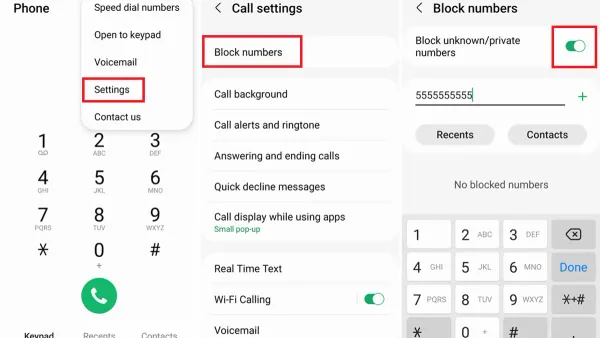
Blocking phone numbers is not supported on OkCupid. Users attempting to block numbers should use their phone’s native blocking features or contact their mobile carrier for options. OkCupid’s blocking only applies to profiles within the app and does not extend to external contact methods.
If harassment continues despite blocking, use OkCupid’s reporting feature to flag abusive behavior. Reporting helps the platform take action beyond what blocking can achieve. Persistent issues may require combining blocking with reporting and device-level controls.
Clearing the app cache can also fix problems where blocking appears ineffective. Cache clearing removes corrupted data that may interfere with blocking commands. To clear cache, go to device settings, find OkCupid in the app list, and select clear cache. Afterward, relaunch the app and verify the block option is accessible and working.
Frequently asked questions
Can you block a number on okcupid?
OkCupid does not provide a feature to block phone numbers. Blocking on OkCupid applies only to user profiles within the app. To prevent contact from a specific user, one must block their OkCupid profile directly.
How to unblock someone on okcupid
To unblock someone, open the OkCupid app and go to Settings > Blocking. From the list of blocked profiles, select the user to unblock and confirm the action. This restores their ability to view the profile and send messages.
What happens when you block someone on okcupid
Blocking a user removes their ability to see your profile, send messages, or interact with you on OkCupid. The blocked person is not notified of the block. However, blocking does not affect outside communication channels such as phone or email.
Can you block someone on okcupid
Yes, OkCupid allows blocking of individual profiles. This is done through the user’s profile menu or message thread by selecting 'Block'. Blocking restricts the user’s interaction with your profile within the app.
Can you block a number on okcupid
This question repeats the earlier one: OkCupid does not support blocking phone numbers. Blocking is limited to OkCupid profiles only, so number blocking must be done through the phone or carrier settings, not the app.
What Blocking on OkCupid Does Not Cover
Blocking on OkCupid only restricts interactions within the app. It does not stop the blocked user from contacting through other communication channels such as phone, email, or social media. Additionally, blocking does not prevent someone from creating new OkCupid accounts to bypass restrictions. Users experiencing serious harassment or threats should consider reporting the behavior to OkCupid’s support team and, if necessary, seek help from law enforcement or trusted organizations for online safety.
Tip: Use OkCupid’s report feature alongside blocking for serious or repeated violations.
The most useful next step is to regularly check the blocked list under Settings > Privacy > Blocked Users. This ensures that the list is up to date and helps manage who can interact on the platform effectively.
See also: How to Block Someone on Hinge: A Step-by-Step Guide · How to Block Someone on Bumble: A Clear Step-by-Step Guide · How to Block Someone on Grindr: A Clear Step-by-Step Guide · How to Block Someone on Mastodon: A Clear Step-by-Step Guide